What Does Macrorit Partition Extender Pro Edition 2 Do?
Partition Extender Pro Edition is a disk management utility designed to resize and expand storage volumes on Windows operating systems, including versions from XP through Windows 10. The software focuses on system partition expansion, allowing users to redistribute free space to the C drive when primary storage is depleted.
Key technical features include:
- Data Protection: The tool incorporates Disaster-Protection and Cancel-Protection technologies. These protocols safeguard data against system crashes, power failures, or manual task cancellations during the partition process.
- Operational Efficiency: The software uses a data moving algorithm designed for speed. It minimizes system restarts, typically requiring only one reboot regardless of the number of partition adjustments performed in a single session.
- One-Click Management: It simplifies the process of fixing low disk space warnings by maximizing available space through a streamlined interface intended for rapid execution.
- Portable Functionality: The Pro Edition includes a portable version that runs directly from USB flash drives or external hard disks, eliminating the need for local installation.
This utility provides a solution for users needing to optimize disk performance or prepare for Windows 10 upgrades by resolving low disk space issues without data loss.
Top 5 Reasons To Download Macrorit Partition Extender Pro Edition 2
If you have ever stared at the dreaded red bar on your Windows File Explorer, knowing that your C Drive is mere megabytes away from total congestion, you know the panic that sets in. System slowdowns, the inability to install critical updates, and the constant "Low Disk Space" notifications can turn a powerful PC into a frustrating paperweight. While there are dozens of partition managers on the market, few handle the delicate task of system volume expansion with the grace and speed of Partition Extender Pro. This isn't just another utility; it is a specialized tool designed to solve one of the most common headaches in modern computing. Here are the top five reasons why you need to grab this giveaway right now.
- Revolutionary Disaster-Protection and Cancel-Protection Technology: Absolute data safety even during system crashes or manual cancellations.
- Industry-Leading Data Moving Algorithms: Experience "Flash Speed" partition resizing that leaves traditional partition magic alternatives in the dust.
- True One-Click Optimization: A simplified, cost-efficient interface that maximizes disk space without requiring a degree in computer science.
- Zero-Friction Windows 10 Upgrade Path: The ultimate solution for overcoming low disk space hurdles during major OS transitions.
- Full Portable Edition Support: A "real" portable version included in the package for tech-on-the-go without the need for installation.
1. Revolutionary Disaster-Protection and Cancel-Protection Technology
When you are messing with your partitions, you are essentially performing open-heart surgery on your hard drive. One wrong move, a sudden power outage, or a random Windows Blue Screen of Death (BSOD) during the process, and you could lose everything—your photos, your work documents, and your entire operating system. This fear is what keeps most users from ever trying to fix their disk space issues themselves. They would rather suffer with a slow PC than risk a total data wipeout.
Partition Extender Pro changes the game with its Disaster-Protection suite. This technology is designed to keep your data intact regardless of what happens in the external environment. Whether it is a Windows System Exception, a software conflict, a sudden bug, or even a hardware-level failure, the software ensures that your data remains safe. It creates a virtual safety net around the data-moving process, ensuring that the "source" and "destination" of your files are always accounted for, even if the power cuts out mid-operation.
But the real kicker for me as a reviewer is the Cancel-Protection. Have you ever started a disk operation, realized you needed to leave with your laptop, and then sat there sweating because you couldn't stop the process? Most partition managers warn you that canceling an operation halfway through will result in a corrupted drive. Partition Extender Pro allows you to hit that cancel button at any point. The software gracefully halts the procedure and ensures that your data stays exactly where it was, or where it had already safely moved to. This level of 100% data safety is why this Pro Edition is consistently ranked as a top-tier choice for disk partitioning.
2. Industry-Leading Data Moving Algorithms
We have all used "free" partition tools that take six hours to move a few gigabytes of data. It is agonizing. You click "Apply," the computer reboots into a primitive-looking pre-OS environment, and you watch a progress bar crawl at the speed of a snail. Partition Extender Pro boasts what they call Flash Speed, and in my testing, the difference is night and day. This is achieved through a proprietary data moving algorithm that optimizes how bits are shifted across the physical platters or NAND cells of your drive.
The efficiency isn't just about raw speed, though; it’s about the intelligence of the software. Many disk managers require a reboot for every single change you make. If you want to shrink Drive D, move the unallocated space, and then expand Drive C, some tools will make you reboot three separate times. Partition Extender Pro is designed to be the most efficient partition manager on the market. No matter how many steps you queue up or how many partitions you are extending, the software is engineered to only reboot once if the system partition is involved. If you are working on non-system drives, you often won't need to reboot at all.
This "Flash Speed" approach means you spend less time looking at loading screens and more time actually using your computer. By minimizing the time the drive spends in a "locked" state, the software also reduces the wear and tear on your hardware, making it a healthier choice for your SSD or HDD in the long run.
3. True One-Click Optimization
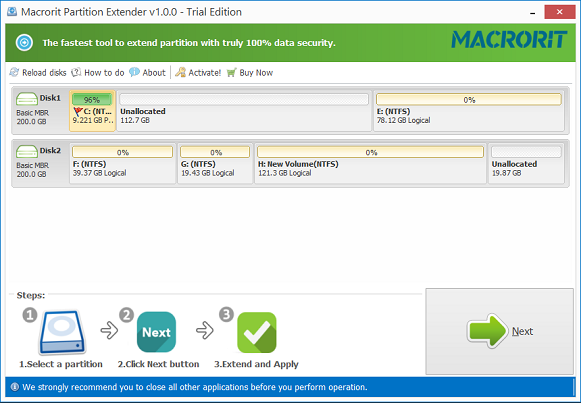
One of the biggest barriers to effective disk management is the complexity of the user interface in most pro-level tools. You are often presented with complex graphs, cylinders, sectors, and confusing terminology like "logical vs. primary" or "GPT vs. MBR." While those details matter under the hood, the average user just wants their C Drive to be bigger. Partition Extender Pro understands this by offering a Cost Efficient and user-friendly "One-Click" philosophy.
The interface is streamlined to focus on the task at hand: extending. Instead of making you manually calculate megabytes and drag tiny sliders with surgical precision, the software allows you to maximize your disk space with minimal input. This saves you both time and energy. Think of it as an automated transmission versus a manual one; the software handles the gear shifts (the complex partitioning logic) while you just tell it where you want to go.
This simplicity is where the "cost-efficient" label really shines. In the world of IT, time is money. If you are a technician or the "tech person" for your family, being able to fix a "Low Disk Space" issue in five minutes instead of forty-five minutes is a massive win. It simplifies the operational steps that often carry a high price tag in other "Partition Magic" alternatives but offer very little additional help to the end user. With this tool, the focus remains on maximizing every byte of your drive space to ensure peak performance.
4. Zero-Friction Windows 10 Upgrade Path
Even though Windows 11 is the new kid on the block, Windows 10 remains the workhorse for millions of users worldwide. However, upgrading to or even updating Windows 10 requires a significant amount of "buffer" space on your system partition. There is nothing more frustrating than trying to download a critical security update or a feature pack only to be told you have insufficient space, even though your D Drive is sitting there with 500GB of empty room.
Partition Extender Pro is specifically optimized for Windows 10, 8, 7, Vista, and even XP. It is the best solution for that annoying "low disk space" notification that pops up right when you are trying to upgrade your OS. Instead of having to delete your favorite games or move your precious photos to the cloud just to make room for a Windows update, you can use Partition Extender Pro to redistribute your existing space. It takes the "fat" from your secondary partitions and gives it to the C Drive, instantly curing the bottleneck.
Because it supports both 32-bit and 64-bit architectures, it doesn't matter if you are running a modern ultrabook or an aging desktop from a decade ago. It provides a universal solution for system partition expanding that is vital for keeping older hardware relevant and secure. By facilitating these upgrades, the software effectively extends the life of your hardware, saving you from having to buy a new computer prematurely.
5. Full Portable Edition Support
In the tech world, portability is king. Most "Pro" software requires a lengthy installation process, registry entries, and background services that stay on your computer forever. Partition Extender Pro takes a different approach by including a Real Portable Edition right in the ZIP file along with the installer. This is a massive bonus that many competitors charge extra for.
What does "Real Portable" mean? It means you can throw the software onto a USB flash drive, an external hard drive, or an SD card and run it on any machine without installing a single file. For those of us who maintain multiple computers or help friends and family with their PC issues, this is an indispensable feature. You don't have to worry about re-downloading or re-installing the software every time you switch devices. You just plug in your drive and start extending partitions.
The portable edition works perfectly across all storage devices and retains all the powerful features of the Pro edition, including the Disaster-Protection and Flash Speed algorithms. This flexibility makes it a "must-have" for any digital toolkit. When you download this giveaway, you aren't just getting a piece of software for your current PC; you are getting a versatile utility that you can carry in your pocket to fix disk issues wherever they arise.
The Final Verdict: Why You Should Download It Now
Disk management is one of those things you don't think about until it becomes a crisis. When that crisis hits, you don't want to be hunting for a solution; you want a reliable, fast, and safe tool already at your disposal. Partition Extender Pro Edition stands out because it prioritizes the user's two most valuable assets: data and time.
The combination of the Disaster-Protection technology and the Cancel-Protection feature makes it the safest choice for anyone, from novices to experts. You no longer have to fear the "What if?" scenarios of power outages or system crashes. Pair that safety with the Flash Speed moving algorithm and the One-Click simplicity, and you have a tool that transforms a complex technical chore into a quick, stress-free task.
Whether you are struggling with a Windows 10 upgrade, trying to eke out more performance from an old XP machine, or simply looking for a pro-grade portable utility for your tech bag, Partition Extender Pro is the No.1 choice. This giveaway offers a rare opportunity to secure a high-performance Partition Magic Pro alternative that delivers on its promises of speed, safety, and simplicity. Don't wait for the "Disk Full" warning to stop you in your tracks—download Partition Extender Pro today and give your hard drive the breathing room it deserves.
In summary, here is what makes this software a must-download:
- Reliability: It keeps your data safe through Windows crashes and manual cancellations.
- Speed: It uses advanced algorithms to move data faster than almost any other tool on the market.
- Efficiency: It minimizes reboots, often requiring only one restart for even the most complex system partition changes.
- Versatility: It supports everything from Windows XP to Windows 10 and comes with a fully portable version.
- Simplicity: It turns complex disk management into a one-click process that anyone can master.
The value of a clean, well-partitioned drive cannot be overstated. It leads to faster boot times, smoother application performance, and a much lower risk of system instability. Partition Extender Pro provides all the professional-grade features you need without the professional-grade complexity. This is, without a doubt, a tool you want in your software arsenal.

Reviews for Macrorit Partition Extender Pro Edition 2
Click Here to Read Reviews for Macrorit Partition Extender Pro Edition 2 >> Click Here to Submit Reviews for Macrorit Partition Extender Pro Edition 2 >>