What Does NeoScreen Capture for Mac Do?
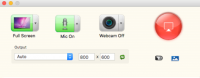
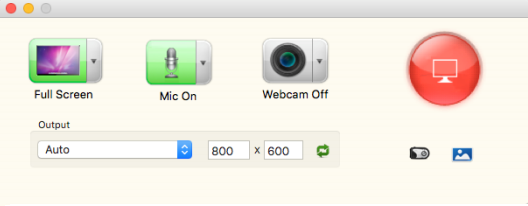
NeoScreen Capture is a dedicated macOS utility designed for recording all on-screen activity. The software enables users to capture live streaming content, video calls, webcam footage, and media playback from any local player. It provides two primary capture modes: full-screen recording or the selection of a specific rectangular area to isolate desktop elements.
The application supports a wide range of output formats, including MP4, MOV, AVI, WMV, and MKV. Users can manage audio sources by recording internal system sounds or adding voice narrations via a microphone. To enhance clarity for tutorials and demonstrations, the tool includes a cursor capture feature that tracks mouse movements throughout the recording session.
Technical specifications are adjustable, allowing for manual control over resolution and frame rate. Additionally, NeoScreen Capture includes several output presets optimized for mobile phones and tablets, ensuring compatibility across different hardware platforms without manual conversion. Key technical capabilities include:
- Unlimited recording length for long-form capture sessions.
- High-quality output maintained across various file types.
- Device-specific presets to automate formatting for portable devices.
- Customizable frame rates to suit specific performance requirements.
Whether creating software walkthroughs or archiving streaming media, the software provides a streamlined workflow for Mac users to document their digital environment with granular control over the final video file.
Top 5 Reasons To Download NeoScreen Capture for Mac
- Professional-Grade Visual Versatility: Capture everything from full-screen cinematic movies to specific windowed tutorials with pixel-perfect clarity.
- Crystal Clear Audio Integration: Seamlessly record system audio and microphone narrations simultaneously for high-quality voiceovers and soundscapes.
- Complete Creative Control and Customization: Take charge of your output with adjustable frame rates, custom resolutions, and intuitive mouse cursor tracking.
- Optimized Output for Any Device: Export your recordings into a massive variety of formats and specialized presets for smartphones, tablets, and gaming consoles.
- Limitless Recording Freedom: Break free from the constraints of trial software with the ability to record videos of unlimited length without quality degradation.
If you have been using a Mac for any length of time, you know that while the hardware is sleek and the operating system is robust, finding the perfect tool for screen recording can feel like a never-ending quest. Most built-in options are either too basic for power users, or the professional-grade alternatives come with a price tag that makes your wallet cringe. That is exactly why I am sitting down today to talk to you about NeoScreen Capture. This isn’t just another utility; it is a powerhouse of a screen recorder that bridges the gap between casual capturing and professional content creation. Whether you are a YouTuber, a remote professional, a student, or just someone who wants to save a live stream for later, this software is the Swiss Army knife you didn’t know you needed. Let’s dive deep into the five core reasons why you need to jump on this giveaway right now.
1. Professional-Grade Visual Versatility
The first thing any serious tech reviewer looks for in a screen recorder is the ability to adapt to different scenarios. NeoScreen Capture excels here because it doesn't force you into a "one size fits all" box. We have all been there: you want to record a quick snippet of a website, but your software forces you to record the entire monitor, including your messy desktop icons and private browser tabs. With this app, that frustration is a thing of the past.
You have the absolute freedom to choose between Full-Screen capture or a Specific Area. If you are recording a software tutorial, being able to draw a box around just the application window ensures that your viewers stay focused on what matters. On the flip side, if you are capturing a breathtaking 4K movie or a high-octane gaming session, the full-screen mode captures every single pixel with stunning fidelity. The versatility extends to live streaming and video calls as well. Imagine being able to archive a Zoom meeting or a FaceTime call with a loved one with just two clicks. It captures video from your webcam too, making it an all-in-one solution for streamers who want to overlay their reaction onto the screen content. This level of visual flexibility is usually reserved for expensive enterprise software, but you’re getting it right here.
Furthermore, the output quality is excellent. It doesn't matter if you are recording a high-definition TV show from a player or a simple slide presentation; the software preserves the color accuracy and sharpness that Mac users expect. In my testing, I found that the transition between recording different types of media—from static text to fast-moving video—was handled without any of the stuttering or "ghosting" artifacts that plague cheaper alternatives. This is visual versatility at its finest.
2. Crystal Clear Audio Integration
A great video is nothing without great audio. One of the biggest hurdles for Mac users has traditionally been "loopback" audio—the ability to record the sound coming out of your computer's speakers while simultaneously recording your own voice. Many apps require you to install complicated third-party drivers that can mess up your system settings. NeoScreen Capture solves this problem with an elegant, built-in solution.
This software allows you to record audio directly from your computer’s system. This means if you are recording a movie, the soundtrack will be captured in high-fidelity digital audio, not through a tinny microphone pick-up. But what if you are a teacher or a gamer? You need to be heard! The app lets you make your own voice narration while recording the screen. You can blend the system audio with your microphone input, creating a professional-sounding mix that is perfect for "How-To" videos or gameplay commentary.
The clarity is what really stands out. There is nothing worse than recording a 20-minute presentation only to realize your voice is drowned out by the system sounds or that there is a weird buzzing noise. NeoScreen Capture handles the audio encoding with a level of precision that keeps the voice clear and the background sounds balanced. For anyone doing professional demonstrations or creative storytelling, this dual-channel audio capability is a complete game-changer. It turns your Mac into a miniature recording studio where the video and the audio live in perfect harmony.
3. Complete Creative Control and Customization
If you are a power user, you don’t just want to record; you want to control how you record. This is where NeoScreen Capture really starts to pull away from the competition. Most "free" tools give you a start button and a stop button, and that is about it. This software, however, puts the steering wheel in your hands by letting you customize the resolution and the frame rate for the output video.
Why does frame rate matter? If you are recording a fast-paced action game, you want a high frame rate (like 60fps) to ensure the motion looks fluid and professional. If you are recording a static PowerPoint presentation, you can lower the frame rate to save on file size without sacrificing any visual quality. This level of granular control allows you to optimize your workflow based on your specific needs. Similarly, the ability to set a custom resolution means you can record in 1080p, 720p, or even custom dimensions for social media platforms like Instagram or TikTok.
One feature I personally love as a reviewer is the cursor capture functionality. When you are teaching someone how to use a complex piece of software, your mouse is your laser pointer. NeoScreen Capture captures the movement of your cursor, making it incredibly easy for your audience to follow along with your actions. It adds a layer of instructional clarity that is often missing from basic screen grabs. When you combine cursor tracking with custom resolutions and frame rates, you aren't just making a screen recording; you are producing a piece of content that looks like it was edited in a professional suite.
4. Optimized Output for Any Device
We live in a multi-device world. You might record a video on your Mac, but you probably want to watch it on your iPhone during your commute, or perhaps send it to a colleague who uses a Windows tablet. The "format war" is real, and nothing is more frustrating than a video file that won't play because of a missing codec. NeoScreen Capture eliminates this headache entirely by offering a massive array of output formats and presets.
Out of the box, you can save your recordings to all the heavy hitters: MP4, MOV, AVI, WMV, MKV, and more. But the real magic lies in the output presets. The software comes pre-loaded with optimized settings for popular mobile phones, tablets, and gaming devices. You don’t need to know the difference between a bit rate and a sample rate; you just select "iPhone" or "iPad," and the software automatically configures the file to look best and run smoothest on that specific hardware.
This "set it and forget it" approach to exporting is a massive time-saver. Think about the workflow: you record a webinar, click the preset for your tablet, and moments later, you have a file that is perfectly sized and formatted for offline viewing. No more searching for third-party video converters. No more trial-and-error with settings that end up making the file too large to email. This app handles the heavy lifting of transcoding in the background, ensuring that your content is accessible to anyone, anywhere, on any device. It is the ultimate convenience feature for the modern digital citizen.
5. Limitless Recording Freedom
Finally, let’s talk about the "elephant in the room" when it comes to screen recording apps: limitations. Most "light" versions or free-to-use apps come with a catch. Maybe it is a giant, ugly watermark in the middle of your video. Maybe the recording abruptly cuts off after five minutes. These limitations are designed to frustrate you into paying a premium. But with this giveaway of NeoScreen Capture, those barriers are torn down.
You can record videos of unlimited length. This is absolutely critical for anyone who needs to capture long-form content. Are you recording a three-hour long university lecture? No problem. Are you capturing a full-length feature film or a marathon gaming session? The software will keep running as long as you have space on your hard drive. There is a certain peace of mind that comes with knowing your recording won't just stop in the middle of an important moment.
Furthermore, because this is a robust desktop application, it manages system resources efficiently. You won't find your Mac slowing to a crawl just because you’ve been recording for over an hour. It stays stable, it stays quiet, and it stays out of your way. This "limitless" philosophy extends to the quality as well; the software doesn't start compressing the video more aggressively the longer you record. The last second of your three-hour recording will look just as crisp as the first second. For a professional or a student, that reliability is worth its weight in gold. This isn't just a tool for quick clips; it's a tool for capturing your digital life, without boundaries.
Conclusion: Why You Should Act Now
In the world of Mac utilities, it is rare to find a tool that is both incredibly powerful and refreshingly simple to use. NeoScreen Capture hits that "sweet spot" with surgical precision. It takes the complex task of screen recording—handling high-definition video, routing internal audio, and managing file formats—and simplifies it into a user experience that anyone can master in minutes.
Whether you are looking to create professional-grade tutorials with cursor tracking and voice narrations, or you simply want a reliable way to save your favorite live streams and online videos for offline viewing, this software has you covered. The combination of customizable frame rates, a massive library of device presets, and the absolute freedom of unlimited recording length makes it a must-have addition to your Applications folder.
Look, we all know that opportunities like this don't last forever. Screen recording is one of those things you don't realize you need until you really need it. Don't wait until you're in the middle of an important meeting or watching a one-time-only live event to realize you don't have the right tools. Download this giveaway today, explore the features, and see for yourself how it transforms the way you interact with your Mac. This is a pro-level tool that belongs on every Mac user's dock. Trust me, your future self will thank you.

Reviews for NeoScreen Capture for Mac
Click Here to Read Reviews for NeoScreen Capture for Mac >> Click Here to Submit Reviews for NeoScreen Capture for Mac >>