What Does Inpaint Do?
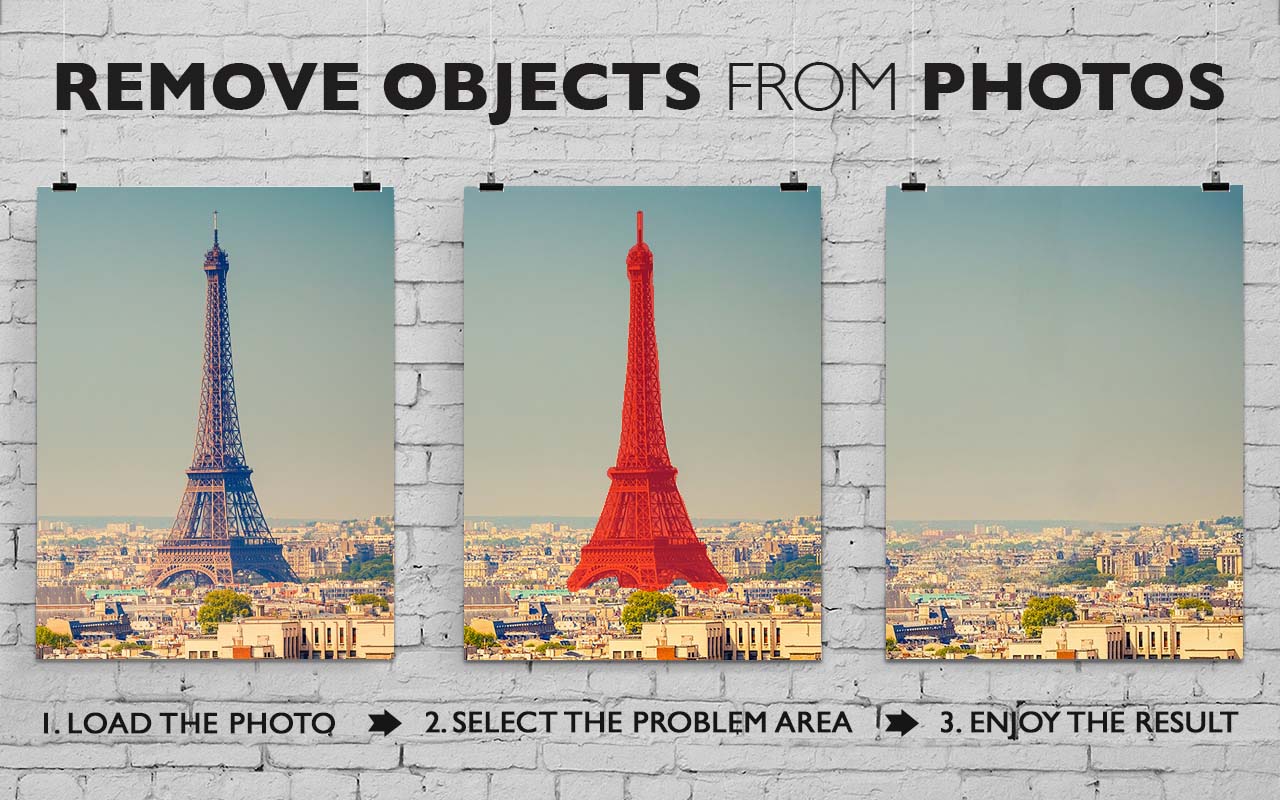
Inpaint is a photo restoration tool designed to remove unwanted elements from images without requiring professional editing expertise. The software automates the process of deleting objects, people, or digital artifacts by reconstructing a selected area using pixel data from the surrounding boundary. This technology serves as a streamlined alternative to manual cloning tools, simplifying the workflow for users who need to clean up photographs quickly.
The application supports a wide range of common editing tasks. Users can erase large-scale obstructions such as power lines and buildings or focus on specific details like watermarks, date stamps, and text overlays. It is also optimized for digital facial retouching, enabling the removal of skin blemishes and wrinkles. For travel photography, Inpaint can be used to eliminate tourists or other moving objects that may obstruct a scene.
Additional capabilities include the restoration of digitized old photos and the ability to fill in empty black areas often found in stitched panoramic images. The software is designed for a non-technical audience, prioritizing an interface that allows for modifications with minimal clicks. By automating the texture synthesis process, Inpaint provides a functional solution for repairing image compositions and removing undesirable artifacts from any digital photograph.
Top 5 Reasons To Download Inpaint
If you have ever spent a day taking photos at a beautiful location only to get home and realize that a stray tourist, a distracting power line, or a poorly placed trash can ruined your masterpiece, then you know the specific kind of heartbreak that photography can bring. In the past, fixing these issues required hundreds of dollars in software and a college-level understanding of layer masks, clone stamps, and healing brushes. But today, we are looking at a game-changer. Inpaint is the ultimate solution for anyone who wants professional-grade photo editing results without the professional-grade struggle. This giveaway is an absolute must-download for anyone with a camera, whether you are a professional photographer or someone who just wants their vacation photos to look spectacular.
Before we dive into the deep technical benefits and the sheer creative freedom this software offers, let’s look at the core reasons why you need to add Inpaint to your digital toolkit immediately. Here are the top five reasons to download this giveaway today:
- Seamless Professional-Grade Object Removal: Effortlessly erase people, tourists, and distracting objects with a few clicks.
- Complete Photo Restoration: Breathe new life into old, damaged family photos by removing scratches, tears, and age spots.
- Advanced Digital Retouching: Perform high-end facial retouching by removing skin blemishes, wrinkles, and imperfections instantly.
- Clean Up Urban and Natural Landscapes: Remove power lines, watermarks, date stamps, and logos that clutter your compositions.
- Unmatched Ease of Use: Get professional results with a zero-learning-curve interface designed for non-technical users.
1. Seamless Professional-Grade Object Removal
The primary reason anyone should jump on this Inpaint giveaway is the sheer power of its object removal engine. In the world of traditional photo editing, removing an object is a tedious, manual process. You would usually have to use a "clone stamp" tool, which involves meticulously copying one part of an image and painting it over another. If you aren't an expert, this often results in "ghosting" or repetitive patterns that make the photo look obviously doctored. Inpaint changes the game entirely.
Instead of forcing you to do the heavy lifting, Inpaint uses a sophisticated algorithm to reconstruct the selected image area from the pixels near the area boundary. When you highlight a person or an object you want to vanish, the software analyzes the texture, lighting, and colors of the surrounding environment. It then "intelligently" fills in the gap. Whether it is a stranger walking through the background of your wedding photo or a stray dog running through your sunset shot, Inpaint makes it look as though they were never there in the first place. The transition is so seamless that even an eagle-eyed viewer would struggle to find where the edit was made.
For travel photographers, this is a literal lifesaver. We have all been to famous landmarks like the Eiffel Tower or the Great Wall of China, only to find them swarming with thousands of other tourists. With Inpaint, you can "clear the crowd." By taking a few shots and using the software to remove the moving elements, you can create a serene, isolated photo of a world-famous location that looks like you had the whole place to yourself. This level of control over your environment is something that was previously reserved for high-budget magazine editors, but now, it is available to you in just a few clicks.
2. Complete Photo Restoration
We all have those precious boxes of old family photographs—pictures of grandparents, great-grandparents, or our own childhoods—that have seen better days. Over time, physical photos suffer from creases, scratches, dust spots, and even "foxing" (those brown spots caused by age and humidity). Many of these memories are irreplaceable, and seeing them degrade is painful. The second major reason to download Inpaint is its incredible ability to function as a restoration powerhouse.
When you scan these old photos into your computer, Inpaint can act as a digital time machine. By selecting the cracks, scratches, or torn edges of an old black-and-white or sepia photograph, you can instruct the software to "heal" the image. Because Inpaint works by reconstructing pixels based on the surrounding data, it is remarkably effective at filling in the gaps where the physical paper has folded or flaked away. It doesn't just smudge the area; it restores the texture of the original photo paper and the grain of the image.
Beyond physical damage, Inpaint is perfect for removing those annoying digital artifacts of the past, such as date stamps. Remember the 90s and early 2000s when every camera insisted on printing a bright orange "OCT 12 98" in the bottom right corner of every memory? Those stamps can ruin the timeless feel of a photo. Inpaint recognizes the contrast of these stamps and allows you to wipe them away, leaving the original background intact. This restoration capability ensures that your family's visual history is preserved in its best possible light for future generations.
3. Advanced Digital Retouching
In the age of social media and digital portfolios, we all want to look our best. However, even the best lighting and the most expensive cameras can sometimes capture things we'd rather not highlight. Whether it's a temporary skin blemish, a distracting wrinkle, or a stray hair that caught the wind at the wrong moment, these minor imperfections can distract from the subject of the portrait. This leads us to the third reason to use Inpaint: digital facial retouching.
While many "beauty apps" apply a generic, blurry filter over the entire face—making the person look like a plastic mannequin—Inpaint allows for precision editing. You can target specific areas while maintaining the natural texture of the skin. If you have a stray pimple or a small scar you’d like to minimize, you simply highlight it and let the software work its magic. It replaces the blemish with the surrounding skin tone and texture, preserving the "pores" and natural shadows that make a person look real.
This isn't just about vanity; it's about professional presentation. If you are uploading a headshot for a LinkedIn profile or a corporate website, you want to look polished. Inpaint allows you to perform these retouches quickly without needing to learn the complexities of "frequency separation" or other advanced Photoshop techniques. You can even use it to whiten teeth or remove "red-eye" artifacts by carefully selecting the affected areas. It’s like having a professional makeup artist and a lighting assistant built right into your computer.
4. Clean Up Urban and Natural Landscapes
Landscape photography is often a battle against the modern world. You find a stunning mountain range, but there is a massive power line cutting right through the middle of the frame. You find a perfect beach, but there are "No Swimming" signs and trash cans littering the foreground. You take a photo of a beautiful historic building, but it is covered in modern logos or distracting graffiti. The fourth reason to download Inpaint is its unparalleled ability to clean up the environment.
Power lines are perhaps the most common enemy of the outdoor photographer. They are thin, dark, and often cross through complex backgrounds like trees or clouds. Manually removing them is a nightmare. However, Inpaint’s selection tools make it incredibly easy to trace the line and hit "Erase." The software is smart enough to understand that the blue sky or the leafy tree behind the wire should be continuous. It fills in the sky or the foliage with remarkable accuracy, leaving you with a pristine, untouched-looking landscape.
Furthermore, if you are a content creator or a blogger, you may often find yourself needing to remove watermarks or logos from images (provided you have the right to do so). Perhaps you have an old image of your own where you lost the original and only have a watermarked version, or maybe there is a distracting brand name on a shirt that ruins the "timeless" vibe of a photo shoot. Inpaint handles these text-based obstructions with ease. It can even be used to fill in the "black areas" of a panorama. Sometimes, when you stitch several photos together to make a panoramic shot, the edges don't line up perfectly, leaving black triangular gaps. Inpaint can analyze the edges of your panorama and "hallucinate" the missing sky or ground to create a perfect, rectangular final image.
5. Absolute Accessibility for Non-Technical Users
The final and perhaps most compelling reason to grab this giveaway is that it is completely non-technical. We live in an era where software is becoming increasingly bloated. High-end photo editors often require a subscription, a massive amount of hard drive space, and dozens of hours of YouTube tutorials just to understand the basic layout. Inpaint is the antithesis of that complexity.
The user interface is stripped down to the essentials. You don't have to worry about layers, blending modes, opacity settings, or complicated brush dynamics. The workflow is simple: open the photo, highlight what you don't want, and click the "Run" button. That is it. This simplicity doesn't mean the software is "basic" in its results; rather, it means the complex engineering is hidden under the hood so that you can focus on the creative outcome.
This accessibility makes it the perfect tool for everyone. If you are a small business owner who needs to clean up product photos for an e-commerce site, you can do it yourself in seconds rather than hiring a freelancer. If you are a student working on a presentation, you can ensure your visual aids are professional and distraction-free. Even if you are someone who isn't "good with computers," you will find Inpaint intuitive. It’s lightweight, it’s fast, and it just works. In a world of over-complicated tech, there is something deeply refreshing about a tool that does one thing—object removal—and does it better than almost anyone else in the industry.
Conclusion: Don't Miss Out on This Essential Tool
In conclusion, Inpaint is not just another photo editor; it is a specialized, surgical tool for your digital images. It takes the most difficult, time-consuming tasks in photo manipulation and turns them into a "one-click" reality. Whether you are looking to preserve the past through photo restoration, perfect your present through digital retouching, or create a better future for your photography by removing the distractions of the modern world, Inpaint is the solution.
Think about all the photos currently sitting on your hard drive that are "almost perfect." That one shot of your kids where someone walked in front of the lens. That beautiful sunset that is marred by a telephone pole. That profile picture where you have a temporary blemish. All of those photos can be "fixed" and turned into works of art with this single piece of software.
By downloading this giveaway, you are giving yourself the power of a professional editor without the steep costs or the steep learning curve. You are saving yourself hours of frustration and ensuring that your memories are captured exactly the way you remember them—not the way the stray objects in the frame tried to dictate. Don't wait until you have a "ruined" photo to wish you had this tool. Download Inpaint today, and start seeing your photos in a whole new, distraction-free light. It is, quite simply, the magic wand every digital photographer deserves.


Reviews for Inpaint
Click Here to Read Reviews for Inpaint >> Click Here to Submit Reviews for Inpaint >>