What Does Allavsoft Downloader Do?
Allavsoft Downloader is a specialized utility designed to batch download and convert media from over 10,000 video and music sharing websites. The software provides direct integration with platforms such as YouTube, Vevo, Vimeo, Dailymotion, Facebook, Lynda, Spotify, and Deezer. It enables users to save content directly into various video formats, including MP4, AVI, WMV, MOV, and WebM, or extract audio into formats like MP3, AAC, FLAC, and WAV.
The application supports media quality ranging from standard definition to ultra high definition 4K (4096p), as well as 1080p, 720p, 3K, and 3D. Beyond file acquisition, Allavsoft features a built-in media player for the immediate preview and playback of downloaded files. The service also captures subtitles and removes advertisements during the download process to ensure a clean local copy.
Technical features for workflow management include:
- Breakpoint Resume: This allows users to pause and restart downloads at any point without losing data or progress.
- Automated Actions: The software can be configured to automatically shut down the computer once all active download tasks are finished.
- History Tracking: Allavsoft maintains a comprehensive log of all downloaded files for simplified asset management.
This software provides a centralized solution for users looking to archive high-resolution media, playlists, or full albums for offline consumption across a variety of hardware devices.
Top 5 Reasons To Download Allavsoft Downloader
- Unmatched Universal Access: Download from over 10,000 websites, including YouTube, Spotify, Deezer, and Lynda.
- High-Fidelity Quality: Support for Ultra HD 4K video and lossless audio formats like FLAC and WAV.
- Seamless Format Conversion: Directly download and convert files into any format, ensuring compatibility with all your devices.
- Ad-Free and Subtitle-Ready: Enjoy clean downloads without annoying ads and keep essential subtitles for movies and tutorials.
- Efficient Workflow Management: Features like batch downloading, breakpoint resume, and automatic post-download shutdown.
In the modern digital age, we are constantly bombarded with content. Whether it is a deep-dive documentary on YouTube, a high-energy playlist on Spotify, an educational course on Lynda, or a viral clip on Facebook, the sheer volume of media available to us is staggering. However, there is a catch that every tech enthusiast knows all too well: accessibility. We are often tethered to an internet connection to enjoy our favorite media. Streaming services are great until you hit a dead zone, go on a long flight, or find that a video you loved has been taken down. This is where a truly robust media downloader becomes an essential part of your digital toolkit. Today, I am looking at a piece of software that handles these challenges with surgical precision: Allavsoft Downloader. If you have been looking for a reason to upgrade your media management game, this giveaway is exactly what you need. Here is an in-depth look at why this tool is a game-changer.
1. Unmatched Universal Access
The biggest frustration with most media downloaders is their limited scope. You find one that works great for YouTube, but it fails when you try to grab a track from SoundCloud. Or you find a tool for social media videos, but it cannot touch professional educational platforms like Lynda or music streaming giants like Deezer. Allavsoft Downloader shatters these limitations by offering support for over 10,000 video and music sharing websites. This is not just a "YouTube downloader"; it is a comprehensive media acquisition engine.
From a reviewer’s perspective, the versatility here is the headline feature. Imagine having the ability to archive your favorite tutorials for offline study, or grabbing a high-quality version of a niche documentary from a platform like Dailymotion or Vimeo without jumping through hoops. For music lovers, the integration with services like Spotify and Deezer is a massive win. It allows you to take your playlists offline in a format that you actually own, rather than being locked into a subscription-based offline mode that disappears the moment you stop paying. This software acts as a bridge between the fragmented world of web content and your personal, permanent library.
The "batch download" capability further enhances this access. You don’t have to sit there and paste links one by one. You can feed the software a list of URLs or an entire playlist link, and it will systematically work through the queue. This is the kind of efficiency that distinguishes professional-grade software from the dozens of "free" web-based tools that are often riddled with malware or restrictive limits. With this tool, the entire internet essentially becomes your personal library.
2. High-Fidelity Quality
There is nothing worse than downloading a video only to find it looks like it was filmed on a potato. In an era where 4K displays are becoming the standard for laptops and home theaters, low-resolution downloads simply do not cut it. Allavsoft recognizes this and provides full support for Ultra High Definition. We are talking about 4K (4096p), 1080p HD, 720p, and even 3K or 3D videos. If the source material is high quality, this software ensures the download stays that way.
But the focus on quality isn't just limited to video. For the audiophiles out there, this software is a dream come true. When downloading from music platforms like Spotify or Deezer, you aren't stuck with low-bitrate junk. You can opt for lossless formats like FLAC, WAV, or AIFF. This means you get the full depth and nuance of the music, exactly as the artist intended. Whether you are listening on a high-end home stereo system or professional studio headphones, the audio quality remains pristine.
The ability to select your resolution or bitrate before the download begins gives you ultimate control. If you are worried about storage space on a mobile device, you can opt for a standard 480p or 360p version. If you are archiving a masterpiece for your home cinema, you can go all the way up to 4K. This flexibility ensures that you are never wasting bandwidth or storage, while always having access to the best possible version of your media.
3. Seamless Format Conversion
One of the most common tech headaches is the "unsupported file format" error. You download a video in a weird WebM format, and then you realize your smart TV or your older tablet can't play it. Usually, this means you have to go find another piece of software to convert the file, which often leads to a loss in quality and a waste of time. Allavsoft eliminates this middleman by offering direct-to-format downloading.
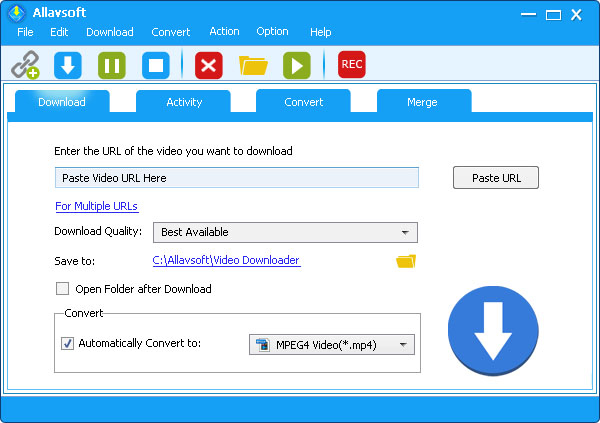
When you start a download, you can tell the software exactly what you want the output to be. Need an MP4 for your iPhone? An AVI for your Windows machine? A MOV for your Mac? Or perhaps a WMV, MPG, VOB, or FLV? It’s all there. The software performs the conversion on the fly as it processes the download. This is a massive time-saver for anyone who consumes media across multiple devices.
The same logic applies to audio. You can convert music or playlists directly to MP3, AAC, AC3, or the previously mentioned lossless formats. The interface makes it incredibly easy to choose the right format for your specific needs. As a tech reviewer, I always look for tools that simplify a workflow. Allavsoft takes the two-step process of "download then convert" and turns it into a single, seamless action. This ensures that the moment your download is finished, it is ready to be moved to your device and played without any further technical tinkering.
4. Ad-Free and Subtitle-Ready
The modern web is cluttered with advertisements. When you stream a video, you often have to sit through unskippable ads at the beginning, middle, and end. Some downloaders even bake these ads into the file or force you to view them during the process. Allavsoft provides a clean, professional experience by stripping away the noise. When you download a video, you get the video and nothing else. No mid-roll interruptions, no banner overlays, and no promotional fluff. It is a pure viewing experience.
Another often-overlooked feature that Allavsoft handles brilliantly is subtitle support. For international cinema fans, anime enthusiasts, or students watching educational lectures in a second language, subtitles are not optional—they are essential. This software allows you to download the video along with its subtitles. You don't have to go hunting for SRT files on shady third-party websites. It captures the data directly from the source, ensuring that your offline viewing is just as informative as the online version.
Furthermore, the software includes a built-in player. This might seem like a small addition, but it is incredibly useful for a quick preview and playback. You can check the quality of the download or verify that you have the right version before you transfer it to another device. It supports almost any format, meaning you don't even need to open a separate media player like VLC to check your files. It’s all contained within one efficient ecosystem.
5. Efficient Workflow Management
Finally, we have to talk about the "quality of life" features that make Allavsoft a tool for power users. If you have a slow internet connection or a massive library of videos to download, the Breakpoint Resume feature is a lifesaver. If your Wi-Fi drops out or you need to restart your computer, you don't lose your progress. You can pause a download and resume it later right from where it left off. This reliability is vital for large 4K files that might take a significant amount of time to finish.
Then there is the "Action after download" feature. This is one of those clever additions that shows the developers actually use their own software. If you have 50 videos to download, you probably don't want to sit at your desk for three hours waiting for them to finish. You can set Allavsoft to automatically shut down your computer, enter sleep mode, or stand by once the tasks are complete. You can start a massive batch download before you go to bed, and know that your computer won't be running needlessly all night once the work is done.
The software also keeps a detailed history of your downloads, making it easy to track what you have already acquired and where it is stored on your hard drive. This level of organization is perfect for creators, researchers, or anyone building a serious media archive. It transforms the chaotic act of "saving stuff from the web" into an organized, professional process. When you combine the batch processing, the resume capability, and the automated post-download actions, you have a tool that respects your time and your system resources.
Conclusion: Why You Should Grab This Now
In the world of software, we often see "jack of all trades, master of none." Allavsoft Downloader is the rare exception that manages to be a master of all. It handles the widest variety of sites, provides the highest possible quality, simplifies the conversion process, cleans up the experience by removing ads, and offers the kind of workflow management that usually requires a premium subscription.
If you are tired of using clunky websites that pop up ads and malware every time you try to save a video, or if you are frustrated by the limitations of your current "free" downloader, this is the upgrade you have been waiting for. It is a stable, professional-grade utility that solves the problem of media portability once and for all. Whether you are a student, a music lover, a movie buff, or a content creator, Allavsoft provides the features you need to take control of your digital life.
Don't miss out on this giveaway. Tools of this caliber don't come around for free often. Having a reliable way to archive the content you care about is not just a convenience—it's a way to ensure that your favorite media is always there when you need it, regardless of your internet connection or the whims of streaming platforms. Download it, test it out with your favorite Spotify playlist or a 4K YouTube clip, and you will quickly see why this is a permanent fixture on my desktop. It is fast, it is powerful, and it is exactly what a modern media downloader should be.
The sheer breadth of features—from the 10,000+ supported sites to the intelligent auto-shutdown—makes Allavsoft a standout choice. It is rare to find software that balances such deep technical capabilities with an interface that is easy enough for anyone to use. By removing the technical barriers to downloading and converting media, Allavsoft lets you focus on what really matters: enjoying the content. Make sure to take advantage of this opportunity and secure your copy of this powerhouse downloader today.

Reviews for Allavsoft Downloader
Click Here to Read Reviews for Allavsoft Downloader >> Click Here to Submit Reviews for Allavsoft Downloader >>