What Does Genie Timeline Home 10 Do?
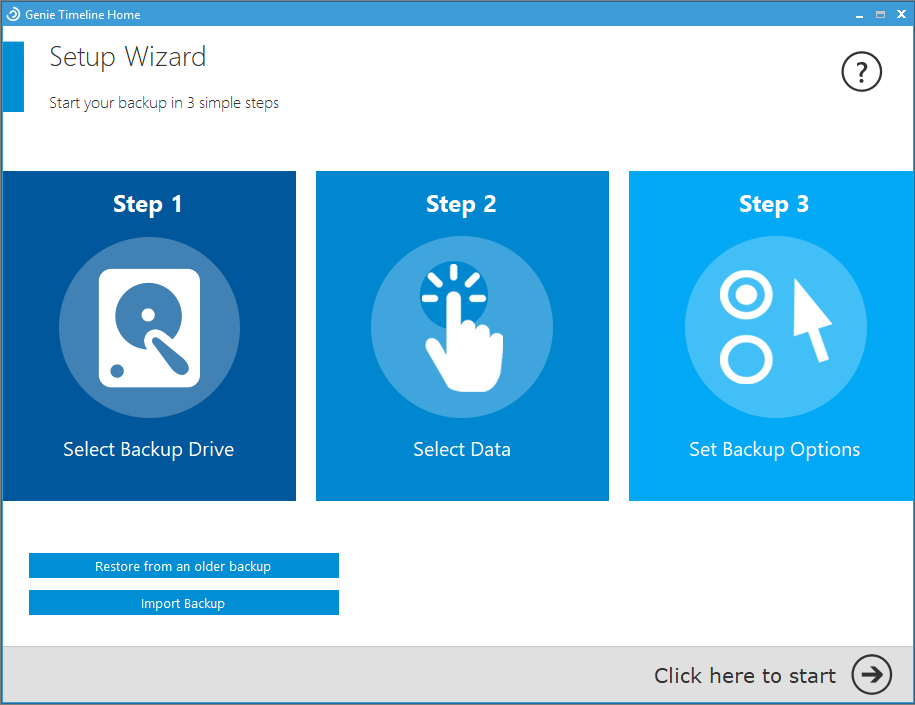
Genie Timeline is a backup utility designed for continuous, automated file protection across multiple storage environments. The software streamlines the backup process through a three-step configuration, allowing users to secure data located on internal drives, external hardware, and network-attached storage. Once initiated, the application monitors for changes and backs up new or modified files automatically without requiring manual intervention.
The service offers several functional tools for data management and recovery:
- Point-in-Time Recovery: The software features a timeline interface that allows users to browse and restore specific versions of files from various points in the past.
- Direct Restoration: Users can recover deleted items or undo accidental changes through right-click integration within the file explorer.
- Status Monitoring: The system provides live feedback via a dedicated mobile app and can be configured to send automated status reports directly to a user's email inbox.
- Native File Access: Backups are stored in their original format without proprietary compression. This enables users to view and retrieve their data on any computer without needing to have the Genie Timeline software installed.
By focusing on a set it and forget it workflow, Genie Timeline provides a redundancy solution that operates in the background to ensure data remains synchronized and accessible across different hardware platforms.
Top 5 Reasons To Download Genie Timeline Home 10
- True "Set It and Forget It" Automation: A three-step configuration that ensures your files are protected continuously without manual intervention.
- The "Time Machine" Experience: The ability to browse through various versions of your files and recover data from specific points in time.
- Native File Access: Your backups are stored in their original format, allowing you to access your data on any computer without needing the software installed.
- Seamless Explorer Integration: Recover deleted files or previous versions directly from your Windows interface with a simple right-click.
- Remote Peace of Mind: Real-time status updates via a mobile app and email notifications so you never have to wonder if your data is safe.
We have all been there. That sinking feeling in the pit of your stomach when you realize a document you have been working on for six hours has just corrupted, or worse, you accidentally hit "Shift+Delete" on a folder containing a decade’s worth of family photos. In the world of tech, we often talk about hardware specs, processing power, and high-refresh-rate displays, but the most important thing sitting on your desk isn't the computer itself—it is the data inside it. Hard drives fail, ransomware attacks are on the rise, and human error is an absolute certainty. That is why, as someone who spends their life testing software, I am telling you that you need to jump on this Genie Timeline giveaway immediately. This isn't just another utility; it is your digital safety net, and it is designed with a level of elegance that most backup solutions completely lack.
1. True "Set It and Forget It" Automation
The biggest problem with most backup software is that it is built for IT professionals, not for human beings. Most programs require you to understand complex scheduling, differential vs. incremental logic, and block-level encryption settings. The result? People get overwhelmed, they postpone the setup, and then disaster strikes when they have no protection. Genie Timeline completely disrupts this cycle by offering a three-step configuration process that is, quite frankly, foolproof. You don’t need a degree in computer science to get this running; you just need to know what you want to save.
Once you complete those initial three steps, the software retreats into the background and becomes a silent guardian. It doesn't nag you with pop-ups every five minutes, and it doesn't hog your system resources. It uses a continuous protection model, meaning it monitors your files for changes. When you save a new version of a document or add new photos to a folder, Genie Timeline notices. It quietly syncs those changes to your external or network drive in the background. It is the definition of "effortless." For those of us who are busy—which is everyone—this automation is the difference between having a backup and thinking you have a backup.
Furthermore, the software is intelligent enough to manage your system resources. It won't try to run a massive backup operation while you are in the middle of a high-stakes gaming session or rendering a 4K video. It waits for the right moment to work, ensuring that your PC remains snappy while your data remains secure. This level of "smart" automation is exactly what a modern user needs.
2. The "Time Machine" Experience
Most people think of backup as a way to recover from a total hard drive failure. While it does that, the real day-to-day value of Genie Timeline lies in its ability to let you "go back in time." Think about the last time you spent hours editing a spreadsheet or a design file, only to realize that the version you had three hours ago was actually better than the one you have now. In a standard setup, you are stuck. If you hit save, the old version is gone forever.
Genie Timeline changes that dynamic entirely. Through its intuitive Timeline interface, you can scroll back through time to see exactly what your file structure looked like at a specific hour, day, or week. It creates a historical record of your digital life. This isn't just a backup; it's a version control system for the average user. Whether you need to find a paragraph you deleted yesterday or recover a file that was corrupted this morning, the Timeline makes it as easy as moving a slider. This feature alone makes the software worth its weight in gold, especially for students, writers, and creative professionals who are constantly iterating on their work.
The beauty of the Timeline is that it visualizes your data. You aren't looking at a list of cryptic file names and timestamps; you are looking at a clear, chronological representation of your backups. It takes the guesswork out of data recovery. You don't have to guess which backup contains the file you need; you can see it, select it, and bring it back to life instantly.
3. Native File Access
This is arguably the most important technical feature of Genie Timeline, and it is the one that sets it apart from almost every other major competitor on the market. Most backup software uses "proprietary containers." This means they take your files, compress them, and wrap them in a special file format that only their software can read. If you want your photos back, you must have their software installed and working. This creates a dangerous dependency. What happens if your computer dies, you get a new one, and you can't find your license key or the software won't install on the new OS? Your data is essentially held hostage in a format you can't open.
Genie Timeline offers a "no compression" option that stores your files in their native form. This means if you back up a folder of .JPG photos and .DOCX documents, they are stored on your backup drive as .JPGs and .DOCXs. You can take that backup drive, plug it into any computer in the world—even one that doesn't have Genie Timeline installed—and open your files immediately. This is the ultimate "fail-safe."
As a reviewer, I always prioritize data portability. You should always own your data, and you should never be locked into a software ecosystem just to access your own memories and work. By allowing native file access, Genie Timeline ensures that even in a worst-case scenario where the software itself is unavailable, your files are still right there, readable and ready to go. It is a level of transparency and user-centric design that I wish more developers would adopt.
4. Seamless Explorer Integration
We live in a world of shortcuts. If a task takes more than three clicks, most people won't do it. The developers of Genie Timeline understood this perfectly, which is why they integrated the recovery process directly into the Windows operating system. You don't have to open the main Genie Timeline dashboard every time you want to fix a mistake. Instead, you can simply use the "Right-Click" menu in Windows Explorer.
Did you just accidentally delete a file? Right-click the folder it was in and select the recovery option. Did you save over a document with the wrong information? Right-click the file, and you can view its previous versions right there. This integration makes the software feel like a part of the operating system rather than a bulky third-party add-on. It turns the "Undo" command—which we usually only think of within an app like Word—and applies it to your entire file system.
This "Right-Click" recovery is a massive time-saver. It removes the friction from the recovery process. When you are in a panic because a file is missing, the last thing you want to do is navigate a complex software UI. You want to go where you already are—your folders—and get your data back. Genie Timeline makes that possible. It's an "Undo" button for your entire digital life, and once you have used it, you will wonder how you ever managed without it.
5. Remote Peace of Mind
The final reason you need to download this giveaway is the "Peace of Mind" factor. A backup is only useful if it is actually working, but how often do you check your backup status? Most people set up a backup and then don't look at it for six months, only to find out when the hard drive fails that the backup stopped working three months ago because the drive was full or a cable was loose.
Genie Timeline solves this by providing live feedback through a dedicated mobile app and email notifications. You can be at a coffee shop or on vacation on the other side of the world, and you can check your phone to see the status of your home computer's backup. If the backup is successful, you see a green light. If there is an issue, you get an alert. This constant feedback loop ensures that you are never left in the dark about the safety of your data.
In addition to the mobile app, the email notifications are a godsend for anyone managing multiple computers. You can have the software send a summary of the backup status directly to your inbox. It is a proactive approach to data security. Instead of you having to remember to check the software, the software reminds you that everything is okay. In an age of information overload, having one less thing to worry about is a luxury, and Genie Timeline provides that luxury for free through this giveaway.
Conclusion: There are a lot of utilities out there that claim to protect your digital life, but few do it with the simplicity and reliability of Genie Timeline. By combining automated, continuous protection with the flexibility of native file access and the convenience of mobile monitoring, it creates a comprehensive safety net that is accessible to everyone. Whether you are a power user who wants version control or a casual user who just wants to make sure their family photos are safe, this software is an absolute essential. Don't wait for your hard drive to start making that clicking sound. Download this giveaway, take the three minutes to set it up, and then go back to enjoying your digital life with the confidence that your files are protected by one of the best in the business. Your future self will thank you.

Reviews for Genie Timeline Home 10
Click Here to Read Reviews for Genie Timeline Home 10 >> Click Here to Submit Reviews for Genie Timeline Home 10 >>