What Does CUMeeting Group Video Chat & Conference [8-user] Do?
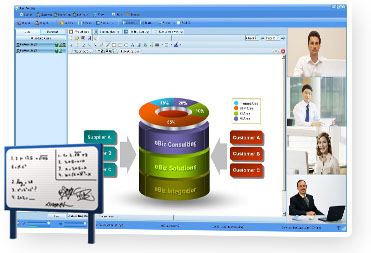
CUMeeting is a high-definition web conferencing platform designed for virtual collaboration across the education, corporate, and technical support sectors. The software supports 16-way multipoint video sessions with 720p and 1080p resolution. For larger groups, a video polling feature allows for the sequential broadcasting of participant feeds. The interface provides four distinct layout types, including training and full-screen modes, and supports dual-monitor displays.
Collaboration features include real-time screen and application sharing for Office documents and various media formats. A digital whiteboard enables participants to add annotations and highlight content during presentations. The platform also offers remote PC access, allowing hosts to control a presenter's computer or adjust remote PTZ camera settings. Sessions can be recorded in high resolution and saved as WMV or ASF files for later review.
For meeting management, CUMeeting includes tools for electronic voting, public and private text chat, and role-based permissions for hosts, presenters, and attendees. The software is compatible with Android and iOS devices, ensuring mobile access. Integrated audio settings provide automatic noise suppression, acoustic echo cancellation, and voice activity detection to maintain signal clarity.
Top 5 Reasons To Download CUMeeting Group Video Chat & Conference [8-user]
If you are looking for the ultimate solution to bridge the gap between remote teams, students, or clients, you have come to the right place. CUMeeting is not just another video conferencing tool; it is a comprehensive powerhouse designed to handle everything from high-stakes corporate boardrooms to interactive digital classrooms. In an era where connectivity is the backbone of productivity, having a tool that is both robust and intuitive is no longer a luxury—it is a necessity. Here are the top 5 reasons why you need to download CUMeeting today:
- Unrivaled Multipoint HD Video Quality: Experience crystal-clear 1080p resolution with support for up to 16-way simultaneous video feeds and intelligent video polling.
- Comprehensive Collaborative Sharing Suite: Beyond simple screen sharing, you can broadcast applications, documents, and high-definition media files while utilizing an interactive whiteboard for real-time annotation.
- Advanced Remote Control and PTZ Management: Take command of the meeting with the ability to remotely access a presenter’s PC or even adjust a participant's camera hardware through PTZ (Pan-Tilt-Zoom) controls.
- Full Mobile and Cross-Platform Accessibility: Stay connected on the go with full compatibility for Android, iPhone, and iPad, ensuring you never miss a beat regardless of your location.
- Data-Driven Engagement Tools: Maximize the impact of your sessions with built-in electronic voting, real-time polling, and high-resolution session recording for future review.
Now, let’s dive deep into why these features make CUMeeting the absolute best choice for your professional and educational needs. As someone who has tested countless web conferencing platforms, I can tell you that the devil is in the details, and CUMeeting has mastered them all.
1. Unrivaled Multipoint HD Video Quality
We have all been there—staring at a pixelated, lagging screen during an important presentation, trying to decipher the facial expressions of a client or a teacher. It’s frustrating and unprofessional. CUMeeting solves this by offering true high-definition video conferencing. Supporting both 720p and 1080p perfectly, this software ensures that every frame is sharp and every detail is visible. When you go full-screen, the clarity is breathtaking, making it feel as though you are sitting across the table from your colleagues, even if they are on the other side of the planet.
One of the most impressive aspects of the video engine is the Multipoint Video Conference capability. While many platforms struggle to maintain stability with multiple cameras active, CUMeeting supports 16-way video feeds simultaneously. But what happens if you have a massive webinar with dozens of people who need to be seen? This is where the video polling feature shines. The software can automatically cycle through participant videos, broadcasting each point by turns so that everyone gets their moment on screen without overloading the bandwidth. Furthermore, the voice synchronization is tuned to perfection, ensuring that the audio matches the lip movements (mouth sync), which significantly reduces the cognitive load and "Zoom fatigue" often associated with web meetings.
2. Comprehensive Collaborative Sharing Suite
A meeting is more than just a conversation; it is a workspace. CUMeeting understands this by providing a "Powerful Sharing" feature set that goes far beyond the industry standard. Most apps let you share your whole desktop, which can be a privacy nightmare. CUMeeting allows you to select specific applications or files to share. Whether it is a complex Excel spreadsheet, a sleek PowerPoint presentation, a Word document, or a PDF, the transition is seamless. Your participants see exactly what you want them to see, in real-time, with zero lag.
But it doesn’t stop at static documents. This software is a media powerhouse. You can play popular video and audio formats like MP3, WMV, AVI, and RMVB directly within the conference. This makes it an ideal tool for creative agencies or training sessions where high-quality media playback is essential. To complement this, the Interactive Whiteboard feature transforms your presentation into a collaborative canvas. You can add annotations, highlight specific data points on a PDF or Image, and brainstorm ideas on a virtual board. These annotations are reviewed by everyone in real-time, making it an indispensable feature for educators who need to "mark up" a student's work or engineers who need to point out specific architectural details.
3. Advanced Remote Control and PTZ Management
This is the feature that truly sets CUMeeting apart from the "basic" apps you might find on the app store. For tech support teams and heavy-duty presenters, the Remote Control functionality is a game-changer. A meeting host can grant permission for a participant to access and control the presenter’s computer. This is perfect for collaborative coding, troubleshooting software issues, or guiding someone through a complex workflow. It’s like having a "remote desktop" app built directly into your conferencing suite.
Additionally, CUMeeting offers PTZ (Pan-Tilt-Zoom) camera control. If a participant is using a camera that supports these hardware movements, the host can actually zoom in, zoom out, and adjust the camera’s physical position remotely. Imagine you are conducting a remote site inspection or a medical consultation; being able to control the camera on the other end to see exactly what you need to see is an incredible advantage. This level of hardware integration is rarely seen in standard web conferencing tools and speaks to the professional-grade nature of CUMeeting.
4. Full Mobile and Cross-Platform Accessibility
In today's fast-paced world, you can't always be tethered to a desk. The hallmark of a great modern app is its ability to follow you wherever you go. CUMeeting is fully compatible with the Android OS, iPad, and iPhone. This isn't just a "lite" version of the software; it brings the power of the web conference to your pocket. Whether you are in a taxi, at an airport, or working from a coffee shop, you can join, host, and interact with conferences with the same ease as you would on a desktop.
For those back at the office, the software supports Dual Displays and Omnibearing Displays. You can separate the video feeds from the whiteboard layout and display them on two different monitors. This allows for a much more immersive experience—keep your eye on your team on one screen while focusing on the data on the other. Furthermore, for high-end setups, CUMeeting supports up to 6 cameras at a single point. This allows for an "omnibearing" view of a room, which is perfect for large conference halls or laboratories where a single camera angle simply isn't enough to capture the full scope of the activity.
5. Data-Driven Engagement Tools
How do you know if your audience is actually paying attention? How do you make collective decisions quickly? CUMeeting includes a robust Electronic Voting system that allows hosts to set up single or multiple-choice questions on the fly. You can set time limits (up to 120 minutes), choose to make the results anonymous or transparent, and broadcast the results to the entire group in real-time. This is perfect for corporate voting, classroom quizzes, or just getting a quick "vibe check" from your team.
To ensure that the value of your meeting lasts long after the "Leave Meeting" button is clicked, CUMeeting features High-Resolution Recording. You can capture every second of the video, audio, and shared content, saving it as a high-quality .wmv or .asf file. This is an essential feature for compliance, training archives, or for sharing with team members who couldn't attend the live session. You never have to worry about missing a crucial detail again because the entire session is preserved in stunning clarity. Combine this with the Text Chat functionality—which allows for both public and private messages—and you have a complete communication ecosystem that ensures no thought or question goes unheard.
Why Professionals are Switching to CUMeeting
Beyond the top five reasons, the "under the hood" technical specifications of CUMeeting are what make it a reliable workhorse. The software includes Customizable Audio and Video Settings that allow you to fine-tune the experience based on your hardware. It features automatic noise suppression and acoustic echo cancellation. We have all experienced that annoying "feedback loop" in other apps; CUMeeting's intelligent gain control and voice activity detection work together to eliminate those distractions, ensuring that only the speaker’s voice is heard, clear and crisp.
The flexibility of the interface is another major selling point. With Four Layout Types (Standard, Training, Video, and Full Screen), you can customize the visual priority of the meeting. The "Training Layout" is particularly useful for educators, as it allows the training panel to "break out," giving students a better view of the instructional material. The "Video Layout" can split your monitor into a grid of up to 16 parts, allowing you to monitor a large group with ease. This level of UI customization ensures that the software adapts to your workflow, rather than forcing you to adapt to the software.
Management is also a breeze. The Host role has total control over the environment. As a host, you can remotely adjust a participant’s audio/video parameters, lock the conference for security, mute disruptive attendees, or even remove someone from the meeting entirely. There are Three Distinct Roles—Host, Presenter, and Attendee—each with specific permissions. This hierarchy is vital for maintaining order in large webinars or classrooms. Anyone can apply to be a host or presenter, allowing for a dynamic and fluid meeting structure where the "floor" can be handed over to different experts as needed.
Final Thoughts: Don't Miss This Giveaway
In the crowded market of communication apps, CUMeeting stands out by offering a professional, high-performance suite that refuses to compromise on quality or features. It bridges the gap between a simple video call and a high-end telepresence system. Whether you are a teacher looking to engage students with a digital whiteboard and real-time voting, an IT professional needing remote control capabilities to save the day, or a business executive who demands 1080p clarity for international negotiations, this software is designed for you.
The opportunity to download this giveaway is one you should not pass up. You are getting a tool that handles multipoint HD video, advanced document sharing, hardware camera control, and cross-platform mobility all in one package. It is the most powerful web conferencing solution available for education, training, and professional collaboration. Download it now, and experience what it’s like to have the world’s most powerful boardroom right on your desktop or mobile device. It’s time to make everyone be in the same place, from anywhere in the world, with CUMeeting.


Reviews for CUMeeting Group Video Chat & Conference [8-user]
Click Here to Read Reviews for CUMeeting Group Video Chat & Conference [8-user] >> Click Here to Submit Reviews for CUMeeting Group Video Chat & Conference [8-user] >>