

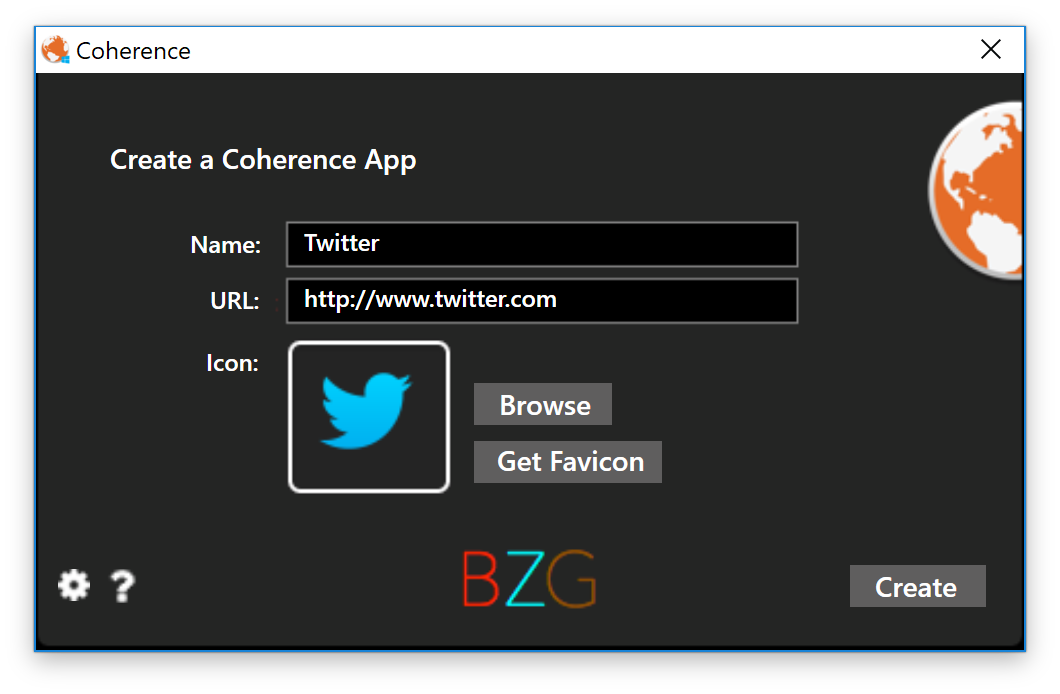
Coherence allows you to turn any website into a full-blown Windows application in seconds. And, using the power of Google Chrome, allows each app to have separate settings and extensions. Simply type in a name, a URL, and select an icon, and a full featured app will appear.
Official Product Description
Overview
What Does Coherence for Windows Do?
Coherence is a utility for Windows designed to bridge the gap between web services and desktop software. By leveraging the Chromium engine via Google Chrome, the application enables users to transform any website into a standalone desktop application. The setup process requires three primary inputs: a chosen name for the application, the target URL, and a preferred icon. Once configured, the software generates a dedicated executable that functions independently of the standard browser interface.
The core functionality of the tool centers on instance isolation and customization. Key features include:
- Isolated Environments: Each created app maintains its own separate cache and data directory.
- Extension Support: Users can install and manage specific Chrome extensions for individual applications.
- Independent Settings: Cookies and configuration settings are stored per instance, allowing for multiple account logins without session conflicts.
- System Integration: Resulting apps can be pinned to the Windows Taskbar or Start Menu for rapid access.
Unlike standard browser shortcuts, Coherence focuses on providing a native-like experience. This allows for a more organized workflow for users who rely heavily on web-based tools for productivity, ensuring that each web service operates as its own distinct entity within the Windows environment.
Top 5 Reasons To Download Coherence for Windows
Before we dive deep into the technical brilliance and the workflow-altering capabilities of this software, let’s look at the core reasons why you need to grab this giveaway immediately. If you have ever felt overwhelmed by the sheer number of browser tabs you have open, or if you wish your favorite web tools felt more like professional desktop software, Coherence is the answer you have been waiting for. Here are the top five reasons to integrate this tool into your daily routine right now:
- Total Workflow Decoupling: Transform cluttered browser windows into a streamlined collection of independent desktop applications, allowing you to focus on one task at a time without the distraction of unrelated tabs.
- Isolated Browser Environments: Leverage the power of the Google Chrome engine to create apps with separate cookies, settings, and extensions, providing a cleaner and more secure browsing experience for every service you use.
- Native Windows Integration: Experience your favorite websites as full-fledged Windows applications that can be pinned to your taskbar, launched via the Start menu, and managed through the standard Alt-Tab switcher.
- Unmatched Customization and Branding: Take full control of your desktop aesthetics by choosing custom names and high-resolution icons for every web app you create, making your workspace look professional and organized.
- Lightning-Fast Deployment: Create a functional, dedicated application in seconds with a simple three-step process—name it, link it, and iconize it—eliminating the need for complex coding or manual configuration.
1. Total Workflow Decoupling and the End of "Tab Hell"
We have all been there. You start your workday with a single goal, but within an hour, your browser window has thirty tabs open. You have your email, your project management tool, a couple of research articles, your social media feeds, and perhaps a music streaming service all fighting for your attention in a single, cramped horizontal bar. This is what many tech enthusiasts call "Tab Hell," and it is one of the greatest productivity killers of the modern era. When everything lives inside the same browser window, the mental friction of switching between tasks increases exponentially. You click the wrong tab, you get distracted by a notification on a site you weren't supposed to be looking at, and your flow is broken.
Coherence solves this problem by allowing for total workflow decoupling. By turning a website into a standalone Windows application, you are effectively pulling that tool out of the chaotic browser environment and giving it its own dedicated space on your desktop. Imagine having your CRM, your company’s internal portal, or your favorite AI writing assistant as its own icon on the taskbar. When you need to check your mail, you don't hunt through a forest of tabs; you simply click the mail icon. This physical separation of tasks leads to a significant reduction in cognitive load. You are no longer "browsing the web"; you are using a suite of professional tools. This shift in mindset is subtle but powerful, and it is the primary reason why power users are flocking to this giveaway.
Furthermore, because these apps run independently, you can use Windows' built-in window management features like Snap Assist to organize your workspace more effectively. You can have your research app snapped to the left and your writing app snapped to the right, without the browser's address bar and bookmark folders eating up precious vertical screen real estate. It turns the entire internet into a personalized software suite tailored specifically to your needs.
2. Isolated Browser Environments and Enhanced Security
One of the most technically impressive features of Coherence is its ability to utilize the Google Chrome engine to create isolated environments for every app you build. In a standard browser, your extensions, cookies, and cache are generally shared across all tabs. This can lead to a variety of issues, from privacy concerns to technical glitches. For instance, if you have multiple accounts for a service like Gmail or Twitter, managing them in a single browser can be a nightmare of logging in and out or using cumbersome incognito windows that don't save your progress.
With this software, each application you create acts as its own "silo." This means you can have one app for your personal Facebook and another for your business Facebook, and they will never interfere with one another. They don't share cookies, meaning you stay logged into both simultaneously without any session conflicts. But the benefits go beyond just multiple logins. This isolation also extends to browser extensions. We all know that having too many extensions can slow down your browser and pose a security risk. Coherence allows you to enable only the specific extensions you need for a specific app. For example, you might want a grammar checker enabled in your "Wordpress App" but disabled in your "YouTube App" to save on system resources.
From a security perspective, this sandboxing is a game-changer. If a particular website has tracking scripts or intrusive cookies, they are confined to that specific app. They cannot track your movements across the other web apps you have created. You are essentially building a modular digital fortress where each tool performs its function without overstepping its bounds. For any user who values privacy and technical efficiency, this level of control over the browser engine is an absolute must-have.
3. Native Windows Integration and System Performance
Many people mistake web apps for being "lesser" than native desktop software, but Coherence bridges that gap entirely through native Windows integration. When you use this tool to create an app, Windows doesn't treat it as just another Chrome window. Instead, it treats it like a standard .exe application. This means you can pin your created apps to your taskbar for one-click access. You can find them in your Start menu by searching for the name you gave them. They even show up in the "Add or Remove Programs" list if you decide you no longer need them. This level of integration makes the web feel like a permanent part of your operating system.
Consider the benefits of the Alt-Tab switcher. In a traditional browser setup, Alt-Tabbing only takes you between the browser and other programs. If you want to switch between two different websites, you have to Alt-Tab to the browser and then use Ctrl-Tab to find the right tab. With Coherence, every web app is a first-class citizen in the Alt-Tab menu. This speeds up navigation significantly, allowing you to fly between your Slack app, your Notion app, and your Excel spreadsheets with the same muscle memory you use for traditional software. It removes the extra "click" or "keystroke" that usually slows down web-based work.
There is also a performance aspect to consider. Because each app is its own process, Windows can manage system resources more effectively. If one specific web app hangs or crashes, it doesn't take down your entire browser or all your other apps with it. You simply close that one window and restart it. This stability is crucial for professionals who rely on web-based tools for their livelihood. By downloading this giveaway, you are essentially upgrading your operating system’s capability to handle the modern, web-centric world of computing.
4. Unmatched Customization and Professional Branding
Let’s talk about the aesthetic and organizational side of things. Most browser-based tools look identical in the taskbar—they all share the same browser icon, perhaps with a tiny favicon if you're lucky. This makes for a messy, confusing visual experience. Coherence allows for unmatched customization and branding of your web apps. When you create an app, the software prompts you to choose a name and an icon. This might seem like a small detail, but it changes everything about how you interact with your computer.
You can download high-quality, professional icons for your favorite services and apply them to your apps. Instead of a generic Chrome logo, your taskbar can be filled with beautiful, distinct icons for Canva, Spotify, Trello, and Discord. This visual clarity allows you to identify and launch the tools you need in a fraction of a second. It transforms your desktop from a cluttered workspace into a curated dashboard of productivity. For the creative professionals, the ability to customize the "skin" of their workflow is not just about vanity; it’s about creating an environment that feels inspiring and organized.
Furthermore, because you can name these apps whatever you want, you can categorize them according to your own internal logic. You can have apps named "Work - Project Alpha," "Work - Billing," and "Personal - Finance." This level of organizational freedom is simply not possible within the confines of a standard web browser. You are the architect of your own desktop experience, and this software provides the tools you need to build it exactly the way you want. The power to turn any URL into a branded, beautiful desktop utility is something every Windows user should experience.
5. Lightning-Fast Deployment and Ease of Use
Finally, we have to talk about how incredibly easy this software is to use. In the world of tech, we often see powerful tools that require a steep learning curve or advanced coding knowledge. Coherence is the complete opposite. It offers lightning-fast deployment that anyone, regardless of their technical skill level, can master in under a minute. The user interface is clean, intuitive, and focused on one goal: getting your app up and running as quickly as possible.
The process is incredibly simple. You open the software, and it asks for three things: a name for your app, the URL of the website, and an icon. You can even use the website's own favicon if you don't have a custom icon ready. Once you click create, the software handles all the heavy lifting in the background. It sets up the isolated Chrome instance, configures the shortcuts, and integrates the app into the Windows shell. There is no messing around with command-line arguments, no manual folder creation, and no complex configuration files. It is "plug and play" in the truest sense of the phrase.
This ease of use means you can experiment. If you find a new web tool you like, you can turn it into an app in five seconds. If you find you're not using it as much as you thought, you can delete it just as easily. This giveaway provides a low-friction way to revolutionize your digital life. You don't need to be a developer to create a custom software suite; you just need Coherence. In a world where our time is our most valuable resource, a tool that provides this much value with this little effort is an absolute "must-download."
Conclusion: Why You Should Act Now
In conclusion, the way we use the internet has changed, but the way our browsers work has largely stayed the same. We are trying to run entire businesses, manage our personal lives, and stay entertained through a single application—the web browser—that was never originally designed for such a massive workload. This software represents the next evolution of the desktop experience. It acknowledges that the web is the platform, but it insists that the user should have the power to organize that platform in a way that makes sense for them.
By downloading this giveaway, you are giving yourself the gift of focus. You are removing the clutter of "Tab Hell," securing your data through isolated environments, and integrating your most-used tools directly into the heart of Windows. You are gaining the ability to customize your workspace to a degree that was previously reserved for power users and developers. And perhaps most importantly, you are doing all of this with a tool that is so simple to use, it feels like it should have been a part of Windows all along.
As a tech reviewer, I see hundreds of apps every year, but few offer such an immediate and tangible improvement to the daily user experience as Coherence. It is efficient, it is powerful, and it is elegant. Don't let your productivity be held hostage by a cluttered browser window for one more day. Download this giveaway, turn your favorite websites into apps, and take control of your digital desktop once and for all. Your future, more organized self will thank you.
Whether you are a student trying to keep your research separate from your social media, a professional managing multiple client dashboards, or simply someone who loves a clean and efficient computer, this software is a definitive upgrade. The power of Google Chrome combined with the native feel of Windows is a winning combination that you simply cannot afford to pass up. Grab it now and see the difference it makes in your first hour of use.
Reviews for Coherence for Windows
Click Here to Read Reviews for Coherence for Windows >> Click Here to Submit Reviews for Coherence for Windows >>