What Does 1-abc.net Wallpaper Rotation Do?
Windows users often find their desktop backgrounds becoming stale after months of inactivity. 1-abc.net Wallpaper Rotation automates the process of refreshing these visuals by rotating images at user-defined intervals. The application allows for the selection of individual files or entire folders, making it possible to cycle through personal photo collections, holiday pictures, or curated downloads without manual intervention.
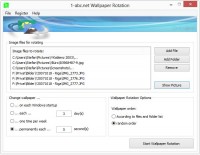
The software provides extensive control over rotation schedules. Users can configure the program to trigger a background change on every system startup or set specific intervals ranging from seconds to several weeks. Additionally, images can be displayed in a fixed sequence based on the file list or presented in a randomized shuffle mode to provide more variety.
Designed for efficiency, the tool operates with minimal system resources. It typically executes during the boot sequence and exits once the update is complete, though it can also remain active in the system tray for more frequent changes. Beyond standard desktop installation, the application supports deployment on portable media, such as USB sticks and camera cards, allowing users to maintain their preferences across different machines.
Core Features
- Automated Rotation: Change desktop backgrounds on startup or at specific timed intervals.
- Flexible Sources: Support for individual image files and complete directory paths from local or network drives.
- Display Modes: Options for both sequential and randomized image shuffling.
- Portability: Capability to install and run the software from removable storage media.
- Resource Efficient: Low system overhead with a minimal tray-based interface.
Top 5 Reasons To Download 1-abc.net Wallpaper Rotation
- Complete Automation of Your Visual Environment: Eliminate the stagnation of a static desktop by automating the rotation of your background images without lifting a finger.
- Seamless Integration of Personal Memories: Effortlessly turn your vast collection of holiday photos, family portraits, and hobbyist snapshots into a dynamic slideshow that breathes life into your workspace.
- Hyper-Flexible Scheduling Options: Take total control over the frequency of change, ranging from every few seconds for a high-energy environment to once a week for a subtle refresh.
- Minimalist System Footprint: Enjoy a beautiful desktop experience without sacrificing performance, thanks to a lightweight architecture that respects your PC’s resources.
- Universal Portability and Accessibility: Use the software on any Windows machine via USB sticks or camera cards, ensuring your personalized environment follows you wherever you go.
We have all been there. You boot up your Windows PC, the familiar chime sounds, and there it is—the same desktop wallpaper you have been staring at for the last six months. Maybe it is a generic mountain range, a stock architectural photo, or a picture of your cat from three years ago. You know you should change it. You know that a fresh look would probably give you a little boost of productivity or at least a moment of aesthetic pleasure. But let’s be honest: who has the time to go digging through folders, resizing images, and manually updating settings every few days? Most of us are too busy or, frankly, just not in the mood to hunt for a new high-quality image. This is where the digital stagnation sets in, and your desktop becomes a graveyard of forgotten memories and boring stock imagery.
Enter 1-abc.net Wallpaper Rotation. This isn't just another utility; it is a lifestyle upgrade for your digital workspace. As a tech reviewer, I see hundreds of apps that claim to "optimize" your workflow, but few actually address the psychological impact of our visual environment. This software is designed to solve the problem of the "boring desktop" once and for all. It takes the massive libraries of photos we all have buried in our hard drives and puts them front and center where they belong. Below, I am going to break down exactly why you need to grab this giveaway right now and how it will transform your daily computing experience.
1. Complete Automation of Your Visual Environment
The primary reason you need 1-abc.net Wallpaper Rotation is the sheer convenience of total automation. We live in an era of automation, yet for some reason, many of us still manually manage our desktop backgrounds. It is a tedious task that often falls to the bottom of the priority list. When you use this software, you are essentially hiring a digital curator for your monitor. You no longer have to remember to change your wallpaper; the software does it for you based on your specific preferences.
The beauty of this automation lies in its "set it and forget it" philosophy. Once you have configured your initial list of images or folders, the program takes over. There is a specific kind of joy in logging into your computer on a Monday morning and being greeted by a stunning sunset you captured on vacation last year, followed by a crisp professional shot of your favorite sports car on Tuesday. It keeps the interface feeling "new." In the tech world, we often talk about the user experience (UX), and there is nothing that degrades UX faster than visual monotony. By automating the rotation, you ensure that your workspace remains dynamic and engaging, which can actually help reduce eye strain and mental fatigue during long work sessions.
Furthermore, the automation is smart. It doesn’t just cycle through a few pre-loaded images. It allows you to add as many picture files as you want. Whether you have ten images or ten thousand, the software handles the rotation with ease. This level of automation turns your monitor into a living digital picture frame, making the most of the high-resolution displays we pay so much money for.
2. Seamless Integration of Personal Memories
Most of us have "digital clutter"—thousands of photos stored in folders like "Holiday 2022," "Wedding Photos," or "Random Downloads." These images rarely see the light of day unless we specifically go looking for them. 1-abc.net Wallpaper Rotation changes that by allowing you to add entire folders to its rotation list. This is a game-changer for anyone who loves photography or simply enjoys looking at their own memories.
Instead of manually picking individual files, you can simply point the software to a path on your local computer or even a network drive. Imagine pointing the app to your "Family" folder. Every time the wallpaper changes, you get a surprise memory. One moment you are looking at a photo from your child’s first birthday, and the next, you are seeing a candid shot from a family dinner. This personal connection to your hardware makes using your computer a much more pleasant, emotional experience. It bridges the gap between a cold, industrial machine and a personal tool that reflects who you are.
The software also supports images from online sources that you have saved. If you are a fan of specific celebrities, sports teams, or architectural styles, you can create dedicated folders for these interests. The software will then curate these images for you. The ability to pull from network drives is also a high-end feature often overlooked. If you have a NAS (Network Attached Storage) where you keep your high-res photography, 1-abc.net Wallpaper Rotation can pull directly from there, ensuring you aren't duplicating files and wasting precious SSD space on your main drive.
3. Hyper-Flexible Scheduling Options
Control is the name of the game here. A wallpaper rotator is only as good as its customization options, and this software offers a level of granularity that is truly impressive. Some users might want a new look every time they start their computer—a fresh start for a fresh session. Others might want the image to change every few seconds, creating a fast-paced, high-energy environment similar to a digital billboard. Then there are those who prefer a slow change, perhaps once a week, to subtly shift the mood of their office.
1-abc.net Wallpaper Rotation allows you to decide exactly when that change happens. You can set the interval to a specific number of days, hours, or even seconds. This flexibility means the software can adapt to your specific workflow. If you use your PC for creative work, a faster rotation might provide a constant stream of visual inspiration. If you use it for focused, deep work, a daily change might be less distracting while still providing that necessary variety.
Additionally, the shuffle feature is a must-have. Without it, you would eventually learn the order of your photos, which kills the element of surprise. By enabling the random order option, the software ensures that you never quite know what is coming next. It keeps the experience unpredictable and fresh. You can also choose to stick to your file list order if you have carefully curated a sequence of images. This level of dynamic control is what separates a professional tool from a basic system setting.
4. Minimalist System Footprint
As tech reviewers, we are always wary of "bloatware"—software that eats up RAM, slows down boot times, and clutters the system tray with unnecessary processes. This is one area where 1-abc.net Wallpaper Rotation really shines. The developer has clearly prioritized efficiency. The program does not modify your system at a deep level; it simply executes its task and then gets out of the way.
When you set the software to change the wallpaper on startup, it runs, performs the update, and then turns itself off if there is nothing more for it to do. If you choose to have a permanent rotation running in the background, the app minimizes to the system tray (systray). It stays out of your taskbar, keeping your workspace clean. Most importantly, it uses very low system resources. In an era where some background apps can hog hundreds of megabytes of RAM, this utility is a breath of fresh air. It is so lightweight that you won't even notice it's running, even on older hardware or laptops with limited resources.
This efficiency extends to how it handles the rotation process. It doesn't cause system stutters or lag when the image changes. It is a smooth, seamless transition that happens in the background. For gamers or professionals who need every ounce of CPU power for their primary tasks, this low-impact design is the ultimate selling point. You get all the aesthetic benefits without any of the performance trade-offs.
5. Universal Portability and Accessibility
Finally, we have to talk about the portability of this software. In the modern world, many of us move between different workstations—perhaps a desktop at home, a laptop for travel, and a workstation at the office. 1-abc.net Wallpaper Rotation can be installed on USB sticks, camera cards, or other rewritable media. This means you can take your entire wallpaper configuration with you.
This portability is incredibly rare for system-related utilities. By installing it on a USB drive, you can plug it into any Windows machine and immediately have access to your curated rotation settings and image lists. It is an excellent feature for people who work in IT or design and find themselves using different machines throughout the week. It ensures a consistent "home" feeling no matter which computer you are using.
The interface itself is also designed for maximum accessibility. It is very easy to use, even for those who don't consider themselves "tech-savvy." The one-click start and stop functionality means you aren't digging through complex menus to toggle the rotation. If you decide you want to stick with one image for a while, stopping the process is just as easy as starting it. The simplicity of the UI reflects a deep understanding of what the user actually wants: a tool that works, doesn't require a manual to understand, and provides immediate value.
Conclusion: Why You Should Download This Now
In conclusion, your desktop is the window into your digital world. Staring at the same image day after day is a missed opportunity to inspire yourself, relive your best memories, or simply enjoy beautiful art. 1-abc.net Wallpaper Rotation takes a task that is normally a chore and turns it into a source of daily delight. It is a powerful, flexible, and lightweight tool that respects your system while maximizing your visual experience.
Between the ability to add entire folders, the precision timing controls, the shuffle options, and the ultra-low resource usage, there is no reason not to have this in your toolkit. Whether you are a photographer wanting to showcase your portfolio, a parent wanting to see pictures of your kids, or a power user who loves a sleek, ever-changing interface, this software delivers on every front. Don't let your desktop stay boring for another day. Download this giveaway, point it to your favorite photo folder, and let yourself be surprised by the beauty of your own collection. It is one of those small changes that makes a surprisingly big difference in how you feel about your daily computer use. Experience the ease of a rotating desktop and give your Windows system the visual upgrade it deserves.
The software is compatible with modern Windows systems and is designed to be non-intrusive, making it a safe and effective addition to any PC. Grab it now while the giveaway is active and start seeing your desktop in a whole new light!


Reviews for 1-abc.net Wallpaper Rotation
Click Here to Read Reviews for 1-abc.net Wallpaper Rotation >> Click Here to Submit Reviews for 1-abc.net Wallpaper Rotation >>