What Does Video to GIF Converter Do?
Aoao Video to GIF Converter is a Windows-based utility designed to transform video files into animated GIFs or sequential image sets. The software focuses on high-fidelity conversion, promising zero loss in visual quality or frame rate during the transition from video to graphic formats. It supports a broad range of input containers, including AVI, MPEG, MP4, MKV, WMV, MOV, and 3GP.
The application provides several core functionalities for media management:
- Animated GIF Creation: Users can convert specific video segments into looping animations. The tool includes a time slider and frame-by-frame selection for precise trimming.
- Image Sequence Export: Beyond animations, the software can extract frames to produce seriate pictures in formats such as JPG, BMP, TGA, and ICO.
- Frame Rate and Size Control: To manage file sizes, users can manually set the output frame rate from 1 to 24 frames per second and resize the final dimensions of the image.
- Integrated Effects: During the conversion process, users can apply visual filters including grayscale, emboss, invert, sharpen, and noise reduction.
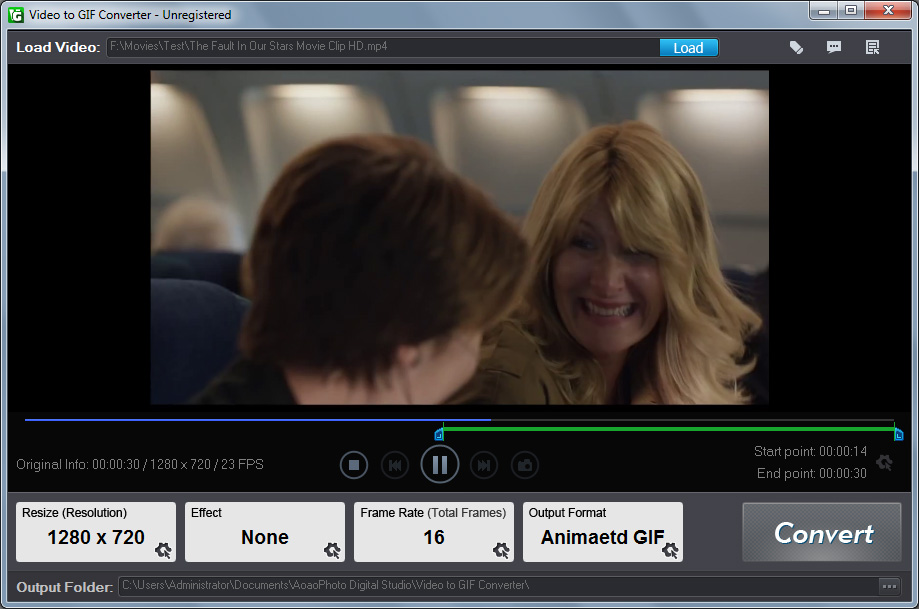
Aoao Video to GIF Converter streamlines the workflow into three primary steps: loading the video, selecting the output period, and executing the conversion. This factual approach to media processing allows for the quick generation of web-ready assets from standard video files.
Top 5 Reasons To Download Video to GIF Converter
- Zero Quality and Frame Rate Loss: Experience high-fidelity conversions that maintain the visual integrity of your original high-definition video files.
- Extensive Format Support: Effortlessly convert between all popular video formats like AVI, MP4, and MKV, and output to various image formats including GIF, JPG, and BMP.
- Professional-Grade Special Effects: Enhance your creations instantly with built-in filters such as Grayscale, Emboss, and Sharpen without needing external editing software.
- Precise Frame-by-Frame Control: Utilize a sophisticated time slider and frame rate adjustments to capture the exact moment you want with surgical precision.
- Streamlined Three-Step Workflow: Enjoy an intuitive user interface that allows you to move from raw video to a finished animated GIF in just three simple clicks.
In the fast-paced world of digital communication, the animated GIF has emerged as the undisputed king of expression. Whether you are reacting to a hilarious moment in a group chat, creating a custom avatar for your favorite gaming forum, or looking to add a bit of dynamic flair to your professional presentation, the GIF is the medium of choice. However, anyone who has ever tried to create one knows the struggle. Most online tools are riddled with intrusive advertisements, impose strict file size limits, or—worst of all—destroy the quality of your video during the conversion process. This is exactly why Aoao Video to GIF Converter is a game-changer for anyone who values quality and efficiency.
As a tech reviewer who has tested dozens of conversion utilities, I can confidently say that finding a tool that balances power with simplicity is rare. Usually, you are forced to choose between a complex professional suite that takes hours to learn or a "one-click" web tool that leaves your video looking like a pixelated mess from the 1990s. Aoao Video to GIF Converter bridges this gap perfectly. It offers "Leading Technology" that ensures your output is as crisp as your source material. This giveaway is a golden opportunity to add a professional-grade utility to your digital toolkit. Let’s dive deep into the five primary reasons why you need to download this software today.
1. Zero Quality and Frame Rate Loss
The biggest complaint users have when converting video to GIF is the immediate drop in visual quality. Traditional converters often use aggressive compression algorithms that result in "banding" in gradients and a "muddy" appearance in high-motion scenes. Aoao Video to GIF Converter tackles this head-on with its proprietary conversion engine. The software is designed to respect the original bitrate and color depth of your video as much as the GIF format allows. When we talk about "Leading Technology," we are talking about a system that minimizes artifacts and maintains the sharpness of the original footage.
Furthermore, frame rate loss is the silent killer of a good GIF. Have you ever downloaded a GIF that felt "choppy" or "laggy"? That is usually the result of the converter dropping frames to save on file size. This software ensures zero frame rate loss, meaning the fluid motion of your 60fps or 30fps video is translated accurately into the animated format. This is particularly vital for gamers who want to show off high-speed maneuvers or for sports fans capturing a blink-and-you-miss-it play. By maintaining the temporal integrity of the video, the resulting GIF feels like a living piece of media rather than a flickering slideshow.
When you download this giveaway, you are essentially getting a tool that treats your media with the respect it deserves. You won't have to worry about your high-definition MP4 looking like a blurry thumbprint once it's converted. The "zero loss" promise is a testament to the engineering behind the software, making it an essential download for anyone who demands professional results.
2. Universal Format Support and Versatility
We live in a fragmented digital landscape. One device records in MOV, another downloads in MKV, and your old archives might be stuck in AVI or WMV. One of the most frustrating experiences is having a perfect video clip but being unable to open it because your converter doesn't support the codec. Aoao Video to GIF Converter eliminates this "format anxiety" entirely. It supports an exhaustive list of input formats, including but not limited to AVI, MPEG, MP4, MKV, WMV, MOV, 3GP, and even WebM.
But the versatility doesn't stop at video-to-GIF conversion. This software doubles as a powerful image extraction tool. It allows you to convert video to "seriate pictures"—essentially a series of still images (frames) captured from the video sequence. You can export these as JPG, BMP, TGA, TIF, or even ICO files. This is incredibly useful for developers who need to create icons or for designers who need a high-quality still frame from a 4K video to use as a promotional image.
Having a single program that handles both animation and still-frame extraction across every major file format is a massive productivity boost. You no longer need a separate "video to JPG" tool and a "video to GIF" tool. This software is a Swiss Army knife for visual media. It handles the heavy lifting of decoding various video containers so you can focus on the creative side of the process. For a tech enthusiast, this level of compatibility is non-negotiable.
3. Creative Control with Built-in Special Effects
Sometimes, a raw video clip needs a little extra "oomph" to make it stand out. Most people think they need to open a heavy editor like Adobe Premiere or Photoshop to add filters to a GIF, but that is a time-consuming workflow. Aoao Video to GIF Converter integrates special effects directly into the conversion pipeline. This means you can retouch your GIF during the process, saving you an immense amount of time and effort.
The software includes a variety of popular effects that can completely change the mood of your clip. Want a classic, cinematic look? Apply the Black and White or Grayscale filter. Want something more artistic or "techy"? Try the Invert or Emboss effects. If your source video is a bit soft, the Sharpen tool can bring out the fine details, while the Brighten and Noise filters help you correct lighting issues or add a gritty, film-like texture.
The beauty of this feature is that it requires only a single click. There is no "extended time" added to the conversion process. The software applies the mathematical transformations to the frames as it processes them. This allows you to experiment with different aesthetics quickly. For social media managers or content creators, being able to stylize a GIF on the fly is a massive advantage. It allows for a level of personalization that makes your content instantly recognizable and more engaging for your audience.
4. Precision Frame Control and Resizing
A great GIF isn't just about the content; it's about the timing. A GIF that starts too early or ends a second too late loses its comedic or informational impact. Many basic converters only allow you to select a start and end time in seconds, but Aoao Video to GIF Converter goes deeper. It utilizes a sophisticated time slider combined with frame-rate control that allows you to fine-tune your selection to the individual frame. Since standard video often runs at 24 frames per second, this software gives you the power to pinpoint the exact 1/24th of a second where your GIF should begin.
This precision is complemented by the ability to Resize Output GIF. We've all seen those GIFs that are 50MB in size and take forever to load on a mobile connection. With this software, you have total control over the dimensions of your output. Whether you need a small 100x100 avatar or a large, high-resolution loop for a blog post, you can set the width and height manually while maintaining the aspect ratio.
Furthermore, the Rate Setting function is a hidden gem for optimizing file size. You can choose to export at the full 24 frames per second for maximum smoothness, or you can drop it down to 1 or 5 frames per second to create a "stop-motion" effect or to keep the file size incredibly small for email attachments. This balance of precision and optimization is what separates professional software from hobbyist tools. It empowers the user to create the exact file they need for their specific platform, ensuring that "technical limitations" never get in the way of creativity.
5. Effortless Workflow and Speed
In our modern era, no one has the patience for complicated manuals or 20-step processes. The developers of Aoao Video to GIF Converter clearly understood this, as they have distilled the entire conversion process into three logical steps: Load Video, Select the Output Period, and Run. This "3-step" philosophy makes the software accessible to everyone, from tech-savvy power users to grandparents who just want to share a clip of their cat.
The interface is clean, uncluttered, and focuses entirely on the task at hand. When you load a video, you are presented with a clear preview window. This isn't just a static thumbnail; it's a functional workspace where you can scrub through your footage to find the perfect segment. The "Run" phase is where the "Leading Technology" really shines, as the software leverages your computer's hardware to process the conversion rapidly. You aren't stuck waiting for a progress bar for twenty minutes; even complex conversions with effects are finished in a matter of seconds.
Speed isn't just about how fast the "Run" button works; it's about how quickly a user can go from an idea to a finished product. Because the tool is so focused and the UI is so intuitive, the "total time to creation" is significantly lower than using online alternatives or heavy video editors. In the time it takes for an online converter to upload your file to its server, you could have already finished your GIF locally using Aoao. This efficiency is why I recommend this giveaway so highly—it respects your time while delivering superior results.
Embrace the world of high-quality animation today. The Aoao Video to GIF Converter is more than just a simple utility; it is a powerful bridge between the world of video and the world of social expression. By offering zero quality loss, incredible format support, artistic filters, surgical precision, and a lightning-fast workflow, it sets the standard for what a conversion tool should be. Don't settle for "good enough" when it comes to your digital content. Download this giveaway, take control of your media, and start creating GIFs that truly represent your vision with crystal-clear clarity. You'll wonder how you ever managed without it.
In conclusion, if you are looking for a reliable, professional, and incredibly easy-to-use solution for your video conversion needs, look no further. This software is a testament to the idea that professional results don't have to come with a professional learning curve. Whether you are a professional designer, a social media influencer, or just someone who loves a good meme, Aoao Video to GIF Converter is the tool you've been waiting for. Secure your download now and experience the difference that "Leading Technology" makes in every frame.

Reviews for Video to GIF Converter
Click Here to Read Reviews for Video to GIF Converter >> Click Here to Submit Reviews for Video to GIF Converter >>