What Does AVIToolbox Do?
AVIToolbox is a lightweight utility suite designed for streamlined video manipulation. Developed by KC Softwares, the application focuses on high-frequency tasks such as trimming clips and isolating audio tracks without the steep learning curve often associated with professional non-linear editors.
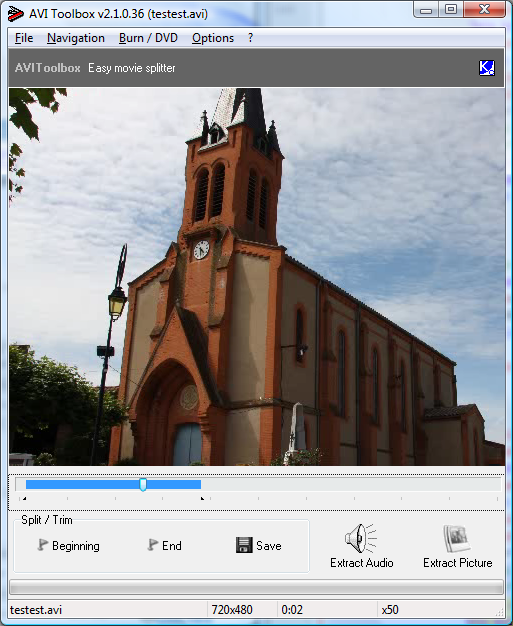
The software provides a simplified interface tailored for specific, common file operations. One of its primary functions is video splitting, which allows users to extract or remove precise segments from a larger video file. Additionally, the tool facilitates soundtrack extraction, enabling users to convert video content into standalone audio files for external use. For users needing visual documentation or thumbnails, the integrated picture capture feature saves high-quality still frames directly from the video stream.
Beyond these core editing functions, AVIToolbox offers integration for burning and converting media to DVD formats. These specific capabilities are designed to work in conjunction with third-party software, specifically CopyTo and ConvertXToDVD. The application is built with international support to accommodate a global user base and ensures a streamlined workflow by removing nag screens in the full version.
Key features included in the software are:
- User-friendly interface designed for rapid task execution and navigation.
- Video Splitting functionality to isolate or extract specific segments from larger files.
- Audio Extraction tools to save soundtracks independently from the video source.
- Picture Capture capabilities for saving still images from individual video frames.
- DVD Support for burning and conversion via third-party tool integration.
- International Support providing accessibility for multiple languages.
Top 5 Reasons To Download AVIToolbox
- Surgical Precision in Video Splitting: Effortlessly extract specific segments from large video files without the need for complex, resource-heavy editing suites.
- High-Fidelity Audio Extraction: Seamlessly strip soundtracks from your favorite videos to create MP3s, ringtones, or audio archives with a single click.
- High-Resolution Still Image Capture: Capture the perfect frame from any video sequence to create high-quality thumbnails, wallpapers, or reference photos.
- Ultra-Lightweight and Intuitive Interface: A streamlined user experience that prioritizes speed and efficiency, making it accessible for beginners and pros alike.
- Premium Full-Version Benefits: This giveaway provides the full experience, meaning no annoying nag screens, no watermarks, and complete access to all features.
In the modern digital landscape, we are constantly bombarded with video content. Whether you are a content creator, a hobbyist videographer, or someone who simply wants to keep their digital library organized, the tools you use define your productivity. We have all been there: you have a massive two-hour recording, and you only need a thirty-second clip to share on social media or send to a friend. You open a professional-grade video editor, wait five minutes for it to load, struggle through a timeline filled with a thousand options you do not need, and finally export a file that is somehow larger than the original. It is a nightmare of inefficiency. This is exactly why AVIToolbox is the software you didn't know you needed, but won't be able to live without once you have it. This giveaway represents a golden opportunity to add a surgical instrument to your digital toolkit, and here is why you need to hit that download button right now.
1. Surgical Precision in Video Splitting
The primary reason anyone should jump on this giveaway is the sheer efficiency of the video splitting tool. In the world of tech reviewing, we often talk about "bloatware"—software that tries to do everything and ends up doing nothing particularly well. AVIToolbox takes the opposite approach. It is a specialized tool designed to handle common video operations with extreme focus. The splitting feature allows you to navigate through a video file and mark the exact start and end points of a segment you wish to keep.
Why is this better than a traditional editor? It comes down to system resources and speed. Traditional non-linear editors (NLEs) require massive amounts of RAM and CPU power because they are rendering multiple tracks, effects, and transitions. If you just want to "extract" a part of a video, you do not want to "render" it; you want to cut it. AVIToolbox streamlines this process. It allows you to prune your video library, removing the fluff and keeping only the highlights. This is incredibly useful for gamers who want to save their best plays, parents who want to clip a specific moment from a long school play recording, or professionals who need to isolate specific data points from a recorded meeting. By downloading this giveaway, you are gaining a tool that respects your time and your computer's hardware.
Furthermore, the precision offered here is top-notch. You aren't just guessing where the cut happens. The interface allows for frame-by-accurate seeking, ensuring that your extracted clip starts and ends exactly where you want it to. There is no awkward half-second of the previous scene or a cut-off sentence at the end. It is clean, professional, and incredibly fast.
2. High-Fidelity Audio Extraction
We live in an era of multi-modal content. Often, the value of a video isn't actually in the visuals, but in the audio. Perhaps you have a recording of a lecture, a concert, or a rare interview where the video quality is poor but the sound is gold. Or maybe you are a content creator who needs to sample a specific sound bite for a podcast or a new video project. This is where the audio extraction feature of AVIToolbox becomes an absolute game-changer.
Instead of using sketchy online converters that often bundle malware or compress your audio into a tinny, low-quality mess, AVIToolbox performs the extraction locally on your machine. This ensures the highest possible fidelity. When you extract a soundtrack using this tool, you are getting the raw data from the video file. This is essential for anyone who cares about sound quality. If you are building a music library from live performances or saving motivational speeches to listen to during your morning commute, you want that audio to be crisp and clear.
The process is so simple it almost feels like magic. You load your file, select the extraction option, and within seconds, you have a standalone audio file. This eliminates the need for complex workarounds like "loopback" recording or using heavy video software just to mute the video track and export the audio. It is a one-stop-shop for turning video content into a portable audio format. For those of us who juggle multiple devices, having our favorite video soundtracks as manageable audio files is a massive convenience that this giveaway provides for free.
3. High-Resolution Still Image Capture
Have you ever tried to take a screenshot of a video using the standard "Print Screen" button or a basic snippet tool? Usually, the result is a blurry, pixelated mess, or worse, a black screen due to hardware acceleration issues. AVIToolbox solves this common frustration with its dedicated picture capture feature. This tool allows you to scrub through your video frame-by-frame to find the absolute perfect shot and save it as a high-quality still image.
This is a feature that has a surprising number of use cases. For social media enthusiasts, it is the best way to create custom thumbnails for YouTube or preview images for Instagram. For researchers or students, it is an invaluable way to capture diagrams, slides, or visual evidence from recorded presentations. Even for casual users, it is a great way to save a beautiful moment from a family video to print out or use as a desktop wallpaper.
The beauty of this feature is that it captures the frame at the native resolution of the video. If you are watching a 4K video, you aren't getting a screenshot of your monitor's resolution; you are getting a 4K still image. This level of quality is hard to achieve without specialized software. By grabbing this giveaway, you are essentially getting a high-end camera that can take photos "inside" your video files. It turns every video in your collection into a potential photo album.
4. Ultra-Lightweight and Intuitive Interface
One of the biggest hurdles in the tech world is the "learning curve." Many powerful tools are hidden behind interfaces that look like the cockpit of a fighter jet. AVIToolbox breaks this trend by offering a user-friendly interface that prioritizes the user's intent. From the moment you open the application, it is clear what you need to do. There are no hidden menus, no confusing jargon, and no unnecessary bells and whistles.
As a reviewer, I see a lot of software that fails because it is too "busy." Users get overwhelmed and end up going back to their old, inefficient ways. AVIToolbox is different. It follows the "KISS" principle: Keep It Simple, Stupid. The buttons are clearly labeled, the timeline is easy to navigate, and the "International Support" ensures that users across the globe can operate it in their native tongue. This makes it the perfect tool to recommend to friends and family who might not be "tech-savvy" but still need to perform these common video tasks.
Furthermore, because the software is so lightweight, it opens almost instantly. It doesn't hog your system's background processes or require the latest graphics card to run smoothly. It is the definition of a "utility" app—it stays out of your way until you need it, performs the task perfectly, and then closes without leaving a trace. In an age of software-as-a-service (SaaS) where everything requires a login and a subscription, having a standalone, lightweight tool like this is a breath of fresh air.
5. Premium Full-Version Benefits
Finally, we have to talk about the value of this being a giveaway. Many "free" versions of video software are what we call "crippleware." They might let you split a video, but then they'll slap a massive, ugly watermark right in the center of your clip. Or they might let you extract audio, but only for the first thirty seconds. Even worse are the "nag screens"—those annoying pop-ups that appear every time you click a button, begging you to upgrade to the Pro version.
By downloading this giveaway, you are getting the full version experience. This means no nag screens. You get the peace of mind that comes with using professional-grade software without the interruptions. You get the full functionality of the toolset, from the DVD burning and conversion capabilities (which integrate beautifully with third-party tools like CopyTo and ConvertXToDVD) to the limitless video splitting and audio extraction features.
This is a "set it and forget it" piece of software. Once you have it installed and activated through this giveaway, it is yours. It becomes a reliable part of your digital workflow. You won't have to worry about trial periods expiring or features being locked behind a paywall just when you need them most. For anyone who values their digital sovereignty and hates the trend of constant advertisements within software, this giveaway is a must-have. It is a premium experience that respects the user, and that is something truly rare in today's market.
Conclusion: Don't Miss Out
To wrap this up, AVIToolbox is the quintessential utility for the modern video consumer. It doesn't try to be a Hollywood editing suite; instead, it masters the four or five things that 90% of users actually need to do with their video files. It is fast, it is light, it is precise, and it is incredibly easy to use.
Whether you are looking to save space by trimming down your video library, create an audio collection from your favorite clips, or capture that one-in-a-million still frame, this software provides the most efficient path to your goal. The added bonus of international support and the ability to link up with DVD burning tools makes it a versatile powerhouse despite its small size.
Remember, giveaways like this don't last forever. This is your chance to secure a lifetime of hassle-free video operations. No more watermarks, no more nag screens, and no more bloated software slowing down your creative process. AVIToolbox is the lean, mean, video-processing machine your computer deserves. Download it now, explore its features, and you will quickly see why it is a staple in the toolkit of power users everywhere. You have nothing to lose and a vastly more organized and capable digital life to gain. Grab your copy today!
Final Pro-Tip: When you first launch the app, take a moment to look through the settings. You can customize your output folders and preferred formats, making the "one-click" experience even faster for your specific workflow. It is this level of thoughtful design that sets KC Softwares apart from the competition. Happy editing!

Reviews for AVIToolbox
Click Here to Read Reviews for AVIToolbox >> Click Here to Submit Reviews for AVIToolbox >>