What Does Paintslate Do?
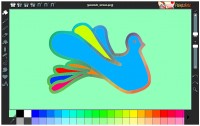
Paintslate is a digital illustration suite designed for a broad demographic, accommodating users from ages 5 to 55. The application features a versatile toolset including pencils, smudge tools, and dual color palette styles. Users can choose to work on a standard white canvas or select from a variety of textured paper backgrounds. The software includes pre-installed background categories, such as animals and seasonal themes, while also allowing for the manual import of custom images.
Beyond standard drawing tools, the program provides a selection of shapes, including circles, squares, hearts, and lines. A notable feature is the special effects brush, which allows users to "paint" effects onto specific areas of an image for localized editing. Version 1.5 introduces "Milo," a new feature that enables the creation of web-based or flash slideshows from saved work.
The interface is specifically optimized for touch-enabled hardware, including netbooks, tablet PCs, and interactive whiteboards. To facilitate a more efficient workflow on these devices, Paintslate utilizes a one-click open and save system, which automates file storage to eliminate manual intervention. This focus on touch-sensitivity and simplified file management makes it a functional tool for both desktop and mobile computing environments.
Top 5 Reasons To Download Paintslate
Before we dive into the nitty-gritty details of why this software is a must-have for your digital toolkit, let’s look at the highlights. If you are looking for a reason to hit that download button immediately, here are the top five reasons why Paintslate is the creative spark you have been waiting for:
- Seamless Touch and Tablet Optimization: Built specifically for the modern era of hardware, it turns your tablet PC or interactive whiteboard into a professional-grade canvas.
- The Innovative "Painting" of Special Effects: Unlike traditional filters, you can brush special effects directly onto specific parts of your image for surgical creative control.
- Versatile Media Backgrounds and Textures: From realistic paper textures to themed backgrounds like Christmas and Animals, your canvas is never just a boring white void.
- Zero-Friction Workflow with One-Click Saving: Eliminate the "Save As" fatigue with an automated filing system designed for speed and tablet efficiency.
- Universal Accessibility for All Skill Levels: With a UI designed for users aged 5 to 55, it bridges the gap between child-friendly play and adult-level creativity.
1. Seamless Touch and Tablet Optimization
In the world of digital art, the interface is everything. We have all struggled with software that feels like it was designed for a 1995 desktop computer—clunky menus, tiny buttons that are impossible to hit with a finger, and a total lack of pressure sensitivity support. Paintslate breaks that mold entirely. It has been meticulously engineered to run on the devices we actually use today: netbooks, tablet PCs, touchscreens, and even Interactive White Boards (IWBs).
If you have ever tried to use a traditional mouse-based painting program on a touchscreen, you know the frustration. The lag is real, and the precision is non-existent. However, because Paintslate is optimized for touch capabilities, it feels natural. When you draw a line with your stylus or your finger, it appears exactly where you expect it to. This makes it an incredible tool for educators using Interactive White Boards in a classroom setting. It allows teachers to create engaging, colorful diagrams on the fly without fumbling through complex sub-menus.
For the mobile artist using a tablet PC or a netbook, this optimization means you can take your studio with you. Whether you are sitting on a train or relaxing in a park, the software responds to your touch with the fluid grace of a physical sketchbook. It turns your hardware into a true extension of your hand, which is the highest praise any tech reviewer can give to a creative app.
2. The Innovative "Painting" of Special Effects
Most photo editors and painting apps treat "effects" like a blanket. You click a button, and the whole image turns sepia, or the whole image gets blurred. Paintslate takes a different, much more intuitive approach that I absolutely love. It borrows a high-end concept found in Pixo and Pixo SE: the ability to "paint" your effects.
Imagine you have a beautiful drawing of a landscape. You don't want the whole thing to look stylized—maybe you just want the water in the lake to have a shimmering effect, or perhaps you want to add a soft blur to the distant mountains to create a sense of depth. With this software, you simply select the effect and brush it onto the specific area you want to change. This level of "masked" editing is usually reserved for very expensive, professional-grade software that takes months to learn. Paintslate makes it as easy as using a crayon.
Combined with the robust toolset that includes everything from a standard pencil to a high-quality smudge tool, the possibilities are endless. The smudge tool, in particular, works beautifully with the special effects. You can apply a color, paint an effect over it, and then use the smudge tool to blend the two into a unique texture that looks like real oil paint or charcoal. It encourages experimentation, which is the heart of great art.
3. Versatile Media Backgrounds and Textures
One of the biggest hurdles to starting a new art project is the "fear of the blank page." Staring at a bright white, digital void can be intimidating for kids and adults alike. Paintslate solves this by providing an incredible array of backgrounds and paper types right out of the box.
First, let's talk about the Paper feature. Digital art often looks "too perfect," which can make it feel cold or clinical. By choosing from a selection of realistic paper backgrounds, you give your work an immediate tactile quality. Whether you want the tooth of a heavy watercolor paper or the smooth finish of a Bristol board, these textures change the way your digital strokes interact with the "surface." It adds a layer of depth that makes your paintings pop off the screen.
Beyond textures, the software comes pre-loaded with themed background images. If you have children, the Animals or Christmas backgrounds provide immediate inspiration for holiday cards or school projects. But the real kicker for the power user is the ability to import your own favorites. You can take a photo of a brick wall, a piece of old parchment, or even a sunset, and with a few easy steps, it becomes your canvas. This allows you to use Paintslate as a powerful photo-manipulation tool where you can draw, shape, and paint directly over your own photography.
4. Zero-Friction Workflow with One-Click Saving
As a tech reviewer, I see a lot of software that fails because it makes the "boring" parts of the process too difficult. File management is usually the death of creativity. You're in the zone, you've just created a masterpiece, and then you have to navigate a complex file tree, name the file, choose a format, and click "Okay" three times. It's a momentum killer.
Paintslate introduces a One Click Open & Save feature that is a total game-changer, especially for tablet and touchscreen users. In this mode, files are saved automatically without any further intervention. This is a brilliant move for several reasons. For the 5-year-old user, it means they never lose their work because they forgot to save. For the 55-year-old hobbyist, it removes the technical barrier of file extensions and directory paths. For the professional, it means you can iterate rapidly without stopping to manage your hard drive.
And the workflow doesn't stop at saving. The new version 1.5 introduces the "Milo" feature. This is a massive addition that allows you to take your saved drawings and instantly turn them into web or flash-based slideshows. Think about the utility here: a student can create a series of drawings for a science project and, with a few clicks, have a professional-looking slideshow ready to present to the class. An artist can compile their week's sketches into a digital portfolio to share online. It’s about taking your art from the canvas to the world with as little friction as possible.
5. Universal Accessibility for All Skill Levels
The tagline "for users aged 5 to 55" isn't just marketing fluff—it's a design philosophy. Most painting apps fall into one of two camps: they are either "toys" meant for toddlers that lack any real depth, or they are "beasts" like Photoshop that require a college degree to master. Paintslate occupies the "Goldilocks" zone. It is simple enough for a child to understand the basics within seconds, yet deep enough that a serious hobbyist can produce high-quality work.
The Shapes tool is a perfect example of this balance. In addition to free-hand drawing, you have access to perfectly rendered Circles, Squares, Hearts, and Lines. A child can use these to build a house or a valentine’s card, while a more advanced user can use them as the geometric foundation for a complex architectural sketch or a graphic design layout. The dual color palette styles also cater to different needs—one for quick, bright selections and another for more nuanced color mixing.
By making the software fun and easy to use, Paintslate removes the ego from the creative process. It invites you to play. In an age where we are constantly bombarded by complex notifications and difficult interfaces, there is something profoundly refreshing about an app that just wants you to pick up a virtual brush and start creating. Whether you are using it for serious digital painting, quick photo edits, or just to keep the kids entertained with something productive, it delivers on every front.
Conclusion: Why You Need To Download It Now
We often overlook the importance of having a reliable, fun, and fast creative outlet on our devices. Paintslate is more than just a painting program; it’s a versatile tool that adapts to your hardware and your skill level. It takes the best parts of professional editing—like localized effects and texture overlays—and packages them in an interface that anyone can pick up and enjoy.
The optimization for touchscreens and tablet PCs makes it a forward-thinking piece of software. As we move further away from the mouse-and-keyboard era, tools like Paintslate will become the standard for how we interact with digital media. The addition of the "Milo" slideshow creator and the stress-free one-click saving system shows that the developers truly understand the needs of their users. They have removed the "work" from "artwork."
If you have a tablet PC, a netbook, or any touchscreen device, you owe it to yourself to see how smooth and responsive this program feels. Don't let the "5 to 55" age range fool you; this is a robust creative engine that can handle everything from a simple doodle to a complex digital painting. It is rare to find a giveaway that offers this much utility and pure, unadulterated fun. Download it, open a new canvas, choose a nice paper texture, and see where your imagination takes you. You won't regret adding this versatile gem to your collection.
With its wide toolset, innovative effects, and incredibly user-friendly design, Paintslate stands out as a premier choice for digital creation. Whether you are a teacher, a student, a parent, or an aspiring artist, this software provides the perfect environment to explore your creativity. Grab this giveaway while you can and start painting your masterpiece today!


Reviews for Paintslate
Click Here to Read Reviews for Paintslate >> Click Here to Submit Reviews for Paintslate >>