What Does EaseUS MobiSaver Pro Do?
EaseUS MobiSaver Pro is a professional data recovery suite for Windows that supports both Android and iOS platforms. It is designed to retrieve lost information from smartphones and tablets under various circumstances, such as accidental deletion, factory resets, rooting, or system crashes.
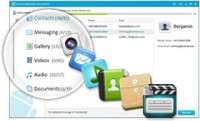
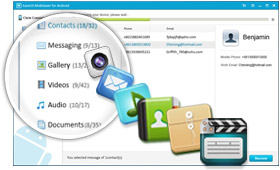
For Android hardware, the software scans both internal storage and SD cards to recover contacts, SMS, photos, videos, audio, and documents. It is compatible with major manufacturers including Samsung, LG, HTC, and Google. The tool features a preview function, allowing users to verify data before restoration, and supports selective recovery to target specific files.
Apple users can utilize three specific recovery methods: direct device scanning, extraction from iTunes backups, and restoration via iCloud. These options are effective even if a device is locked, damaged, or experiencing an iOS upgrade failure. The software can salvage messages, call logs, and media files that might otherwise be inaccessible.
The utility emphasizes a streamlined three-step workflow to simplify the recovery process. It operates as a read-only solution, ensuring that existing data on the device remains unchanged and secure during the scanning and retrieval phases.
Top 5 Reasons To Download EaseUS MobiSaver Pro
- Universal Dual-Platform Support: A single professional solution that handles both Android and iOS devices, covering everything from Samsung and Google Pixels to the latest iPhones and iPads.
- Comprehensive Data Retrieval: The ability to recover an exhaustive list of file types including SMS, contacts, photos, videos, audio, and documents, even from external SD cards.
- Versatile Recovery Scenarios: Solutions for the most "hopeless" situations, such as failed OS updates, accidental formatting, rooting/jailbreak errors, and even locked devices with forgotten passwords.
- Triple-Threat iOS Recovery Modes: Apple users get three distinct ways to find lost data: directly from the device, through iTunes backup extraction, or via iCloud backup restoration.
- Risk-Free Selective Recovery: A 100% safe process that allows you to preview all recoverable data before committing, ensuring you only restore exactly what you need without risking further data damage.
We have all been there. It is that sinking feeling in the pit of your stomach when you realize that a split-second tap on "Delete" just wiped out a year’s worth of irreplaceable photos. Or perhaps it is that moment of sheer panic when a routine OS update goes sideways, leaving your smartphone stuck on a boot loop or the dreaded white Apple logo. In the modern age, our entire lives are stored on these pocket-sized glass rectangles. Our professional contacts, our private conversations, our financial documents, and our most cherished memories are all digitized. When that data disappears, it feels like a part of your life has been erased.
This is exactly why you need to pay attention to this giveaway. As a tech reviewer who has seen countless "recovery tools" come and go, I can tell you that very few manage to combine raw power with an interface that doesn't require a computer science degree to navigate. EaseUS MobiSaver Pro is the gold standard in this category. It isn't just a utility; it is an insurance policy for your digital life. Let’s dive deep into the five reasons why this software is an absolute must-download today.
1. Universal Dual-Platform Support: The Only Tool You Will Ever Need
One of the biggest frustrations in the tech world is the "walled garden" effect. Usually, if you own an Android tablet and an iPhone, you are forced to buy two different sets of software to manage them. EaseUS MobiSaver Pro breaks down those walls by offering a comprehensive Windows-based solution that talks to both ecosystems. This isn't a watered-down version of two different programs; it is a professional-grade suite that understands the file structures of both Android and iOS.
For the Android enthusiasts, this software supports a massive array of manufacturers. Whether you are rocking the latest Samsung Galaxy, a sleek LG, an HTC classic, a Motorola, or a Google Pixel, MobiSaver has the drivers and the protocols ready to go. It doesn't matter if your data is sitting on the internal storage or tucked away on a micro-SD card; the software treats the device as a holistic unit and leaves no stone unturned.
On the flip side, for the Apple aficionados, the software is fully optimized for the iPhone, iPad, and iPod Touch. Because it is a "Pro" version, it bypasses many of the standard limitations found in free tools. Having one single program installed on your PC that can handle every mobile device in your household is not just convenient—it is efficient. You don't have to learn two different interfaces or manage two different licenses. It is a one-stop shop for mobile data security.
2. Comprehensive Data Retrieval: Beyond Just Photos
When people think of data recovery, they usually think of photos. While photos are incredibly important, they are only one piece of the puzzle. EaseUS MobiSaver Pro understands that your digital footprint is diverse. This software is designed to dig deep into the databases of your device to pull out information you might have thought was gone forever.
Think about your SMS messages and contacts. For many of us, our text history contains vital business information, addresses, and sentimental conversations. If you lose your contacts, you lose your network. MobiSaver can reconstruct these databases, allowing you to export them back into a readable format. But it doesn't stop there. It targets audio files, videos, and even complex documents like PDFs or Word files that you might have downloaded for work.
The SD card recovery feature for Android is particularly impressive. Often, when an SD card "corrupts," a phone will simply tell you that the card needs to be formatted, which would erase everything. MobiSaver can often bypass the phone’s OS to read the raw data on the card, saving you from having to hit that "Format" button. It treats your data with a level of forensic-level detail that is usually reserved for high-end IT departments, but brings it to your home desktop.
3. Versatile Recovery Scenarios: Hope in "Hopeless" Situations
Most recovery tools work fine if you just accidentally hit delete. But what if the problem is deeper? What if the "accident" wasn't yours, but the device’s? This is where EaseUS MobiSaver Pro really earns its "Pro" moniker. It is built to handle the "tough" circumstances that send most users to the repair shop for an expensive (and often unsuccessful) bill.
Consider the rooting or jailbreaking failure. Many power users want to unlock the full potential of their devices, but one wrong step can leave a phone "bricked." Traditionally, the fix for a bricked phone is a factory reset, which wipes all your data. MobiSaver provides a bridge to get your data off that "stuck" device before you perform a reset. The same applies to iOS users who find themselves stuck on the white Apple logo or recovery mode after a failed iOS upgrade.
Furthermore, the software addresses physical and logical barriers. If your screen is smashed but the computer can still "see" the device via USB, MobiSaver can extract the data. If you have been locked out because you forgot a password or a pattern, and the device is threatening to wipe itself after too many attempts, this software can be your savior. It even handles data lost due to factory resets and formatting, which are usually the "point of no return" for standard users. By utilizing advanced scanning algorithms, it can find "ghost" data that has been marked for deletion but hasn't been overwritten yet.
4. Triple-Threat iOS Recovery Modes: Total Redundancy
For iPhone and iPad users, EaseUS MobiSaver Pro offers a level of redundancy that is simply unmatched. Apple’s ecosystem is built around backups, but those backups can be notoriously finicky. Sometimes iTunes won't open, or iCloud says your storage is full, or the backup file itself is "corrupted." EaseUS provides three distinct pathways to ensure you get your files back.
The first mode is Recover from iOS Device. This is the "active" recovery mode where the software scans the actual hardware of your iPhone. This is perfect for when you just deleted a few photos and want them back immediately without messing with backups. The second mode is Recover from iTunes Backup. This is a game-changer. Usually, to get data from an iTunes backup, you have to "Restore" the whole phone, which overwrites everything currently on it. EaseUS MobiSaver allows you to "extract" specific files from that backup without doing a full restore. You can cherry-pick a single conversation or a specific video from a backup made months ago.
The third mode is Recover from iCloud Backup. If your phone is lost, stolen, or dropped in the middle of the ocean, you can't scan the device. However, if you have been syncing to iCloud, EaseUS can log in and help you download and sort through that data on your PC. Having these three options means that as long as your data existed at some point, EaseUS has a way to find it. It is a multi-layered approach that covers every possible failure point in the Apple ecosystem.
5. Risk-Free Selective Recovery: Control and Privacy
One of the scariest things about using data recovery software is the "black box" element. You click a button, wait three hours, and hope for the best. Sometimes, you end up recovering thousands of system icons and junk files you don't need, wasting time and storage space. EaseUS MobiSaver Pro changes the game with its Preview and Selective Recovery features.
After the software performs its "quick" or "deep" scan, it presents you with a neatly organized gallery of what it found. You can actually look at the photos, read the text messages, and see the names of the contacts before you hit the "Recover" button. This ensures 100% transparency. You know exactly what is recoverable before you commit. This "look before you leap" approach saves an immense amount of time and gives the user a sense of confidence that the software is actually doing its job.
Moreover, there is the issue of safety and privacy. When you take your phone to a local repair shop to have data recovered, you are handing your private photos and messages to a stranger. With EaseUS MobiSaver Pro, the entire process happens locally on your computer. Your data never leaves your system, and it is never uploaded to a third-party server (unless you are specifically accessing your own iCloud). The software is 100% safe, designed to read data without "writing" to it, which means there is zero risk of damaging your existing files during the scan. It is the most private, secure, and controlled way to handle sensitive data recovery.
Final Thoughts: Why You Need This Giveaway Now
In the world of tech, we often talk about "essential" apps. We talk about browsers, email clients, and social media. But the most essential apps are the ones you hope you never have to use—the ones that sit in your digital toolkit ready to save the day when disaster strikes. EaseUS MobiSaver Pro is exactly that kind of tool. It is the ultimate "break glass in case of emergency" software.
Think about the cost of professional data recovery services. If you take a dead phone to a specialist, you could easily be looking at hundreds, if not thousands, of dollars. By downloading this giveaway, you are essentially getting that professional capability for free. You are getting a tool that handles the two most popular mobile operating systems on the planet, provides multiple pathways for recovery, and does so with an interface that is as easy as one, two, three.
The three-step process mentioned in the software description is no exaggeration. You connect your device, you let the software scan, and you preview/recover your data. It removes the mystery and the stress from a situation that is usually defined by anxiety. Whether you are a "power user" who likes to tinker with rooting and jailbreaking, or a casual user who just wants to make sure their family photos are safe, this software is for you.
Do not wait until you have already lost your data to look for a solution. At that point, you might be panicking and make a mistake that makes the data unrecoverable. The best time to get a data recovery tool is before you need it. By taking advantage of this giveaway now, you are securing your digital future. You are ensuring that "accidental deletion" or a "failed update" is nothing more than a minor speed bump rather than a digital catastrophe. This is a pro-grade tool, offered by a company with a stellar reputation in the industry. It is powerful, it is efficient, and most importantly, it works. Download it, install it, and breathe a sigh of relief knowing that your data is protected by the best in the business.
In summary: You are getting universal support for Android and iOS, the ability to recover almost any file type, a solution for the most difficult technical failures, multiple backup extraction methods for Apple users, and a safe, private way to preview your files. There is simply no reason to pass this up. This is the kind of giveaway that provides real, tangible value to any smartphone user. Make sure you grab your copy of EaseUS MobiSaver Pro today and keep your memories, your contacts, and your digital life exactly where they belong—in your hands.

Reviews for EaseUS MobiSaver Pro
Click Here to Read Reviews for EaseUS MobiSaver Pro >> Click Here to Submit Reviews for EaseUS MobiSaver Pro >>