What Does Allavsoft Do?
Allavsoft is a specialized utility designed for the batch acquisition of video, music, and subtitle files from a library of over 10,000 supported websites. The software caters to a broad spectrum of platforms, ranging from social media and video-sharing sites like YouTube and Vimeo to specialized educational portals such as Udemy, Lynda, and Skillshare. It also facilitates audio extraction from streaming services including Spotify and SoundCloud.
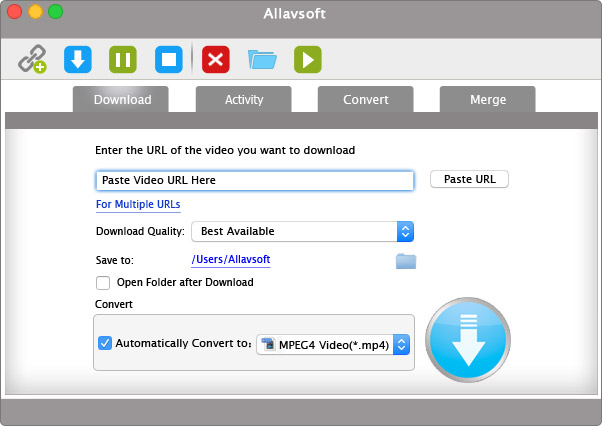
The application streamlines the media management process by allowing users to input multiple URLs for simultaneous downloading and conversion. Key technical features include:
- Format Conversion: Content can be downloaded directly into various industry-standard file types, including MP4, MP3, AVI, WAV, and MOV.
- Ad Filtering: The software automatically detects and excludes advertisements from web video files during the download phase to ensures clean local files.
- Integrated Playback: A built-in media player is included to facilitate the immediate preview and playback of downloaded content within the interface.
- Subtitle Support: The tool can identify and download accompanying subtitle tracks alongside video files.
Allavsoft operates as a centralized hub for offline media access, removing the need for separate browser extensions or individual conversion tools. Its capability to handle high volumes of data across diverse domains makes it a practical solution for users requiring offline access to web-based media for educational or entertainment purposes.
Top 5 Reasons To Download Allavsoft
Before we dive into the deep end of what makes this software a must-have for your digital toolkit, let's look at the core strengths that set it apart from every other media downloader on the market today. If you are tired of being tethered to an internet connection or frustrated by the limitations of streaming platforms, these five reasons are exactly why you need to grab Allavsoft right now.
- Unrivaled Compatibility Across 10,000+ Platforms: From mainstream giants like YouTube and Spotify to niche educational platforms like Udemy and Skillshare, the sheer breadth of supported sites is staggering.
- High-Efficiency Batch Downloading and Multi-URL Support: Stop wasting time downloading files one by one; Allavsoft allows you to queue up entire playlists or series with a single click.
- Direct-to-Format Conversion: Whether you need an MP4 for your tablet, an MP3 for your car, or an AVI for your legacy media player, the software converts files during the download process for instant compatibility.
- Intelligent Ad-Detection and Removal: Experience your content the way it was meant to be seen—without the annoying interruptions of mid-roll or pre-roll advertisements.
- Built-in Media Player for Instant Gratification: No need to toggle between different apps to check your files; the integrated player lets you preview and enjoy your content the moment the download finishes.
As a tech reviewer, I have seen countless "media downloaders" come and go. Most of them are buggy, riddled with malware, or stop working the moment a platform like YouTube updates its API. However, every once in a while, a tool comes along that feels like the ultimate "Swiss Army Knife" for media. Allavsoft is that tool. It is a robust, professional-grade solution for anyone who wants to take control of their digital media library. Below, I will break down exactly why these five features make Allavsoft a non-negotiable download for power users and casual viewers alike.
1. Unrivaled Compatibility Across 10,000+ Platforms
In the modern digital landscape, we are constantly hopping between different ecosystems. You might spend your morning watching a tutorial on Udemy, your afternoon listening to a playlist on Spotify, and your evening catching up on documentaries on SBS on Demand or ABC iview. The problem is that each of these platforms wants to keep you "locked in" to their specific app or website. They make it intentionally difficult to take your content offline or use it on the devices you prefer.
This is where Allavsoft shines with a level of compatibility that is frankly ridiculous. When we talk about "10,000+ websites," it isn't just a marketing gimmick. This software supports the big names like Vimeo and Dailymotion, but it truly proves its worth when you look at the niche categories. For the lifelong learners, support for platforms like Lynda, Ine, Academy of E-Hacking, and School of Podcasting means you can build a permanent offline library of educational resources. You are no longer at the mercy of a subscription that might expire or a video that might be taken down.
For the music lovers, the ability to pull high-quality audio from Spotify, Deezer, and SoundCloud is a game-changer. Imagine being able to archive your favorite underground tracks or podcast episodes that aren't available for download through standard means. Even specialized sites like Crunchyroll for anime fans or Kissasian for drama enthusiasts are covered. This software acts as a universal key to the world's media, breaking down the walls of these digital silos and letting you own the content you consume.
2. High-Efficiency Batch Downloading and Multi-URL Support
Time is the one commodity we can never get back. If you are someone who likes to archive entire YouTube playlists, full seasons of web series, or complete courses from Skillshare, the thought of manually copying and pasting URLs one by one is enough to make you give up before you start. This is a common pain point with free, browser-based downloaders—they are designed for the "one-off" user, not the person building a library.
Allavsoft’s batch downloading capability is an absolute workflow lifesaver. You can take a list of twenty, fifty, or even a hundred URLs, paste them into the interface, and let the software handle the heavy lifting while you go grab a coffee or work on something else. The multi-threaded engine ensures that your bandwidth is utilized efficiently, downloading multiple files simultaneously rather than making you wait for a linear queue to finish.
This feature is particularly vital for professionals. Suppose you are a researcher who needs to archive a series of interviews from various sites, or a teacher gathering video examples for a classroom presentation. The ability to batch process these files means you can organize your resources in minutes rather than hours. It is about moving from a reactive "I need this one video" mindset to a proactive "I am building a comprehensive archive" strategy. The stability of the software during these high-volume tasks is what separates a professional tool from a hobbyist's toy.
3. Direct-to-Format Conversion
We’ve all been there: you finally manage to download a video, only to find out that your smartphone won't play the file format, or your car's audio system doesn't recognize the codec. Usually, this means you have to go find another piece of software—a video converter—and spend even more time transcoding the file. It is a tedious, multi-step process that often results in a loss of quality if you don't know exactly what settings to use.
Allavsoft eliminates this entire headache by integrating the conversion process directly into the download. Before you even hit the "Start" button, you can tell the software exactly what you want the final file to be. Need an MP4 for universal compatibility? Done. Need a high-fidelity WAV file for audio editing? Easy. Want to convert a music video directly into an MP3 for your phone? It happens automatically.
The software supports a massive array of formats, including AVI, MOV, WMV, and more. What I find most impressive is how it handles the metadata and quality settings. You aren't just getting a file; you are getting a high-quality render that maintains the integrity of the original source. For users who aren't "tech-savvy," this is a godsend. You don't need to know what a bitrate is or how H.264 encoding works; you just pick your device or format from a list and let Allavsoft do the math. It’s "one-stop-shop" functionality at its finest.
4. Intelligent Ad-Detection and Removal
Let’s be honest: the state of the modern web is a mess of advertisements. It has reached a point where a ten-minute video might be interrupted three or four times by unskippable ads. Not only is this annoying, but it also ruins the flow of educational content or the immersion of a movie. If you are trying to learn a complex topic on a site like Udemy or YouTube, the last thing you want is a loud, jarring advertisement for car insurance breaking your concentration.
One of Allavsoft’s most "pro-user" features is its ability to automatically detect and strip away advertisements during the download process. When the software scrapes the video data from the web, it identifies the ad-markers and ensures that only the actual content is saved to your hard drive. This results in a "clean" file that is much more professional and enjoyable to watch.
This isn't just about convenience; it’s about quality of life. Imagine downloading a long playlist of music for a party or a workout. Without ad-removal, you would have to listen to commercials every two tracks. With Allavsoft, you get a seamless, uninterrupted experience. It provides the "premium" feeling of a paid streaming subscription without the recurring monthly fee. For anyone who values a distraction-free environment, this feature alone makes the software worth its weight in gold.
5. Built-in Media Player for Instant Gratification
How many times have you downloaded a file, only to find out it was the wrong version, or the audio was out of sync, or the quality wasn't what you expected? Usually, you have to navigate to your download folder, open the file in a third-party player like VLC or Windows Media Player, and then go back to your downloader if there’s an issue. It’s a small friction point, but over time, it becomes incredibly frustrating.
Allavsoft includes a built-in media player that allows you to preview and playback your downloaded files directly within the application. This might seem like a simple addition, but from a productivity standpoint, it is essential. It allows for instant verification. You can check the subtitles (which Allavsoft also downloads, by the way), verify the audio track, and ensure the video quality is exactly where you want it to be without ever leaving the interface.
Furthermore, this integrated player is designed to handle the various formats the software produces. You don't have to worry about whether your system has the right codecs installed to "check" a download; if Allavsoft downloaded it, Allavsoft can play it. This creates a cohesive, closed-loop ecosystem where you search, download, convert, and watch all in one place. It streamlines the entire media consumption process and makes the software feel like a complete media management center rather than just a simple utility.
The Final Verdict: Why You Need This Now
We live in an era of "digital fragility." Content that is available today might be gone tomorrow due to licensing changes, platform shutdowns, or creator deletions. Depending on a constant internet connection for your entertainment or education is a gamble. Allavsoft is the ultimate insurance policy for your digital life. It gives you the power to archive the things that matter to you, in the formats you need, without the clutter of advertisements or the hurdles of proprietary platform restrictions.
Think about the possibilities. You could download an entire Masterclass or Skillshare course to watch while you’re on a long flight where there is no Wi-Fi. You could grab your favorite SoundCloud sets for a road trip through areas with spotty cell service. You could preserve high-quality versions of videos from sites like Vimeo that might otherwise be lost to the "digital void."
The tech reviewer in me is always looking for software that is reliable, versatile, and user-friendly. Allavsoft hits all three of those marks with ease. It doesn't try to be flashy with unnecessary animations or complicated menus. Instead, it focuses on being an absolute workhorse. It handles the 10,000+ websites with the same level of stability regardless of whether you’re downloading a 30-second clip or a 4-hour 4K documentary.
In a world where companies are trying to charge you a monthly subscription for every little feature, having a tool that provides this much utility in a single package is refreshing. It is an empowerment tool. It shifts the control of media consumption from the hands of the giant tech corporations back into the hands of the user—you. You decide where you watch, how you watch, and what device you use to do it.
Don't miss out on this giveaway. Opportunities to grab a professional-grade tool like Allavsoft for free or at a discount are rare. Whether you are a student looking to save lectures, a music lover building the ultimate library, or a cinephile who wants a clean, ad-free experience, this software is the answer. It is efficient, it is powerful, and it is quite simply the best in its class. Download it today and start building the media library you’ve always wanted—on your own terms.
The digital world is vast, but with Allavsoft, it is finally yours to keep.

Reviews for Allavsoft
Click Here to Read Reviews for Allavsoft >> Click Here to Submit Reviews for Allavsoft >>