What Does Ashampoo UnInstaller 12 Do?
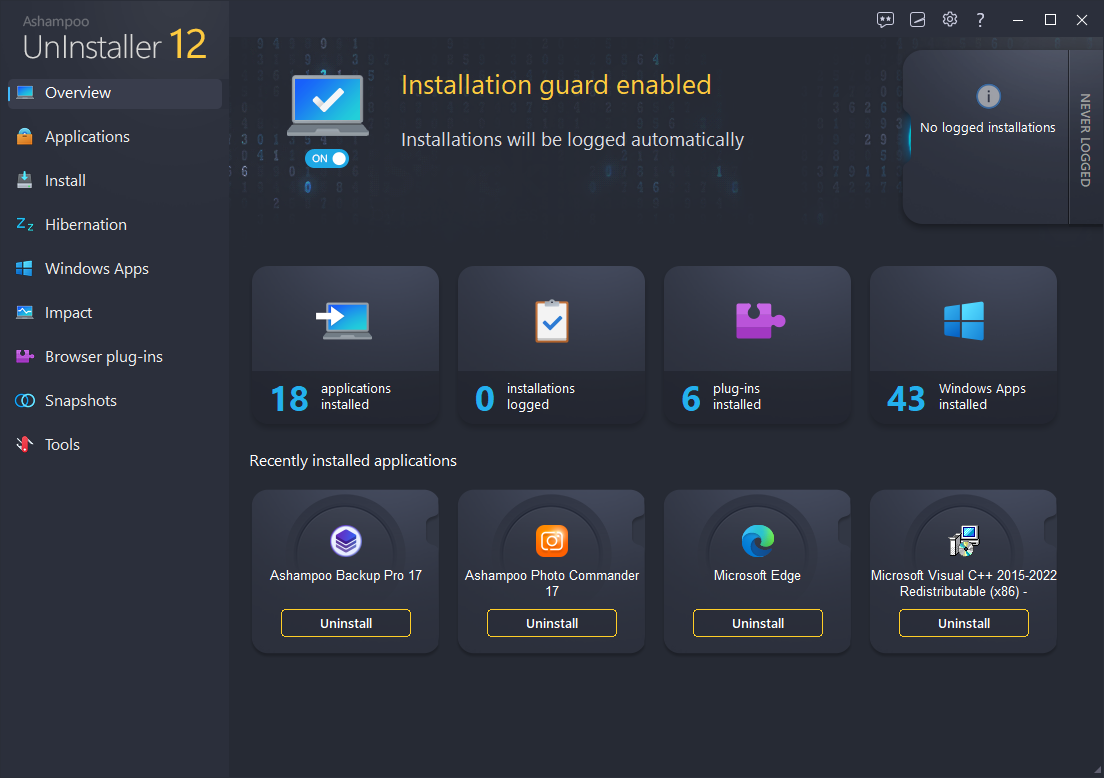
Ashampoo UnInstaller 12 is a utility designed to remove software, Windows apps, and browser plugins without leaving residual files. The software utilizes four distinct deletion methods to ensure thorough removal, exceeding the capabilities of standard Windows tools. Its primary mechanism is real-time installation monitoring, which logs every file and system modification. This allows the program to completely reverse changes when an application is removed.
For programs installed without active monitoring, the tool uses a database of software profiles combined with deep cleaning technology to identify and delete orphaned data. Users can also manage software through batch processing or a drag-and-drop interface. Version 12 introduces a hibernation feature that suspends installed applications and their associated background services, tasks, and autostart entries to free up system resources without permanent deletion.
The utility includes several system maintenance tools:
- Snapshot technology for comparing different system states to identify modifications.
- Updated cleaners that perform 50% faster than previous iterations.
- A cross-browser cookie manager to whitelist or remove tracking data.
These features combine to provide a controlled environment for installing and testing software while maintaining system performance. The program automatically detects most installations to minimize manual intervention during the logging process.
Top 5 Reasons To Download Ashampoo UnInstaller 12
- Total Removal with Four Complementary Deletion Methods: Say goodbye to digital leftovers and registry bloat forever.
- Real-Time Installation Monitoring: Track every single file and registry change as it happens for a perfect reversal later.
- The Revolutionary Hibernation Mode: Temporarily disable demanding software to boost system performance without uninstalling your favorite tools.
- Deep Cleaning Technology for Unlogged Installs: Clean up software that was installed before you even had Ashampoo UnInstaller 12.
- Comprehensive Privacy and Browser Management: A brand-new cookie manager and plugin cleaner to keep your web surfing fast and private.
If you have been using a Windows PC for more than a week, you know the inevitable "sludge" that begins to build up. You install a game to try it out, you realize it is not for you, and you hit uninstall. You download a productivity tool, find a better one, and hit uninstall. On the surface, it looks like those programs are gone. But under the hood? Your Windows registry is crying. There are orphaned folders in your AppData directory, leftover drivers lurking in system folders, and background services that continue to ping your CPU even though the "main" program is long gone. This is why your lightning-fast PC eventually starts to feel like it is wading through molasses.
Enter Ashampoo UnInstaller 12. This is not just another utility; it is the ultimate janitor for your operating system. I have tested dozens of uninstallers over the years, and many of them are just glorified versions of the default Windows "Add or Remove Programs" tool. Ashampoo, however, has built something that actually takes control of your file system. If you are looking for a way to keep your machine running like it just came out of the box, this is the giveaway you cannot afford to miss. Let’s dive deep into why this software deserves a permanent spot on your hard drive.
1. Total Removal with Four Complementary Deletion Methods
The biggest lie in the world of computing is the "Uninstall" button. When you click that button in the Windows Control Panel, you are essentially asking the program to delete itself. It is like asking a messy roommate to move out; sure, they might take their bed and their TV, but they are probably going to leave a few socks under the radiator and some old milk in the fridge. Ashampoo UnInstaller 12 changes the dynamic. It doesn't ask the program to leave; it evicts it and scrubs the floors afterward.
The software utilizes four different, complementary deletion methods to ensure that nothing is left behind. First, it triggers the standard uninstaller. Then, it kicks in with a deep scan of the registry. Third, it hunts down file system remnants. Finally, it uses a sophisticated database of software profiles to find hidden files that standard scans often miss. This multi-layered approach is essential because modern software is incredibly complex. Many programs use "nested setups" where one installer actually puts three or four different components on your machine. Standard tools usually only see the "wrapper" and leave the components behind. Ashampoo tracks all of it, ensuring that when you say "delete," it actually means delete.
In my experience, using this tool reveals just how much junk is usually left behind. After a typical session of testing five or six apps, Ashampoo UnInstaller 12 often finds hundreds of megabytes and dozens of registry entries that would have otherwise stayed on my system until the end of time. This isn't just about saving disk space; it is about system stability. Every leftover registry key is a potential conflict waiting to happen. By using Ashampoo, you are effectively bulletproofing your OS.
2. Real-Time Installation Monitoring
The best way to clean up a mess is to watch it being made. This is where Ashampoo UnInstaller 12 truly outshines the competition. The built-in installation monitoring technology acts like a high-tech security camera for your file system. The moment you launch an installer, Ashampoo recognizes the activity and begins logging every single modification. It notes every folder created, every file moved, and every single registry value altered.
This "log-based" approach is the gold standard of system maintenance. Because the software has a play-by-play record of the installation, the removal process is 100% accurate. It doesn't have to guess what belongs to the program; it knows. This is particularly useful for those "stubborn" programs that refuse to uninstall through traditional means or those that don't even provide an uninstaller. Since Ashampoo monitored the birth of the program on your drive, it can perfectly reverse the process.
The beauty of the version 12 monitoring system is that it is almost entirely automated. You don't have to remember to "right-click and monitor." It auto-detects most installations from beginning to end. As a tech reviewer, I appreciate software that stays out of my way until I need it. This tool sits quietly in the background, keeping a watchful eye on your system's integrity without hogging resources. It’s the ultimate "set it and forget it" solution for power users and novices alike.
3. The Revolutionary Hibernation Mode
This is easily my favorite new feature in version 12, and it is a complete game-changer for anyone who struggles with system resources. We all have those "heavy" programs—think Adobe Creative Cloud, various CAD software, or even certain gaming platforms—that we only use once a week or once a month. The problem is that these programs often install background services, autostart entries, and scheduled tasks that run 24/7, eating up your RAM and slowing down your boot time, even when you aren't using the app.
Previously, your only options were to leave them running and suffer the performance hit, or uninstall and reinstall them every time you needed them. Hibernation Mode offers a brilliant third way. With one click, you can put an application into a deep sleep. Ashampoo temporarily suspends all related services, tasks, and autostart entries. The program remains installed on your disk, but it occupies zero percent of your CPU and RAM while in hibernation.
When you actually need the program, you just "wake it up," and Ashampoo instantly restores all its functionality. This is essentially a way to have an unlimited number of programs installed without ever sacrificing your PC's speed. It’s like having an infinite garage where the cars only take up space when they are on the road. For users with mid-range laptops or older desktops, this feature alone makes the download worth it. It is the most effective way I have seen to reclaim system "snappiness" without deleting a single important file.
4. Deep Cleaning Technology for Unlogged Installs
What about the programs you already have on your computer? If you are downloading Ashampoo UnInstaller 12 today, you likely have years of digital debris already accumulated. You might think, "Well, the monitoring feature is great for new stuff, but what about the mess I already have?" Ashampoo has you covered with their Deep Cleaning technology and a massive database of software profiles.
Even if a program was installed before you had Ashampoo to monitor it, the software can still perform a surgical removal. It uses a cloud-updated database containing hundreds of software profiles. This means Ashampoo knows exactly where common programs like Office, Photoshop, or Spotify hide their "leftover" files. When you initiate an uninstallation of an unlogged program, it cross-references its database and performs an exhaustive search of your system to find the fingerprints of that specific software.
Furthermore, the cleaning tools themselves have been overhauled in version 12. They are now 50% faster and much more efficient at identifying junk. The software includes an Internet Cleaner, a Drive Cleaner, and a Registry Optimizer. These aren't just tacked-on extras; they are robust tools that complement the uninstallation process. In my testing, the speed increase is very noticeable. Scanning a cluttered system for junk used to take minutes; now it takes seconds. This efficiency encourages you to keep your system clean more often, rather than letting the junk pile up for months.
5. Comprehensive Privacy and Browser Management
In the modern era, our browsers are often more cluttered than our actual hard drives. Between cookies, trackers, and "helper" plugins we don't remember installing, our web experience can become sluggish and invasive. Ashampoo UnInstaller 12 recognizes that a clean PC is only half the battle; you also need a clean web presence. The new version features a sophisticated Cookie Manager that works across all your browsers.
Most cleaners just delete all your cookies, which is a massive pain because it logs you out of every website you use. Ashampoo’s manager allows you to whitelist important cookies (like your email or banking logins) while nuking the tracking cookies that follow you around the web. This is a perfect balance of privacy and convenience. You get to keep your "safe" data while getting rid of the "spy" data.
Additionally, the software provides a clear overview of all installed browser plugins and extensions, including the ones that are often hidden from the browser's own extension manager. We’ve all seen those malicious toolbars that seem impossible to remove. Ashampoo identifies them and provides a rating system so you can see which ones are flagged as suspicious by other users. Between the plugin management, the cookie control, and the ability to easily remove "Windows Apps" (those pre-installed apps like Weather or News that Windows makes it hard to delete), you are getting a total privacy suite packaged inside an uninstaller. It empowers you to take back control of your desktop and your data.
Final Thoughts: Why You Need This Now
We often spend hundreds or thousands of dollars on the latest hardware, only to let it be weighed down by poor software management. Using the default Windows uninstaller is like trying to clean a carpet with a leaf blower; you might move some of the dirt around, but the grit is still there, deep in the fibers. Ashampoo UnInstaller 12 is the deep-clean vacuum your PC has been begging for.
From the incredible resource-saving Hibernation Mode to the meticulous Installation Guard, this software provides a level of control that Windows simply does not offer out of the box. Whether you are a hardcore gamer trying to squeeze every frame out of your GPU, a creative professional needing a stable workstation, or a casual user who is tired of seeing "Low Disk Space" warnings, this tool is the solution.
Remember, this is a giveaway of a premium, high-tier utility. You are getting professional-grade system maintenance tools that normally come with a price tag, for absolutely nothing. It is an investment in the longevity of your hardware. By keeping your registry clean, your startup processes lean, and your browser free of bloat, you are extending the life of your PC. Do not let your computer become a graveyard of forgotten software. Download Ashampoo UnInstaller 12, run a deep scan, and feel the difference of a truly clean machine. You will notice the speed improvement from the very first reboot, and you will wonder how you ever managed your system without it.
In the world of tech, we often talk about "must-have" apps. Usually, that is hyperbole. In the case of a high-quality uninstaller, it is the literal truth. Your operating system is not designed to clean up after itself. You need a tool that is dedicated to that specific job. Ashampoo has spent years perfecting this technology, and version 12 is the pinnacle of their efforts. It is faster, smarter, and more powerful than ever before. Don't wait until your computer starts crashing or slowing to a crawl—get ahead of the bloat and download this giveaway today.

Reviews for Ashampoo UnInstaller 12
Click Here to Read Reviews for Ashampoo UnInstaller 12 >> Click Here to Submit Reviews for Ashampoo UnInstaller 12 >>