What Does Ashampoo UnInstaller 14 Do?
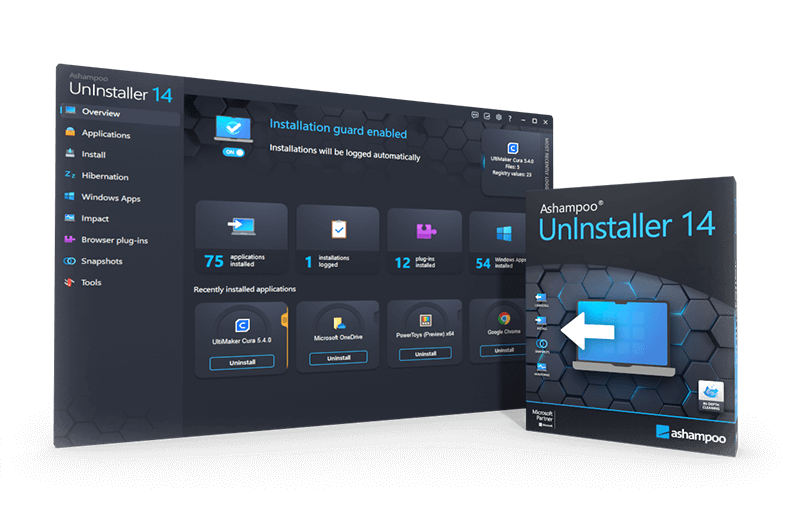
Ashampoo UnInstaller 14 is a specialized utility designed to remove software without leaving residual files or registry entries. Utilizing five distinct deletion methods, the tool provides a more thorough alternative to standard Windows uninstallation processes. Its primary feature is real-time installation monitoring, which logs all system modifications during a setup to ensure every change can be fully reversed upon removal.
For applications that were not monitored during their initial installation, the software employs a database of software profiles combined with Deep Cleaning technology. This process scans the Registry and system directories to eliminate orphaned entries and hidden files. Version 14 introduces several technical enhancements focused on system management and maintenance:
- Application Migration: Move installed programs between partitions or drives to optimize disk space.
- Snapshot Technology: Compare system states to identify specific modifications made by software over time.
- Batch Removal: Process multiple uninstallations simultaneously or use drag-and-drop functionality for quick removal.
- Maintenance Tools: An updated Drive Cleaner with custom file filters and the capability to auto-delete empty folders.
- Data Portability: Export and import lists of installed applications to assist with system migrations.
The utility is fully compatible with the latest Windows updates and web browsers, offering specialized removal tools for desktop applications, Windows apps, and browser plugins.
Top 5 Reasons To Download Ashampoo UnInstaller 14
- Unrivaled Deep Cleaning with Five Deletion Methods: Ashampoo UnInstaller 14 goes far beyond the standard Windows removal process by using five complementary methods to ensure that every single file, registry entry, and leftover folder is completely eradicated from your system.
- Real-Time Installation Monitoring: The software proactively logs every modification made during a new installation, allowing for a 100% precise reversal of the process when you decide to remove the application later.
- Seamless Application Relocation: A standout feature of version 14, this tool allows you to move installed programs to different drives or partitions effortlessly, helping you manage disk space without breaking your software shortcuts or registry links.
- Comprehensive Support for Windows Apps and Plugins: Unlike many competitors, this tool provides full control over hidden Windows apps and browser plugins, cleaning up the "bloatware" that usually slows down your operating system.
- Advanced Snapshot Technology and System Optimization: By comparing different system states, you can see exactly what changed on your PC over time, while integrated tools like Drive Cleaner and Registry Optimizer keep your machine running at peak performance.
If you have spent any significant amount of time using a Windows PC, you are likely familiar with the "slow creep." It starts the moment you unbox a new machine or finish a fresh install of your operating system. You download a few tools, try out a new game, install some productivity software, and then, eventually, you uninstall them. But here is the dirty secret of the software world: most uninstallers are incredibly lazy. They leave behind temporary files, empty folders, orphaned registry entries, and background services that continue to eat up your system resources long after the program's icon has vanished from your desktop. This is exactly why Ashampoo UnInstaller 14 is not just a utility; it is an essential piece of kit for anyone who cares about the longevity and speed of their computer.
As a tech reviewer, I have seen dozens of "system cleaners" and "uninstaller pros," but Ashampoo has consistently set the bar for what a comprehensive removal tool should look like. With the release of version 14, they have pushed the envelope even further. This isn't just about deleting a folder; it is about maintaining system integrity. Let’s dive deep into why you absolutely need to grab this giveaway and make this software a permanent resident on your hard drive.
1. Unrivaled Deep Cleaning with Five Deletion Methods
The primary reason anyone looks for a third-party uninstaller is that the default Windows "Add or Remove Programs" feature is, frankly, insufficient. When you use the standard Windows method, you are essentially asking the program you want to delete to delete itself. If that program's built-in uninstaller is poorly written—which is common—it will leave "digital crumbs" everywhere. Ashampoo UnInstaller 14 solves this by employing five distinct, complementary deletion methods.
The brilliance of this approach is that it covers every possible scenario. Whether you are dealing with a standard application, a stubborn Windows app, or a nested setup where one installer triggers three others, Ashampoo has a protocol for it. The Deep Cleaning technology has been significantly enhanced in version 14. It doesn't just look for folders with the program's name; it scans the deepest corners of your Registry and your System32 folders to find orphaned entries that are totally hidden from the average user. This ensures that your system remains as lean as it was the day you bought it. By eliminating these leftovers, you prevent registry bloat, which is one of the leading causes of system crashes and "blue screens" over time.
Furthermore, the ability to handle nested setups is a game-changer. We have all downloaded a piece of software that secretly installs a "helper" tool or a "toolbar" alongside it. Standard uninstallers often miss these secondary installations. Ashampoo UnInstaller 14 logs the entire chain of events, ensuring that when you say "delete," every single piece of that software bundle is wiped from existence.
2. Real-Time Installation Monitoring
While deep cleaning is great for removing programs that are already on your computer, Ashampoo UnInstaller 14 is at its best when it is working proactively. This is where the Installation Monitoring technology comes into play. The moment you launch an installer, Ashampoo recognizes the process and begins logging every single change. It tracks which files are added, which system settings are modified, and every new line added to the Windows Registry.
Why is this so important? Because it creates a perfect "undo" map. When you decide a month later that you no longer need that software, Ashampoo doesn't have to "guess" what to delete; it simply refers back to the log it created and reverses every single action. This is the gold standard for software removal. It is 100% precise. You can install, test, and remove software without any worries about permanent system changes. For those of us who like to try out new tools or "beta" software, this provides a massive safety net.
The best part about version 14 is the automation. You don't have to remember to "start" the monitor. The program auto-detects most installations from beginning to end. It sits quietly in the background, using minimal resources, and only springs into action when it detects an installation routine. It is a set-it-and-forget-it solution that keeps your PC's health at the forefront without requiring you to be a technical expert.
3. Seamless Application Relocation
This is one of the most exciting new features in Ashampoo UnInstaller 14, and it addresses a problem that almost every power user faces: running out of space on the primary drive. Typically, your C: drive (usually an SSD) is where Windows and all your programs live. As games and modern applications grow in size, that drive fills up fast. In the past, if you wanted to move a program to a different drive, you had to uninstall it and reinstall it from scratch on the new path. This meant losing settings, wasting time, and potentially running into activation issues.
Version 14 introduces the ability to move installed applications to new locations instantly. Want to move a 100GB game from your lightning-fast (but full) NVMe drive to a larger secondary SATA SSD? Ashampoo handles the move and, crucially, updates all the system links and registry entries so that the program still works perfectly. Your shortcuts still work, your save files are still there, and Windows still knows exactly where the program is. This level of disk management is usually reserved for very complex command-line tools, but Ashampoo makes it a simple "drag and drop" or "click and move" process. It is an incredible way to free up disk space and manage your hardware resources effectively.
4. Comprehensive Support for Windows Apps and Plugins
We live in an era of "bloatware." When you install Windows, it comes pre-loaded with apps you probably never asked for—news apps, weather apps, and various games that take up space and sometimes run background processes. Worse yet, our web browsers are often cluttered with plugins and extensions that we didn't realize were being installed. These "extras" are notoriously difficult to remove using standard methods because they are "hooked" into the operating system or the browser's core architecture.
Ashampoo UnInstaller 14 treats Windows Apps and browser plugins with the same level of scrutiny as standard desktop software. It brings transparency to these hidden items. It provides a clear list of every Windows app installed, including those hidden from the Start Menu, and allows for batch removal. If you want to strip Windows down to its bare essentials for maximum performance, this is the tool to do it. The redesigned reports in version 14 now specifically cover Windows apps, giving you a detailed breakdown of what is taking up space. Furthermore, the plugin manager helps you identify and remove those "shady" browser extensions that might be tracking your data or slowing down your web surfing experience. It puts the control back into the hands of the user, which is exactly where it belongs.
5. Advanced Snapshot Technology and System Optimization
Finally, we have to talk about the "extra" utility suite that comes bundled within Ashampoo UnInstaller 14. This isn't just a one-trick pony. The Snapshot Technology is perhaps the most powerful tool for "system detectives." It allows you to create a "snapshot" of your entire system state—files and registry—at any given time. You can then perform an action (like changing a system setting or installing a complex driver) and take a second snapshot. Ashampoo will compare the two and show you exactly what changed. This is an invaluable tool for troubleshooting or for users who want to know exactly what a specific piece of software is doing behind their backs.
Beyond snapshots, the software includes a suite of maintenance tools that would normally cost extra as standalone products. The Drive Cleaner has been significantly updated in version 14 to include custom file filters and an auto-delete function for empty folders. It keeps your file system tidy. The Registry Optimizer scans for errors and defragments the registry database, which can lead to faster boot times and a more responsive UI. All of these cleaners have been fully updated to work with the latest versions of Windows 10 and Windows 11, as well as all major modern browsers.
When you download this giveaway, you aren't just getting an uninstaller; you are getting a PC maintenance suite. It is designed to keep your machine fast, clean, and organized. In an age where software is becoming more intrusive and "heavy," having a tool like Ashampoo UnInstaller 14 is the only way to ensure that your computer remains your computer. It gives you the confidence to explore new software, knowing that you can always return your system to a pristine state with just a few clicks.
In conclusion, Ashampoo UnInstaller 14 is a masterpiece of utility software. It is rare to find a tool that combines such high-level technical power with an interface that is accessible to everyone. Whether you are a hardcore gamer looking to move your library, a professional needing a clean environment for work, or a casual user tired of "computer lag," this software is the answer. Don't miss out on this giveaway; your PC will thank you for years to come.

Reviews for Ashampoo UnInstaller 14
Click Here to Read Reviews for Ashampoo UnInstaller 14 >> Click Here to Submit Reviews for Ashampoo UnInstaller 14 >>