What Does Batch Image Upscaler AI Do?
Batch Image Upscaler is a standalone desktop application designed for high-quality image enhancement using artificial intelligence. Unlike traditional resizing, which often leads to pixelation and blurriness, this tool employs trained synthetic data models to predict and generate missing detail, allowing for up to 4x enlargement. It supports JPG, PNG, and WEBP formats, streamlining workflows through bulk processing capabilities.
The software features two distinct modes: Artwork, optimized for vector-based illustrations and anime, and Photo, which focuses on preserving natural textures in real-life photography. By utilizing the Vulkan driver, the program achieves GPU acceleration across Intel, AMD, and Nvidia hardware without requiring external dependencies like CUDA or Python environments.
A key differentiator is its commitment to privacy; the application operates entirely offline. No data is transmitted to external servers, making it a secure choice for sensitive projects. The package is fully portable, containing all necessary binaries and pre-trained models for immediate use. For professionals and hobbyists looking to restore low-resolution files or prepare digital art for high-resolution output, Batch Image Upscaler provides a localized, efficient solution for achieving super-resolution results.
Top 5 Reasons To Download Batch Image Upscaler AI
We have all been there. You find the perfect image for a presentation, a website design, or a personal wallpaper, only to realize it is a tiny, blurry, pixelated mess. Or perhaps you have unearthed a collection of cherished family photos from the early days of digital cameras, now looking painfully low-resolution on modern high-definition displays. In the past, your only options were to accept the poor quality or attempt to stretch the image using basic photo-editing software, which only resulted in a smeary, blocky nightmare. Fortunately, the era of smart image enhancement has arrived, and it is powered by cutting-edge artificial intelligence.
Today, we are looking at a utility that solves these exact problems with incredible efficiency: Batch Image Upscaler. This is not just another simple resizing tool; it is a fully offline, GPU-accelerated powerhouse designed to transform low-resolution images into stunning, high-definition masterpieces. Because this software is currently available as a giveaway, there has never been a better time to add this essential utility to your digital toolkit. If you are on the fence about whether you need another image tool on your computer, let us break down exactly why this software is an absolute must-download.
Before we dive deep into the technical brilliance of this app, here is a quick preview of the top five reasons why you need to grab this giveaway immediately:
- Genuine 4x AI-Powered Super-Resolution: It actually reconstructs missing details and enhances clarity rather than simply stretching pixels.
- Complete Offline Operation and Total Privacy: Your photos never leave your computer, ensuring absolute security with zero cloud dependencies.
- Optimized Dual-Mode Upscaling (Artwork vs. Photo): Tailored AI models ensure perfect processing whether you are enhancing digital art, anime, or real-life photographs.
- High-Efficiency Batch Processing: Save massive amounts of time by dragging, dropping, and upscaling entire folders of images in a single action.
- Hassle-Free GPU Acceleration via Vulkan: Enjoy blazing-fast processing speeds across AMD, Intel, and Nvidia graphics cards with no complex setups or dependencies.
Now, let us take a deep, comprehensive look at each of these reasons to understand why Batch Image Upscaler stands out from the crowd and why this giveaway is an opportunity you cannot afford to miss.
1. Genuine 4x AI-Powered Super-Resolution
To truly appreciate what Batch Image Upscaler does, we first need to address the massive difference between traditional image resizing and AI-powered super-resolution. When you open a standard image editor and increase the dimensions of a photo, the software uses basic interpolation algorithms like bilinear or bicubic filtering. These algorithms look at the existing pixels and try to guess what should go between them by averaging the colors. The result is always the same: a larger image that looks soft, blurry, and distinctly out of focus. It does not add detail; it just stretches the blur.
Batch Image Upscaler works on an entirely different scientific level. By utilizing advanced artificial intelligence models, this software performs what is known as Super-Resolution. Instead of stretching pixels, the AI analyzes the structures within your image—identifying edges, textures, patterns, and gradients. It then reconstructs the image from the ground up, generating entirely new, high-fidelity pixels that fit seamlessly into the picture. The software can enlarge your images up to four times (4x) their original dimensions while actually increasing the perceived sharpness and detail.
For example, if you input a tiny 500x500 pixel image, traditional resizing will give you a blurry 2000x2000 pixel mess. Batch Image Upscaler, however, will output a clean, crisp 2000x2000 pixel image where textures look natural, lines look sharp, and fine details that were previously invisible are suddenly revealed. This makes it an invaluable tool for graphic designers who need to prepare web graphics for print, collectors of vintage digital art, and anyone looking to breathe new life into low-resolution assets.
2. Complete Offline Operation and Total Privacy
In the modern software landscape, almost everything is shifting toward the cloud. While cloud-based AI image upscalers exist, they come with a long list of massive drawbacks. First and foremost is the issue of privacy. When you upload your personal photographs, family albums, or proprietary business graphics to a cloud service, you lose control over that data. You have to trust that the company hosting the service is securing your files and not using your images to train their models without your explicit consent.
Secondly, cloud services are notoriously slow and restrictive. You are forced to deal with slow upload times, waiting in queues behind thousands of other users, and hitting aggressive daily usage caps unless you pay a hefty monthly subscription fee. If your internet connection drops, your workflow comes to a grinding halt.
Batch Image Upscaler completely bypasses all of these frustrations by being a fully offline desktop application. Once you download and install the package, every single calculation and AI inference is performed locally on your own computer's hardware. Your files never leave your machine, and absolutely no data is transmitted over the internet. This guarantees 100% privacy and security for your sensitive documents, personal snapshots, and proprietary designs.
Furthermore, because it runs entirely local, you do not need an active internet connection to use it. You can upscale your image library while traveling on a plane, working in a remote cabin, or during a network outage. There are no monthly subscription fees, no queues, and no limits on how many images you can process. It is your software running on your hardware, exactly the way software should be.
3. Optimized Dual-Mode Upscaling (Artwork vs. Photo)
Not all images are created equal, and a one-size-fits-all approach to AI upscaling simply does not work. A digital painting, an anime illustration, or a vector logo has fundamentally different visual characteristics than a real-world photograph. Drawings rely on clean lines, flat color gradients, and sharp boundaries. Real-life photographs, on the other hand, are defined by complex textures, subtle lighting, organic skin tones, and soft backgrounds.
Batch Image Upscaler recognizes this crucial distinction and offers two highly optimized modes: Artwork Mode and Photo Mode. These modes are powered by specialized AI models trained on synthetic data, ensuring that the upscaling process is tailored perfectly to the specific type of image you are working with.
- Artwork Mode: This mode is a dream come true for digital artists, comic book fans, and anime enthusiasts. It focuses heavily on line preservation, noise reduction, and edge contrast. When you run an illustration through Artwork Mode, it eliminates compression artifacts and jagged edges, leaving you with vector-like clarity and beautiful, smooth color transitions. It is perfect for preparing digital drawings for large-format printing or upscaling classic game art.
- Photo Mode: When dealing with real-life photography, Artwork Mode would make things look too smooth and artificial. That is where Photo Mode shines. It is designed to preserve organic textures like hair, skin pores, fabric weaves, and natural foliage. Instead of smoothing everything out, it intelligently enhances the fine micro-details, ensuring that the final, upscaled photograph looks incredibly realistic, sharp, and natural.
By giving you the power to choose between these two distinct engines, Batch Image Upscaler ensures that you always get the absolute best results possible, regardless of your source material.
4. High-Efficiency Batch Processing
Let's face it: time is our most valuable resource. If you have a collection of fifty low-resolution images that need to be enhanced, importing them one by one into an image editor, applying filters, and saving them individually is an agonizingly slow process. It turns what should be a creative or productive task into a tedious chore.
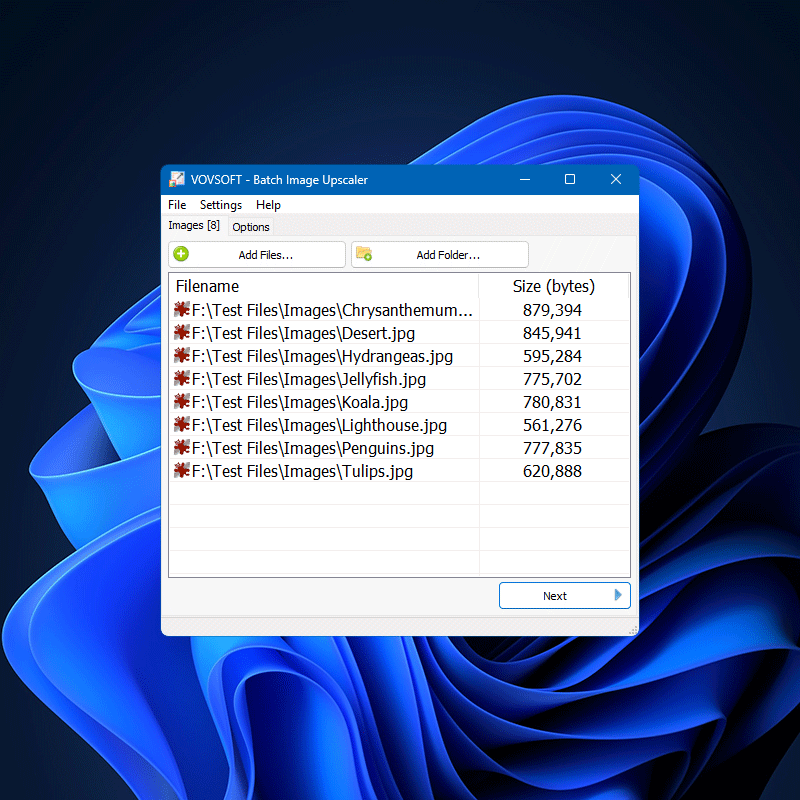
This is where the "Batch" in Batch Image Upscaler truly earns its name. The software is built from the ground up to handle massive workloads with ease. The user interface is clean, uncluttered, and incredibly intuitive. You don't need a degree in computer science to figure out how to use it. You simply drag and drop a batch of images—whether they are JPG, PNG, or WEBP formats—choose your desired settings, and let the software do the heavy lifting.
The program will systematically process every single image in your queue, applying your chosen AI model and saving the high-resolution outputs automatically. You can load up hundreds of files, click start, and walk away to grab a cup of coffee. When you return, your entire library will be beautifully upscaled and organized. Whether you are a professional photographer preparing an entire wedding album, a web developer optimizing product images for an e-commerce store, or an archivist digitizing historical documents, this high-efficiency workflow will save you hours of manual labor.
5. Hassle-Free GPU Acceleration via Vulkan
AI processing is computationally expensive. Running deep learning models on a standard computer processor (CPU) can be painfully slow, often taking several minutes just to process a single image. To get fast, usable speeds, AI software needs to harness the massive parallel processing power of a graphics card (GPU). However, many local AI tools on the market are incredibly difficult to set up. They often require you to install massive external software packages, configure Python environments, download specific CUDA libraries for Nvidia cards, or navigate complex command-line interfaces. If you own an AMD or Intel graphics card, you are frequently left completely out in the cold.
Batch Image Upscaler solves this accessibility problem brilliantly by leveraging the Vulkan API. Vulkan is a modern, cross-platform graphics and compute API that enjoys universal support across almost all modern hardware. Because the software uses Vulkan, it is compatible with graphics cards from all three major manufacturers: Nvidia, AMD, and Intel. Whether you have a dedicated high-end gaming GPU or a modern laptop with integrated Intel Iris or AMD Radeon graphics, this program can utilize your hardware to its fullest potential.
Best of all, this GPU acceleration works completely out of the box. There are absolutely no additional dependencies to install. You do not need to download Python, you do not need to configure CUDA, and you do not need to deal with confusing setup scripts. The download is an all-in-one, portable package that includes all the necessary binaries and pre-trained models. You simply run the program, and it immediately communicates with your graphics card to deliver blazing-fast upscaling speeds. It brings professional-grade AI power to everyday users without any of the technical headaches.
Conclusion: Why You Need to Download This Giveaway Today
Every now and then, a piece of software comes along that transitions from being a "nice-to-have" utility to an absolute necessity. Batch Image Upscaler is one of those tools. It takes the incredibly complex, cutting-edge world of artificial intelligence and packages it into a simple, offline, user-friendly desktop application that anyone can master in seconds.
Whether you want to rescue old family photos from the scrapheap of low-resolution history, upscale digital artwork for professional printing, or simply optimize your image workflow without sacrificing your personal privacy, this software delivers exceptional results. It bypasses the slow queues, privacy concerns, and recurring costs of cloud-based services, putting the power of a professional super-resolution engine directly onto your local machine.
Opportunities to download premium, fully featured utility software like this for free do not come around often. By securing this giveaway, you are equipping your computer with a future-proof image enhancement tool that will save you time, protect your privacy, and elevate the quality of your visual media to heights you never thought possible. Do not wait until you are struggling with a blurry image down the road—download Batch Image Upscaler today and experience the magic of local, AI-powered image restoration for yourself!

Reviews for Batch Image Upscaler AI
Click Here to Read Reviews for Batch Image Upscaler AI >> Click Here to Submit Reviews for Batch Image Upscaler AI >>