What Does Black Bird Image Optimizer PRO Do?
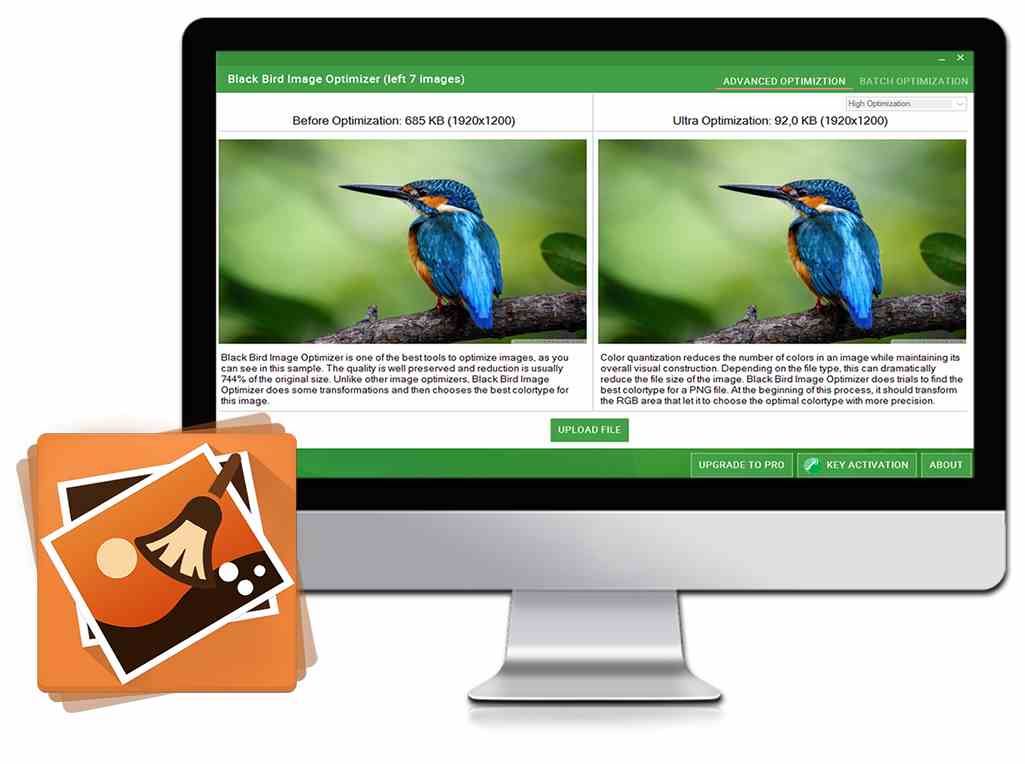
Black Bird Image Optimizer PRO is a specialized utility designed to reduce photograph file sizes while maintaining visual fidelity. The software utilizes a proprietary color quantization algorithm that decreases the total number of colors in an image without compromising its structural integrity. This process allows for significant reductions in storage requirements across various image formats while remaining visually indistinguishable from the original files.
A key technical feature of the application is its specific approach to PNG optimization. The tool performs multiple trials to identify the most efficient color type for a given file. During this sequence, the software transforms the RGB space, allowing it to select an optimal color profile with high precision. This ensures that the final output retains the clarity of the source image despite the reduced data footprint.
Beyond size reduction, Black Bird Image Optimizer PRO offers several functional advantages for managing digital assets. The software is capable of preserving existing metadata, ensuring that embedded information remains intact after processing. This functionality is particularly useful for photographers and web developers who require high-quality visuals that are optimized for faster loading and efficient storage. The application provides a factual solution for users looking to maximize disk space without resorting to traditional lossy compression methods.
Top 5 Reasons To Download Black Bird Image Optimizer PRO
- Cutting-Edge Color Quantization Algorithms
- Massive File Size Reduction with Zero Perceived Quality Loss
- Superior PNG-Specific Optimization and RGB Transformation
- Comprehensive Metadata Management and Preservation
- Professional-Grade Batch Processing and Workflow Optimization
If you are anything like me, your hard drive is currently gasping for air under the weight of thousands of high-resolution photographs. Whether you are a professional photographer, a web developer, or just someone who enjoys capturing every moment on a high-end smartphone, you have likely run into the "storage wall." We live in an era where a single snapshot can easily exceed ten or fifteen megabytes. While that detail is great for large-scale printing, it is a nightmare for web performance, email attachments, and cloud storage costs. This is where Black Bird Image Optimizer PRO steps into the spotlight, and honestly, it is a game-changer for anyone who handles digital imagery. Today, I am going to break down exactly why you need to jump on this giveaway and add this tool to your utility belt.
1. Cutting-Edge Color Quantization Algorithms
The secret sauce behind any great image optimizer lies in its math. Most generic tools use outdated compression methods that simply "smush" pixels together, resulting in those ugly, blocky artifacts we all recognize. Black Bird Image Optimizer PRO takes a completely different approach by utilizing advanced color quantization algorithms. But what does that actually mean for the average user? In simple terms, quantization is the process of reducing the number of distinct colors in an image while ensuring the overall visual construction remains intact.
Think about a clear blue sky in one of your photos. To the human eye, it looks like a smooth gradient of blue. In reality, that sky might contain thousands of slightly different shades of azure, navy, and cyan. Standard compression might just cut those colors out, leading to "banding" where you see distinct stripes of color instead of a smooth sky. The new algorithms used by Black Bird are significantly more intelligent. They analyze the image to determine which colors are essential to the human eye's perception and which ones are redundant. By mapping the image to an optimized color palette, the software can discard massive amounts of data without the viewer ever realizing a change has occurred. It is a sophisticated balancing act of data science and visual artistry that ensures your photos look vibrant and professional while weighing a fraction of their original size.
As a reviewer, I have tested dozens of these tools, and many of them struggle with complex textures like grass, hair, or water. Because Black Bird uses these "completely new" algorithms, it handles these high-frequency details with a level of grace that many of its competitors lack. It is not just about making a file smaller; it is about making it smarter.
2. Massive File Size Reduction with Zero Perceived Quality Loss
The primary reason anyone looks for an image optimizer is to save space, but the fear of "ruining" a photo often stops people from hitting that "compress" button. We have all seen what happens when you over-compress a JPEG: it becomes a blurry, muddy mess. Black Bird Image Optimizer PRO addresses this head-on with its lossless quality reduction capabilities. The goal here is to reduce the size of your photos "several times" over without sacrificing the clarity that makes the photo worth keeping in the first place.
When we talk about "lossless" in this context, we are talking about visual fidelity. By utilizing the aforementioned quantization, the software can often reduce a 10MB photo down to 2MB or even 1MB with zero perceptible difference to the naked eye. This is a massive win for several reasons. First, for web designers and bloggers, this is the difference between a website that loads in under a second and one that makes users wait and eventually bounce. Search engines love fast websites, and optimizing your images is one of the single most effective ways to boost your SEO rankings.
For the casual user, imagine being able to fit five times as many photos on your phone or your Google Drive without upgrading your storage plan. It is effectively like getting a free hard drive upgrade just by running your existing library through this software. The PRO version specifically excels here because it allows for deeper levels of optimization that the standard free-tier tools usually lock away. When you download this giveaway, you are getting the full power of an engine designed to trim the fat while keeping the steak perfectly intact.
3. Superior PNG-Specific Optimization and RGB Transformation
While JPEGs are the king of photography, PNGs are the workhorse of the digital design world. PNG files are essential because they support transparency and offer high-quality lossless compression by default. However, the downside is that PNGs can be absolutely massive, often much larger than their JPEG counterparts. Black Bird Image Optimizer PRO includes specialized logic specifically for the PNG format that sets it apart from "one-size-fits-all" converters.
The software performs multiple trials to find the absolute best colortype for any given PNG file. This is a highly technical process where the app evaluates whether the image should be saved as a PNG-8, PNG-24, or another variant based on its content. Before it even settles on a format, it performs a transformation of the RGB area. This allows the software to choose the optimal colortype with much higher precision. If you are working with logos, icons, or UI elements for an app or website, this precision is vital. It ensures that your lines stay sharp and your transparency remains clean, all while stripping away every unnecessary bit of data.
Most people don't realize that PNG files often carry "hidden" data that doesn't contribute to the image at all. By optimizing the RGB space and selecting the perfect colortype, Black Bird ensures that you aren't just compressing the file, but you are actually re-encoding it in its most efficient possible form. As someone who has spent hours manually trying to optimize assets for web projects, having a tool that does these trials automatically is an incredible time-saver.
4. Comprehensive Metadata Management and Preservation
One of the most overlooked aspects of image optimization is what happens to the metadata. Metadata (or EXIF data) includes things like the date the photo was taken, the camera settings used (ISO, shutter speed, aperture), and even the GPS coordinates of where you were standing. Many "lite" optimizers automatically strip this data out to save space, which can be a disaster if you are a professional photographer who needs to maintain copyright info or a hobbyist who likes to organize photos by date and location.
Black Bird Image Optimizer PRO gives you control. As the description notes, it "doesn't need to" remove your metadata. This means you have the flexibility to keep that vital information intact while still benefiting from the reduced file size of the image itself. For those who are privacy-conscious, you can also choose to strip that data out when you want to share a photo on social media without revealing your exact home coordinates. Having this choice integrated into the optimization workflow is a "PRO" feature that makes the software much more versatile than basic online converters.
Imagine you are a professional photographer delivering a gallery to a client. You want those images to be optimized so they can be easily downloaded and viewed, but you absolutely must keep your copyright and contact information embedded in the file metadata. With this tool, you can achieve both goals simultaneously. You get the weight reduction of a modern algorithm without losing the "digital DNA" of your creative work.
5. Professional-Grade Batch Processing and Workflow Optimization
Let's be honest: no one wants to optimize images one by one. If you have a folder with 500 photos from your last vacation or a thousand product shots for an e-commerce site, you need a tool that can handle the load. The "many more features" mentioned in the software's description include a robust batch processing system that makes the PRO version a true productivity powerhouse.
The interface is designed to be intuitive, allowing you to drag and drop entire folders and let the software do the heavy lifting in the background. Because it uses optimized algorithms, it can zip through large batches of images surprisingly quickly. This efficiency is what separates a "toy" app from a professional tool. When you are in the flow of a project, the last thing you want is to be slowed down by a clunky interface or a slow processing engine. Black Bird feels snappy and purposeful.
Furthermore, since this is a giveaway for the PRO version, you are gaining access to the full suite of features without the limitations found in trial versions. You get the best quantization, the most precise PNG trials, and the fastest processing speeds. In the world of tech, we often say that "time is the only resource you can't buy," but a good piece of software like this actually does buy you time. It automates the tedious parts of image management, leaving you with more time to focus on taking great photos or building your next big project.
Conclusion: Why You Shouldn't Wait
We are currently generating more visual data than at any other point in human history. Our screens are getting sharper, our cameras are getting more powerful, and as a result, our files are getting bigger. You cannot simply rely on buying more and more hard drives or cloud storage buckets forever. Eventually, you need a way to manage that data more effectively. Black Bird Image Optimizer PRO offers a sophisticated, elegant, and technologically advanced solution to the problem of "file bloat."
By downloading this giveaway, you are arming yourself with a tool that uses completely new color quantization algorithms to achieve what was once thought impossible: making files significantly smaller without making them look worse. Whether you are looking to speed up your website, clear some space on your laptop, or simply professionalize your digital workflow, this software provides the features you need. From the precision of its RGB transformations to the flexibility of its metadata handling, it is clear that this app was built with both the enthusiast and the professional in mind.
Don't let your high-resolution memories become a storage burden. Take advantage of this opportunity to get the PRO version of a top-tier optimizer. It is efficient, it is powerful, and most importantly, it preserves the beauty of your photos while stripping away the digital weight. Download it, run a few of your largest photos through it, and prepare to be impressed by the results. This is one tech tool that truly delivers on its promises.

Reviews for Black Bird Image Optimizer PRO
Click Here to Read Reviews for Black Bird Image Optimizer PRO >> Click Here to Submit Reviews for Black Bird Image Optimizer PRO >>