What Does Commodore Do?
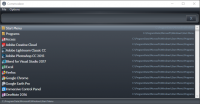
Commodore is a compact, portable search utility designed for Windows users who require immediate access to their local file systems. The software operates as a lightweight tool that indexes files and folders, allowing for near-instant retrieval regardless of directory depth. Users can trigger the application’s interface via a customizable hotkey, maintaining a minimal footprint on system resources while hidden from view.
The application includes granular filtering options, enabling users to narrow search results by specific file extensions, such as Excel spreadsheets or PowerPoint presentations. Beyond discovery, Commodore facilitates direct file management; users can copy selected files or folders directly to their clipboard or export them to the desktop from within the search interface.
Engineered for portability, Commodore can be executed from a USB flash drive without the need for a traditional installation process. This makes it a viable tool for users who operate across multiple machines or require a mobile utility suite. From a security perspective, the software functions without tracking or logging user activity, maintaining a localized operational profile. The tool focuses on speed and utility, providing an alternative to the native indexing services found in standard operating system environments.
Top 5 Reasons To Download Commodore
- Blazing Fast Search Performance: Commodore eliminates the "wait time" usually associated with finding files on a Windows PC, delivering results the moment you start typing.
- Unmatched Portability: As a tiny, standalone application, it requires no installation and can be run directly from a USB drive, making it the perfect tool for IT professionals and power users on the go.
- Privacy and Security by Design: In an era of invasive telemetry, Commodore stands out by offering a completely private experience with absolutely no tracking, logging, or data collection.
- Powerful Filtering and Action Tools: Beyond simple searching, the app allows users to filter by specific file types and instantly copy items to the clipboard or desktop, streamlining your entire workflow.
- Seamless Hotkey Integration: The app stays out of your way until you need it, popping up instantly with a custom hotkey to provide an "invisible" but powerful assistant for your file management needs.
Why You Need to Ditch Default Windows Search Right Now
If you have ever found yourself staring at that little green progress bar crawling across the top of your Windows Explorer window, you know the true meaning of frustration. We live in an era where processors have multiple cores and solid-state drives can read gigabytes of data per second, yet somehow, finding a simple Excel spreadsheet on a local drive can still feel like an exercise in futility. This is the primary reason why tech enthusiasts are always on the lookout for a better way. Enter Commodore, an elegantly simple but incredibly powerful search utility that changes the way you interact with your digital filing system.
As a tech reviewer, I see hundreds of "productivity" apps every year. Most of them are bloated, require a monthly subscription, and insist on "syncing to the cloud" before they let you do anything useful. Commodore is the antithesis of that trend. It is a tiny, focused, and incredibly fast utility designed to do one thing: find your stuff instantly. It doesn't want to be your social media platform; it doesn't want to track your location. It just wants to help you find that "Project_Final_v2_REALLY_FINAL.pdf" file that you buried in a subfolder three months ago. Let’s dive deep into why this specific giveaway is a mandatory download for anyone who values their time and their sanity.
Reason 1: Blazing Fast Search Performance
The core promise of Commodore is speed, and it delivers in a way that makes the native Windows search feel like it belongs in the 1990s. When we talk about "instant-search," we aren't talking about a three-second delay. We are talking about as-you-type results. The moment your finger hits the "P" key, every file starting with that letter is visible. By the time you finish typing "Powerpoint," the exact document you need is highlighted and ready to open. This level of responsiveness is addictive. Once you experience it, going back to the default Windows "search" function feels like walking through molasses.
Why is this speed so important? It’s about more than just saving a few seconds here and there. It’s about maintaining "flow." When you are in the middle of a complex project, your brain is holding onto a dozen different variables. Every time you have to stop and wait for your computer to catch up to you, that mental stack begins to crumble. Commodore preserves your cognitive momentum. Because the results are instantaneous, the tool becomes an extension of your thought process rather than an obstacle to it. This is the "secret sauce" of high-level productivity that the developers of Commodore have clearly mastered.
Furthermore, the efficiency of the search algorithm within Commodore is optimized for modern file systems. Whether you have a few hundred files or a few hundred thousand, the performance remains consistent. It bypasses the traditional, often-broken Windows Indexing Service that tends to hog CPU resources at the worst possible times. Instead, Commodore provides a lightweight alternative that gives you the answers you need without the system overhead that usually accompanies comprehensive file indexing.
Reason 2: Unmatched Portability and a Tiny Footprint
One of the most impressive aspects of Commodore is that it is a "tiny" app. In the modern software landscape, even a basic calculator app can sometimes take up hundreds of megabytes of space. Commodore stays true to the philosophy of minimalist software design. It is lightweight, meaning it won't bog down your system resources, and it is portable, which is a massive win for anyone who works across multiple machines.
Being "portable" means that Commodore does not require a traditional installation process. You don't have to worry about it scattering files across your System32 folder or bloating your Windows Registry with unnecessary entries. You simply run the executable, and it works. For those of us who like to keep our primary OS "clean," this is a dream come true. But the benefits go even further. You can keep Commodore on a USB thumb drive and take it with you. If you are a consultant, a student using lab computers, or the "family IT person" who is constantly fixing relatives' laptops, having a portable, instant-search tool in your pocket is a game-changer.
The "tiny" nature of the app also means it is incredibly gentle on your RAM. In an era where web browsers can easily eat up 4GB of memory just by having a few tabs open, Commodore operates in the background with a negligible footprint. You get all the power of a high-end search engine without the hardware penalty. This makes it an ideal choice for older laptops or budget machines that might struggle with more resource-intensive software. It’s a masterclass in efficient coding that we rarely see in the consumer software space anymore.
Reason 3: Privacy and Security by Design
We need to talk about the elephant in the room: data privacy. Most modern software is designed to "phone home." Companies want to know what you’re searching for, how often you’re using their app, and what your hardware configuration looks like. This data is then packaged, sold, or used to build a profile on you. Commodore takes a stand against this trend. One of its most defining features is that it contains no tracking or logging whatsoever.
When you use Commodore to search for sensitive legal documents, personal photos, or proprietary business data, that information stays on your machine. The app doesn't send your search queries to a remote server to "improve the algorithm." It doesn't track which files you open most frequently to serve you ads. It is a local tool for local files. For professionals in the legal, medical, or financial sectors—where data sovereignty is not just a preference but a requirement—this lack of telemetry is a critical feature.
This commitment to privacy also improves the security of your system. Apps that constantly communicate with the internet are potential vectors for vulnerabilities. By keeping everything local and skipping the logging process, Commodore minimizes its attack surface. It is a "quiet" piece of software that respects the user's boundaries. In a world where we are constantly being watched by our devices, there is something deeply refreshing about a tool that just does its job and leaves you alone.
Reason 4: Powerful Filtering and Action Tools
A search tool is only as good as what you can do with the results. Commodore understands this, which is why it includes robust filtering options. Let's say you remember that you saved a file named "Invoice," but you can't remember if it was an Excel sheet, a PDF, or a Word document. With Commodore, you can quickly filter your search by file type. This allows you to narrow down thousands of results into a handful of relevant hits in a matter of milliseconds.
But the functionality doesn't stop at just finding the file. Commodore includes features that allow you to act on those files immediately. You can copy searched files and folders directly to your desktop or your clipboard. This might sound like a small feature, but in practice, it is a massive time-saver. Imagine you need to attach five different files from five different folders to an email. Instead of navigating through the labyrinth of Windows Explorer, you can search for each one in Commodore, copy them to your clipboard, and paste them directly into your email client. It turns a five-minute chore into a thirty-second task.
The ability to instantly "show in folder" or open the file with its default application is also handled with extreme efficiency. Commodore is designed to be the "command center" for your file system. It isn't just a viewer; it’s a launcher. By providing these utility-focused features, the app transcends the role of a simple search bar and becomes an essential component of a high-speed digital workflow. It’s about reducing the number of clicks between "thinking of a file" and "working on a file."
Reason 5: Seamless Workflow Integration and Hotkey Access
The final reason you need to download Commodore is how well it integrates into your daily routine. A tool is only useful if it’s accessible, and Commodore is designed to be available at a moment's notice. By using a customizable hotkey, you can hide or show the Commodore interface instantly. It doesn't need to take up space on your taskbar or clutter your desktop. It lives in the background, dormant, until you call upon it.
This "ghost-like" presence is exactly what a utility should aim for. When you need to find something, you hit your hotkey, type three letters, hit enter, and the app vanishes as the file opens. It’s seamless. It feels less like "opening a program" and more like a native upgrade to the Windows operating system itself. For users who prefer a clean workspace, the ability to summon a powerful search engine out of thin air is incredibly satisfying.
Emphasizing the user experience is key here. Commodore doesn't try to reinvent the wheel with a flashy, confusing interface. It sticks to a clean, readable design that prioritizes functionality. The learning curve is non-existent. If you know how to type, you know how to use Commodore. This simplicity, combined with the power of the hotkey, makes it one of those rare apps that you’ll find yourself using dozens of times a day without even thinking about it. It becomes muscle memory. And that, more than anything else, is the hallmark of a truly great piece of software.
Conclusion: Don't Miss This Opportunity
In the world of tech, we are often told that "bigger is better" or that "more features equals more value." Commodore proves that the opposite is often true. By focusing on a single, vital task—finding files—and doing it better than anyone else, Commodore has earned its place on every Windows PC. It solves the speed issues of native search, respects your privacy, offers professional-grade portability, and integrates perfectly into your workflow.
This giveaway is an opportunity to reclaim your time and fix one of the most persistent annoyances of the Windows experience. Whether you are a hardcore power user who manages terabytes of data or a casual user who just wants to find their photos faster, Commodore is the solution. It is lightweight, it is fast, and it is completely private. Download it today and experience what it feels like to have your computer finally keep up with your brain. You won't realize how much time you were wasting until you see how much time Commodore saves you. This is a must-have utility that belongs in every user's digital toolkit.
Final Thought: In a digital landscape filled with "subscription-ware" and apps that track your every move, Commodore is a breath of fresh air. It is a reminder of a time when software was built to serve the user, not the other way around. Don't let this giveaway pass you by—your file system will thank you.


Reviews for Commodore
Click Here to Read Reviews for Commodore >> Click Here to Submit Reviews for Commodore >>