What Does DVDFab Toolkit Do?
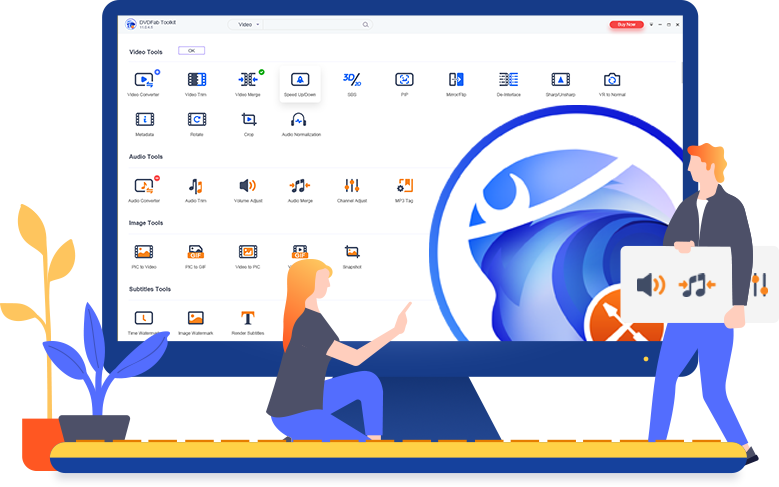
DVDFab Toolkit is a comprehensive suite featuring more than 20 specialized utility modules designed for multimedia processing. Rather than utilizing a single complex interface, the software employs a modular architecture where each tool functions independently to handle specific video, audio, and image tasks.
In terms of video management, the toolkit offers utilities for converting files between formats, trimming unwanted segments, and merging multiple clips. Users can also adjust playback speeds, rotate or flip footage, and sharpen or de-interlace video content. For audio needs, the software provides tools to extract audio tracks from video files and convert formats to ensure compatibility across different hardware and software players.
Beyond standard conversion, the suite includes tools for visual content creation and capture. This includes generating animated GIFs from video segments and capturing high-quality screenshots from specific frames. It also features a recording module capable of capturing computer screen activity alongside webcam footage, which is suitable for creating tutorials or presentations. Additional utilities allow for the assembly of videos from static image sequences. Each module within the DVDFab Toolkit is designed to be lightweight, focusing on executing a singular primary task without the system overhead often associated with full-scale professional editing suites.
Top 5 Reasons To Download DVDFab Toolkit
1. The Ultimate Swiss Army Knife of Media Tools: You get over 20 specialized utilities in one single package, replacing dozens of disparate apps.
2. High-Octane Performance with a Modular Interface: The software is designed to be lightweight and fast, loading only the specific module you need to get the job done without system bloat.
3. Professional-Grade Screen Recording and Content Creation: From capturing high-quality gameplay to creating instructional webinars, the integrated recording tools are robust and intuitive.
4. Precision Control Over Video and Audio: Whether you need to normalize audio levels, crop a video, or adjust the playback speed, you have surgical precision at your fingertips.
5. Effortless Conversion for Any Device: Gone are the days of "format not supported" errors; this toolkit ensures your media works on everything from smartphones to high-end home theaters.
1. The Ultimate Swiss Army Knife of Media Tools
In the modern digital landscape, we are constantly bombarded with different file types, media formats, and creative requirements. One moment you are trying to trim a video for social media, and the next, you are desperately searching for a way to extract the audio from a recorded lecture. Most users end up with a desktop cluttered with "free" software that is often filled with watermarks, ads, or limited trial periods. This is where the DVDFab Toolkit changes the game. It isn't just a single-purpose application; it is a comprehensive suite of over 20 small but incredibly powerful utility tools designed to handle almost every common media task you can imagine.
The sheer variety of tools available in this giveaway is staggering. You have tools to convert videos, convert audios, take screenshots from videos, make GIFs, and even turn a series of images into a polished video file. Instead of having to learn the interface of five different programs, you have one centralized hub. For a tech enthusiast or a content creator, this efficiency is worth its weight in gold. Imagine the convenience of being able to rotate a vertical video that was shot accidentally on your phone, and then immediately switching to a tool that compresses that same video so it can be sent over email. All of this happens within the same ecosystem.
Furthermore, the "handy" nature of these tools cannot be overstated. Often, professional video editing suites are too heavy and complex for simple tasks. You don't need to open a massive, resource-hungry video editor just to clip thirty seconds out of a two-hour movie. You need something that opens instantly, performs the clip, and saves it without a fuss. That is the philosophy behind this toolkit. It provides the essential "building blocks" of media management in a way that is accessible to everyone, from tech-savvy power users to beginners who just want their files to work.
2. High-Octane Performance with a Modular Interface
One of the biggest complaints I have as a reviewer when it comes to "all-in-one" software is the bloat. Often, these programs try to load every single feature into the RAM at once, causing your computer to crawl. This toolkit avoids that trap beautifully through its modular design. When you launch the app, you aren't loading a massive engine; you are looking at a clean dashboard of icons. When you click on "Video Converter" or "GIF Maker," only that specific module initializes. This keeps the software incredibly lightweight and ensures that it runs smoothly even on older hardware or laptops with limited resources.
The user interface is a masterclass in modern, minimalist design. Each module works on its own to perform one primary task, which means the learning curve is practically non-existent. There are no hidden menus or complex sub-folders to navigate. If you want to merge two videos together, you click the Merge tool, drag your files in, and hit start. It is that simple. This "independent module" approach also means the software is remarkably stable. If one process is working on a heavy conversion, it doesn't freeze up the entire suite.
From a performance perspective, the toolkit is optimized for speed. It leverages modern hardware acceleration to ensure that conversions and renders happen as fast as your processor and graphics card allow. Whether you are dealing with 4K video files or high-fidelity lossless audio, the toolkit handles the data throughput with professional-grade efficiency. For anyone who has ever sat around for an hour waiting for a video to finish rendering, you will immediately appreciate the snappiness and responsiveness of this software. It is built for people who value their time.
3. Professional-Grade Screen Recording and Content Creation
We live in an age of visual communication. Whether you are a gamer wanting to show off a high score, a teacher creating a tutorial for students, or a professional recording a bug report for a software developer, screen recording is an essential skill. The DVDFab Toolkit includes a robust screen recorder that goes far beyond the basic "record" buttons found in most operating systems. It allows you to record everything from your computer screen and webcams simultaneously, making it a perfect tool for "picture-in-picture" style content.
But the content creation tools don't stop at just recording. Once you have your footage, you can use the integrated screenshot tool to capture high-quality stills from any video file. This is perfect for creating thumbnails for YouTube or capturing a specific frame from a movie for a presentation. Even more impressive is the GIF maker. GIFs have become the "language of the internet," and being able to quickly turn a funny or informative video clip into a high-quality GIF is a feature you will find yourself using more often than you think. You can control the frame rate, the looping, and the resolution to ensure your GIF looks perfect on any social media platform.
There is also a very cool "Image to Video" feature. In a world where slideshows are often boring, this tool allows you to take your static photos and breathe life into them, creating a video file that can be easily shared or uploaded. When you combine the screen recording, the GIF making, and the image-to-video capabilities, you aren't just downloading a utility kit; you are downloading a mini production studio that empowers you to create content that looks professional without needing a degree in film editing.
4. Precision Control Over Video and Audio
Sometimes, a video is almost perfect, but it just needs a little "tweak." Maybe the volume is too low, or there is a black bar on the side that needs to be cropped out. Perhaps the video is playing just a bit too slow, or you need to flip it horizontally. This toolkit provides specialized modules for these exact scenarios. The video editing tools include options to trim, crop, rotate, flip, and adjust the speed of your footage. These are the "bread and butter" edits that most people need on a daily basis, and having them as dedicated tools makes the process incredibly fast.
Audio is often the forgotten half of the media equation, but not here. The toolkit offers a suite of audio-specific tools that are just as powerful as the video ones. You can convert audio between various formats (like moving from a massive WAV file to a portable MP3), but you can also perform more advanced tasks. The Audio Normalization tool is a lifesaver; it analyzes your audio files and adjusts the volume to a consistent level, ensuring that your listeners aren't constantly reaching for the volume knob. You can also trim audio files to create custom ringtones or merge multiple tracks into a single continuous file.
For those who are more technically inclined, the toolkit allows you to dig into the metadata and technical specifications. You can adjust bitrates, change sample rates, and ensure that the technical output matches the specific requirements of your project. This level of precision is usually reserved for expensive, high-end software, but here it is presented in a way that is easy to understand and execute. It’s about giving the user total control over their media, ensuring that the final product is exactly what they envisioned.
5. Effortless Conversion for Any Device
The most common frustration in the digital age is the "file incompatibility" issue. You download a video on your computer, but your smart TV won't play it. You record a voice memo on one device, but your editing software won't recognize the format. The DVDFab Toolkit acts as a universal translator for your media files. Its conversion modules support a vast array of video and audio formats, ensuring that you can move your content between devices with zero friction.
When you use the conversion tools, you aren't just changing a file extension. The toolkit optimizes the file for the target device. If you are converting a video to play on a smartphone, the software can adjust the resolution and compression to ensure it looks great while taking up as little storage space as possible. If you are converting for a high-end PC, you can maintain the highest possible quality. This flexibility is essential for anyone who moves between different hardware ecosystems, such as using an iPhone with a Windows PC or a Mac with an Android tablet.
Beyond simple conversion, the toolkit also helps with "cleaning up" your media. For example, if you have a video with multiple audio tracks or subtitles that you don't need, you can use the toolkit to strip those out, reducing the file size and making the file more compatible with basic media players. It also includes a tool to extract audio from video, which is perfect for turning a music video or a concert recording into an MP3 for your commute. By removing the barriers between different formats and devices, this software ensures that your media is always ready to go, wherever you are. It provides the ultimate peace of mind for anyone who deals with digital media on a regular basis.
Conclusion: Why You Need to Act Now
In the world of tech, we often see programs that promise to do "everything" but end up doing nothing particularly well. The DVDFab Toolkit is the exception to that rule. By breaking down complex media tasks into 20+ small, efficient, and independent modules, it provides a level of utility that is unmatched in the industry. Whether you are a student, a professional, a content creator, or just someone who wants to organize their family videos, this toolkit is an essential addition to your digital arsenal.
This giveaway is a rare opportunity to get a "pro" set of tools for absolutely nothing. Usually, you would have to pay a premium for this level of stability, speed, and feature-richness. From the ability to record your screen in high definition to the power of converting and editing files with just a few clicks, there is something in this toolkit for everyone. Don't let your digital life be complicated by incompatible formats or bloated software. Download this toolkit, explore the 20+ modules, and see for yourself how much easier your media management can be. It is fast, it is powerful, and most importantly, it is exactly what you need to take control of your digital world.
Summary of the key highlights you'll experience:
- Instant access to video and audio trimming, merging, and cropping.
- High-quality GIF creation from any video source.
- Seamless screen and webcam recording for all your creative projects.
- Advanced audio normalization to fix volume inconsistencies.
- Fast image-to-video conversion for dynamic slideshows.
- Comprehensive format support ensuring compatibility across all your devices.
In my years of reviewing software, I have rarely come across a package that is this useful for the average person while still having the "guts" to satisfy a power user. The modular interface is a breath of fresh air, and the speed of the individual tools is truly impressive. This isn't just a download; it's an upgrade to your entire computing experience. Make sure you grab this giveaway while it lasts and start enjoying a more streamlined, efficient, and creative digital life today.

Reviews for DVDFab Toolkit
Click Here to Read Reviews for DVDFab Toolkit >> Click Here to Submit Reviews for DVDFab Toolkit >>