What Does Fast Resize Do?
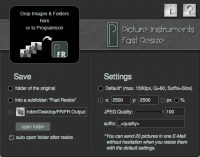
Fast Resize is a dedicated utility designed to streamline the process of scaling images for rapid distribution. The software prioritizes efficiency, allowing users to process individual files or entire directories through a drag-and-drop interface. Users can drop content directly onto the application icon or into the active program window to initiate the transformation.
The tool’s default configuration is optimized for email compatibility, resizing images so that approximately 20 files typically fit within standard attachment limits. Beyond these presets, Fast Resize provides manual controls for specific requirements. Users can define output dimensions using fixed pixel counts or percentages and adjust JPEG compression quality on a scale from 0 to 100%.
Key functional features include:
- Flexible Output Locations: Users can save processed files to the source directory, a dedicated "Fast Resize" subfolder, or a custom user-defined path.
- Custom Naming Conventions: The software supports individual file extensions and dynamic attributes. For example, using the long attribute appends the pixel length of the image's longest edge to the filename.
- Automated Workflow: The destination folder can be configured to open automatically upon completion, ensuring immediate access to the resized files.
Fast Resize bypasses complex menu structures to deliver processed images ready for use in email clients or web uploads, emphasizing speed and batch processing capabilities.
Top 5 Reasons To Download Fast Resize
- Unrivaled Workflow Speed through Drag-and-Drop Integration
- Seamless Automation for Instant Email Readiness
- Granular Control Over Compression and Image Quality
- Advanced Dynamic File Naming and Metadata Attributes
- Flexible Folder Management for a Clutter-Free Workspace
In the world of digital photography and content creation, we often find ourselves bogged down by the sheer size of modern image files. Whether you are shooting on a high-end DSLR or the latest flagship smartphone, a single photograph can easily take up ten to twenty megabytes of space. While that high resolution is great for printing posters or deep-crop editing, it is a nightmare for quick sharing, web uploads, or email attachments. Most of us reach for heavy-duty tools like Photoshop or GIMP to handle these tasks, but let’s be honest: waiting for a massive creative suite to load just to resize a few vacation photos is like driving a semi-truck to the grocery store to buy a loaf of bread. It is overkill, it is slow, and it is inefficient.
This is where Fast Resize enters the frame. As a tech reviewer who has tested dozens of image utilities, I can tell you that the best tools are often the ones that do exactly one thing and do it better than anyone else. Fast Resize is designed for the user who values their time. It strips away the bloat and focuses entirely on the velocity of the resizing process. If you have been looking for a way to streamline your digital workflow, this is the utility you need to grab right now. Here is a deep dive into why this software is a game-changer for anyone who handles images on a daily basis.
1. Unrivaled Workflow Speed through Drag-and-Drop Integration
The primary reason you need to download Fast Resize is the sheer speed of its user interface. Most software requires you to open the program, click "File," then "Open," navigate through a labyrinth of folders, select your images, and then finally begin the process. Fast Resize respects your time by eliminating those unnecessary steps. The software is built around a "Zero-Click" philosophy. You don't even need to have the program window active to start working.
You can simply highlight a handful of images or even an entire folder on your desktop and drag them directly onto the Fast Resize program icon. The software immediately kicks into gear, processing every file in the batch without requiring you to navigate a single internal menu. This makes it an essential tool for "on-the-fly" tasks. Imagine you are in the middle of a project and realize you need twenty thumbnails. With Fast Resize, you don't stop what you're doing; you just drag, drop, and keep moving. For those who prefer a more traditional workspace, you can also drag images directly into the active window of the open program. This level of flexibility ensures that the tool adapts to your style of working, rather than forcing you to adapt to its interface.
2. Seamless Automation for Instant Email Readiness
We have all been there: you try to send a dozen photos to a family member or a client, and your email provider hits you with the dreaded "Attachment size too large" error. You then have to go back, resize the images one by one, and try again. Fast Resize was built specifically to solve this headache. The software’s default settings are tuned for the "sweet spot" of email sharing. When you use the default scaling, the program optimizes your images so that you can typically fit up to 20 images into a single email while staying within the attachment limits of most major service providers.
But the automation doesn't stop at the resizing itself. One of the most brilliant features of this giveaway is that Fast Resize can be set to automatically open the destination folder as soon as the scaling is complete. This sounds like a small detail, but in practice, it is a massive productivity boost. You drag your original high-res photos onto the icon, the program does its work in the background, and a second later, a window pops up with your perfectly sized images ready to be grabbed. From there, you can immediately drag them into your email client. This creates a friction-less bridge between your storage and your communication, making the "save-as-and-search" routine a thing of the past.
3. Granular Control Over Compression and Image Quality
While Fast Resize excels at quick, automated tasks, it doesn't sacrifice professional-level control. A common complaint with simple "quick-fix" apps is that they often use a "one-size-fits-all" approach to quality, which can result in images that are either still too large or look like they were taken with a potato. Fast Resize gives the power back to the user. Within the software, you can manually set your scaling options to meet specific requirements.
You have the choice to scale by fixed pixels (essential for web developers who need specific widths) or by percentage of the original size (perfect for quick reductions). Even more impressive is the manual JPEG compression slider. You can set the quality anywhere from 0% to 100%. If you need an image that is "web-light" for a blog post, you can dial the compression down to find that perfect balance between file size and visual clarity. If you are preparing a digital preview for a client and want to maintain every bit of color accuracy, you can crank it to 100%. This level of customization ensures that you are never sacrificing quality for the sake of speed.
4. Advanced Dynamic File Naming and Metadata Attributes
Organization is the bane of many digital creators. When you resize a bunch of images, you often end up with a folder full of files named "Image01," "Image01_copy," and "Image01_resized," which becomes a nightmare to sort through later. Fast Resize solves this with an incredibly clever dynamic naming system. The software allows you to add individual file name extensions to each scaled image automatically. But it goes much further than just adding "small" to the end of a filename.
You can use attributes in angle brackets to pull metadata directly from the image and insert it into the filename. For example, using the tag for the long edge of the image allows the software to rename your files based on their actual dimensions. If you have an image that is 1000x1500 pixels and you apply a specific extension string, Fast Resize can automatically rename it to include those dimensions. This is an absolute lifesaver for photographers who need to keep track of different versions of their work for different platforms. Instead of checking the "Properties" or "Get Info" tab for every single file, the information you need is right there in the filename, generated automatically during the resizing process.
5. Flexible Folder Management for a Clutter-Free Workspace
Nothing ruins a productive afternoon faster than a messy desktop. Many image resizers simply dump the new files into the same folder as the originals, leading to a confusing mix of high-res and low-res files. Fast Resize gives you three distinct ways to handle your output, ensuring your workspace stays exactly as you want it. You can choose to save scaled images back to the original folder, which is fine for quick one-off tasks. However, the real power lies in the other two options.
You can choose to have the program automatically create a subfolder named "Fast Resize" within your original folder. This keeps your project organized by segregating the resized versions from your master files. Alternatively, for those with complex workflows, you can assign an individual folder of your choice as the universal destination. This is perfect for those who want all their "ready-to-share" images to land in a specific Dropbox or OneDrive folder for instant syncing. Furthermore, if you choose not to have the folder open automatically after every task, the program keeps a shortcut within its interface so you can jump to your resized images at a later time without having to go hunting through your file explorer. It is a thoughtful, user-centric approach to file management that professional users will deeply appreciate.
The Final Verdict: Why You Need Fast Resize Today
We often think that to get "pro" results, we need "pro" software. But in the tech world, true "pro" status is often about efficiency. Fast Resize isn't trying to replace your photo editor; it is trying to replace the twenty minutes of tedious work you do every day resizing images for emails, blogs, and social media. By downloading this giveaway, you are essentially buying yourself time. You are removing the friction from your digital life and replacing it with a streamlined, automated process that works at the speed of your imagination.
Whether you are a casual user who just wants to send pictures of the grandkids without crashing your sister's inbox, or a power user who needs to batch-process hundreds of files with specific naming conventions, Fast Resize is the tool for the job. It is lightweight, it is incredibly fast, and it offers the perfect blend of automation and manual control. Do not let this giveaway pass you by. The moment you drag your first folder of images onto that icon and see the resized versions pop up instantly, you will wonder how you ever managed without it. Download Fast Resize now and take control of your digital workflow once and for all.
In conclusion, the modern digital landscape demands speed. We are sharing more images than ever before, and the barriers to that sharing—file size, naming conventions, and folder organization—should not slow us down. Fast Resize is the bridge between your high-quality captures and the rest of the world. It is a utility that understands the value of a single click and the importance of a well-organized file system. Embrace the speed, enjoy the automation, and download Fast Resize while you can.


Reviews for Fast Resize
Click Here to Read Reviews for Fast Resize >> Click Here to Submit Reviews for Fast Resize >>