What Does FotoJet Designer Do?
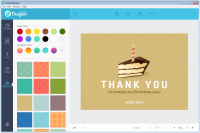
FotoJet Designer for Windows is a dedicated graphic design application designed to facilitate the creation of high-quality visual content. The software targets both entry-level users and experienced designers by providing a streamlined interface and a vast library of pre-built assets. It features over 900 templates and thousands of additional resources, including icons, shapes, and fonts, to assist in the assembly of professional layouts.
The application supports the creation of several distinct media types, including:
- Social media graphics for various platforms
- Custom posters and flyers
- Invitations and greeting cards
- Digital banners and headers
Users can manipulate their projects using a suite of powerful editing tools. These tools allow for precise control over text styling, image layering, and background adjustments. The software's primary functionality lies in its ability to condense complex design processes into a series of intuitive steps. Even without formal graphic design training, users can produce unique, polished results in a short timeframe.
FotoJet Designer focuses on efficiency, offering the necessary tools to transform basic ideas into sophisticated digital or print-ready files. By combining automated templates with manual editing capabilities, the platform serves as a versatile utility for rapid content production and professional branding tasks.
Top 5 Reasons To Download FotoJet Designer
1. Professional Grade Templates for Every Possible Scenario: With over 900 professionally designed templates, you can skip the "blank canvas syndrome" and start with a high-quality foundation for social media, business, or personal projects.
2. An Intuitive Interface That Levels the Playing Field: You do not need a degree in graphic design or years of experience with complex software; FotoJet Designer offers a drag-and-drop experience that makes professional design accessible to everyone.
3. A Massive Integrated Resource Library: Gain instant access to thousands of resources, including clipart, shapes, backgrounds, and fonts, eliminating the need to scour the internet for external assets.
4. Speed and Efficiency for High-Volume Content Creators: The software is optimized for rapid creation, allowing you to turn a simple idea into a polished flyer, banner, or social post in a matter of seconds rather than hours.
5. Dedicated Windows Performance and Stability: As a native Windows application, it offers a smoother, more reliable experience than browser-based alternatives, providing better resource management and a more focused workspace.
The Professional Edge Without the Professional Struggle
Let’s be honest for a second: the world of graphic design can be incredibly intimidating. We have all been there—staring at a blank white screen in a high-end, expensive design suite, feeling the weight of a dozen different menus and hundreds of tiny icons that look like they require a PhD to understand. For the average user, the small business owner, the student, or the social media enthusiast, those high-end tools are often more of a barrier than a bridge to creativity. This is precisely why FotoJet Designer for Windows is such a breath of fresh air, and why this giveaway is something you absolutely cannot afford to pass up.
As a tech reviewer, I see hundreds of apps every year claiming to "simplify" complex tasks. Most of the time, "simplify" is just code for "stripping away features until the app is useless." But every once in a while, a piece of software gets the balance exactly right. FotoJet Designer is one of those rare gems. It manages to pack the punch of a professional design studio into a package that is so intuitive, you’ll feel like an expert within the first five minutes of opening it. It’s about empowering the user to create real designs that look like they were commissioned from a high-priced agency.
Whether you are looking to revamp your brand's presence, create stunning invitations for a personal event, or just make your social media feed look a bit more polished, this software is the tool you've been waiting for. In the following sections, I am going to break down exactly why FotoJet Designer deserves a permanent spot on your Windows desktop.
Reason 1: Professional Grade Templates for Every Possible Scenario
The biggest hurdle in any creative project is the beginning. That "blank page" is the enemy of productivity. FotoJet Designer solves this problem immediately by providing over 900 professional templates. Now, I’ve seen template libraries before, and many of them feel dated or generic. However, the library in FotoJet is modern, trendy, and incredibly diverse. We are talking about designs that look like they belong in 2024, not 2004.
The sheer variety here is staggering. Are you a small business owner trying to drum up some foot traffic? You have access to a wide range of posters and flyers that are ready to go. Just swap out the text, and you’re done. Are you an influencer or a digital marketer? The social media templates are specifically sized for Facebook, Instagram, Pinterest, and YouTube, ensuring your headers and posts look crisp and professional without you having to memorize pixel dimensions. Even for personal use—like birthday cards, wedding invitations, or thank-you notes—the quality of the templates is high enough that your friends and family will think you spent hours crafting them from scratch.
What makes these templates truly useful is that they aren't rigid. They are starting points. You can change the colors to match your brand, swap out the images, and rearrange the layout. It gives you a professional scaffolding upon which you can build your own unique vision. This saves you the most valuable resource you have: time.
Reason 2: An Intuitive Interface That Levels the Playing Field
In the tech world, we talk a lot about the "learning curve." Some software has a learning curve that looks like a vertical cliff. FotoJet Designer’s learning curve is more like a gentle, welcoming slope. This is the second reason why this download is a must-have. The developers have clearly spent a lot of time thinking about the user experience, moving away from cluttered sidebars and hidden menus toward a clean, drag-and-drop interface.
When you open the app, everything feels logical. If you want to move an object, you click and drag it. If you want to resize it, you grab the corner. If you want to add text, the button is right there, staring you in the face. This simplicity is its greatest strength. It democratizes design. It means that the person who has never touched a design app in their life can produce a flyer that looks just as good as something made by someone with years of experience.
But don't let the simplicity fool you. Beneath that easy-to-use exterior are powerful editing tools. You can manage layers just like you would in high-end software, allowing you to stack elements, adjust transparency, and create depth. You have control over font spacing, alignment, and color profiles. It provides the "Pro" feel without the "Pro" headache. For anyone who has ever felt "not creative enough" to design something, FotoJet Designer is the ultimate confidence booster.
Reason 3: A Massive Integrated Resource Library
One of the most annoying parts of design work is the "asset hunt." You find a great template, but you need a specific icon of a lightbulb, or a particular background texture, or a specific style of flourish. Usually, this involves closing your app, going to a search engine, navigating sketchy stock photo sites, downloading a file, and then importing it. It breaks your flow and wastes your time.
FotoJet Designer eliminates this friction by including a massive resource library directly within the software. We are talking about thousands of resources at your fingertips. There are thousands of clipart images covering every category imaginable. There are hundreds of shapes and lines to help structure your design. There is a vast collection of backgrounds ranging from minimalist gradients to complex patterns.
Perhaps most importantly, the font selection is excellent. Typography is often what separates a "homemade" looking design from a "professional" one. FotoJet provides a wide array of high-quality fonts that can transform a simple message into a powerful visual statement. Having all of these assets inside the app means you can experiment rapidly. You can try five different icons in the span of thirty seconds to see which one "pops." This encourages creativity through experimentation, which is how the best designs are born.
Reason 4: Speed and Efficiency for High-Volume Content Creators
We live in a fast-paced digital economy. If you are a content creator, a social media manager, or a business owner, you don't have three days to spend on a single Instagram post or a promotional banner. You need to be able to react to trends, announce sales, and share updates now. This leads us to the fourth reason to download this software: its incredible efficiency.
Because the templates are so well-constructed and the interface is so snappy, you can go from "concept" to "exported file" in a matter of minutes. FotoJet Designer is built for speed. The tools are responsive, the rendering is fast, and the export options are straightforward. You can quickly save your work in various formats (like JPG or PNG) at the quality level you need.
I’ve used many design tools where the software itself seems to get in the way—lagging when you move a heavy image or taking forever to load a font list. FotoJet Designer for Windows feels optimized. It handles your assets gracefully, allowing you to focus on the creative side of things rather than the technical side. For anyone who needs to produce a high volume of quality visual content, this efficiency isn't just a "nice to have"—it's an essential part of your workflow.
Reason 5: Dedicated Windows Performance and Stability
While web-based design tools have become popular recently, there is still something to be said for a dedicated desktop application. This is the final, and perhaps most underrated, reason to jump on this giveaway. FotoJet Designer for Windows offers a level of stability and performance that browser-based tools often struggle to match.
When you are working in a browser, you are at the mercy of your internet connection, your browser's memory usage, and the dozens of other tabs you probably have open. A dedicated Windows app like FotoJet Designer operates in its own environment. It can more effectively utilize your PC's hardware, leading to a smoother experience with less lag. You don't have to worry about a browser crash wiping out your unsaved work, or a slow internet connection making the interface feel sluggish.
Furthermore, having a dedicated app on your taskbar creates a more focused workspace. When you open FotoJet Designer, you are in "design mode." There are no browser notifications or distracting bookmarks to pull you away from your task. It’s a professional tool for a professional environment. Plus, managing your files locally on your hard drive is often much faster and more secure than relying on cloud-only storage. This software gives you the best of both worlds: the modern features of a top-tier design suite with the reliability of a native Windows application.
Final Thoughts: Why You Should Click Download Now
In the tech world, "giveaways" are often a mixed bag. Sometimes you get a "lite" version of a tool that constantly pokes you to upgrade. But FotoJet Designer for Windows is a comprehensive, powerful, and genuinely useful piece of software that can change the way you approach visual communication. It bridges the gap between the amateur and the professional, providing the tools, the assets, and the templates needed to create stunning visuals without the traditional overhead of expensive software or specialized training.
Think about the projects you have coming up. Do you need a new banner for your YouTube channel? A flyer for a local charity event? A professional-looking resume? Or perhaps just some eye-catching graphics for your small business's Facebook page? Whatever the task, FotoJet Designer is equipped to handle it with style and speed. It is the ultimate "no-excuses" design tool. You no longer have to settle for mediocre graphics because you don't have the time or the skills to use "the big name" software.
The value proposition here is undeniable. You are getting a massive library of templates, thousands of built-in assets, a refined and user-friendly interface, and the stable performance of a native Windows app—all in one package. It is rare to find a tool that is this accessible yet this capable. If you have any interest in creating visual content, whether for work or for play, this is a download you will use again and again. Don't let this opportunity pass you by; download FotoJet Designer and start creating like a pro today. You will be amazed at what you can create when you have the right tools in your hands.
In summary, FotoJet Designer for Windows is more than just a simple graphics app; it is a full-featured design workstation that respects your time and empowers your creativity. Between the massive template library and the streamlined workflow, it’s a must-have for any Windows user looking to elevate their visual game. Get it now and see the difference for yourself!


Reviews for FotoJet Designer
Click Here to Read Reviews for FotoJet Designer >> Click Here to Submit Reviews for FotoJet Designer >>