What Does Geekersoft Video Saver Do?
Geekersoft’s Video Saver is a specialized utility designed for retrieving and converting online video content. The software focuses on efficiency, featuring a lightweight installation process and multi-threaded downloading capabilities to maximize transfer speeds on desktop systems.
The primary function of Video Saver is to capture media from various websites, including high-definition YouTube streams. Users can download content in resolutions ranging from standard definitions up to 4K. Integrated transcoding tools allow for the immediate conversion of these files into several formats, such as MP4 for video playback or MP3 for audio extraction, depending on the user's specific requirements.
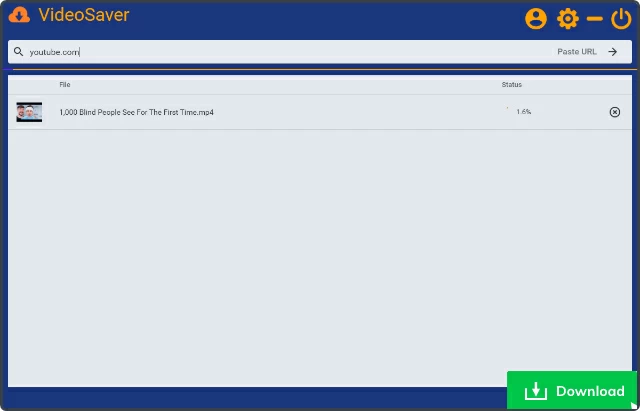
The application is built with a minimalist interface intended for ease of use, incorporating smart functions to streamline the downloading workflow. Regarding system security, the developer specifies that the software is free of bundled malware, providing a clean installation environment. Its versatility and speed make it a practical solution for users looking to archive web-based media for offline viewing without navigating complex configurations.
- Fast Performance: Utilizes multi-threaded technology for rapid downloads and quick startup.
- High-Quality Output: Supports 4K and HD video resolutions for high-fidelity backups.
- Format Conversion: Directly transforms web videos into MP4 and MP3 files.
- Broad Support: Compatible with a wide range of mainstream video hosting platforms.
- Secure Installation: Compact software footprint verified to be free of bundled malware.
Top 5 Reasons To Download Geekersoft Video Saver
In the digital age, video content is the king of media. Whether you are a student looking to save educational tutorials, a traveler needing entertainment for a long flight, or a content creator seeking inspiration, having a reliable tool to grab online video is essential. Enter Video Saver by Geekersoft. This isn't just another utility; it is a streamlined powerhouse designed to make video acquisition effortless. If you have been looking for a reason to upgrade your digital toolkit, this giveaway is your perfect opportunity. Here are the top five reasons why you need to download Video Saver right now.
- Blazing Fast Multi-Threaded Downloading: Experience peak efficiency with technology that splits files to maximize your bandwidth.
- True 4K and High-Definition Support: Don't settle for grainy footage; download your favorite content in stunning ultra-high-definition.
- Clean, Secure, and Lightweight Architecture: A compact software footprint that is guaranteed to be free of malware and bundled bloatware.
- Versatile Transcoding and Format Conversion: Seamlessly convert YouTube videos into MP4, MP3, and various other formats to suit any device.
- Broad Platform Compatibility and Smart Interface: An intuitive user experience that works across a wide range of mainstream video websites beyond just YouTube.
Now that you have seen the highlights, let’s dive deep into why Video Saver stands out in a crowded market and why this giveaway is a must-grab for any serious tech enthusiast.
1. Blazing Fast Multi-Threaded Downloading
We have all been there: you find a video you absolutely need, you click download on some generic browser extension, and then you sit... and wait. In the world of modern software, speed is not just a luxury; it is a requirement. Video Saver, developed by the experts at Geekersoft, understands this better than anyone. The software is built on a multi-threaded downloading engine. But what does that actually mean for the average user?
Think of a standard download as a single lane of traffic. No matter how fast your car is, you are limited by that one lane. Multi-threading turns that single lane into a ten-lane superhighway. Video Saver breaks the video file into smaller "chunks" and downloads them simultaneously. Once the pieces are on your computer, it seamlessly stitches them back together. This results in download speeds that are significantly faster than traditional methods, allowing you to grab entire playlists in the time it used to take to download a single clip.
Furthermore, the startup and installation of Video Saver are incredibly rapid. Some video suites take minutes to load, hogging system resources and slowing down your entire PC. Video Saver is optimized for "instant-on" performance. You can go from clicking the app icon to starting a download in mere seconds. For power users who value their time, this efficiency is the primary reason why this software belongs on your desktop.
2. True 4K and High-Definition Support
We are living in the era of Retina displays, OLED monitors, and 4K television sets. Watching a 480p or 720p video on a high-end screen is a disappointing experience. Many free online downloaders cap your resolution to save on their own server costs, leaving you with blurry, pixelated files. Video Saver removes these artificial barriers.
One of the most compelling features of this tool is its ability to download YouTube videos in 4K and Full HD. When you paste a link into Video Saver, it analyzes the source and offers you the highest possible quality available. If the original creator uploaded the video in 4K, Video Saver ensures you get every single pixel of that resolution. This is vital for archival purposes. If you are saving a concert, a nature documentary, or a technical walkthrough, you want to see every detail clearly.
The software’s ability to maintain high bitrates during the download process means that the color accuracy and motion smoothness of the original video are preserved. This makes it an ideal choice for users who want to build a high-quality offline media library. Whether you are viewing the content on a 15-inch laptop or a 65-inch home theater screen, Video Saver ensures the visual integrity remains top-notch.
3. Clean, Secure, and Lightweight Architecture
The "free software" world is often a minefield. Far too many video downloaders come "bundled" with unwanted toolbars, tracking cookies, or worse—actual malware. As a tech reviewer, the first thing I look for is the integrity of the installer. Geekersoft has done a phenomenal job ensuring that Video Saver is a clean and secure utility.
When you download this giveaway, you are getting the software and nothing else. There is no hidden "Special Offers" checkbox that installs a different browser or a system cleaner you didn't ask for. This "peace of mind" factor cannot be overstated. In an age where digital privacy and system security are under constant threat, using a tool that respects your system’s boundaries is refreshing.
Additionally, Video Saver is remarkably compact. It does not require gigabytes of space or massive amounts of RAM to operate. It is a focused, "point-and-shoot" style application. It sits quietly on your drive, taking up minimal space, and stays out of the way when you aren't using it. For users with older laptops or those who simply like to keep their operating systems lean and mean, Video Saver is the gold standard for lightweight utility design.
4. Versatile Transcoding and Format Conversion
Downloading a video is only half the battle; sometimes, you need that video in a specific format for a specific device. Maybe you want the video to play on a legacy media player, or perhaps you only want the audio so you can listen to a lecture while you are at the gym. Video Saver features built-in smart transcoding functions that eliminate the need for secondary conversion software.
While YouTube primarily uses formats like WebM or MP4, Video Saver allows you to dictate the output. You can convert YouTube videos directly to MP4, MP3, and other formats according to your specific needs. The MP3 extraction feature is particularly impressive. It doesn't just record the audio; it extracts the high-quality stream directly from the video source, ensuring that your music or podcasts sound crisp and professional.
The transcoding process is integrated into the download workflow. You don't have to download a file and then start a separate conversion process. You simply select your desired format and quality level at the start, and Video Saver handles the rest in the background. This "all-in-one" approach saves you from the headache of managing multiple apps and ensures that your files are ready for your iPhone, Android, tablet, or car audio system the moment the download finishes.
5. Broad Platform Compatibility and Smart Interface
While many people focus solely on YouTube, the internet is vast. There are incredible video resources on various social media platforms, educational sites, and news outlets. A truly useful video downloader must be versatile. Video Saver supports a wide range of video content websites, making it a universal tool for the modern web. Whether you are pulling a clip from a mainstream social site or a specialized video hosting platform, Video Saver’s "smart" detection engine identifies the media and prepares it for capture.
This versatility is matched by a simple and easy-to-use interface. Some tech tools look like the cockpit of a fighter jet—overwhelming, cluttered, and confusing. Video Saver takes the opposite approach. The interface is clean, modern, and intuitive. Even if you are not a "tech person," you will find the process straightforward:
- Copy the URL of the video you want.
- Paste it into the Video Saver interface.
- Select your quality and format preferences.
- Click download and watch the progress bar fly.
The "smart functions" of the software also include automatic link detection and batch processing capabilities. If you have a list of videos you need to download, you don't have to wait for one to finish before starting the next. You can queue them up and let the software work its magic. This combination of powerful back-end technology and a user-friendly front-end makes Video Saver a rare find in the utility space.
Why You Should Not Miss This Giveaway
Software giveaways of this caliber don't happen every day. Often, giveaways are for outdated versions of apps or tools that are about to be discontinued. That is not the case here. You are getting access to a practical, high-performance tool that addresses a real need in our daily digital lives. Video Saver by Geekersoft is a polished product that has been refined to provide the best possible user experience.
Imagine never having to deal with a buffering video again. Imagine being able to watch your favorite creators while you are in a "dead zone" for internet or on an airplane. Imagine having the ability to turn a video-heavy tutorial into a portable MP3 that you can listen to while commuting. All of these possibilities are unlocked once you have Video Saver installed on your machine.
The tech reviewer’s verdict? Video Saver is a "no-brainer" download. It hits all the right notes: it’s fast, it’s high-quality, it’s secure, it’s versatile, and it’s incredibly easy to use. In a market flooded with bloated, ad-ridden alternatives, Geekersoft has delivered a streamlined experience that does exactly what it says on the tin—and it does it better than the competition.
Conclusion: If you value high-quality video, if you want to save time with multi-threaded downloads, and if you care about keeping your computer clean from junk software, then this Video Saver giveaway is exactly what you’ve been looking for. Don’t wait until the offer expires; download it now and take control of your online video library. You will wonder how you ever managed without it.
By choosing Video Saver, you are choosing a tool that empowers your digital lifestyle. Whether it's for 4K movies or MP3 music extraction, the power of the web is now truly in your hands. Get the software, enjoy the speed, and start building your ultimate offline collection today.

Reviews for Geekersoft Video Saver
Click Here to Read Reviews for Geekersoft Video Saver >> Click Here to Submit Reviews for Geekersoft Video Saver >>