What Does Glary Malware Hunter Pro Do?
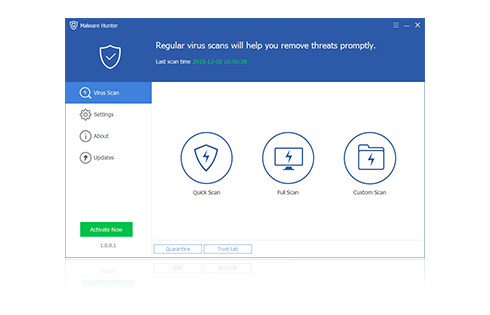
Malware Hunter is a security application designed to provide comprehensive protection against various digital threats, including viruses and persistent malware. The software focuses on three primary areas: system scanning, real-time updates, and process protection. It is engineered to secure user data and maintain PC privacy through a specialized detection engine.
The utility utilizes a Hyper scan technology, which is optimized to increase scanning speeds while maintaining high detection rates. This allows users to identify and remove stubborn malware and potential dangers that may compromise the operating system. To ensure the defense remains effective against emerging vulnerabilities, the tool includes an automatic update feature. This provides real-time protection by keeping virus definitions current without requiring manual intervention from the user.
In addition to standard file scanning, Malware Hunter offers specific process protection. This feature monitors active system processes to ensure the computer operates safely and prevents malicious scripts from interfering with system stability. By combining these tools, the application aims to keep PCs virus-free and ensure the integrity of the operating environment.
Key technical components include:
- Hyper Scan: Fast detection and removal of deep-seated malware and potential threats.
- Automatic Updates: Continuous security patches to address evolving digital dangers.
- Process Protection: Targeted monitoring of active system operations to maintain computer safety.
Top 5 Reasons To Download Glary Malware Hunter Pro
Let’s be honest for a second. The digital world is currently behaving like the Wild West. Every single day, we hear about a new security breach, a sophisticated ransomware strain holding someone's precious family photos hostage, or stealthy spyware silently siphoning sensitive bank details in the background. If you are still relying on basic, built-in operating system defenses or, worse, a bloated, resource-hogging antivirus program that was designed in the last decade, your computer is essentially sitting on a ticking time bomb. You need a solution that is fast, smart, lightweight, and incredibly aggressive against modern digital threats.
That is where Glarysoft’s Malware Hunter comes into play. As a seasoned tech reviewer, I have run hundreds of security suites through their paces, and most of them leave me frustrated. They either slow your PC to a crawl, bombard you with endless annoying pop-ups, or fail to catch the most stubborn malware variants that hide deep within your system registry. Fortunately, there is a golden opportunity staring you right in the face today. We are talking about an exclusive giveaway of Malware Hunter, an award-winning security powerhouse that is built to keep your system pristine, secure, and running at peak performance. If you are on the fence about whether you should click that download button, let me make this decision incredibly easy for you.
Before we dive into the nitty-gritty details of how this software works, let’s look at the absolute best features it brings to the table. Here are the top five reasons why you need to download this giveaway immediately:
- Hyper Scan Technology for Lightning-Fast Detection
- Surgical Elimination of Deeply Rooted and Stubborn Malware
- Effortless Automatic Updates for Proactive, Real-Time Defense
- Active Process Protection to Block Live Exploits and Memory Attacks
- Award-Winning Performance That Preserves System Speed and Protects Privacy
Now that you have seen the quick breakdown, let’s dig deep into each of these points. I am going to explain exactly why these features make Malware Hunter an absolute must-have addition to your digital security toolkit.
1. Hyper Scan Technology for Lightning-Fast Detection
We have all been there. You click "Full System Scan" on a traditional antivirus program, and suddenly your computer freezes up. The fan starts spinning so loud it sounds like a jet engine taking off, and your CPU usage spikes to one hundred percent. Worst of all, the progress bar estimates that the scan will take three, four, or even five hours to complete. In today’s fast-paced world, nobody has time for that. If a security program forces you to stop working, gaming, or streaming just to perform a routine check, you are eventually going to disable it. And that is exactly when hackers strike.
Malware Hunter completely solves this frustrating bottleneck with its revolutionary Hyper Scan engine. The developers at Glarysoft recognized that standard scanning methods are wildly inefficient. Instead of mindlessly scanning every single inert text file and media clip on your hard drive, Hyper Scan uses highly advanced, intelligent algorithms to target the exact locations where malicious code loves to hide. It instantly analyzes your system memory, boot sectors, critical system registry entries, and active application directories.
The result of this optimized approach is a scanning speed that is genuinely jaw-dropping. What takes other software hours to complete is accomplished by Malware Hunter in a matter of minutes. You get a comprehensive, deep-diving assessment of your system's health without experiencing any noticeable slowdown in your day-to-day computer usage. Whether you are running a quick scan before joining an online multiplayer match or conducting a routine check during your lunch break, Hyper Scan ensures your system remains clean without ever getting in your way.
2. Surgical Elimination of Deeply Rooted and Stubborn Malware
Not all malware is created equal. Some basic viruses are easy to detect and delete, but modern cyber threats are incredibly cunning. Today’s hackers write highly sophisticated, stubborn malware strains, including rootkits, trojans, and persistent adware, that are specifically designed to evade detection. These malicious programs will often disguise themselves as legitimate system files, bury themselves deep within the Windows Registry, or create hidden backup copies of themselves so that if your antivirus deletes one file, the malware simply resurrects itself upon your next system reboot.
This is where Malware Hunter acts as a true specialist. It does not just scratch the surface of your file system; it acts as a digital bloodhound. The software is equipped with specialized detection routines that are engineered to unmask even the most heavily obfuscated code. It analyzes file behaviors, looking for anomalies that indicate a file is attempting to mask its true identity or hijack system resources.
When Malware Hunter detects these stubborn threats, it does not just put a temporary band-aid on the issue. It performs a complete, multi-point eradication process. It halts the malicious processes, cleans up the modified registry keys, deletes the core executable files, and sweeps away any secondary files designed to trigger a re-infection. If you have a PC that has been acting strangely, showing random pop-ups, or running sluggishly despite having other security tools installed, downloading this giveaway will allow you to clean out those deeply entrenched threats that other programs consistently miss.
3. Effortless Automatic Updates for Proactive, Real-Time Defense
A security program is only as good as its threat library. Cybercriminals are constantly mutating their code, releasing thousands of new malware variants, zero-day exploits, and ransomware strains every single day. If your security software relies on threat definitions that are even a few days old, you are essentially leaving your front door unlocked. Relying on manual updates is a recipe for disaster because, let’s be honest, you are going to forget to check for updates regularly.
Malware Hunter takes this burden entirely off your shoulders with its seamless Automatic Updates system. The software works silently in the background, constantly communicating with Glarysoft’s secure servers to download the latest threat definitions and engine optimizations. This happens automatically, requiring absolutely zero intervention or clicks from your end. You do not have to worry about looking through settings menus or scheduling updates during the middle of the night.
Because your threat database is always kept up to date in real time, Malware Hunter is constantly prepared to defend against the newest, most cutting-edge dangers lurking on the web. The moment a new threat is identified and cataloged by security researchers anywhere in the world, your system is immediately immunized against it. This proactive defense model ensures that your personal documents, financial information, and private data remain secure against both established threats and emerging zero-day attacks.
4. Active Process Protection to Block Live Exploits and Memory Attacks
Many traditional security tools act like a cleanup crew; they wait for a virus to download to your hard drive, and then they try to find it and clean it up. But in the modern threat landscape, that is a highly risky strategy. Some of the most dangerous modern cyberattacks do not even write files directly to your hard drive. Instead, they utilize "fileless" malware techniques or memory injection attacks to hijack active, legitimate processes that are already running on your PC, such as your web browser or system utilities.
To combat this sophisticated vector of attack, Malware Hunter features dedicated, real-time Process Protection. This feature acts as an elite, active bodyguard for your computer’s operating system. It constantly monitors all running processes in your system memory. If an untrusted application attempts to inject malicious code into a running system process, or if a process exhibits suspicious behavior (such as trying to silently modify your system files or encrypt your data), Malware Hunter steps in instantly.
It immediately flags the anomalous behavior, quarantines the offending process, and neutralizes the threat before it can execute its payload. This live, active intervention is critical for stopping ransomware in its tracks before it has the chance to encrypt a single one of your files. By ensuring the safe, unhijacked operation of your computer’s active memory, Process Protection provides an indispensable layer of security that keeps you safe while you are actively browsing, downloading, or running applications.
5. Award-Winning Performance That Preserves System Speed and Protects Privacy
One of the biggest complaints users have about modern security software is the loss of privacy and system performance. Many big-brand security suites have evolved into bloated platforms that track your web browsing habits to sell to advertisers, install unwanted toolbars, and consume massive amounts of RAM and CPU resources. It often feels like the security software itself is behaving like adware.
Malware Hunter is a breath of fresh air. Developed by Glarysoft, an award-winning company with a legendary reputation for creating high-quality PC optimization tools, this utility is built with efficiency in its DNA. It is incredibly lightweight and optimized to run seamlessly alongside your existing operating system without hogging system resources. It respects your privacy, focusing solely on securing your data and ensuring your PC remains completely virus-free, without any of the shady telemetry or data-tracking practices found in other products.
Furthermore, Malware Hunter is designed to secure your digital privacy by scanning for and eliminating tracking cookies, spyware, and keyloggers that attempt to monitor your keystrokes or steal your login credentials. By combining world-class malware detection with a lightweight footprint and a steadfast commitment to user privacy, it delivers an award-winning user experience that keeps your computer running just as fast as the day you bought it.
Conclusion: Why You Cannot Afford to Miss This Giveaway
In the tech world, truly valuable software giveaways do not come around very often. Most of the time, free security offers are stripped-down "trial" versions that tease you with features only to demand your credit card information a few days later. This Malware Hunter giveaway is a major exception to that rule. You are getting access to a premium, award-winning security tool that delivers blazing-fast Hyper Scans, deep stubborn malware removal, hands-free automatic updates, active process protection, and privacy-first performance.
Your digital security is not something you should leave to chance or postpone for another day. It only takes one wrong click, one compromised website, or one malicious email attachment to ruin your computer, steal your identity, or lock away your valuable files forever. With Malware Hunter, you get a powerful, silent, and incredibly effective shield that protects your PC around the clock.
Do not wait until you are already dealing with a sluggish, virus-infected computer to take action. Treat your PC to the premium protection it deserves. Download this Malware Hunter giveaway today, run your first Hyper Scan, and experience the peace of mind that comes with knowing your system is backed by world-class, award-winning security technology. Your computer will thank you for it!

Reviews for Glary Malware Hunter Pro
Click Here to Read Reviews for Glary Malware Hunter Pro >> Click Here to Submit Reviews for Glary Malware Hunter Pro >>