What Does Hasleo Disk Clone Professional Do?
Hasleo Disk Clone is a comprehensive cloning utility designed for Windows systems ranging from Vista to Windows 11 and Windows Server 2008 through 2025. The software provides tools for operating system migration, full disk cloning, and individual partition transfers. It allows users to migrate an active OS to an SSD or HDD—regardless of whether the target drive is smaller or larger—without the need to reinstall drivers or applications.
The application supports several advanced cloning methods, including:
- Full Disk and Partition Cloning: Create exact copies of disks for backup or move specific partitions without data loss.
- MBR and GPT Conversion: Convert between disk styles during the migration process.
- Sector-by-Sector Copying: Generate an identical bit-level replica of the source drive.
- Delta Clone Technology: Utilize intelligent sector copying to increase transfer speeds and efficiency.
For professional-grade control, the software includes multiple disk alignment modes and allows for the manual adjustment of partition layouts on the target disk. Users can also create a bootable WinPE emergency disk to perform migrations outside the main operating environment. The utility features native support for X86, X64, and ARM64 architectures, ensuring compatibility across various modern hardware configurations.
Top 5 Reasons To Download Hasleo Disk Clone Professional
- Seamless OS Migration Without Reinstallation: Move your entire Windows environment, including apps and drivers, to a new drive without the headache of a fresh install.
- High-Speed Performance with Delta Clone Technology: Experience significantly faster cloning speeds thanks to intelligent sector copying and advanced Delta technologies.
- Effortless MBR to GPT Conversion: Modernize your system by converting disk styles during the cloning process, ensuring compatibility with the latest UEFI hardware.
- Comprehensive Partition and Disk Control: Enjoy total flexibility to resize, move, and adjust partition layouts even when moving to smaller or larger drives.
- Professional-Grade WinPE Bootable Media: Create an emergency recovery environment to perform disk operations outside of the active Windows OS for maximum reliability.
If you have ever purchased a brand-new, lightning-fast SSD only to stare at it in the box because you are dreading the 12-hour process of reinstalling Windows, your apps, and your drivers, then this article is for you. We have all been there. The hardware upgrade is the easy part; the software migration is where the nightmare begins. However, every once in a while, a tool comes along that feels like a "cheat code" for PC maintenance. That tool is Hasleo Disk Clone. As a tech reviewer who has seen dozens of disk utilities, I can tell you that this giveaway is something you do not want to pass up. It is a professional-grade, all-in-one cloning suite that handles the heavy lifting of data migration with surgical precision.
Whether you are a casual user looking to speed up an old laptop or a system administrator managing a fleet of servers, the versatility of Hasleo Disk Clone is unmatched. It supports everything from Windows Vista to the upcoming Windows Server 2025, and it even includes native support for ARM64 architecture. This is not just a simple copy-paste tool; it is a sophisticated engine designed to ensure your data arrives at its destination safely and efficiently. Let’s dive deep into the top five reasons why you need to grab this giveaway right now.
1. Seamless OS Migration Without Reinstallation
The single most compelling reason to use Hasleo Disk Clone is the ability to migrate your operating system. For most people, "reinstalling Windows" is a phrase that induces immediate stress. It is not just the OS itself; it is the hours spent hunting down license keys for your office software, re-downloading massive game libraries, configuring your desktop shortcuts, and ensuring that every single driver for your printer or specialized hardware is working correctly. It is a weekend-ruining task.
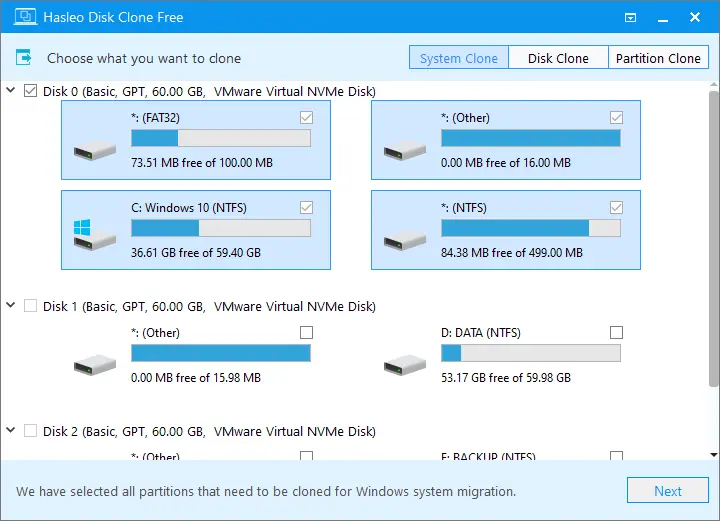
Hasleo Disk Clone eliminates this entire process. By using the System Clone feature, the software takes a perfect snapshot of your current Windows environment—including the hidden boot partitions that make the system start up—and moves it to your new drive. You can migrate from an old, mechanical Hard Disk Drive (HDD) to a high-performance Solid State Drive (SSD) or even a cutting-edge NVMe drive. The beauty of this tool is that it handles the transition between different hardware types seamlessly. Once the clone is finished, you simply swap the drives, and your computer boots up exactly as you left it, just much faster. It is the ultimate "set it and forget it" solution for hardware upgrades.
Why this matters for you: It saves you an entire day of manual labor. Your browser tabs will be where you left them, your wallpaper will be the same, and all your professional software will remain activated and ready to go. It is the most efficient way to upgrade your hardware without losing your digital life.
2. High-Speed Performance with Delta Clone Technology
Speed is often the biggest bottleneck when dealing with disk cloning. Traditional cloning software often reads every single bit of data on a drive, which can take hours if you are dealing with terabytes of information. Hasleo Disk Clone changes the game with its "Intelligent Sector Copy" and "Delta Clone" technology. Instead of blindly copying every empty space on your disk, the software identifies which sectors actually contain data and focuses its energy there. This drastically reduces the time required for the initial clone.
The Delta Clone technology is particularly impressive. This feature is designed to identify the differences between the source and the target disks, only copying the blocks of data that have changed. This is a massive advantage for users who use cloning as a backup strategy. If you clone your drive once a week, the subsequent clones will be finished in a fraction of the time because the software isn't starting from scratch; it’s just updating the changes. In my testing, this makes Hasleo one of the fastest cloning utilities on the market, rivaling expensive enterprise-level software.
The Professional Edge: Time is money. Whether you are a technician servicing multiple PCs or a home user who doesn't want to leave their computer running all night, the speed enhancements provided by Delta technology are a major quality-of-life improvement. You get reliability without the long wait times.
3. Effortless MBR to GPT Conversion
As we move further into the era of Windows 11, the technical requirements for hardware have become more stringent. One of the biggest hurdles for users upgrading older machines is the transition from the old MBR (Master Boot Record) partition style to the modern GPT (GUID Partition Table) style. GPT is required for UEFI booting and is necessary if you want to use hard drives larger than 2TB. In the past, converting a drive from MBR to GPT often required wiping the drive and starting over, or using risky command-line tools that could lead to data loss.
Hasleo Disk Clone solves this problem by allowing you to convert the disk style during the cloning process. This is a "superpower" for anyone dealing with older hardware. You can take an old Windows installation running on an MBR disk and clone it onto a brand-new GPT disk. The software handles the conversion of the partition table and ensures the bootloader is correctly configured for the new style. This feature alone makes the giveaway worth it, as it future-proofs your system and allows you to take full advantage of modern hardware features like Secure Boot and massive storage capacities.
Technical Flexibility: Most cloning tools are rigid—they require the target disk to be the same format as the source. Hasleo gives you the freedom to evolve your system architecture while you migrate, bridging the gap between legacy hardware and modern standards.
4. Comprehensive Partition and Disk Control
One of the most common issues people face when cloning a disk is a size mismatch. What happens if you are moving from a 1TB HDD to a 500GB SSD? Or what if you are moving to a massive 4TB drive and you don't want your partitions to stay the same size? Many basic cloning tools fail in these scenarios, either refusing to clone to a smaller drive or leaving the extra space on a larger drive as "unallocated" and unusable.
Hasleo Disk Clone provides "Full Control" over the partition layout. During the cloning setup, you can manually adjust the size of the partitions on the target disk. If you are moving to a smaller drive, the software will intelligently shrink the partitions to fit, provided your data doesn't exceed the new drive's capacity. If you are moving to a larger drive, you can expand your C: drive on the fly so that you can immediately use all that new space. This level of granularity is usually reserved for dedicated partition management software, but Hasleo includes it right in the cloning wizard.
User Experience: You don't need to be a disk geometry expert to use this. The interface is intuitive, allowing you to drag and resize partitions visually. It removes the "math" from the cloning process, ensuring that your new drive is perfectly optimized the moment the process finishes.
5. Professional-Grade WinPE Bootable Media
Finally, we have to talk about the "Safety Net." Cloning a disk while the operating system is currently running (often called "Hot Cloning") is convenient, but it can sometimes be interrupted by system processes or locked files. For the most reliable, bit-perfect clone possible, it is always better to perform the operation outside of the Windows environment. Hasleo Disk Clone includes a built-in tool to create a WinPE (Windows Preinstallation Environment) emergency disk.
By creating a bootable USB drive or CD/DVD using Hasleo, you can boot your computer into a lightweight, dedicated recovery environment. From here, you can perform system migrations, disk clones, or partition copies without any interference from the main OS. This is also a lifesaver if your Windows installation becomes corrupted and won't boot at all. You can use the WinPE disk to clone your data off the failing drive before it dies completely. Having a bootable WinPE disk in your drawer is like having a fire extinguisher for your data—you hope you never need it, but you'll be incredibly glad you have it when things go wrong.
Reliability and Support: The software even supports Windows X86, X64, and ARM64 within the WinPE environment, meaning you can create a rescue tool that works for virtually any Windows machine in existence, from a high-end gaming rig to a portable Surface Pro.
Conclusion: Why You Should Download This Now
In the world of tech utilities, there is a lot of "bloatware" that promises the world but delivers very little. Hasleo Disk Clone is the exception. It is a lean, powerful, and highly focused tool that solves real-world problems. Whether you are looking to boost your PC's performance with an SSD upgrade, backing up your entire system for peace of mind, or migrating complex server environments, this software provides the professional features you need in a user-friendly package.
The combination of Delta Clone technology for speed, the ability to convert MBR to GPT on the fly, and the security of a WinPE emergency disk makes this one of the most comprehensive disk management suites available. This giveaway is a rare opportunity to add a high-tier tool to your digital toolkit for free. Don't wait until your hard drive starts making clicking sounds or your system slows to a crawl. Download Hasleo Disk Clone today, create your bootable emergency media, and take control of your data. Your future self will thank you when your next hardware upgrade takes minutes instead of hours.
Final Thought: Tech reviewers like myself see tools like this come and go, but Hasleo has built a reputation for stability and broad compatibility. From Windows Vista all the way to Windows 11 and the latest Server editions, this is the "Swiss Army Knife" of disk cloning. Grab it while the giveaway is live and never worry about reinstalling Windows again!

Reviews for Hasleo Disk Clone Professional
Click Here to Read Reviews for Hasleo Disk Clone Professional >> Click Here to Submit Reviews for Hasleo Disk Clone Professional >>