What Does ImageUpscale AI Pro Do?
ImageUpscale AI is a dedicated desktop application for Windows designed to enhance low-resolution images using advanced neural networks. Built on a high-performance C++/C# engine, the software reconstructs fine textures and visual details, allowing users to scale images up to 8x their original size. Because the application runs natively on local hardware, it bypasses the need for cloud-based processing, ensuring that all data remains private and secure.
The software features a selection of AI models tailored to specific professional requirements:
- Fast: Optimized for rapid processing.
- High-Quality: Prioritizes maximum detail and texture reconstruction.
- Balanced: Offers a compromise between processing speed and image fidelity.
- Multi-Scale: Provides flexible scaling options for varied workflows.
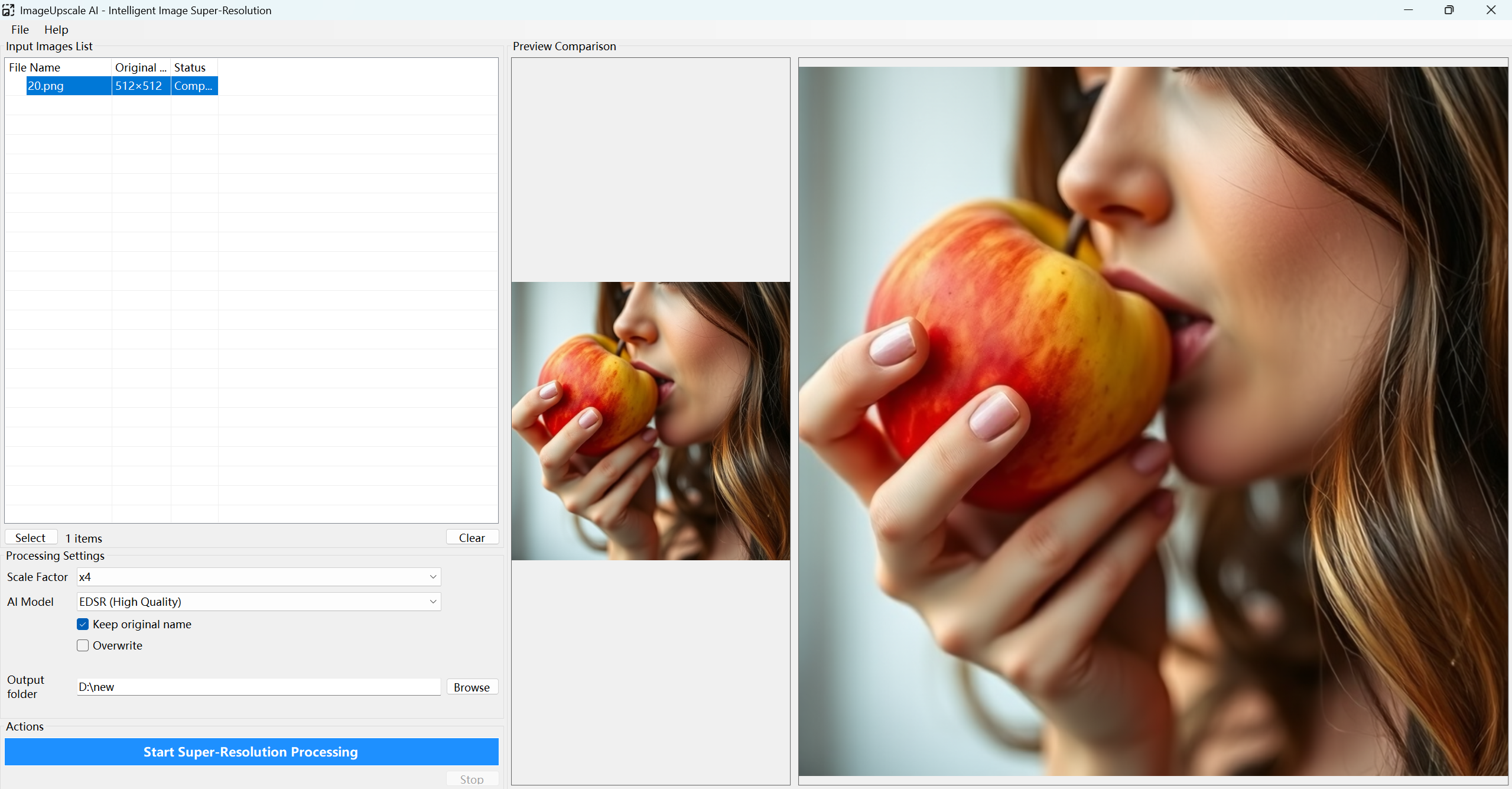
For high-volume tasks, ImageUpscale AI supports lossless batch processing for common file formats, including JPG, PNG, BMP, TIFF, and WEBP. Users can verify results through a real-time side-by-side preview, which allows for immediate comparison between the source image and the upscaled version. By utilizing a one-time purchase model rather than a subscription service, the app provides a permanent offline solution for photo restoration without the bloat of traditional graphics editors.
Top 5 Reasons To Download ImageUpscale AI Pro
Every digital creator, photographer, and casual tech enthusiast knows the sting of discovering the perfect photograph only to realize it is trapped in a painfully low resolution. Whether you are dealing with vintage family photos captured on early digital cameras, heavily compressed graphics pulled from web archives, or smartphone snaps that lose all structural integrity the moment you crop in, low-resolution media is a persistent bottleneck. For years, fixing this meant wrestling with complex graphic design suites or feeding your private photos into pricey cloud platforms that charge monthly subscriptions while holding your data hostage on remote servers.
Enter ImageUpscale AI, a dedicated desktop solution engineered to transform low-resolution, pixelated assets into razor-sharp, high-definition files without recurring bills or technical friction. If you have been looking for an uncompromising, high-performance utility to enhance your visual library, this giveaway represents an incredible opportunity to upgrade your toolkit permanently.
Before we dive deep into the technical architecture and real-world performance benefits, here are the top five reasons you need to download this software today:
- 100% Local and Private Execution: Your files never leave your Windows PC, ensuring zero cloud exposure, ironclad security, and complete offline autonomy.
- Neural Network Detail Reconstruction Up to 8x: Instead of merely stretching pixels, the app mathematically regenerates authentic microscopic textures, edges, and details at up to eight times the original scale.
- Four Purpose-Built AI Model Presets: Tailor every upscaling operation with Fast, High-Quality, Balanced, and Multi-Scale engines to match your exact hardware and quality needs.
- High-Yield Lossless Batch Processing: Automate entire archives of JPG, PNG, BMP, TIFF, and WEBP images in a single pass without quality degradation.
- Native C++/C# Engine with Real-Time Preview: Built natively for lean Windows performance, eliminating bloatware while providing side-by-side verification before rendering.
Now, let us examine exactly why each of these features makes ImageUpscale AI an essential download for your digital workflow.
1. Total Privacy and Offline Freedom with 100% Local Execution
We live in an era dominated by Software-as-a-Service platforms. Virtually every modern image enhancement platform wants you to register an account, upload your personal media to a remote cloud server, wait in a processing queue, and pay a monthly subscription fee for the privilege. From a privacy and operational standpoint, this model is fundamentally flawed. When you upload photos of your family, sensitive corporate assets, or unreleased artistic projects to a third-party server, you surrender control over where those files are stored, how long they are retained, and who might have access to them.
ImageUpscale AI completely upends this intrusive paradigm by running 100% locally on your Windows PC. When you launch this software, your computer is the computational hub. Every tensor calculation, edge-detection sweep, and texture synthesis pass happens entirely on your local machine. No packets containing your image data are sent across the internet, no server logs track your editing habits, and no third party can monetize or index your personal memories.
The operational benefits of this offline architecture are massive. First and foremost, you are never restricted by internet connection speeds. If you are working on a laptop while traveling, operating in a remote studio with limited connectivity, or simply managing a fluctuating home Wi-Fi network, your editing suite remains fully operational. Furthermore, you will never encounter bandwidth throttling, cloud server outages, or unexpected maintenance windows that derail your deadlines.
Equally critical is the economic liberation from recurring fees. Cloud-based upscaling platforms inevitably charge per-image credits or enforce strict monthly billing cycles. If you only need to upscale images occasionally, a continuous subscription is a financial drain; conversely, if you have thousands of photos to process, credit packs become exorbitantly expensive. By taking advantage of this giveaway, you secure unlimited, private, local upscaling capability that you can use on your own terms forever.
2. True Deep Neural Detail Reconstruction Up to 8x Scale
To appreciate why ImageUpscale AI is a generational leap forward, one must understand the difference between traditional image interpolation and genuine neural detail reconstruction. For decades, software relied on legacy algorithms such as nearest-neighbor, bilinear, or bicubic interpolation. When you enlarged an image using these outdated methods, the software merely duplicated existing pixels or created averaged color gradients between them. The inevitable result was an image that looked blurry, muddy, pixelated, or surrounded by unsightly halos.
ImageUpscale AI approaches image enlargement from a completely different scientific angle. Operating at magnification scales up to 8x, the application utilizes advanced deep convolutional neural networks that have been trained on vast datasets of high-resolution imagery. Rather than guessing color values between pixels, the AI analyzes the underlying contextual semantics of the photograph. It recognizes structures such as strands of human hair, the weave of fabric, the grain of natural wood, architectural masonry, and organic foliage.
When you initiate an 8x upscale, the neural network does not merely expand the image canvas; it dynamically reconstructs the fine micro-textures that were lost to distance, sensor limitations, or digital compression. Edges are sharpened with pinpoint mathematical precision, chromatic aberration is suppressed, and digital compression artifacts are purged. An old 800-by-600 thumbnail from two decades ago can be revitalized into an ultra-high-resolution asset exceeding 6400-by-4800 pixels, rendering it suitable for large-format physical printing, high-resolution desktop backgrounds, or 4K digital presentations.
This level of visual fidelity makes the software indispensable for photographers salvaging heavily cropped shots, archivists restoring genealogical treasures, and graphic designers adapting vintage logos or legacy artwork for modern ultra-HD marketing campaigns. It does not just make images larger; it makes them genuinely better.
3. Versatile AI Models Tailored to Your Specific Workflow
In digital image processing, there is rarely a universal, one-size-fits-all solution. A quick concept graphic for social media demands different processing priorities than a 60-megapixel gallery print. Similarly, hardware configurations vary wildly, ranging from high-end desktop workstations equipped with dedicated GPUs to everyday ultrabooks optimized for battery life. ImageUpscale AI demonstrates exceptional architectural maturity by offering four distinct AI models: Fast, High-Quality, Balanced, and Multi-Scale.
The Fast engine is calibrated for rapid turnaround times. When you are triaging dozens of images or working against a strict deadline on modest hardware, this model applies an efficient, optimized neural pass that sharpens edges and clears up noise in fractions of the time required by deeper models. It is the perfect choice for real-time proofing or quickly enhancing reference materials.
The High-Quality engine shifts computational priorities entirely toward uncompromising aesthetic perfection. This model performs extensive, iterative neural passes across the image, scrutinizing complex lighting gradients, high-frequency textural details, and intricate lines. While it demands more system memory and computational cycles, the output is astonishingly lifelike. It is specifically engineered for critical creative projects where every single pixel must withstand close inspection on professional 4K and 8K displays.
The Balanced engine strikes an intelligent compromise between computational velocity and structural fidelity. For the vast majority of everyday tasks, such as enhancing family snapshots or preparing photos for an e-commerce catalog, this model delivers stunning clarity while maintaining rapid processing speeds. It ensures you never have to waste system resources on unnecessary compute cycles when a balanced pass achieves visual perfection.
Finally, the Multi-Scale engine provides unique flexibility for non-standard upscaling tasks. Instead of locking you into rigid aspect ratios or single-stage enlargements, it processes the image across varying dimensional thresholds, preserving compositional integrity regardless of the source file's quirks. Having immediate access to these four engines directly within a streamlined interface ensures that you always have the right computational tool for the specific task at hand.
4. Lossless Batch Processing Across All Industry-Standard Formats
A major flaw in many contemporary AI tools is that they are designed as single-image toys rather than practical production instruments. If you have an album containing three hundred photographs from a family vacation, or if you are managing a catalog of five hundred product shots for a web store, manually loading, configuring, processing, and saving images one by one is an excruciating waste of time. Professional utility demands high-throughput automation, and that is precisely what ImageUpscale AI delivers.
The platform features an industrial-strength lossless batch processing pipeline. You simply drop your collection of images into the software, choose your target enlargement scale and preferred AI model, define your output folder, and allow the background engine to do the heavy lifting. The software works sequentially through your queue, leveraging your computer's processing threads to maintain steady throughput without crashing or leaking memory.
Furthermore, ImageUpscale AI treats format compatibility with the seriousness power users require. It offers native support for the full spectrum of essential file formats, including:
- PNG: Preserving crisp graphics, digital illustrations, and vital alpha-channel transparency without artifact contamination.
- JPG/JPEG: Cleaning up lossy compression blocks and digital noise across everyday consumer photos.
- WEBP: Enhancing modern, next-generation web assets while retaining streamlined file sizes.
- TIFF: Processing heavy, uncompressed archival photography and professional scans without stripping color depth.
- BMP: Handling legacy Windows bitmaps effortlessly for retro software and game asset restoration.
Crucially, the processing pipeline is strictly lossless in terms of user control. The application does not forcibly re-compress your imagery into muddy low-bitrate outputs. Instead, it respects the structural integrity of your source media, delivering pristine, color-accurate files that are ready for immediate integration into video editing software, layout design applications, or print-ready production files.
5. Native C++/C# Engine with Real-Time Side-by-Side Preview
Too many modern desktop applications are built using bloated, resource-heavy web frameworks that disguise websites as desktop software. These programs often consume gigabytes of RAM just sitting idle, launch with sluggish delay, and feel unresponsive under real workloads. ImageUpscale AI avoids this trap by employing a high-performance native C++ and C# engine. This software is lean, lighting-fast, and built from the ground up to communicate directly with your Windows operating system and local hardware components.
Because the core algorithms are written in compiled, low-level C++ code, computational overhead is minimized. The software allocates system resources with pinpoint efficiency, ensuring that your CPU and GPU power is directed exclusively toward running the neural network calculations rather than rendering an unnecessarily bloated interface. The software installs in seconds, launches instantaneously, and maintains a remarkably tiny digital footprint on your hard drive.
Despite this hyper-efficient architecture, ImageUpscale AI does not sacrifice user convenience. One of its standout usability features is the real-time side-by-side preview window. Before committing computational time to an extensive 8x upscaling pass or rendering a massive batch queue, you can immediately inspect a split-screen visual comparison of your image. A movable slider allows you to scrutinize the raw original file directly against the AI-reconstructed preview in real time.
This interactive preview completely eliminates the frustrating trial-and-error cycle inherent in less sophisticated tools. You can immediately see how different AI models treat hair, foliage, skin tones, or typographic text. If the Fast model looks great, you can proceed immediately; if the image requires the deeper scrutiny of the High-Quality engine, you can switch parameters with a single click and see the updated result instantly. It is intuitive, transparent, and built to respect the user's valuable time.
The Final Verdict: Why You Should Download This Giveaway Today
High-end digital image restoration used to be locked behind specialized computer vision labs or costly creative agency retainers. The emergence of consumer AI tools has opened new creative horizons, but the market has unfortunately become saturated with predatory subscription platforms that throttle your bandwidth and harvest your personal data. Finding a desktop tool that combines cutting-edge neural network reconstruction with local processing, batch productivity, and total financial freedom is an exceptional rarity.
ImageUpscale AI hits the elusive sweet spot between elite visual capability and refreshing operational simplicity. It strips away the intimidating learning curve of massive creative software suites while delivering image enhancement results that consistently outshine legacy interpolation techniques. Whether you are a professional photographer seeking to rescue a high-ISO crop, an archivist modernizing historic media, a game modder upscaling classic textures, or an everyday computer user eager to see your memories in stunning high definition, this application delivers outstanding value.
Opportunities to acquire a fully capable, lifetime desktop utility with zero recurring fees and absolute data privacy do not come along often. Download ImageUpscale AI today, take command of your photo library, and experience the transformative power of desktop AI processing firsthand.

Reviews for ImageUpscale AI Pro
Click Here to Read Reviews for ImageUpscale AI Pro >> Click Here to Submit Reviews for ImageUpscale AI Pro >>