What Does Kingshiper Vocal Remover [with AI] Do?
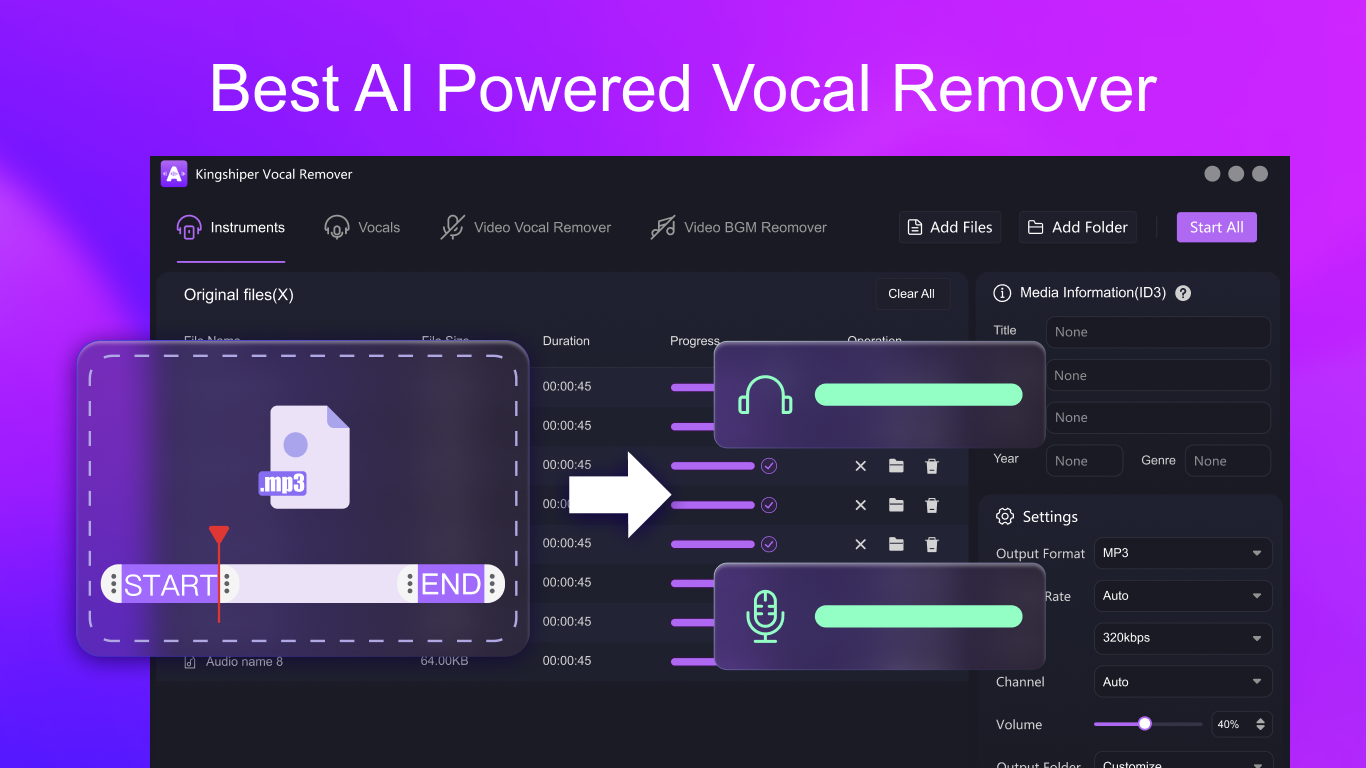
Kingshiper Vocal Remover is an AI-driven desktop application engineered to isolate specific audio components from multimedia files. The tool utilizes advanced algorithms to separate vocals, instrumentation, and background music from both audio and video tracks. It features batch processing capabilities and maintains original audio fidelity while completing extractions through a three-step workflow.
The software provides several core functionalities for audio and video manipulation:
- Vocal and Instrumental Extraction: Users can isolate vocal tracks for rehearsal and production purposes or remove them entirely to generate instrumental versions. The software includes precision trimming tools to refine the output, catering to musicians, DJs, and music producers.
- Video Vocal Remover: This feature identifies and isolates speech within video files while suppressing background noise. It allows content creators to extract clean dialogue for use in new multimedia projects.
- Video BGM Remover: This tool targets and eliminates background music from video clips. By reducing background layers, editors can emphasize narration or insert alternative soundtracks into tutorials and professional presentations.
This utility serves content creators requiring clean audio tracks for remixes, karaoke, or professional video production. By leveraging AI technology, Kingshiper Vocal Remover processes complex files in seconds, providing high-fidelity results suitable for integration into various digital projects.
Top 5 Reasons To Download Kingshiper Vocal Remover [with AI]
- Cutting-Edge AI Precision: Kingshiper Vocal Remover uses advanced artificial intelligence to flawlessly separate vocals from instruments without the artifacts or "ghosting" found in traditional software.
- True Versatility for Video and Audio: Unlike many competitors that only handle MP3s, this tool works seamlessly with video files, allowing you to extract BGM or isolate speech from your favorite clips.
- High-Efficiency Batch Processing: Save hours of manual work by processing multiple files simultaneously, a feature designed for professional creators and heavy-duty music libraries.
- Lossless Quality Output: The software ensures that your extracted tracks remain crisp and clean, maintaining the original fidelity of the audio for professional-grade results.
- Streamlined, Three-Step Workflow: You don't need to be a sound engineer to use it; the intuitive interface allows anyone to achieve perfect audio isolation in just seconds.
In the rapidly evolving world of digital media, the ability to manipulate audio with precision is no longer just a luxury for professional studio engineers—it has become a necessity for content creators, musicians, and hobbyists alike. Whether you are a YouTuber trying to clean up a noisy interview, a DJ looking to create the ultimate mashup, or a karaoke enthusiast who needs a clean instrumental track, the tools you use define the quality of your output. This brings us to a software that has been making significant waves in the tech community: Kingshiper Vocal Remover. If you have been looking for a reason to upgrade your audio toolkit, this giveaway is the perfect opportunity. As someone who has tested countless audio isolation tools, I can confidently say that this software stands out in a crowded market. Here is a deep dive into why you need to download this giveaway today.
1. Cutting-Edge AI Precision
For years, vocal removal was a messy process. Old-school methods usually involved "phase cancellation," which often left the remaining audio sounding hollow, underwater, or metallic. If the vocals were panned even slightly to the left or right, the old tools would fail miserably. Kingshiper Vocal Remover represents the next generation of this technology by utilizing advanced AI algorithms. This isn't just a simple filter; it is an intelligent engine that understands the difference between the human voice and a guitar string.
The AI has been trained on millions of audio samples, allowing it to recognize the unique frequencies and textures of vocals versus background instruments. When you feed a track into this software, the AI performs a deep scan, identifying the nuances of the performance. It can distinguish between a lead singer, a backing choir, and the accompanying orchestra with startling accuracy. This means that when you ask it to extract the vocals, you get a "dry" vocal track that sounds like it was recorded in a separate booth. This precision is a game-changer for music producers who want to sample vocals from classic tracks without the "bleed" of the original drums or bass.
Furthermore, the AI excels at handling complex tracks. Many vocal removers struggle when a song has heavy reverb or layered synthesizers that occupy the same frequency range as the voice. However, the sophisticated processing in this tool manages to untangle these layers, giving you a clean separation that was previously impossible without having the original multi-track stems from the recording studio. By downloading this giveaway, you are essentially putting a professional AI engineer in your pocket.
2. True Versatility for Video and Audio
One of the biggest frustrations with standard audio software is the lack of video support. Usually, if you want to remove the vocals from a video, you have to extract the audio, process it in one program, and then sync it back in your video editor. Kingshiper Vocal Remover eliminates this tedious workflow by offering dedicated Video Vocal Remover and Video BGM Remover features. This makes it an indispensable tool for the modern content creator.
Imagine you are a video editor working on a documentary or a vlog. You find the perfect clip, but the background music is distracting or copyrighted, and you only need the person’s speech. With the Video Vocal Remover feature, you can isolate the dialogue and eliminate the music entirely, leaving you with a clean voiceover that you can then layer over your own chosen soundtrack. Conversely, if you love the background music of a cinematic trailer but don’t want the voiceover narrating over it, the Video BGM Remover can significantly reduce or remove the speech, giving you a pure instrumental bed for your own projects.
This versatility extends to the file types supported. Whether you are working with high-definition MP4s, MOVs, or standard MP3 and WAV files, the software handles them with ease. For social media influencers who create content for platforms like TikTok or Instagram, this means you can take any trending video and instantly turn it into a custom sound or a "lite" version of a track for your own commentary. It bridges the gap between audio engineering and video production in a way that very few apps do.
3. High-Efficiency Batch Processing
Time is the most valuable resource for any creative professional. If you have a library of fifty songs that you need to turn into instrumental versions for a live performance or a DJ set, processing them one by one is a nightmare. Kingshiper Vocal Remover addresses this pain point with its powerful batch-processing capabilities. This feature is a massive productivity booster that separates it from the "web-based" free tools that often limit you to one file at a time or throttle your upload speeds.
The batch processing engine is designed to handle multiple audio and video tracks simultaneously without crashing or slowing down your system. You can simply drag and drop an entire folder into the interface, select your desired output (whether it’s vocals, instruments, or BGM), and let the software do the heavy lifting while you grab a cup of coffee. This is particularly useful for music producers who are building their own "stem" libraries or for educators who need to prepare large amounts of audio material for classroom use.
Moreover, the batch processing doesn't sacrifice precision for speed. Each file is treated with the same level of AI scrutiny, ensuring that the fiftieth file sounds just as good as the first one. For those of us who work on tight deadlines, having a reliable tool that can churn through a heavy workload is the difference between finishing a project on time and pulling an all-nighter. This giveaway provides you with a professional-grade workflow that is usually reserved for expensive enterprise software.
4. Lossless Quality Output
The most common complaint about free audio tools is the loss of quality. Often, when you separate a track, the software compresses the output so heavily that the high-end frequencies disappear, leaving the music sounding muffled or "lo-fi." Kingshiper Vocal Remover prides itself on its no-quality-loss guarantee. When you process a file, the software maintains the original bit rate and sample rate, ensuring that the resulting audio is crisp, clear, and ready for professional use.
For audiophiles and musicians, this is non-negotiable. If you are a singer using the "Extract Vocals" feature to practice a song, you need to hear every breath and every inflection in the original performance to learn it correctly. If you are a DJ playing an instrumental track on a large club sound system, any loss in quality will be immediately apparent to the audience. This software ensures that the "kick" of the drums remains punchy and the "shimmer" of the cymbals stays bright even after the vocals have been stripped away.
The "Extract Instruments" feature is equally impressive in its fidelity. By isolating specific sounds or instruments from a multi-track recording, you can hear the intricacies of the guitar work or the bass line without any interference. This is an incredible resource for musicians who are trying to transcribe a difficult solo or learn the arrangement of a complex song. By offering high-fidelity, lossless output, Kingshiper ensures that your final project sounds like it was mastered in a professional studio, not just tweaked in a home office.
5. Streamlined, Three-Step Workflow
One of the biggest barriers to entry for audio editing software is the steep learning curve. Many Digital Audio Workstations (DAWs) require hours of tutorials just to understand the basic interface. Kingshiper Vocal Remover takes the opposite approach by focusing on a streamlined, three-step workflow that makes professional audio separation accessible to everyone. You don't need to understand hertz, decibels, or wave interference to get perfect results.
The process is remarkably simple: upload your file, select the mode (Extract Vocals, Extract Instruments, etc.), and click the process button. The interface is clean, modern, and free of unnecessary clutter. This "user-first" design philosophy means that you spend less time fighting with the software and more time being creative. It is a "one-click" solution for a problem that used to take hours of manual EQing and filtering.
Even though the software is simple to use, it doesn't lack depth. It includes advanced trimming tools that allow you to precisely select the portion of the audio or video you want to process. This is incredibly helpful if you only need the chorus of a song or a specific ten-second clip from a video. The ability to trim and process within the same app saves you from having to open a separate editor, further simplifying your creative process. For anyone who has ever been intimidated by professional audio software, this giveaway is a breath of fresh air. It proves that powerful technology doesn't have to be complicated.
Conclusion: Why You Shouldn't Miss This Giveaway
In conclusion, Kingshiper Vocal Remover is more than just a utility; it is a creative enabler. It takes the complex, often frustrating task of audio separation and turns it into a seamless, high-quality experience. Whether you are looking to extract vocals for a remix, remove background music from a video for a presentation, or simply create a karaoke track for your next party, this software provides the power and precision you need.
The combination of AI-driven accuracy, video support, batch processing, and lossless quality makes it a top-tier choice for anyone working with media. When you add the incredibly intuitive interface into the mix, it becomes clear why this is a must-download. Most people don't realize how much they need a tool like this until they have it—and once you start using it, you'll wonder how you ever managed without it. Don't miss out on this opportunity to add a professional-grade AI vocal remover to your digital arsenal. It is fast, it is effective, and most importantly, it delivers results that speak for themselves. Download the giveaway today and start experiencing your audio and video files in a whole new way.
The era of messy, distorted audio separation is over. With Kingshiper, the power of professional sound engineering is now at your fingertips. Grab this giveaway and see for yourself why this tool is becoming the gold standard for vocal removal and instrument isolation.

Reviews for Kingshiper Vocal Remover [with AI]
Click Here to Read Reviews for Kingshiper Vocal Remover [with AI] >> Click Here to Submit Reviews for Kingshiper Vocal Remover [with AI] >>