What Does LeaderTask Daily Planner Do?
LeaderTask is a task management application designed for organizing daily schedules and complex projects. The software enables users to build task lists, categorize them by project, and decompose larger goals into nested subtasks. Unlike many competing tools, it allows for an unlimited level of subtask depth, facilitating highly detailed project mapping.
A primary feature of the platform is the Antiforgetfulness system. This mechanism automatically identifies overdue tasks from previous days and transfers them to the current daily view, preventing incomplete items from being overlooked. Additionally, the application supports a true offline mode, permitting full task management and data entry without a stable internet connection.
The software is compatible with several established productivity methodologies, including:
- Getting Things Done (GTD)
- The Pomodoro Technique
- Autofocus and Superfocus
- The Stephen Covey system
Users can further customize their workflow by color-coding tasks for visual prioritization and attaching relevant documents directly to entries. The tool also supports collaborative features, allowing tasks to be assigned to colleagues or peers. To date, the platform has processed more than 16,000,000 individual tasks, indicating a significant active user base within the productivity software sector.
Top 5 Reasons To Download LeaderTask Daily Planner
- Infinite Nesting for Complex Projects: Unlike standard checklists, you can divide tasks into subtasks with unlimited levels of depth, allowing for unparalleled project granularity.
- The Proprietary "Antiforgetfulness" System: A unique feature that automatically carries over overdue tasks to your current list, ensuring that nothing ever slips through the cracks of your schedule.
- True Offline Functionality: LeaderTask provides a real offline mode, allowing you to manage, edit, and organize your life without requiring a constant internet connection.
- Support for All Major Time Management Methodologies: Whether you use GTD, Pomodoro, Autofocus, or the Stephen Covey System, this app is built to accommodate your specific workflow.
- Advanced Visual Customization: Enhance your cognitive processing by color-coding and visually highlighting tasks, making your most important priorities stand out at a glance.
Why LeaderTask is the Productivity Powerhouse You Need
In the modern world of tech, we are constantly bombarded with "productivity" apps that promise to change our lives. Most of these applications are little more than glorified grocery lists with a fancy coat of paint. They look nice, but when you actually try to manage a complex project or organize a hectic professional life, they fall apart. You end up with a messy list of fifty items, no clear sense of priority, and a sinking feeling that you are forgetting something important. This is exactly why I am writing this today: to tell you that LeaderTask is different. It isn’t just another app; it is a comprehensive task management ecosystem designed for people who actually have things to do.
If you are looking for a reason to jump on this giveaway, you need to understand that productivity is not just about writing things down; it is about how you interact with that information. LeaderTask has been refined through the creation of over 16 million tasks by users worldwide, and that experience shows in every feature. Below, I’m going to dive deep into the top five reasons why this specific software deserves a permanent spot on your device.
1. Infinite Nesting: Breaking Down the Impossible
Most task managers allow you to create a task and maybe, if you’re lucky, one level of "subtasks." But real life doesn't work in two-step increments. Real life is complex. If you are planning a corporate event, "Organize Catering" isn't just one step. It involves researching vendors, comparing menus, handling dietary restrictions, and finalizing contracts. Each of those, in turn, has its own steps. LeaderTask solves this problem with its infinite nesting capability.
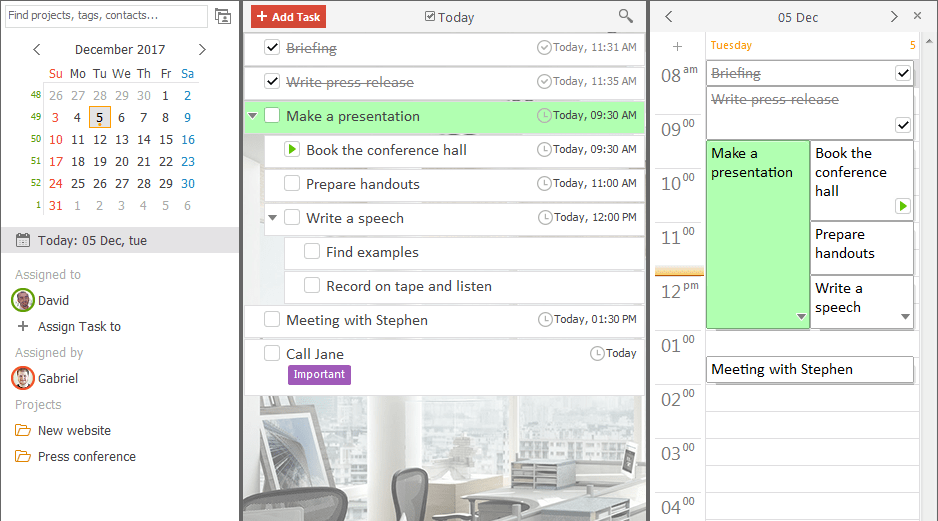
With this software, you can divide tasks into subtasks, and those subtasks into further sub-subtasks, at any nesting level you require. This is a game-changer for project managers and creatives alike. It allows you to take a massive, intimidating goal and break it down into "atomic" actions—tasks so small they are impossible to procrastinate on. When you can see the hierarchical structure of your work, you stop feeling overwhelmed. You stop seeing a mountain and start seeing a staircase. This level of granularity is rarely found in user-friendly apps, making LeaderTask a unique hybrid of simple design and professional-grade power.
2. The "Antiforgetfulness" System: Your Safety Net
We have all been there. You plan a perfect Tuesday, but then a meeting runs long, the car won't start, or you simply run out of steam. Suddenly, it’s Wednesday morning, and those five important tasks you meant to do yesterday are buried in the "Past" view of your calendar, never to be seen again until a client calls to complain. This is where most digital planners fail us; they assume that if a task wasn't done on its assigned day, it no longer matters.
LeaderTask introduces a revolutionary system called "Antiforgetfulness." This isn't just a clever name; it is a core logic built into the software. The system automatically identifies any tasks that were planned for yesterday (or even weeks ago) that were not marked as complete. Instead of leaving them in the graveyard of the past, it automatically transfers them into your list for today. It forces you to confront your unfinished business. It ensures that every single commitment you made to yourself or your team remains "front of mind" until it is actually resolved. This feature alone can save you from the professional embarrassment of a missed deadline or a forgotten follow-up.
3. Real Offline Mode: Productivity Without the Tether
We live in an age of "Cloud-First" applications, which sounds great until you are on a plane, in a subway, or in a remote area with spotty Wi-Fi. Many modern task managers claim to have an offline mode, but often this is just a cached version of your list that won't let you add new tasks or edit existing ones without throwing a sync error. They are essentially read-only documents when the internet goes out.
LeaderTask is built with a real offline mode. This means the app is fully functional regardless of your internet status. You can create projects, assign tasks to colleagues, reorganize your entire week, and attach documents while you are completely disconnected. The moment you reconnect to the web, LeaderTask silently and efficiently syncs all your changes to the cloud. For the traveling professional or the "digital nomad," this reliability is essential. You shouldn't be prevented from organizing your life just because your service provider is having a bad day. With this software, your productivity is no longer held hostage by your data connection.
4. Total Methodological Flexibility
One of the biggest frustrations with productivity software is that the developers often try to force you into their way of thinking. They might build an app that only works for the "Getting Things Done" (GTD) method, or one that is strictly for Pomodoro timers. If you don't like their specific philosophy, the app is useless to you. LeaderTask takes the opposite approach. It is designed to be a "chameleon" for time management.
Because of its robust feature set—including subtasks, projects, reminders, and visual markers—it supports virtually every major time management system currently in use. If you are a fan of David Allen’s GTD, you can easily set up "Contexts" and "Next Actions." If you prefer The Pomodoro Technique, you can use the app to time your bursts of work. It supports Autofocus, Superfocus, Do It Tomorrow, and the Stephen Covey System (The 7 Habits). This means you don't have to change the way you think to use the app; the app adapts to the way you work. This flexibility makes it an incredible tool for students, executives, and freelancers alike, as it grows and evolves with your personal organizational style.
5. Visual Prioritization and Cognitive Ease
Human beings are visual creatures. When we look at a wall of black text on a white background, our brains struggle to determine what is actually important. We experience "choice paralysis" because everything looks the same. LeaderTask addresses this by offering advanced visual highlighting and color-coding features. You can assign specific colors to different types of tasks, projects, or urgency levels.
Imagine opening your app and immediately seeing your high-priority items in vibrant red, your creative projects in soothing blue, and your personal errands in bright green. This visual shorthand allows you to scan your day in seconds and understand your workload without having to read every single line. Beyond just colors, you can attach documents directly to tasks, meaning that the "doing" part of the job is right there next to the "planning" part. You don't have to go hunting through your file folders for that PDF or spreadsheet; it is attached right to the task. This reduces the "friction" of starting a task, which is the number one secret to beating procrastination.
Final Thoughts: Why You Should Download This Now
The marketplace for productivity tools is crowded, but LeaderTask stands out because it balances power with simplicity. It provides the heavy-duty features that power users need—like unlimited nesting and document attachments—without making the interface feel cluttered or confusing. It is a tool that respects your time and understands the reality of human error through its "Antiforgetfulness" system.
With over 16,000,000 tasks already created by its user base, the software has been "battle-tested" in real-world scenarios. It isn't a beta project or a flash-in-the-pan startup; it is a refined, professional utility. Whether you are trying to manage a team of twenty colleagues by assigning tasks and tracking progress, or you are simply trying to make sure you remember to buy milk on the way home, LeaderTask scales to meet your needs.
In the style of a true tech reviewer, I’ll give you the bottom line: The best productivity system is the one that you actually use. Most people stop using their task managers because they become a chore to maintain. LeaderTask removes that burden. It automates the "remembering" part of the equation so you can focus on the "doing" part. This giveaway is an opportunity to upgrade your mental operating system. Don't let your tasks manage you; download LeaderTask and start managing your tasks with the precision and ease you deserve. You will find that when your tools are this reliable, your stress levels drop, and your output skyrockets. This is one download you definitely don't want to miss.

Reviews for LeaderTask Daily Planner
Click Here to Read Reviews for LeaderTask Daily Planner >> Click Here to Submit Reviews for LeaderTask Daily Planner >>