What Does Luminar 3 Do?
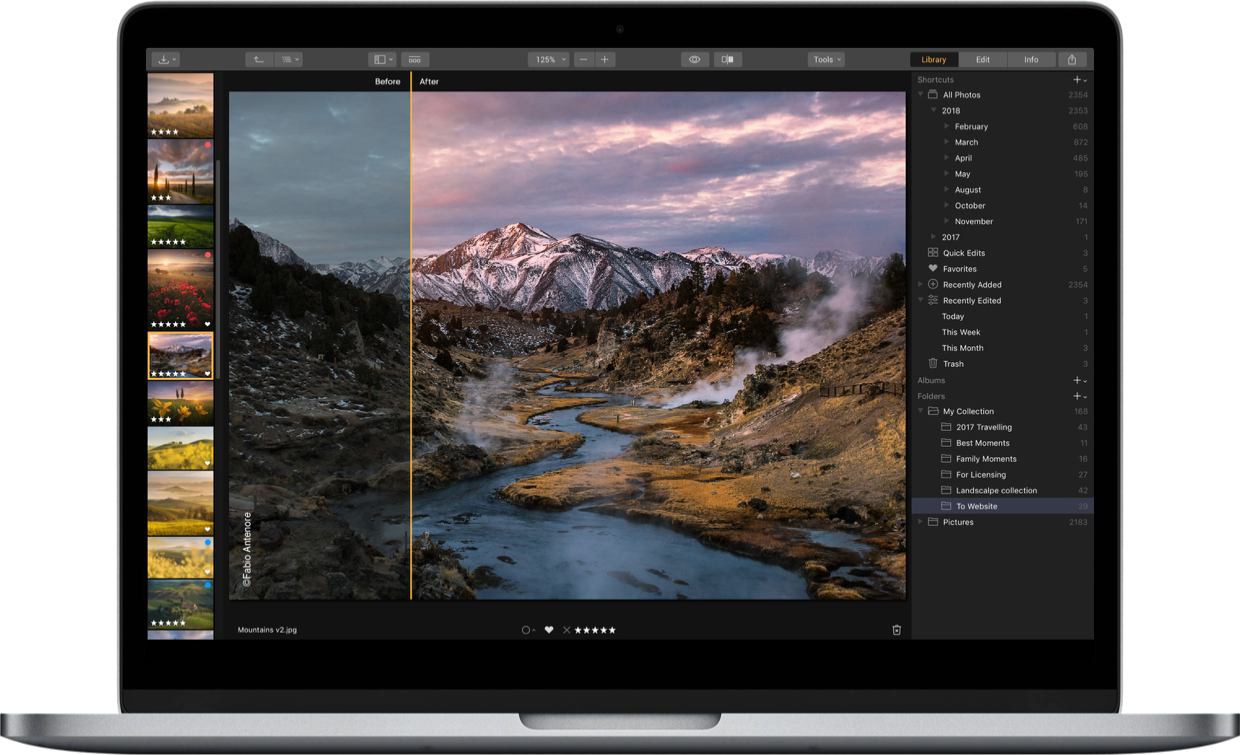
Luminar 3 is a photo editing application designed to streamline post-processing through automated, AI-driven tools. The software centers on Accent AI 2.0, which uses human-aware technology to recognize subjects and apply selective adjustments via a single slider. It also includes an AI Sky Enhancer for adding definition and drama to landscapes with minimal manual input.
The platform provides creative flexibility with over 70 "Instant Looks" developed by professional photographers. These presets are fully adjustable using an adaptive slider to control effect intensity. For lighting adjustments, users can implement Sunrays to generate volumetric light beams or the Golden Hour filter to introduce warm, sunlight-mimicking tones.
Technical corrections are handled through specialized modules. The Denoise tool removes digital grain, while the Sharpening filter improves image clarity. For cleaning up compositions, the software features an object removal tool that can erase strangers, unwanted details, or skin imperfections. It is also capable of restoring older, damaged photographs. With a library of over 50 tools, Luminar 3 aims to provide a high-performance editing environment that remains accessible through a simplified, one-click interface.
Top 5 Reasons To Download Luminar 3
- Accent AI 2.0: A revolutionary, human-aware "magic" slider that handles dozens of adjustments simultaneously while preserving natural skin tones.
- AI Sky Enhancer: One-click sky recovery that adds depth, color, and drama to landscape photos without the need for complex masking.
- 70+ Instant Pro-Level Looks: Access to dozens of hand-crafted presets that instantly change the mood of your images, plus the ability to download hundreds more.
- Powerful Object Removal: An intuitive erase tool that makes photobombers, power lines, and skin imperfections disappear in seconds.
- Advanced Lighting Tools: Professional effects like volumetric Sunrays and the Golden Hour filter that allow you to add realistic, atmospheric light to any scene.
1. The Magic of Accent AI 2.0
In the world of photo editing, we often find ourselves trapped in a cycle of endless micro-adjustments. You tweak the highlights, then you have to adjust the shadows, then the saturation looks off, so you move that slider, and suddenly the contrast is too high. It is a balancing act that can take hours of your life. This is where Accent AI 2.0 changes the game entirely. As a tech reviewer, I have seen many "auto-enhance" buttons, but most of them are blunt instruments that blow out the colors or make the image look like a neon nightmare. Luminar 3 is different.
The "AI" in Accent AI 2.0 is not just a marketing buzzword. This is sophisticated machine learning at work. The software analyzes your image, identifying the foreground, the background, the light sources, and most importantly, the people. The new "human-aware" technology is the standout feature here. In previous versions of photo editors, an aggressive auto-fix might turn a person’s skin into an orange smudge. With Accent AI 2.0, the software recognizes human faces and bodies, applying adjustments selectively. This means you can brighten a sunset and deepen the shadows of a mountain range without making the person standing in the foreground look like a plastic mannequin. It provides more realistic, professional results than anything else in its class.
The beauty of this tool lies in its simplicity. You have one slider. By moving it to the right, you are essentially telling a world-class photo editor to look at your photo and fix everything that is wrong with it. It fixes exposure, tone, color, and detail all at once. For the busy photographer or the hobbyist who wants their vacation photos to look like they belong in a travel magazine, this single feature is worth the download alone. It is about getting to the "final look" faster so you can spend more time taking photos and less time staring at a computer screen.
2. AI Sky Enhancer: Drama in One Click
We have all been there: you are standing in front of a majestic landscape, the air is fresh, and the view is incredible. You take the shot, but when you look at your screen later, the sky is a washed-out, bright white mess. The camera simply couldn't capture the dynamic range that your eyes could see. Normally, fixing this requires "masking"—a tedious process of painting over the sky with a brush, being careful not to overlap with the trees or buildings, and then adjusting the exposure. It is a chore that most people simply don't have the patience for.
The AI Sky Enhancer in Luminar 3 solves this problem with an almost frightening level of accuracy. By using artificial intelligence to detect the horizon and the boundaries of the sky, it allows you to add drama and depth with a single move. Whether your photo has a few wispy clouds or is a flat, gray overcast day, this tool finds the texture and color hidden in the pixels and brings them to the forefront. It makes the blues deeper and the clouds more defined, providing that "National Geographic" look without any manual labor.
What makes this particularly impressive is how it handles complex edges. If you have a photo of a forest, the AI is smart enough to enhance the sky between the leaves of the trees without creating weird halos or artifacts. This level of precision used to be reserved for high-end retouchers who spent years mastering their craft. Now, by downloading this giveaway, you have that same power at your fingertips. It transforms "okay" photos into "breathtaking" photos in seconds.
3. Professional Results with 70+ Instant Looks
Sometimes, you don't even know what your photo needs; you just know it needs something. You want a certain "vibe"—maybe a vintage film look, a gritty urban aesthetic, or a soft, romantic glow. This is where the Luminar Looks system shines. Luminar 3 comes pre-loaded with over 70 instant looks, which are essentially high-end presets hand-crafted by professional photographers. These aren't your average social media filters; these are complex stacks of filters and adjustments designed to give your images a polished, professional finish.
The user interface allows you to visually browse these looks at the bottom of your screen, seeing a live preview of how each one affects your specific photo. It is an incredible way to find inspiration. If you find a look you like but feel it is a bit too "heavy-handed," the adaptive Amount slider allows you to dial in the intensity. You can set it to 50% for a subtle touch or crank it to 100% for full artistic impact. It gives you total creative control while doing 90% of the heavy lifting for you.
Furthermore, the ecosystem is expandable. Beyond the 70+ built-in looks, you can download hundreds of additional looks from the community and professional photographers. This means the software grows with you. As your style evolves, you can find new sets of looks that match your vision. Whether you are shooting weddings, street photography, landscapes, or portraits, there is a set of tools specifically designed to make that genre pop. This library of professional aesthetics is a massive value-add for anyone looking to elevate their visual storytelling.
4. Quickly Erase Distractions and Imperfections
Photography is often the art of exclusion. You want to capture a beautiful beach, but there is a bright red trash can in the corner. You take a perfect portrait of a friend, but there is a distracting power line "growing" out of their head. Or perhaps you are restoring an old family photo that is covered in scratches and dust spots. In traditional editors, the "clone stamp" tool is the standard solution, but it is difficult to master and often leaves visible "repeating patterns" that look fake.
Luminar 3 features a powerful and intuitive Erase Tool that makes these distractions vanish. You simply paint over the object you want to remove, click a button, and the software's algorithms analyze the surrounding pixels to fill in the gap seamlessly. It is like magic. You can easily erase unwanted objects and strangers from your vacation shots, giving you that "private island" feel even if the beach was crowded. It is equally effective for "cutting out" odd or excessive details that ruin the composition of your frame.
For portrait photographers, this tool is a lifesaver. You can fix skin imperfections, blemishes, or stray hairs in just a few clicks. The software is gentle enough to maintain the natural texture of the skin while removing the spots that draw the eye away from the subject. Even better, if you are an enthusiast of vintage photography, you can use these tools to restore old photos, removing the cracks and age spots that have accumulated over decades. This one feature turns Luminar 3 from a simple "photo editor" into a powerful "photo restoration" suite.
5. Creative Mastery with Lighting and Detail Tools
The final reason you absolutely need to download this giveaway is the suite of creative and essential tools that go beyond basic editing. Specifically, the Sunrays filter is a masterpiece of software engineering. Most apps that let you "add" sunbeams look incredibly fake because they just overlay a static image. Luminar’s Sunrays tool is volumetric. This means the light actually "wraps" around objects in your photo. If you place the sun behind a tree, the light beams will realistically peek through the branches and leaves, reacting to the depth of the image. It adds a level of atmosphere and "wow factor" that is hard to achieve any other way.
In addition to the creative flair of Sunrays, you get the Golden Hour filter. Every photographer knows that the best light happens just before sunset, but you can't always be on location at that exact time. This filter simulates that warm, glowing sunlight, giving your photos a rich, inviting feel regardless of when they were actually taken. It is the perfect tool for adding a sense of warmth and nostalgia to your images.
But it isn't all about the "fancy" effects. Luminar 3 also masters the essentials. The Sharpening filter is widely considered one of the best in the industry, helping you recover detail in slightly soft shots without introducing ugly noise. Speaking of noise, the Denoise tool is essential for those grainy photos taken in low light. It cleans up the digital "mush" while preserving the sharp edges, ensuring your nighttime shots look clean and professional. With over 50 powerful tools available at your fingertips, the software manages to be both a playground for creativity and a powerhouse for technical correction.
In conclusion, Luminar 3 is a rare piece of software that respects both your time and your creative vision. It doesn't force you to choose between "easy" and "powerful." By leveraging AI-driven tools like Accent AI 2.0 and the AI Sky Enhancer, it removes the technical barriers that often prevent people from enjoying photo editing. It turns the chore of post-processing into a fast, fun, and rewarding experience. Whether you are looking to remove a distraction, add a dramatic sky, or completely overhaul the mood of an image with a professional "Look," this software delivers every time. Do not miss this giveaway; it is the simplest way to transform your photos into masterpieces, in no time.

Reviews for Luminar 3
Click Here to Read Reviews for Luminar 3 >> Click Here to Submit Reviews for Luminar 3 >>