
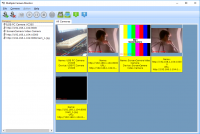
Multiple Camera Monitor is a multi camera surveillance tool that allows users to monitor unlimited cameras both connected to the PC as well as IP cameras. Multiple Camera Monitor is a central point from which you can observe, take pictures, record video and monitor local connected webcams as well as IP Cameras with the ability to pan, zoom, and tilt when supported by the camera.
Official Product Description
Overview
What Does Multiple Camera Monitor Do?
Multiple Camera Monitor functions as a centralized surveillance hub designed for both residential and commercial security applications. The software enables users to interface with an unlimited number of cameras simultaneously, supporting a hybrid environment of locally connected USB webcams and network-based IP cameras. This allows for a scalable monitoring solution that can expand based on the user's specific hardware requirements.
The primary interface serves as a single dashboard for real-time observation. Beyond passive viewing, the software provides integrated tools to capture high-resolution still images and record continuous video streams directly to local storage. These features are essential for maintaining historical records of events or documenting specific security incidents as they occur in real-time.
For hardware that supports advanced movement, the application integrates Pan-Tilt-Zoom (PTZ) functionality. This allows users to actively manipulate a camera's field of view through the desktop interface, ensuring comprehensive coverage of monitored areas without requiring manual adjustment at the camera site.
Key technical capabilities include:
- Unlimited Device Support: Connect and monitor an unrestricted number of camera feeds within a single interface.
- Hybrid Connectivity: Support for both local USB-connected devices and remote IP cameras.
- Media Capture: Tools for manual or automated video recording and image snapshots.
- Hardware Control: Full PTZ support for cameras equipped with pan, tilt, and zoom motors.
The utility is engineered to consolidate disparate hardware sources into a unified environment, streamlining the management and oversight of complex security setups.
Top 5 Reasons To Download Multiple Camera Monitor
- Unlimited Camera Support for Total Coverage
- True Hybrid Integration of Local Webcams and IP Cameras
- Professional-Grade PTZ (Pan, Tilt, Zoom) Command Suite
- Comprehensive Multimedia Capture and Archiving
- Centralized Management Hub with an Intuitive Interface
If you have ever felt that nagging sense of anxiety when leaving your home or office, you are not alone. In an era where security is paramount, we often find ourselves looking for ways to keep an eye on our most valued assets. However, the world of digital surveillance is frequently a fragmented mess of expensive hardware, proprietary software that refuses to play nice with others, and monthly subscription fees that bleed your wallet dry. Enter Multiple Camera Monitor. This isn't just another piece of "me-too" software; it is a professional-grade solution that turns your existing hardware into a high-tech command center. And the best part? You can snag it through this giveaway. As a tech reviewer who has seen hundreds of security suites, I can tell you that this is the one you have been waiting for. Let’s dive deep into why you need to download this software right now.
1. Unlimited Camera Support for Total Coverage
The biggest bottleneck in the consumer security market is the "pay-per-device" model. Most software providers will entice you with a free version, only to slap a limit on you the moment you try to add a fifth or sixth camera. They want you to pay for tiers, for "pro" licenses, or for "enterprise" upgrades just because you have a large property. Multiple Camera Monitor shatters this paradigm by offering support for an unlimited number of cameras. This is a game-changer for anyone serious about security.
Imagine the freedom of being able to monitor every single entry point of your home, every corner of your warehouse, and every cubicle in your office from a single screen. Because there is no artificial cap on the number of devices you can add, you are only limited by your hardware's processing power and your network bandwidth. This scalability means the software grows with you. If you start with three cameras today but decide to expand to thirty next year, you don’t need to buy new software. You don’t need to learn a new interface. You simply plug in the new hardware and add it to your dashboard.
In my testing, the ability to scale without friction is what separates the toys from the tools. Whether you are a small business owner who needs to keep an eye on inventory or a homeowner who wants to see the backyard, the front porch, the nursery, and the garage all at once, this software handles it with ease. It’s about peace of mind without the "nickel and diming" that usually comes with it. When you download this giveaway, you are getting a system that respects your need for comprehensive coverage.
2. True Hybrid Integration of Local Webcams and IP Cameras
One of the most frustrating aspects of building a surveillance setup is the compatibility war. You might have a few high-end IP cameras mounted on your exterior walls, but you also have a couple of high-quality USB webcams sitting in a desk drawer. Usually, these two worlds never meet. You end up using one app for the IP cameras and another for the webcams, or worse, you find out your software only supports one type. Multiple Camera Monitor solves this by being a true hybrid powerhouse.
This software acts as a bridge. It recognizes local webcams connected directly to your PC via USB as easily as it recognizes IP cameras connected via your local network or the internet. This allows you to repurpose old hardware alongside new professional gear. Why let those 1080p webcams go to waste when they could be serving as indoor monitors for your hallway or home office? By integrating both types of devices into a single viewer, the software provides a cohesive experience that is remarkably rare in the industry.
The technical sophistication here shouldn't be overlooked. Managing the different protocols required to stream video from a local USB bus versus a networked IP stream is no small feat. Yet, this tool handles it behind the scenes, presenting you with a clean, unified feed. This hybrid approach is particularly useful for those who want to build a security system on a budget. You can start with the webcams you already own and gradually add IP cameras over time, all while using the same reliable interface. It’s flexible, it’s smart, and it’s incredibly efficient.
3. Professional-Grade PTZ (Pan, Tilt, Zoom) Command Suite
Static cameras are great for fixed points, but the real power in surveillance comes from PTZ: Pan, Tilt, and Zoom. If your camera hardware supports these features, you need software that can actually talk to it. Many generic monitors only give you a static image, forcing you to manually log into the camera’s clunky web interface if you want to move the lens. Multiple Camera Monitor puts those controls front and center, giving you a literal "joystick" experience from your desktop.
Think about the utility of this. You see something suspicious in the corner of your yard. With a few clicks or a drag of the mouse, you can pan the camera over, tilt it down to get a better angle, and zoom in to see a license plate or a face clearly. This transforms your surveillance from a passive "watching" activity into an active "monitoring" operation. It makes you the operator of your own security firm.
The software’s implementation of PTZ is smooth and responsive. It supports a wide array of camera protocols, ensuring that your hardware's motorized components are fully utilized. There is something inherently satisfying—and deeply reassuring—about being able to "look around" your property remotely. It’s the difference between seeing that someone is at your door and being able to zoom in to see exactly what they are holding. For anyone with PTZ-enabled hardware, this feature alone makes the software a mandatory download.
4. Comprehensive Multimedia Capture and Archiving
A surveillance system is only as good as the evidence it provides. Watching a live feed is helpful, but what happens when you need to review footage from two hours ago? Or what if you need to provide a high-resolution snapshot to the authorities? Multiple Camera Monitor excels in its ability to take pictures and record video on the fly. It turns your PC into a sophisticated Digital Video Recorder (DVR).
The software allows you to capture images and video clips with ease. This isn't just a simple "record" button; it’s a systematic approach to archiving. You can take snapshots of specific incidents or record long-form video of ongoing events. Because the software handles multiple cameras simultaneously, you can trigger recordings across different feeds to get multiple angles of the same event. This is crucial for creating a complete record of any incident.
Furthermore, the media management is handled with the user in mind. You aren't hunting through obscure system folders to find your files. The software organizes your captures, making it easy to review, export, and share. Whether you are documenting a delivery, keeping an eye on a pet, or securing a business perimeter, the ability to instantly capture and store high-quality multimedia is a cornerstone of effective security. When you download this, you aren't just getting a viewer; you are getting a full-featured recording studio for your security feeds.
5. Centralized Management Hub with an Intuitive Interface
We have all used software that feels like it was designed by engineers who have never met a human being. Complex menus, hidden settings, and confusing layouts can make security software more of a headache than it’s worth. Multiple Camera Monitor takes the opposite approach. It is designed to be a central point of observation that is actually easy to use. It’s the "cockpit" of your security system, designed for maximum visibility and minimum friction.
The interface allows you to tile your camera feeds, giving you a "Wall of Video" effect that you usually only see in professional security rooms. You can see everything at a glance. If you want to focus on one specific camera, you can bring it to the forefront instantly. The controls for recording, snapshots, and PTZ are integrated into the viewing experience rather than buried in sub-menus. This "single pane of glass" philosophy is what makes the software so powerful. You aren't switching between windows or tabs; everything you need is right there.
For the tech-savvy user, this means a streamlined workflow. For the beginner, it means a shallow learning curve. You don’t need a degree in network engineering to set this up. The software does the heavy lifting of finding and connecting to your cameras, allowing you to focus on the task at hand: keeping your property safe. The efficiency of having one centralized hub for unlimited cameras cannot be overstated. It saves time, reduces system resource heavy-loading, and ensures that you never miss a moment because you were fumbling with a clumsy UI.
Conclusion: Why You Should Act Now
In the world of tech giveaways, there are often "lite" versions or "trial" offers that leave you wanting more. This giveaway for Multiple Camera Monitor is a different beast entirely. You are getting a robust, professional-grade tool that solves the most common problems in home and business surveillance. By providing unlimited camera support, hybrid hardware integration, active PTZ controls, multimedia recording, and a centralized hub, it elevates your security posture to a level that was previously only available to those with deep pockets.
Think about the value proposition here. You are taking the hardware you already own—that old webcam, that new IP camera, that laptop with the built-in lens—and you are weaving them into a sophisticated net of protection. You are removing the limits on how many rooms you can watch. You are giving yourself the power to pan and zoom across your property from the comfort of your chair. You are ensuring that if something does happen, you have the video and photographic evidence to prove it.
As a reviewer, I always look for software that empowers the user. Multiple Camera Monitor does exactly that. It doesn't lock you into a specific brand of camera, and it doesn't limit your vision. It is a tool of pure utility, designed for the modern world where we need to be in two (or twenty) places at once. The peace of mind that comes from knowing you can check on your world with a single click is priceless, but through this giveaway, it’s accessible to everyone.
Don't wait until after a security incident to wish you had a better system. The best time to set up a surveillance hub was yesterday; the second best time is right now. Download this giveaway, hook up your cameras, and experience the confidence that comes with having a professional-grade monitor at your fingertips. This is one download you definitely do not want to miss. It is smart, it is scalable, and most importantly, it is reliable. Turn your PC into the ultimate security command center today.

Reviews for Multiple Camera Monitor
Click Here to Read Reviews for Multiple Camera Monitor >> Click Here to Submit Reviews for Multiple Camera Monitor >>