What Does PDF Imager Professional Edition Do?
Managing PDF documents often presents a technical hurdle when users need to modify content using standard graphic editors. PDF Imager addresses this specific pain point by facilitating the conversion of PDF pages into various raster and vector image formats. This functionality is particularly useful for workflows requiring the insertion of digital signatures or graphical elements via external applications such as Paint or Photoshop.
The utility allows for the conversion of either specific individual pages or entire documents in a single process. It supports a broad range of industry-standard output formats. Users can export their documents to common files like BMP, JPEG, and PNG. For more specialized professional requirements, the software also includes support for EPS, GIF, and TIFF files.
Key features of the software include:
- Batch conversion of multi-page PDF documents into separate image files.
- Support for six distinct output formats to ensure compatibility with various editing suites.
- A streamlined interface designed for rapid task execution and minimal configuration.
- Integration into workflows requiring image-based document manipulation.
By transforming static document pages into editable image files, PDF Imager removes the requirement for expensive or complex PDF editing software. The application focuses on a minimalist user interface to reduce the time required for format migration, ensuring that the conversion process remains functional for users across different technical skill levels.
Top 5 Reasons To Download PDF Imager Professional Edition
1. Seamless Digital Signature Integration: Convert any PDF into a manageable image format to easily overlay your signature graphic using your favorite image editing software like Paint or Photoshop.
2. Extensive Multi-Format Support: Whether you need high-quality TIFFs for archiving or lightweight JPEGs for emailing, PDF Imager supports BMP, JPEG, PNG, EPS, GIF, and TIFF formats.
3. Minimalist and Intuitive User Interface: Skip the steep learning curves of bloated office suites; this tool is designed for speed and simplicity, getting the job done in seconds.
4. Batch Processing Capabilities: Don't waste time converting pages one by one. PDF Imager can handle single pages or entire documents simultaneously, revolutionizing your productivity.
5. Complete Creative Freedom: By turning static PDF pages into editable image files, you unlock the ability to retouch, annotate, and modify your documents using professional-grade creative tools.
The Modern Workflow Crisis: Why You Need PDF Imager
We have all been there. You receive an urgent contract, an invoice, or a non-disclosure agreement via email. It is in the dreaded PDF format. The sender expects it back within the hour, signed and dated. In a perfect world, you would just click "sign" and be done with it. However, the reality is often a nightmare of proprietary software, expensive subscriptions, and "protected" files that refuse to let you insert a simple transparent PNG of your signature.
For years, the workaround was tedious: print the document, sign it with a pen, find a scanner (if you even own one anymore), scan it back to your computer, and email it. Not only is this a waste of paper and ink, but it also looks unprofessional when the scan comes out crooked or blurry. The alternative—buying a full-blown PDF editor—can cost hundreds of dollars a year in subscription fees. This is where PDF Imager steps in as the hero of your digital desktop. It bridges the gap between the rigid world of PDF documents and the flexible world of image editing.
As a tech reviewer, I see hundreds of utilities every year, but few address such a specific, universal pain point with such elegance. This giveaway isn't just a free piece of software; it is a permanent fix for one of the most annoying hurdles in modern office work. Let’s dive deep into why this specific tool deserves a permanent spot on your hard drive.
Reason 1: Seamless Digital Signature Integration
The primary reason most users find themselves frustrated with PDFs is the "signature wall." Most PDF viewers allow you to read a file, but as soon as you want to add something personal—like a handwritten signature—they demand a premium upgrade. PDF Imager bypasses this entire ecosystem by changing the rules of the game. Instead of fighting with the PDF format, you simply turn the page into an image.
Once your PDF page is a high-resolution JPEG or PNG, the possibilities are endless. You can open that image in Microsoft Paint, Adobe Photoshop, or even GIMP. From there, you can "Paste From" your saved signature graphic, move it exactly where it needs to go, and flatten the image. There is no struggling with "form fields" that don't align or fonts that don't match. You are working with pixels, and pixels are easy to manipulate. This software turns a twenty-minute frustration into a two-minute task. If you have ever felt the "PDF rage" while trying to sign a document, this feature alone makes the download worth it.
Furthermore, because you are converting the document to an image before adding your signature, you are essentially creating a "flattened" file. This adds a layer of security, as it becomes much harder for someone to maliciously alter the text of the document after you have signed it, compared to a standard PDF where text elements can sometimes be manipulated even after a digital signature is applied.
Reason 2: Extensive Multi-Format Support
One of the biggest pitfalls of free conversion tools found online is their lack of options. Usually, you are lucky if you get a low-quality JPEG. PDF Imager, however, treats your documents with professional respect by offering a wide array of target formats. The support for BMP, JPEG, PNG, EPS, GIF, and TIFF is a powerhouse lineup that covers every possible use case.
- PNG: Perfect for when you need to maintain clarity and perhaps use the document in a presentation or a web-based environment.
- JPEG: The gold standard for sending documents quickly over email where file size is a concern.
- TIFF: For the professionals who need lossless quality. If you are converting a document that contains fine lines or architectural drawings, TIFF ensures every pixel is preserved for high-quality printing.
- EPS: This is a game-changer for graphic designers. By converting a PDF to EPS (Encapsulated PostScript), you can bring document elements into vector-based programs like Adobe Illustrator with much higher fidelity.
Having all these options in one interface means you don't need a folder full of different converters. Whether you are a lawyer needing a clear TIFF for a court filing or a social media manager needing a quick JPEG for a post, PDF Imager has you covered. It is the Swiss Army knife of file conversion.
Reason 3: Minimalist and Intuitive User Interface
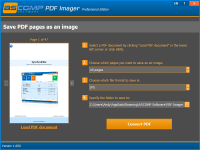
In the tech world, we often talk about "bloatware"—software that is filled with features you don't need, menus that are impossible to navigate, and advertisements that distract you from the task at hand. PDF Imager is the exact opposite. It is a masterclass in simple and intuitive design. When you open the app, you aren't greeted by a complex dashboard or a request to create a cloud account. You are there to convert a file, and the software respects your time.
The interface is designed so that even a person with minimal technical skills can master it in seconds. You select your file, choose your output format, and hit convert. That’s it. This "no-nonsense" approach is incredibly refreshing in an era where even a basic calculator app wants to track your location and show you ads. For the busy professional, this means less time spent looking at a user manual and more time crossing items off the to-do list. The software is lightweight, meaning it won't hog your system resources or slow down your computer while it is running in the background. It is a "get in, get out" tool that performs its function flawlessly.
Reason 4: Batch Processing Capabilities
Time is the one resource we can never get back. If you have a single-page invoice, manual conversion is annoying but doable. But what happens when you have a 50-page legal contract or a 100-page manual that needs to be converted into a series of images for a digital archive? This is where PDF Imager truly shines. The software allows you to convert one or all pages of a selected PDF document at once.
Imagine the manual labor saved. Instead of opening 50 different files or taking 50 different screenshots, you simply tell the program to process the entire document. It will systematically go through every page, converting them into your chosen format and numbering them sequentially. This batch processing is a lifesaver for administrative assistants, researchers, and students. It turns an afternoon of "grunt work" into a task that runs in the background while you grab a cup of coffee. When you return, your folder is populated with perfectly formatted images, ready to be used. This efficiency is why many power users swear by dedicated conversion utilities over "all-in-one" PDF suites that often struggle with large-scale batch tasks.
Reason 5: Complete Creative Freedom
PDFs are, by design, meant to be "final." They are digital paper—static, rigid, and difficult to change. But in a creative or fast-paced business environment, you often need to break those walls down. When you use PDF Imager, you are essentially "unlocking" the document. Once a PDF page is an image, it is no longer a restricted document; it is raw material for your creativity.
Want to highlight a specific section with a "highlighter" tool in Paint? Easy. Want to blur out sensitive information using a Gaussian blur in Photoshop? Simple. Want to crop out the headers and footers to focus on a specific chart for a PowerPoint slide? You can do it in seconds. By converting to an image, you are no longer limited by the tools provided by a PDF reader. You can use the full power of the most advanced image manipulation software on the planet. This level of freedom is invaluable for anyone who needs to repurpose content. It allows you to take parts of a PDF and integrate them into brochures, websites, or reports without the formatting headaches that come with copying and pasting text or trying to "export" elements from a locked PDF file.
The Verdict: Why You Should Download PDF Imager Today
In the landscape of "must-have" utilities, PDF Imager stands out because it solves a universal problem without adding unnecessary complexity. It is a tool built for the "doers"—the people who don't have time to fight with their software and just need to get their work signed, sealed, and delivered. The transition from PDF to image is a small bridge, but it is one that opens up a world of convenience.
We live in a digital age, yet we are often bogged down by file formats that feel like they belong in the 1990s. PDF Imager brings your documents into the modern era, making them compatible with every image editor and viewer on the market. Whether you are using it for the multi-format support, the incredible batch processing, or simply to finally put your signature on that contract without pulling your hair out, this software is a vital addition to your toolkit.
As a tech reviewer, I highly recommend grabbing this giveaway while it is available. It is rare to find a tool that is this lean, this efficient, and this effective at what it does. Don't wait until you have a "PDF emergency" to go looking for a solution. Download PDF Imager now, install it, and the next time someone sends you a "must-sign" document, you will be the person who gets it back to them in record time, perfectly formatted and professionally handled. It is about more than just file conversion; it is about taking control of your digital workflow and removing the friction from your workday. This is the download you didn't know you needed, but won't be able to live without.
Final Thoughts on Efficiency
The beauty of a specialized tool like this is that it doesn't try to be everything to everyone. It doesn't try to be a word processor, a spreadsheet, and an email client all at once. It does one thing—convert PDFs to images—and it does it better than almost any other utility I have tested. This focus on a single, high-quality function is what makes it so reliable. You won't find it crashing because of a "plugin conflict" or failing because of a "cloud sync error." It is local, it is fast, and it is powerful.
In conclusion, if you value your time, if you value your sanity, and if you want to make your digital life just a little bit easier, PDF Imager is a no-brainer. The "simple and intuitive interface" mentioned in the description isn't just marketing speak; it is a genuine reflection of the user experience. You save valuable time, and in the professional world, time is the most expensive thing you have. Make the smart move and add this to your digital arsenal today.


Reviews for PDF Imager Professional Edition
Click Here to Read Reviews for PDF Imager Professional Edition >> Click Here to Submit Reviews for PDF Imager Professional Edition >>