What Does Plain Today Calendar Do?
Plain Today Calendar is a macOS utility designed to integrate a functional calendar widget directly into the system's Notification Center. The software focuses on streamlining date-related tasks through a compact interface and specialized calculation tools.
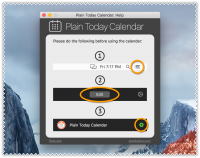
The primary feature is a customizable widget that responds to user interaction. When clicking a specific date within the widget, users can configure the application to perform one of two primary actions:
- Launch the native macOS calendar application immediately to the selected date.
- Copy the formatted date directly to the system clipboard for use in other applications.
These behaviors are managed via the software's Preferences pane, allowing for quick adjustments based on specific workflow requirements. Beyond the core widget functionality, the application includes a Basic Date Calculator. This tool enables users to add or subtract specific periods of time from a chosen date and includes a dedicated business-day counter for professional scheduling.
Additionally, the software features a Date Difference Calculator, which determines the exact duration between two selected points in time. These utilities provide a centralized solution for users who require frequent date computations and quick calendar access without opening a full-sized scheduling suite.
Top 5 Reasons To Download Plain Today Calendar
If you are a power user on macOS, you know that the difference between a cluttered, stressful day and a streamlined, productive one often comes down to the smallest tools in your utility belt. We spend hours looking for the perfect project management software or the most robust email client, but we often overlook the one thing we check dozens of times a day: the calendar. This is where the Plain Today Calendar application comes into play. It is a deceptively simple yet incredibly powerful Notification Center widget that solves the "friction" problem of the macOS ecosystem. Before we dive into the deep end of why this is a must-download giveaway, here are the top five reasons you need this app on your Mac right now:
- Instant Accessibility via the Notification Center: No more hunting for the Calendar app in your Dock or Launchpad; your schedule is always one swipe away.
- Customizable Click Actions: Choose between launching the native macOS Calendar to a specific date or instantly copying that date to your clipboard.
- Built-in Business Day Counter: A game-changer for project managers and freelancers who need to calculate deadlines without counting on their fingers.
- Advanced Date Difference Calculator: Effortlessly find the exact number of days, weeks, or months between two points in time.
- A Minimalist "Plain" Philosophy: It provides a clean, distraction-free interface that respects your Mac’s system resources and your own cognitive load.
Now, let’s get into the nitty-gritty. As a tech reviewer, I’ve seen hundreds of calendar replacements. Most of them are bloated, overpriced, or try to reinvent the wheel. Plain Today Calendar takes a different approach. It asks, "How can we make the existing macOS experience better?" and then executes that vision perfectly. Here is the detailed breakdown of why this giveaway deserves a spot on your SSD.
1. Seamless Integration with the macOS Notification Center
The biggest hurdle to staying organized is friction. Friction is that split second of hesitation when you have to decide whether it is worth it to stop what you are doing, move your mouse to the Dock, click the Calendar icon, wait for the window to pop up, and find the date you are looking for. It doesn't sound like much, but when you do it twenty times a day, it adds up to a lot of lost focus. Plain Today Calendar eliminates this friction by living exactly where you need it: the Notification Center.
By utilizing the widget architecture of macOS, this app ensures that a full monthly calendar view is always available with a simple two-finger swipe from the right edge of your trackpad or a click on the clock in the menu bar. This "at-a-glance" capability is something that the default Apple widgets have historically struggled with. Often, the stock Apple calendar widget only shows you "Up Next" events, forcing you to open the full app if you want to see what day of the week the 22nd falls on next month. Plain Today gives you that full monthly grid immediately. It’s about regaining control over your time and your desktop space. In a world of "tab fatigue," having a dedicated, non-intrusive space for your date-tracking is a breath of fresh air.
2. The Power of Customizable Click Actions
One of the most innovative features of the Plain Today Calendar is what happens when you actually interact with the dates. Most widgets are static; they are there to be looked at, not touched. This app turns your widget into a functional dashboard. Within the Preferences menu, you can toggle between two primary actions that occur when you click a specific day on the calendar grid.
First, you can set it to launch the native macOS Calendar application directly to that date. This is incredibly useful for those moments when you realize you need to schedule a meeting or check your availability for a specific Tuesday three weeks from now. Instead of opening the Calendar app and then scrolling to find the date, the widget acts as a "shortcut," teleporting you to the exact frame of time you need. It turns the widget into a remote control for your entire scheduling system.
The second option, and perhaps my favorite as a writer, is the ability to copy the date to the clipboard. Think about how often you have to type out a date in an email, a legal document, or a file name. Instead of manually typing "October 24, 2023," you simply click the date in your Notification Center and paste it. It ensures formatting accuracy and saves those precious keystrokes. This level of workflow customization is exactly what separates "utility" apps from "essential" apps.
3. Mastering the "Date Math" with the Basic Date Calculator
We have all been there: a client asks for a project to be finished in "45 business days," or a subscription is set to renew in "90 days," and you find yourself staring at a wall calendar, counting manually and trying to remember if there’s a bank holiday coming up. The Plain Today Calendar includes a robust Basic Date Calculator that handles this mental gymnastics for you. This isn't just a simple addition tool; it is a professional-grade utility designed for people who live and breathe deadlines.
The Basic Date Calculator allows you to add or subtract specific periods of time—days, weeks, months, or years—from any given starting point. But the real "killer feature" here is the business-day counter. By allowing users to calculate durations while excluding weekends, the app becomes an indispensable tool for project managers, lawyers, and contractors. You can instantly see when a "60-day" window actually closes, taking the guesswork out of professional commitments. It’s the kind of feature you didn't know you needed until you have it, and once you have it, you can't imagine going back to the old way of doing things.
4. The Date Difference Calculator: Precision Planning
While the first calculator is great for looking forward or backward from a single date, the Date Difference Calculator is designed to measure the bridge between two specific points in time. Why is this important? Imagine you are planning a massive event, a wedding, or a software launch. You need to know exactly how much "runway" you have left. This tool allows you to input a start date and an end date and provides you with the exact delta between them.
Efficiency is the name of the game here. Whether you are calculating the age of a person for a legal form, determining the length of a past project for an invoice, or simply counting down the days until your next vacation, this tool provides the answer in seconds. In the tech world, we often talk about "micro-tools"—apps that do one thing exceptionally well. This calculator is a perfect example of a micro-tool that adds massive value to the overall package. It’s clean, it’s fast, and it works perfectly within the macOS aesthetic.
5. The Minimalist "Plain" Philosophy and System Performance
In the modern software landscape, "feature creep" is a common disease. Apps try to do too much; they want to be your calendar, your to-do list, your habit tracker, and your social media feed all at once. This leads to heavy resource consumption, cluttered interfaces, and a steep learning curve. The Plain Today Calendar lives up to its name by embracing a minimalist philosophy. It is "Plain" in the best way possible—it is unobtrusive, lightweight, and focused.
Because it operates as a widget, it doesn't hog your RAM or drain your MacBook’s battery. It sits quietly in the background, ready when you are, and invisible when you aren't. For users who pride themselves on a "clean" setup—those who use apps like Bartender to hide menu bar icons or who keep their desktops empty—this app is a dream come true. It provides the functionality of a high-end calendar suite without the visual or technical "weight." It feels like a part of the operating system that Apple simply forgot to include. This is the hallmark of great utility software.
Why You Should Download This Giveaway Right Now
As a tech reviewer, I always tell my readers: "The best tools are the ones that get out of your way." Plain Today Calendar is the epitome of that sentiment. It’s not trying to change the way you think about time; it’s just trying to make the way you interact with time more efficient. Whether you are a student trying to keep track of assignment due dates, a professional juggling multiple client deadlines, or just someone who likes to stay organized, this app offers a level of convenience that the stock macOS experience lacks.
Let's recap what you are getting with this download:
- A persistent, easy-to-reach calendar grid that saves you from opening the heavy Calendar app for simple date checks.
- A customizable bridge between your widget and your main calendar or your clipboard, streamlining your data entry and scheduling.
- Mathematical precision for your professional life with the Date Calculator and the Business Day counter, eliminating human error in deadline planning.
- A lightweight footprint that won't slow down your machine, making it perfect for both the latest M-series Macs and older Intel models.
The "Giveaway" aspect of this makes it a no-brainer. Usually, tools this specialized come with a subscription fee or a "pro" upgrade path that locks away the best features. By grabbing this now, you are securing a professional-grade productivity tool for your Mac that will pay for itself in saved time within the first week. We often spend money on "productivity hacks" that don't actually help us work. This, however, is a fundamental improvement to the macOS user interface.
In conclusion, the Plain Today Calendar is a masterclass in utility design. It identifies the gaps in the native macOS Notification Center—specifically the lack of an interactive, full-month calendar and the absence of date-calculation tools—and fills them with a sleek, user-friendly interface. It respects the user's intelligence and their time. If you want to transform your Mac into a more efficient workstation, don't sleep on this giveaway. It is the missing piece of the macOS productivity puzzle.
Final Pro-Tip: Once you download the app, make sure to go straight into the Preferences. Set your "Click Action" to your most-used task. If you’re a heavy scheduler, link it to the Calendar app. If you’re a coder or writer, set it to "Copy to Clipboard." Once you’ve customized it to your workflow, you’ll wonder how you ever managed without it. Happy organizing!


Reviews for Plain Today Calendar
Click Here to Read Reviews for Plain Today Calendar >> Click Here to Submit Reviews for Plain Today Calendar >>