What Does Podcast Downloader Do?
Podcast Downloader by Vovsoft is a minimalist Windows utility designed for users who require a streamlined method for archiving audio content. Unlike comprehensive media suites that function as resource-heavy managers, this application maintains a lightweight system footprint focused specifically on the retrieval of podcast files for offline playback.
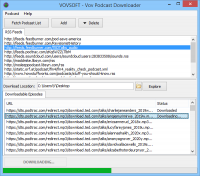
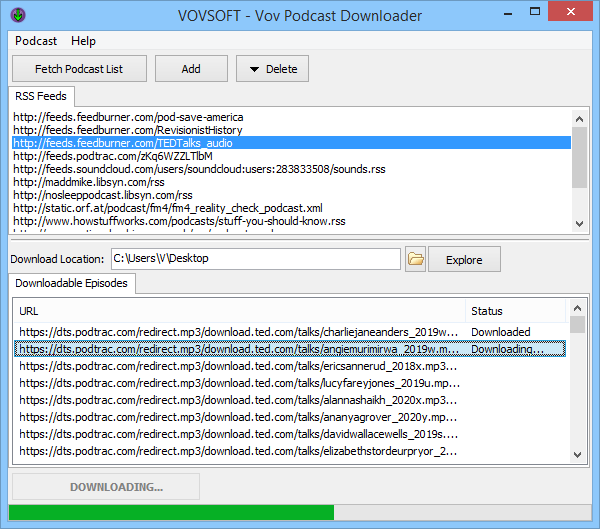
The software operates by parsing RSS feeds to display available episodes in an organized list. Users can interact with the tool through several core functions:
- Manage Feeds: The application includes a predefined list of popular podcasts. Users can expand this library by manually adding custom RSS feeds or remove existing entries to curate their specific interests.
- Direct Download: Selecting a podcast reveals its full episode history. Double-clicking any entry initiates the download process, typically saving the media in MP3 format.
- Directory Control: The interface allows users to view and modify the local download directory, ensuring files are organized for use with any third-party audio player.
By bypassing the complexity of larger management software, this tool provides a direct bridge between RSS subscriptions and local storage. It ensures that audio episodes are accessible without the need for a constant internet connection or a proprietary media ecosystem. The result is a factual, utility-driven approach to digital content consumption.
Top 5 Reasons To Download Podcast Downloader
1. Minimalism and Ease of Use: Unlike bloated media managers, this tool focuses solely on downloading content without unnecessary distractions.
2. Ultra-Lightweight Footprint: It consumes negligible system resources, making it perfect for older PCs or users who want to keep their system running fast.
3. Full RSS Feed Control: You have the power to add any custom RSS feed, ensuring you never miss an episode from your favorite independent creators.
4. Instant Discovery: The software comes with a built-in library of popular podcasts, allowing you to start downloading and listening immediately after installation.
5. True Offline Freedom: By downloading podcasts as MP3 files, you gain total ownership of the media, allowing you to play them on any device without an internet connection or a specific app.
In an era where every single piece of software seems to be fighting for every megabyte of your RAM and every second of your attention, finding a utility that just works is like finding an oasis in a digital desert. We have become so accustomed to "media ecosystems" like Spotify, Apple Podcasts, and Amazon Music that we have forgotten what it feels like to simply own a file. These giant platforms want to keep you inside their walled gardens, tracking your data and requiring a constant internet connection. But what if you just want the audio? What if you want to listen to a deep-dive history podcast while you are camping in the middle of nowhere? This is where Podcast Downloader changes the game.
I have spent years reviewing tech, and if there is one trend that consistently frustrates me, it is "software bloat." You download an app to do one simple thing, and suddenly you are looking at a 500MB installation that wants to run at startup, manage your entire library, and send you notifications every six hours. Podcast Downloader is the antithesis of that trend. It is a lean, mean, downloading machine that serves one purpose: getting your favorite audio content onto your hard drive as quickly as possible. Let’s dive deep into why this specific giveaway is a must-have for any serious audio consumer.
1. Minimalism and Ease of Use
The first thing you will notice when you fire up this application is the interface. It isn't trying to be a social media platform. It isn't trying to sell you a premium subscription. It is a clean, functional window that puts the content front and center. In the tech world, we often talk about "friction." Friction is anything that stands between the user and their goal. Most modern podcast apps are full of friction—ads, "suggested" shows you don't care about, and complex menu systems.
With this software, the friction is gone. You see your list of podcasts, you click on one, you see the episodes, and you double-click to download. It is an intuitive workflow that recalls the early days of the internet when tools were designed to be functional rather than addictive. For users who are tired of navigating through five different tabs just to find their "Downloaded" folder, this simplicity is a breath of fresh air. It respects your time and your intelligence by providing a direct path to your media.
2. Ultra-Lightweight Footprint
We need to talk about system resources. If you have ever tried to run a modern version of iTunes on a Windows machine, you know the pain. It is a resource-heavy beast that can make even a decent laptop stutter. Even web-based players can eat up significant amounts of memory if you leave the tab open. Podcast Downloader, however, is designed with efficiency in mind. It has an extremely light footprint on the host system.
What does this mean for you? It means you can leave it running in the background while you are working on heavy tasks like video editing, gaming, or large spreadsheet calculations without noticing a dip in performance. It parses the RSS feeds quickly, meaning you aren't waiting for the software to "catch up" every time you open it. This makes it an ideal choice for people using budget laptops, older desktop setups, or anyone who simply values a clean, fast-running Windows environment. It is proof that you don't need a massive application to handle complex tasks like feed parsing and file management.
3. Full RSS Feed Control
The heart and soul of podcasting is the RSS feed. It is an open standard that allows anyone to publish audio to the world. Unfortunately, many modern apps hide these feeds or make it difficult to add your own if the show isn't already in their "official" directory. This software puts the power back in your hands. While it comes with a great list of predefined shows, the real magic happens when you start adding your own.
Whether it is a niche tech show, a private Patreon feed you’ve subscribed to, or an underground true-crime series, you can simply paste the RSS URL into the application and it becomes part of your library. This level of customizability is essential for the "power listener." You aren't limited by what a corporate curator thinks you should hear. You can enrich your list with any content available on the open web, and just as easily, you can prune the list. If a show starts getting stale or changes its format, removing it is a matter of a few clicks. This is management the way it was meant to be: user-centric and unrestricted.
4. Instant Discovery
While the ability to add your own feeds is great, sometimes you just want to explore. One of the standout features of this giveaway is the predefined list of podcasts that comes ready to go. For someone who is new to the world of digital audio, or for a veteran listener looking for something new, this is a fantastic value-add. You can explore different genres and categories without having to hunt down URLs across the internet.
The software acts as a gateway. You can scroll through the existing options, see what catches your eye, and immediately view the available episodes. Because most of these files are in the universal MP3 format, you can preview them or commit to a full download without worrying about proprietary file types or DRM (Digital Rights Management). It is a curated experience that doesn't feel forced. It’s like having a well-stocked bookshelf provided for you, with the option to add as many of your own books as you like.
5. True Offline Freedom
Finally, we have to talk about the files themselves. When you "download" an episode on a streaming app, you don't really own it. You can't move that file to a thumb drive to play in your car’s older stereo. You can't back it up to an external hard drive for archival purposes. If the streaming service loses the rights to that show, it disappears from your "downloads" instantly. This software changes that by giving you the actual MP3 file.
When you double-click a link and initiate a download, that file is saved to a directory on your PC that you control. You can change this directory to a synced cloud folder, a high-capacity external drive, or even a network-attached storage device. Once that MP3 is on your drive, it is yours. You can load it onto an old-school MP3 player for a distraction-free workout, transfer it to a phone, or keep it in a permanent archive. This is especially important for history podcasts or educational series that you might want to revisit years from now. In a world of temporary digital access, this software provides the permanent digital ownership that we are slowly losing. It is the ultimate tool for anyone who wants to build a personal library of audio knowledge and entertainment.
The Verdict: If you are someone who values efficiency, control, and the freedom to listen to your content whenever and wherever you want, downloading this software is a no-brainer. It strips away the unnecessary layers of the modern web and returns podcasting to its roots: a simple, effective way to distribute and enjoy audio. Whether you are a tech enthusiast looking to streamline your workflow or a casual listener who just wants a reliable way to get episodes onto their computer, Podcast Downloader is the tool you have been looking for. Don't let your favorite shows stay trapped behind the walls of a streaming app. Download them, own them, and enjoy them on your own terms.
In conclusion, the combination of a tiny system footprint, the ability to manage your own RSS feeds, and the focus on the universal MP3 format makes this one of the most practical utilities you can add to your Windows toolkit. It is a testament to the idea that sometimes, less really is more. By focusing on doing one thing exceptionally well, Vovsoft has created a piece of software that outperforms many of its much larger competitors in the areas that actually matter to the user: speed, reliability, and freedom. Grab this giveaway while you can and start taking control of your audio library today.

Reviews for Podcast Downloader
Click Here to Read Reviews for Podcast Downloader >> Click Here to Submit Reviews for Podcast Downloader >>