What Does Print Multiple Web Pages Do?
Vovsoft Print Multiple Web Pages is a batch printing utility designed for HTML files and web sites. The software addresses the logistical challenge of manually printing individual web-based documents by allowing users to automate the entire process through a single interface. It is built to streamline workflows for users who frequently handle large volumes of web content.
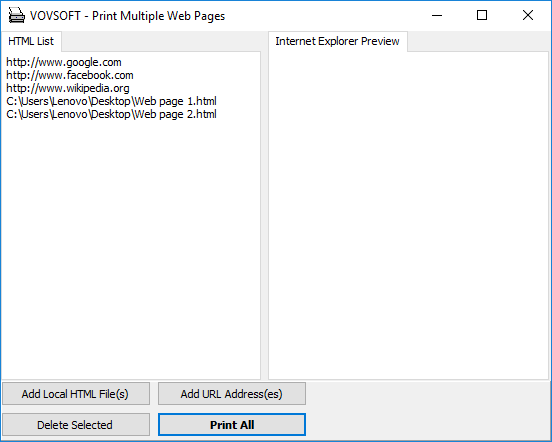
The application operates by allowing users to import a list of URLs or local HTML files into the program window. Once the document list is established, the Print All function executes the sequence automatically. To ensure hardware compatibility, the software includes a configurable wait interval. This setting allows users to adjust the time between print commands, preventing the printer queue from becoming overwhelmed and ensuring the device has time to respond to each request.
Functionally, the software is useful for archiving online resources, managing legal documentation, or preparing physical copies of web-based research. The process concludes automatically once all items in the list have been sent to the printer. By removing the need for repetitive manual clicking and navigation, this utility provides a focused solution for document management and bulk data processing in a Windows environment.
Top 5 Reasons To Download Print Multiple Web Pages
- Unprecedented Batch Processing Speed: Eliminate the tedious task of opening and printing individual web pages manually, allowing you to process dozens or hundreds of URLs in a single click.
- Intelligent Wait Intervals: Take full control over your hardware communication by customizing delay times, ensuring your printer never chokes on large data streams.
- Minimalist, High-Efficiency Interface: A clean and bloat-free design that focuses entirely on performance, making it accessible for both tech-savvy professionals and casual users.
- Versatile Source Input: Whether you are dealing with local HTML files or live web addresses, the software handles diverse sources with equal stability.
- Resource-Light Footprint: Unlike heavy browser suites, this utility uses minimal system memory, ensuring your computer stays fast even during massive print jobs.
In the modern digital landscape, we are often told that the world has gone entirely paperless. We are told that every document, every receipt, and every reference article lives in the cloud, accessible at a moment’s notice. But anyone who works in legal, medical, academic, or administrative fields knows that the "paperless" dream is often a myth. There are countless scenarios where physical copies or "Print to PDF" archives of web content are not just preferred, but mandatory. However, the process of generating these copies has remained stuck in the dark ages of computing. If you have ever had to print fifty different web articles for a research project, you know the frustration: open a tab, press Control-P, select settings, click print, wait, close the tab, and repeat fifty times. It is a soul-crushing waste of time. This is exactly why the batch print utility for HTML files and websites is a game-changer, and why you need to download this giveaway immediately.
1. Unprecedented Batch Processing Speed
The primary reason any professional looks for specialized software is to reclaim their time. Time is the one resource we cannot manufacture, yet we spend it lavishly on repetitive digital chores. This batch print utility is designed to act as a force multiplier for your productivity. When we talk about "batch processing," we are talking about the ability to feed a list of demands into a program and walk away while it executes them. In the context of web pages, this is revolutionary.
Imagine you are a digital archivist or a lawyer preparing a discovery file. You have a list of one hundred URLs that contain vital evidence or information. Manually printing these would take a significant portion of your afternoon. With this utility, you simply import your list of URLs or local HTML files into the interface. With a single click of the Print All button, the software takes over. It communicates with the system's print spooler and sends each page into the queue sequentially. What used to take hours now takes seconds of your actual attention. This isn't just a minor convenience; it is a total transformation of your workflow. By automating the "click and wait" cycle, you free your brain to focus on higher-level tasks, or better yet, you can finally grab that cup of coffee while the software does the heavy lifting for you.
Furthermore, the speed isn't just about how fast the "Print" command is sent. It's about the lack of friction. Most browsers today are bogged down with extensions, sync services, and heavy engines. This utility bypasses the unnecessary fluff of a standard browser when you are in "print mode," focusing solely on the rendering and transmission of the HTML data to the printer. It is the definition of "working smarter, not harder."
2. Intelligent Wait Intervals
One of the most overlooked aspects of batch printing is the physical limitation of hardware. We often forget that printers, even the most modern laser-jet workhorses, have internal memory and processing limits. When a computer sends fifty complex web pages to a printer in a matter of milliseconds, the printer’s buffer can easily overflow. This leads to the dreaded "Printer Not Responding" error, or worse, a complete system hang that requires you to clear the print spooler and restart the entire job from scratch.
This utility addresses this specific pain point with a feature that shows the developers truly understand the end-user's struggle: customizable wait intervals. This is the "secret sauce" that separates a professional-grade utility from a basic script. You can manually increase or decrease the time the software waits between sending each print job. If you are using a high-end office printer with a massive buffer, you can set a short interval to fly through the list. If you are working on an older home printer or a wireless connection that tends to drop packets when overloaded, you can set a longer delay.
This level of control ensures hardware stability. It treats your printer with respect, giving it the necessary "breathing room" to process the current page before the next one arrives. By preventing crashes and data bottlenecks, the wait interval feature actually makes the overall process faster because you won't have to troubleshoot errors or reprint failed pages. It is a thoughtful, technical solution to a very common mechanical problem, and it is a feature you won't find in your standard Chrome or Firefox print settings.
3. Minimalist, High-Efficiency Interface
In an era of "software as a service" where every application is trying to sell you a subscription, show you ads, or track your data, there is something incredibly refreshing about a dedicated, minimalist utility. This batch print tool follows the philosophy of "Do one thing, and do it better than anyone else." The interface is clean, intuitive, and devoid of any unnecessary clutter. When you open the program, you aren't greeted by a complex onboarding process or a dozens of confusing menus. You are greeted by a workspace designed for action.
The simplicity of the design means there is virtually no learning curve. You don't need to read a manual to understand how to add pages or how to start the print job. This makes it the perfect tool for an office environment where different staff members with varying levels of technical expertise might need to use it. You can simply tell a colleague, "Drag the files here and click Print All," and they will be successful on their first try. This reduces the "cognitive load" of the software. We already have enough complex applications to manage in our lives; our utilities should be simple.
But don't mistake simplicity for a lack of power. The minimalist approach means that the developers have prioritized the logic of the program over its aesthetic. Every button serves a purpose. The "Add" function, the "Clear" list option, and the "Print All" command are all exactly where you expect them to be. In the world of tech reviewers, we often call this "frictionless design." It is about getting the user from Point A (a list of URLs) to Point B (a stack of printed pages) with the fewest possible clicks and the least amount of mental effort.
4. Versatile Source Input
The flexibility of this utility is another major selling point that makes it a must-have in your digital toolkit. Many tools are specialized to handle either local files or web URLs, but rarely both with such ease. This software bridges that gap seamlessly. Whether you have a folder full of saved HTML files from an old project or a list of live web addresses you just gathered from a search engine, this tool treats them all with the same level of efficiency.
Consider the use case of a web developer. You might need to print out the various stages of a site's development for a physical portfolio or for a client meeting where digital screens aren't available. You can load up the local index.html and all its subpages directly from your hard drive. On the other hand, consider a student who is gathering sources for a thesis. They can simply copy the URLs of various journals and articles and paste them into the program. The utility's ability to handle both local and remote sources makes it a versatile tool for almost any profession.
Furthermore, the software handles the rendering of these pages with high fidelity. It ensures that the content you see on the screen is what ends up on the paper. In a world where web formatting can be notoriously difficult to "tame" during a print job, having a dedicated utility that focuses on HTML printing provides a level of reliability that general-purpose browsers often lack. It’s about having the right tool for the right job, and if that job involves HTML and paper, this is the tool.
5. Resource-Light Footprint
Finally, we have to talk about performance. Modern web browsers have become notorious "RAM hogs." Opening just ten or fifteen tabs in a modern browser can consume gigabytes of system memory, slowing down your entire computer and making other applications crawl. If you tried to print a hundred pages through a standard browser, you would likely see your system's performance degrade rapidly as the browser struggles to manage the rendering and the print queue simultaneously.
This batch print utility is a lightweight powerhouse. Because it is a dedicated utility rather than a full-featured browser, it doesn't need to load all the background scripts, tracking cookies, and extensions that a browser does. It focuses purely on the task at hand. This means you can run this program on an older laptop or a budget office workstation without any issues. It loads almost instantly, and it executes its tasks without taxing your CPU or draining your RAM.
This resource efficiency is a major advantage for power users who are often multitasking. You can have the batch print utility running a massive job in the background while you continue to work on a high-intensity photo editing project or a complex spreadsheet in the foreground. You won't notice any lag or stuttering. In the tech world, we highly value "utility" software that doesn't demand more than its fair share of system resources. This giveaway offers you a professional-grade tool that respects your hardware and your time, providing a smooth experience from installation to the final printed page.
Conclusion: Why You Should Download It Today
Opportunities to download high-quality, specialized utilities like this don't come around every day. We often find ourselves settling for "good enough" solutions—manual printing, clunky browser extensions, or expensive enterprise software that is too complex for our actual needs. This batch print utility for HTML files and websites strikes the perfect balance between power and simplicity.
It solves a specific, recurring problem that almost everyone faces at some point: the need to bridge the gap between the digital web and the physical page. By providing automation, control, simplicity, versatility, and efficiency, it earns a permanent spot on your desktop. Whether you are archiving internet history, preparing legal documents, or just trying to organize your personal research, this software will save you hours of frustration.
Don't wait until you are staring down a list of fifty pages that need to be printed by the end of the day. Download this giveaway now, install it, and have it ready in your arsenal. The next time you have a batch printing task, you won't feel that familiar sense of dread. Instead, you'll simply add your files, click a button, and watch as the software handles the work for you. It is a rare example of software that truly delivers on its promise to make your digital life easier. Get it now and experience the efficiency for yourself.

Reviews for Print Multiple Web Pages
Click Here to Read Reviews for Print Multiple Web Pages >> Click Here to Submit Reviews for Print Multiple Web Pages >>