What Does QR Code And Barcode Reader Do?
QR Code and Barcode Reader is a specialized utility for Windows desktops and laptops, designed to decode optical data formats locally. This software allows users to process both one-dimensional (1D) barcodes and two-dimensional (2D) QR codes through a variety of input methods. Rather than relying on cloud-based services, the application performs all scanning tasks offline, ensuring that no sensitive data is transmitted over the internet.
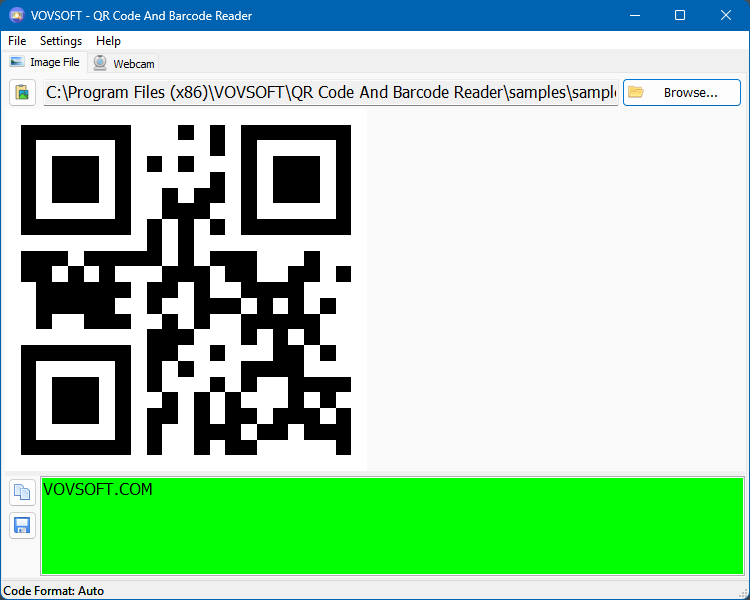
The program utilizes intelligent scanning technology to automatically detect and interpret code types from three primary sources:
- Webcam capture: Scanning physical items or external screens via a connected camera.
- Image files: Importing files in standard formats such as PNG, WEBP, JPEG, TIFF, GIF, and BMP.
- System clipboard: Decoding codes copied directly from other applications, documents, or web browsers.
This desktop application serves as an efficient tool for retrieving product specifications or accessing embedded URLs directly from a workstation. By eliminating the need for a mobile device or an active internet connection, it provides a secure environment for handling information. Its compatibility with a broad range of image formats ensures flexibility for users working with diverse digital assets. The software prioritizes data privacy, keeping all scanned information strictly on the local machine.
Top 5 Reasons To Download QR Code And Barcode Reader
We have all been there. You are sitting at your desk, working on your laptop or desktop computer, and you come across a QR code on a website, in a PDF document, or inside an email. What do you do? You reach into your pocket, grab your smartphone, unlock it, open the camera app, aim it at your computer screen, scan the code, and then... wait. Now the information is on your phone, but you need it on your computer. You end up emailing the link to yourself, messaging it to your own chat history, or manually typing out a ridiculously long URL. It is a tedious, circular dance that disrupts your workflow and wastes valuable time.
Fortunately, there is a better way. The desktop software known as QR Code and Barcode Reader is designed to put an end to this daily annoyance once and for all. This incredibly lightweight, fast, and feature-rich utility brings native scanning capabilities straight to your Windows machine. Whether you are a web developer testing codes, a remote worker accessing secure portals, a consumer tracking packages, or a digital archivist processing documents, this tool is an absolute must-have addition to your software arsenal.
Below, you will find the absolute best features of this application. Here are the top five reasons why you should take advantage of this giveaway and download this software today:
- Uncompromised Privacy and 100% Offline Scanning: Your data remains completely safe because the application processes all barcodes and QR codes locally on your machine without requiring an active internet connection.
- Ultimate Input Flexibility (Files, Webcam, and Clipboard): You can scan codes instantly by uploading an image file, using your computer's built-in webcam, or simply copying an image straight to your clipboard.
- Intelligent Code Auto-Detection: There is no need to manually select formats; the software instantly identifies and decodes both 1D traditional barcodes and 2D QR codes on the fly.
- Lightning-Fast, Ad-Free Desktop Experience: Say goodbye to slow, clunky websites filled with distracting banner ads, trackers, and CAPTCHAs. This native application runs instantly with zero bloat.
- Elimination of "Phone-to-PC" Gymnastics: Keep your focus on your desktop and dramatically boost your productivity by eliminating the need to use your smartphone to scan your monitor screen.
1. Uncompromised Privacy and 100% Offline Scanning
In today's digital landscape, privacy is more than just a preference; it is an absolute necessity. Every single day, we hear stories about data leaks, tracking cookies, and online services that quietly log user activity. Many users resort to using web-based QR scanners when they need to quickly read a code on their computer. While these online tools might seem convenient at first glance, they pose a significant risk to your personal and professional data security.
When you upload an image of a barcode or QR code to an online reader, you are sending that image directly to a remote, third-party server. Who owns that server? What are they doing with your data? Is your information being cached, logged, or analyzed? If the QR code you are scanning contains sensitive credentials, private Wi-Fi passwords, personal contact details, or secure login tokens, you have just handed that data over to a completely unknown entity.
This is where the offline nature of this desktop application becomes an absolute game-changer. The QR Code and Barcode Reader performs every single calculation, image processing task, and decoding sequence entirely locally on your computer's physical hardware. It does not require an active internet connection to function. No data is packaged, compressed, or transmitted over the web. You are the ultimate controller of your private data. Because the software operates completely offline, you can rest easy knowing that your corporate secrets, personal links, and confidential barcodes remain strictly on your hard drive, protected from prying eyes.
2. Ultimate Input Flexibility: Files, Webcam, and Clipboard
A good piece of utility software should adapt to your workflow, not force you to adapt to it. Many barcode readers are incredibly limited in how they accept inputs, requiring you to go through a tedious process of saving files to a specific directory before you can read them. This program breaks down those barriers by offering three highly convenient, versatile input methods that cover every possible scenario.
First, you have the robust file import system. The software supports an incredibly wide range of image formats, including PNG, WEBP, JPEG, TIFF, GIF, and BMP. No matter how the image was saved, you can easily load it into the application and extract the data instantly. This is incredibly useful for scanning invoices, shipping labels, or digital receipts that have been sent to you as image attachments.
Second, the app features direct clipboard integration, which is arguably the most convenient feature for daily office use. Imagine you are browsing a website or looking at a PDF and you see a QR code. Instead of saving the image, you can simply use your operating system's built-in screenshot tool (like the Snipping Tool in Windows) to capture the code, and then paste it directly into the software. The application will instantly read the image from your clipboard and decode it in the blink of an eye. This completely eliminates the digital clutter of saving temporary images to your desktop.
Third, for physical items, the application integrates seamlessly with your computer's webcam. If you have a physical package, a business card, or a printed document in your hand, you do not need to look for your phone. Simply hold the item up to your computer's built-in or external webcam, and the software will capture, focus, and read the code live. This makes it an incredibly versatile bridge between the physical and digital worlds right from your desk.
3. Intelligent Code Auto-Detection
The world of optical codes is surprisingly vast and complex. On one hand, you have traditional, one-dimensional (1D) barcodes. These are the familiar vertical lines that you see on grocery store items, book covers, and shipping boxes. On the other hand, you have two-dimensional (2D) codes, such as the ubiquitous QR code, which can store significantly more data, including website URLs, contact cards, and geographic coordinates.
With many other scanning tools, the user is forced to manually select what kind of code they are trying to scan before the process can even begin. This is not only annoying, but it also requires you to understand the technical differences between various barcode standards. If you select the wrong setting, the software simply fails to read the code, leaving you frustrated and wasting time.
This software eliminates all of that guesswork through its intelligent scanning technology. The application features a highly advanced, automated detection engine. The moment you introduce an image, a clipboard capture, or a webcam feed to the software, it automatically analyzes the visual patterns to determine exactly what type of code it is looking at. Whether it is a standard 1D commercial barcode or a complex 2D QR code, the software identifies the format instantly and applies the correct decoding algorithm. All you have to do is supply the image, and the software handles all the complicated math behind the scenes, delivering clean, readable text or links in a fraction of a second.
4. Lightning-Fast, Ad-Free Desktop Experience
Let's be completely honest: using web-based tools is often a miserable experience. When you search for an "online QR code reader" on search engines, you are greeted with a wall of results that lead to websites overloaded with clunky scripts, invasive cookie banners, annoying pop-up ads, and frustrating CAPTCHAs. These websites are slow to load, heavy on system resources, and constantly trying to trick you into clicking on malicious advertisements or subscribing to newsletters you do not want.
Furthermore, because these websites rely on web-based technologies, they can lag, freeze, or fail entirely if your internet connection drops or if their servers are experiencing high traffic. It is a highly inefficient way to perform a simple task that should take less than a second.
By downloading this native Windows desktop application, you bypass all of those headaches entirely. This software is built from the ground up to be a lightweight, dedicated tool. It launches in a millisecond, features a clean and distraction-free user interface, and contains absolutely no advertisements, tracking scripts, or hidden bloatware. It sits quietly on your system, ready to jump into action the moment you need it. Because it does not run inside a bloated web browser, it consumes practically zero system RAM and CPU resources, making it the perfect utility for older laptops and high-end workstation PCs alike.
5. Elimination of "Phone-to-PC" Gymnastics
Ultimately, the biggest reason to download this software is the sheer boost in daily productivity and the elimination of physical frustration. We have become so accustomed to using our mobile devices for everything that we sometimes overlook how inefficient it is to bridge the gap between our smartphones and our computers.
Think about your current workflow. When you use your phone to scan a QR code on your PC screen, you are introducing a massive break in your concentration. You have to physically stop what you are doing, reach for your phone, unlock it, align the camera, open the link on a tiny mobile screen, and then find a way to get that link back to your computer if you need to do heavy typing, file uploading, or detailed reading. This process is clunky, unprofessional, and entirely unnecessary.
By utilizing this native desktop reader, your hands never have to leave your keyboard and mouse. You can capture, read, and open links directly on the machine you are already working on. If a client sends you a QR code for a Zoom meeting, you can paste it and join the meeting on your desktop instantly. If you are tracking a shipment with a barcode, you can copy the barcode image and immediately view the tracking webpage on your large monitor. It streamlines your digital life, keeps your desktop workflow seamless, and lets you maintain your professional focus without constant, annoying interruptions from your smartphone.
Conclusion: Grab This Essential Tool While It Is Free
In the world of PC utilities, the best programs are the ones that do one specific job flawlessly, quickly, and without getting in your way. The QR Code and Barcode Reader is the textbook definition of a perfect utility. It addresses a highly common digital annoyance with an elegant, incredibly secure, and ultra-fast local desktop solution.
By prioritizing absolute user privacy through offline processing, offering unparalleled input flexibility across files, webcams, and clipboards, and automating the technical side of decoding with intelligent auto-detection, this program stands head and shoulders above any online alternative. It is clean, incredibly lightweight, and completely removes your smartphone from your computer workflow, saving you hours of accumulated frustration and effort over time.
Do not wait until you are stuck in another frustrating situation trying to scan your computer screen with your phone camera. Take advantage of this fantastic giveaway, upgrade your Windows productivity suite, and download this incredibly handy, secure, and reliable barcode and QR code reading software today!

Reviews for QR Code And Barcode Reader
Click Here to Read Reviews for QR Code And Barcode Reader >> Click Here to Submit Reviews for QR Code And Barcode Reader >>