What Does RecordCast PLUS Do?
RecordCast is a browser-based application designed for screen capture and video production. Operating entirely within a web browser, the utility eliminates the requirement for software installations or third-party plugins. Users can initiate recordings of their desktop, a specific application window, or a browser tab through a simplified interface.
The service supports three primary recording modes: screen only, webcam only, or a simultaneous capture of both inputs. Audio recording capabilities include the integration of both internal system sounds and external microphone input. Once the capture is complete, the platform provides a built-in video editor for immediate post-production within the same workspace.
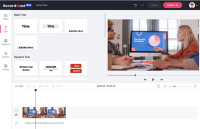
Within the editor, users can perform several tasks to refine their content:
- Trim and split recorded clips for better pacing.
- Apply text effects and graphical overlays.
- Incorporate dynamic elements and background music.
- Modify background colors and layout configurations.
Data privacy is handled via local browser processing. All recordings and video files are processed locally on the user's machine, ensuring that no content is uploaded to a web server or disclosed to third parties. This technical approach prioritizes user security while maintaining the convenience of a web-based workflow.
Top 5 Reasons To Download RecordCast PLUS
Before we dive into the nitty-gritty details of why this tool is a total game-changer for your digital workflow, let’s look at the highlight reel. If you are looking for a way to streamline your content creation, here are the top five reasons you need to jump on this offer right now:
- Zero-Installation Web-Based Accessibility: Forget about bulky software that slows down your computer; record directly from your browser with a single click.
- Versatile Hybrid Recording Modes: Whether you need just the screen, just your webcam, or a professional picture-in-picture setup, this tool handles it all.
- A Fully Integrated Post-Production Suite: You don’t need to export your files to a secondary editor. Trim, add text, and apply overlays within the same interface.
- Comprehensive Audio Control: Capture high-fidelity system audio and microphone input simultaneously to ensure your tutorials or presentations sound professional.
- Ironclad Local Privacy: Your data stays where it belongs—on your machine. All recordings and edits are processed locally, ensuring your sensitive information is never leaked to a server.
The Evolution of Screen Recording: Why RecordCast is the Future
If you have been in the content creation game for more than a minute, you know the struggle. Historically, screen recording has been a fragmented, frustrating process. You’d download a "free" tool only to find it riddled with watermarks. You’d try a professional suite only to realize it requires a computer with the processing power of a NASA workstation. Or, worst of all, you’d finally finish a perfect take only to realize the audio didn't sync, and you have to spend three hours in a separate, complex video editing program just to fix a five-second mistake.
As a tech reviewer, I’ve seen it all. I have tested the high-end subscription services that cost a fortune and the open-source tools that require a degree in computer science to configure. That is why when I came across RecordCast, I knew I had to share it. It represents a paradigm shift in how we approach visual communication. It isn’t just a recorder; it’s an all-in-one ecosystem that lives in your browser, ready to work whenever you are. Let’s break down exactly why this is the tool you’ve been waiting for.
1. Zero-Installation Web-Based Accessibility
We live in a world of "app fatigue." Every time you want to perform a simple task, it seems like you’re forced to download a 500MB installer, agree to twenty pages of terms and conditions, and restart your computer. RecordCast throws that entire archaic model out the window. Because it is a web-based screen recorder, it operates entirely within your browser environment.
This is a massive win for several reasons. First, it means you aren't sacrificing your hard drive space for a utility you might not use every single day. Second, it means you have cross-platform compatibility built-in by default. Whether you are running a high-end Windows gaming rig, a sleek MacBook Pro, or even a budget-friendly Chromebook, RecordCast just works. There are no drivers to update and no plugins to crash your browser.
For those of us who work on multiple devices, this is the ultimate convenience. Imagine being at a library or using a guest computer and needing to capture a quick tutorial or a bug report. You don't have the permission to install software, but you have a browser. With RecordCast, you’re in business. It turns every computer into a potential production studio without leaving a footprint. This "lean" approach to software is exactly what the modern tech enthusiast craves.
2. Versatile Hybrid Recording Modes
One of the biggest complaints I hear from educators and YouTubers is that their recording software is too rigid. Some tools only let you record the full screen. Others struggle to recognize an external webcam while the screen capture is running. RecordCast understands that context matters.
The service offers three distinct modes that cover every possible scenario. You have the Screen + Webcam mode, which is the gold standard for modern communication. This allows you to show your presentation while keeping your face in a corner bubble, which is essential for building rapport with an audience or keeping students engaged during a remote lecture.
Then, you have the Webcam Only mode. Sometimes you don't need to show your desktop; you just need to deliver a quick video message or a "talking head" segment for a vlog. Finally, the Screen Only mode is perfect for those who want to maintain anonymity or create a clean, distraction-free technical walkthrough. The flexibility here is unmatched for a browser-based tool. You can switch between these modes in seconds, ensuring that your content always fits the specific needs of your project.
3. A Fully Integrated Post-Production Suite
This is where RecordCast truly pulls away from the pack. Most screen recorders are "one-trick ponies." They record a file, spit it out as an MP4, and leave you to fend for yourself. If you want to cut out the three seconds at the beginning where you were clearing your throat, or add a title card at the end, you have to find, buy, and learn a separate video editor.
RecordCast eliminates this friction by including a built-in video editor. Once you finish your recording, you aren't prompted to "Save As"—you are invited to "Edit Now." The interface is intuitive enough for a beginner but powerful enough for a pro. You can trim the fat from your clips with surgical precision. But it goes much further than simple cutting.
The editor allows you to add text effects, which are vital for highlighting key points or providing captions. You can drop in overlays and dynamic elements to give your video that "polished" look that usually requires hours of work in expensive software. You can even adjust background colors or add background music to set the right mood. Having this "all-in-one" workflow means you can go from "Start Recording" to "Finished Product" in a fraction of the time it used to take. It’s about efficiency, and RecordCast delivers it in spades.
4. Comprehensive Audio Control
We’ve all been there: you record a brilliant 10-minute software demo, only to realize that while your voice sounds great, the audience couldn't hear the system sounds from the app you were demonstrating. Or, conversely, the system sounds were so loud they drowned out your commentary. Handling audio is notoriously difficult for web apps, but RecordCast has cracked the code.
The tool gives you granular control over your audio sources. You can choose to capture System Audio (the sounds coming from your computer apps and windows), Microphone Audio (your voice via an internal or external mic), or Both. This synchronization is handled on the backend, meaning your voice stays perfectly timed with the action on the screen.
This is particularly important for gamers who want to record their gameplay with commentary, or for business professionals who need to record a video call where both the participants' voices and the presenter's voice need to be audible. The clarity is impressive, and the lack of lag in the audio processing is something you usually only find in heavy-duty desktop applications. In the world of video, audio is half the experience, and RecordCast treats it with the respect it deserves.
5. Ironclad Local Privacy
In an era where data breaches are constantly in the headlines, privacy is no longer a luxury—it’s a necessity. Many online "free" tools operate by uploading your data to their servers for processing. This is a massive red flag, especially if you are recording sensitive company data, private personal information, or proprietary software code.
RecordCast takes a stand on privacy that I find incredibly refreshing. All your recordings and video files are edited locally. This means that while the interface is in your browser, the actual heavy lifting—the encoding and the storing of the video data—happens on your own machine. Your videos are not uploaded to a webserver, and they are never disclosed to third parties.
This "local-first" approach provides a level of security that is rare in the web-app space. You can record a sensitive financial report or a private family message with the peace of mind that your data isn't sitting on a cloud server somewhere, waiting to be hacked. For corporate users who have to follow strict data compliance rules, this feature alone makes RecordCast the only viable choice for a web-based recorder. It combines the convenience of the web with the security of a localized desktop app.
The User Experience: A Reviewer’s Perspective
When I first sat down to test RecordCast, I expected to find "gotchas." Usually, with web recorders, you hit a 5-minute time limit, or the frame rate drops to a stuttering mess as soon as you open a second tab. I was pleasantly surprised to find that the performance remained rock-solid throughout my testing.
The user interface is emblematic of modern design. It’s clean, uses high-contrast elements so you know exactly what is being recorded, and doesn't clutter your screen with unnecessary buttons. The onboarding process is nonexistent because the tool is so intuitive. You click "Start Recording," choose your settings, and you are off to the races.
What I love most as a reviewer is the "One and For All" philosophy mentioned in the tool’s description. It’s about reducing the number of steps between a creative spark and a shared video. In a world where we are constantly bombarded with notifications and distractions, a tool that helps you get the job done faster is worth its weight in gold.
Who Is This Tool For?
While I believe everyone should have this in their digital toolkit, there are a few groups who will find RecordCast indispensable:
- Educators and Students: Create lessons or submit assignments with a personal touch. The ability to add text overlays makes it easy to emphasize learning objectives without needing to be a video editing pro.
- Business Professionals: Instead of a long, rambling email, send a two-minute screen capture. Use it for "async" meetings, bug reporting, or explaining complex spreadsheets to stakeholders.
- Content Creators: If you are starting a YouTube channel or a social media page, RecordCast is the perfect entry point. It gives you professional features without the professional price tag or learning curve.
- Tech Support and Developers: Show, don't tell. Recording a screen to show a specific error or a new feature is much more effective than a dozen screenshots.
Final Thoughts: Don't Miss Out
It is rare to find a service that balances power, simplicity, and security so effectively. RecordCast isn't just a "utility"; it's a productivity booster that respects your time and your privacy. The fact that it integrates a legitimate video editor directly into the recording workflow is a stroke of genius that saves users from the "software shuffle" that usually plagues video production.
If you have been looking for a way to capture anything worth sharing on your screen, this is the definitive answer. Whether you're recording a high-stakes business presentation or just a fun clip to share with friends, RecordCast ensures that the quality of your output matches the quality of your ideas.
The digital world moves fast, and video is the language of the future. Don't let complicated software hold you back. This giveaway is your chance to adopt a tool that will simplify your life and elevate your content. Go ahead and give it a try—your workflow will thank you.


Reviews for RecordCast PLUS
Click Here to Read Reviews for RecordCast PLUS >> Click Here to Submit Reviews for RecordCast PLUS >>