What Does Remote Surveillance Pro Do?
Remote Surveillance Pro is an integrated security solution designed for the remote monitoring of video, audio, and desktop activity. The software functions by hosting a secure web server directly from a local PC, allowing users to access live footage, photo slideshows, and audio streams through any standard web browser on various devices.
The application employs high-precision motion and sound detection sensors. When activity is detected, the system can be configured to automatically transmit email notifications containing the captured media. Every recorded event is time-stamped to ensure chronological accuracy. Key technical features include:
- Multi-Instance Monitoring: Users can track multiple sources simultaneously, with each monitored source assigned its own secure remote access website.
- Integrated Media Tools: A built-in MP4 editor allows for splitting, trimming, or joining clips, while photo slideshows facilitate the analysis of captured events.
- Automated Configuration: Hardware discovery tools generate ready-to-use profiles upon the first run, and task slots save configurations for future use.
- Expanded Capture: The software supports any capture device recognized by the system and includes the ability to log user keystrokes.
This software provides a centralized platform for maintaining oversight of webcams, microphones, and screen activity from any remote location.
Top 5 Reasons To Download Remote Surveillance Pro
1. Comprehensive Triple-Threat Monitoring: Remote Surveillance Pro doesn't just watch your room; it monitors your video feeds, your audio environment, and your actual desktop screen simultaneously.
2. Instant, Secure Remote Access via Built-In Web Server: Unlike other apps that require complex cloud setups, this software transforms your PC into a secure personal server accessible from any browser on any device.
3. Precision Motion and Sound Detection with Smart Alerts: You get hyper-accurate sensors that detect the slightest movement or noise, triggering instant email notifications with attached media so you are always in the loop.
4. Integrated Professional Media Suite: With a built-in MP4 editor and automated photo slideshows, you can trim, join, and analyze captured footage without ever needing third-party software.
5. Scalable Multi-Instance Architecture: The software allows you to run multiple monitoring tasks at once, creating individual secure websites for every single source you choose to track.
Reason 1: Comprehensive Triple-Threat Monitoring
In the world of digital security, most users are accustomed to software that specializes in just one thing. You might have a program for your webcam, a separate utility for recording audio, and perhaps a third-party tool for screen capturing. Remote Surveillance Pro completely disrupts this fragmented approach by offering a "triple-threat" monitoring solution. It is designed to be a centralized hub for remote video surveillance, remote audio surveillance, and remote desktop surveillance all within a single interface.
Think about the implications of this versatility. If you are a parent, you don't just want to see the room; you want to hear what is happening and, perhaps more importantly, see exactly what is appearing on the computer screen. If you are a business owner, monitoring the physical office is only half the battle; ensuring that workstation desktops are being used appropriately is the other half. By combining these three pillars of surveillance, this software provides a 360-degree view of your digital and physical environment.
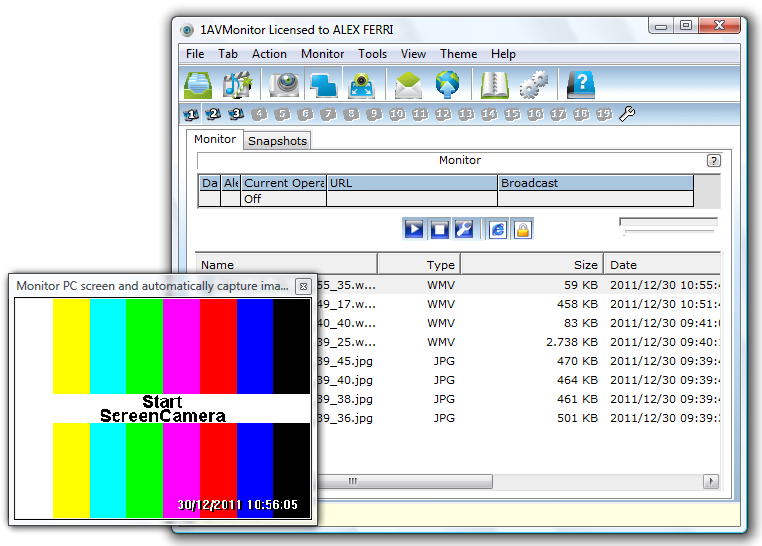
The desktop surveillance aspect is particularly impressive. It doesn't just take occasional screenshots; it treats your desktop like a video source. This means you can keep a remote eye on exactly what a user is doing on the PC in real-time. When you combine this with the ability to tap into any connected webcam or microphone, you have a powerhouse of information at your fingertips. It turns any standard Windows PC into a sophisticated command center, and the best part is that it works with the hardware you already own. You do not need to go out and buy expensive IP cameras when the software can leverage your existing webcams and system resources so effectively.
Reason 2: Instant, Secure Remote Access via Built-In Web Server
One of the biggest headaches with modern surveillance software is the "cloud" requirement. Most companies want to force you into a monthly subscription, storing your private footage on their servers where you have very little control over privacy. Remote Surveillance Pro takes a completely different, and frankly much better, approach. It features a built-in professional web server that publishes a secure website directly from your own computer.
This is a game-changer for anyone who values privacy and ease of use. Because the software acts as the server, you don't have to upload your sensitive video or audio to a third-party database. When you want to check in on your home or office, you simply open a web browser on your smartphone, tablet, or another laptop and navigate to your secure, private URL. The interface is clean, intuitive, and highly responsive, providing you with a live slideshow of photos, video clips, and real-time audio feeds.
This architecture also means you aren't tethered to a specific "viewer app." We have all been in a situation where we want to check a security feed but realize we don't have the right app installed on a friend's device or a work computer. With this software, if the device has a web browser, you have access. The security is robust, ensuring that only you can access the feed, yet the accessibility is universal. This is the kind of professional-grade flexibility that usually costs hundreds of dollars in licensing fees, but it is baked right into this giveaway.
Reason 3: Precision Motion and Sound Detection with Smart Alerts
A surveillance system is only as good as its sensors. If a program is too sensitive, you get a thousand "false positive" emails because a curtain moved in the wind. If it isn't sensitive enough, it misses the very event you were trying to capture. Remote Surveillance Pro utilizes advanced motion and sound detection algorithms that are incredibly accurate. It is designed to detect even minor alterations in the environment, making it a reliable digital watchdog.
The real magic, however, happens after the detection. The software is fully configurable to act as your personal security guard. When the motion or sound sensors are triggered, the program can automatically send you an email. These aren't just text alerts; they include the actual photos, video, and audio captured during the event. This allows you to make an immediate assessment of the situation from your phone. Is it just the cat jumping on the desk, or is there someone in the room who shouldn't be there?
Every piece of activity captured is automatically time-stamped. This is crucial for anyone using the software for professional or legal reasons. Knowing exactly when an event occurred, down to the second, adds a layer of accountability and organization that is often missing from free or basic surveillance tools. You can set it and forget it, knowing that the software is silently monitoring in the background and will only tap you on the shoulder when something actually happens. This saves you hours of manual review and gives you the peace of mind that nothing is slipping through the cracks.
Reason 4: Integrated Professional Media Suite
Most surveillance software stops at the recording phase. They dump a bunch of raw files into a folder and leave it to you to figure out how to view or edit them. Remote Surveillance Pro understands that the "post-capture" experience is just as important as the recording itself. This is why it includes a built-in MP4 video editor that allows you to split, trim, and join detected activity without leaving the application.
Why is this important? Because when you are reviewing hours of footage, you often only need a specific ten-second clip to prove a point or document an event. Instead of exporting the file and opening a heavy video editing suite, you can quickly trim the fat right within the program. You can join multiple clips together to create a chronological narrative of an event, which is incredibly useful for reporting. This level of integration streamlines the workflow and makes the software feel like a complete professional tool rather than a simple utility.
Furthermore, the secure website generated by the software features an automated slideshow of photos. This is a brilliant feature for quick analysis. Sometimes you don't want to sit through a video clip; you just want to see a "storyboard" of what happened. The photo slideshow lets you scan through events visually at a much faster pace than video playback allows. It's these kinds of thoughtful, user-centric features that separate this software from the competition. It isn't just about capturing data; it's about making that data easy to analyze and manage.
Reason 5: Scalable Multi-Instance Architecture
Finally, we have to talk about the sheer power and scalability of this software. Many programs limit you to one camera or one source unless you pay for a "Pro" or "Enterprise" version. Remote Surveillance Pro is multi-instance by design. This means you can monitor multiple sources simultaneously, and each source is treated with the same level of professional detail.
If you have three webcams, two microphones, and two different desktop monitors you want to track, you can set up individual tasks for each one. Each monitored source gets its own dedicated secure website. This organizational structure is perfect for complex setups. You can have one tab open in your browser for the "Front Door," another for the "Server Room," and another for the "Main Office Desktop." The software handles the resource management, allowing you to scale your surveillance needs as your environment grows.
To make this even easier, the software includes a "Hardware Discovery" feature on the first run. It automatically scans your system, identifies every available capture device, and creates profiles for you. This eliminates the tedious process of manual configuration. You don't have to be a tech expert to get a multi-camera setup running; the software does the heavy lifting for you. Additionally, tasks are stored in "slots," so you never have to configure a complex task twice. Once you have your perfect monitoring profile set up, it’s there forever, ready to be activated with a single click. This combination of high-end power and user-friendly automation makes it an essential download for anyone serious about remote monitoring.
The "Silent" Power: Bonus Features You Won't Want to Miss
While the top five reasons provide a compelling argument, the "extra" features are what truly push Remote Surveillance Pro into the "must-have" category for a tech enthusiast. One of the most potent additions is the ability to capture keys pressed by the PC user. While this must be used ethically and legally, it is an invaluable tool for certain scenarios. If you are monitoring a remote server and want to see what commands were entered during a crash, or if you are a parent ensuring your child isn't typing their address into a public forum, this key-logging capability provides a level of detail that video alone cannot offer.
The "Task Slots" feature also deserves a deeper dive. In many surveillance programs, if you want to change your setup—say, switching from "Weekend Mode" to "Workday Mode"—you have to manually adjust every setting. With task slots, you can save entire configurations. You might have one slot dedicated to high-sensitivity motion detection for when the house is empty, and another slot for low-sensitivity audio monitoring for when you are just in the other room. Switching between these complex states is instantaneous, making the software adapt to your life rather than forcing you to adapt to the software.
Finally, the sheer reliability of the software's architecture cannot be overstated. Because it is built to function as a professional-grade server, it is remarkably stable. It is designed to run in the background for days, weeks, or even months without intervention. For a tech reviewer, stability is the ultimate "feature." You need to know that if you are 500 miles away from home, the software isn't going to crash or hang. Remote Surveillance Pro is built with that "always-on" mentality, ensuring that your remote eye and ear never blink or go deaf.
Conclusion: Why You Should Download This Right Now
In an era where we are increasingly distant from our physical assets—whether that's our homes, our offices, or our primary workstations—having a reliable way to check in is no longer a luxury; it's a necessity. Remote Surveillance Pro offers a level of insight that is rarely found in a single package. By merging video, audio, and desktop monitoring into one cohesive system, it provides a total surveillance solution that is both powerful and incredibly easy to use.
The combination of a built-in web server for private access, hyper-accurate motion and sound detection, and the ability to edit your footage on the fly makes this one of the most comprehensive tools in its class. Whether you are looking to bolster your home security, keep an eye on your employees, or simply have the peace of mind that comes with knowing exactly what is happening on your computer when you aren't there, this software delivers on every front.
The hardware discovery feature ensures you’ll be up and running in minutes, and the multi-instance capability means the software grows with your needs. This is not just another webcam app; it is a professional-grade surveillance suite that gives you total control over your environment. As a tech reviewer, I see a lot of software that makes big promises but falls short on execution. Remote Surveillance Pro is the exception. It is robust, it is intuitive, and it is highly effective. Don't miss out on this giveaway—this is a tool that you will find yourself using more often than you ever imagined. Secure your world, monitor your digital footprint, and take control of your hardware today.

Reviews for Remote Surveillance Pro
Click Here to Read Reviews for Remote Surveillance Pro >> Click Here to Submit Reviews for Remote Surveillance Pro >>