What Does Speech to Text Converter Do?
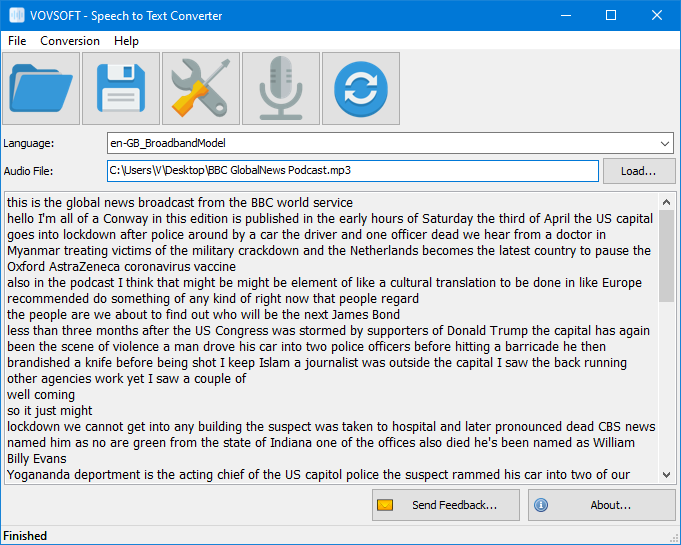
Speech to Text Converter is an automatic speech recognition utility designed to streamline the transcription process for various audio sources. The software supports multiple languages, including English, Spanish, French, Arabic, Brazilian Portuguese, Japanese, Korean, German, and Mandarin. This tool is primarily utilized for converting long-form audio from interviews, meetings, and podcasts into editable text documents.
The application provides two primary methods for audio input:
- Direct recording using a connected microphone.
- Uploading pre-recorded audio files from local storage.
Supported file formats include MP3, FLAC, WAV, OGG, and WEBM. To optimize accuracy, the software allows users to choose between standard and narrow-band models, the latter of which is specifically designed to handle lower-quality audio files. This flexibility ensures the utility can process diverse recordings regardless of the initial capture environment.
Integration with the IBM Cloud Speech to Text API powers the conversion engine. Under the current version's framework, users can process up to 500 minutes of audio per month at no cost. This makes the utility a functional option for professionals requiring consistent transcription services without the need for manual data entry. While high-quality audio input is recommended for the most precise results, the software's settings allow for adjustments based on the specific technical constraints of the source file.
Top 5 Reasons To Download Speech to Text Converter
- Unmatched Multilingual Support: Transcribe in nine of the world's most spoken languages instantly.
- Massive Productivity Gains: Convert hours of audio into text in a fraction of the time it takes to type.
- Flexible Input Options: Seamlessly handle both live microphone recordings and various pre-recorded audio file formats.
- Advanced Audio Processing: Use specialized models to extract clear text even from low-quality or narrow-band recordings.
- Exceptional Value and Integration: Leverage the power of the IBM Cloud Speech to Text API with a generous free tier.
In the fast-paced world of digital content creation, journalism, and corporate administration, there is one task that remains a universal "pain point": transcription. Whether you are a student recording a three-hour lecture, a journalist interviewing a subject, or a business professional trying to document the minutes of a marathon board meeting, the process of turning spoken words into written text is traditionally a grueling, manual slog. However, every once in a while, a piece of software comes along that promises to completely disrupt that workflow. The Speech to Text Converter is exactly that kind of tool. If you have been looking for a reason to modernize your workflow, look no further. This is a must-download utility that bridges the gap between the spoken word and the digital page.
1. Unmatched Multilingual Support
We live in a globalized economy, and our software needs to reflect that. One of the most compelling reasons to download this tool is its robust support for a wide array of global languages. While many basic transcription tools are limited strictly to English, this Speech to Text Converter breaks down international barriers. It supports English, Spanish, French, Arabic, Brazilian Portuguese, Japanese, Korean, German, and Mandarin (Chinese).
For a tech reviewer, this is a standout feature because it addresses the needs of a diverse user base. Imagine you are a researcher conducting field interviews in South America or a business analyst reviewing a conference call from a branch in Tokyo. Having a single, lightweight utility that can pivot between Mandarin and Spanish without skipping a beat is invaluable. The software doesn't just recognize these languages; it utilizes sophisticated linguistic models tailored to the nuances of each tongue. This ensures that the output isn't just a string of phonetically similar words, but a coherent transcription that respects the syntactical structure of the language being spoken.
Furthermore, the inclusion of Arabic and Mandarin is particularly impressive. These languages are notoriously difficult for standard ASR (Automatic Speech Recognition) systems due to their complex character sets and tonal variations. By offering these as standard options, the software positions itself as a professional-grade tool capable of handling the heavy lifting of international communication. Whether you are translating for a global audience or simply archiving records in a native tongue, this multilingual capability is the foundation of the software's utility.
2. Massive Productivity Gains
Time is the most precious resource we have, and manual transcription is a notorious "time-thief." For every hour of recorded audio, the average human typist takes approximately four to six hours to produce a clean transcript. If you are a podcaster, a YouTuber, or a student, that is time you simply cannot afford to lose. This is where the Speech to Text Converter acts as a force multiplier for your productivity.
By automating the transcription process, this software can cut those hours down to minutes. You simply load your file, let the algorithm do its work, and watch as the text populates the screen. This allows you to focus on the value-added aspects of your work—editing the text for tone, pulling out key quotes for an article, or indexing a meeting for action items—rather than the rote, mechanical task of typing.
Think about the sheer volume of audio content generated today. Podcasts are longer than ever, and video meetings have become the standard for office communication. If you are a content creator, being able to quickly generate a transcript of your latest episode means you can easily create blog posts, social media snippets, and captions for accessibility. This giveaway isn't just a piece of code; it is an engine for content repurposing. It turns "dead" audio files sitting in your storage into "living" text documents that can be searched, indexed, and shared across your entire digital ecosystem.
3. Flexible Input Options
A frequent frustration with transcription software is "format friction"—the need to convert files multiple times before the software will even look at them. This utility eliminates that headache by supporting a wide variety of input methods and file formats. Whether you are working with MP3, FLAC, WAV, OGG, or WEBM, the software is ready to go.
The support for FLAC and WAV is particularly important for professionals who demand high fidelity. Lossless audio formats provide the cleanest signal for the ASR engine to analyze, leading to significantly higher accuracy rates. On the other hand, support for WEBM and OGG shows an understanding of modern web standards. If you have downloaded a voice memo or a web-based recording, you can feed it directly into the converter without searching for a third-party file converter.
But the flexibility doesn't stop at pre-recorded files. The software also allows for live microphone recording. This is a game-changer for brainstorming sessions or "think-aloud" drafting. If you are a writer who suffers from "blank page syndrome," you can simply start talking into your microphone and let the software capture your stream of consciousness. You can dictate emails, draft essays, or record memos on the fly. This dual-input approach—handling both the archives of the past and the live recordings of the present—makes it a versatile companion for any digital workstation.
4. Advanced Audio Processing
Any seasoned tech enthusiast knows that the real world isn't a recording studio. Not every audio file is going to be a crystal-clear studio recording. Often, we are dealt files with background noise, low bitrates, or "narrow-band" quality (like a phone call). This is where many free or basic converters fail, producing "word salad" that is more work to fix than to type from scratch.
The Speech to Text Converter addresses this reality by offering narrow-band models for low-quality files. This is a sophisticated feature that adjusts the software's listening parameters to account for the limited frequency range of telephone recordings or compressed audio. By telling the software to expect a lower-quality signal, you actually improve the accuracy of the transcription.
This attention to technical detail is what separates a gimmick from a tool. It means you can successfully transcribe a recorded phone interview or an old archive tape that might have been ignored by other software. The software's ability to handle both high-quality models for studio audio and narrow-band models for compromised audio ensures that you have the right tool for every scenario. It’s about reliability; you need to know that the software will work regardless of whether your source material is a professional podcast or a muffled voice note from a crowded cafe.
5. Exceptional Value and Integration
Finally, we have to talk about the "giveaway" aspect of this software and the underlying engine that powers it. This utility integrates with the IBM Cloud Speech to Text API, which is one of the most powerful and respected AI engines in the world. By using a bridge to the IBM Cloud, the software ensures that you are getting enterprise-grade ASR technology without the enterprise-grade price tag.
One of the most attractive parts of this setup is the 500 minutes per month for free. To put that in perspective, that is over eight hours of audio every single month at no cost. For the casual user, a student, or a small business owner, this is an incredible amount of value. Most professional transcription services charge by the minute, often starting at $1.00 or more per minute of audio. By using this software, you are effectively saving hundreds of dollars every month if you hit that 500-minute threshold.
From a tech reviewer's perspective, this is a "no-brainer." You are getting a localized interface that simplifies the process of connecting to a powerful cloud API. You don't have to worry about complex coding or managing complicated cloud dashboards; the Speech to Text Converter handles the "handshake" between your audio file and the IBM engine. It provides a clean, user-friendly wrapper for one of the most advanced pieces of AI technology currently available. This is the ultimate "power user" hack: getting premium results through a streamlined, accessible tool.
The Verdict
When we look at the landscape of utility software, we are often forced to choose between power and simplicity. We either get a tool that is easy to use but lacks features, or a tool that is powerful but requires a PhD to navigate. This Speech to Text Converter strikes the perfect balance. It is simple enough for a novice to start transcribing in seconds, yet it offers the technical depth (like narrow-band modeling and multi-format support) that professionals require.
The Speech to Text Converter isn't just another app taking up space on your hard drive. It is a solution to one of the most tedious tasks in the digital age. It empowers the journalist to get the story out faster. It allows the student to study more effectively. It helps the business professional keep better records. And for the content creator, it turns a single piece of audio into a mountain of text-based content.
In the style of a true tech reviewer, I’ll say this: Efficiency is the ultimate luxury. By downloading this tool, you are reclaiming your time and leveraging the power of modern AI to do the work you’d rather not do. With 500 free minutes a month and support for nearly every major global language, there is absolutely no reason not to have this in your digital toolkit. Don’t let your audio files sit idle and don’t waste another afternoon transcribing by hand. Download this giveaway, set up your IBM Cloud integration, and enter the era of automated transcription today. Your fingers (and your schedule) will thank you.
The Speech to Text Converter is compatible with modern Windows environments and provides a lightweight, focused experience that respects your system resources while delivering heavy-duty results. It’s time to stop typing and start converting.

Reviews for Speech to Text Converter
Click Here to Read Reviews for Speech to Text Converter >> Click Here to Submit Reviews for Speech to Text Converter >>