What Does Stepok Picture Enlarger Do?
Stepok Picture Enlarger is a specialized utility designed for the high-quality scaling of digital images. While standard image editors often rely on bi-cubic interpolation, which can result in significant blurring, Stepok utilizes proprietary algorithms to maintain edge sharpness and preserve fine details during the enlargement process. The software is engineered to ensure that objects within an image retain their natural appearance even when significantly upscaled.
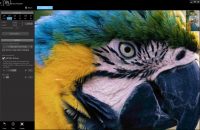
One of the most notable technical aspects of this software is its approach to texture. It introduces a method for generating high-resolution "fake-textures," which adds synthetic detail back into the image in a high-resolution space. This feature is particularly effective for enhancing areas like hair, fur, or other complex surfaces that typically lose definition when pixels are stretched.
The application is versatile, supporting a wide range of source materials, including:
- High-resolution photographs and web-optimized images.
- Vector-style graphics and hand-drawn illustrations.
- Scanned text documents and line art.
By focusing on structural integrity and synthetic texture replenishment, Stepok Picture Enlarger provides a solution for users needing to increase image dimensions without the typical loss of clarity associated with traditional resizing methods. It aims to deliver outputs where the edges remain sharp and natural across various media types.
Top 5 Reasons To Download Stepok Picture Enlarger
- Unrivaled Image Scaling Beyond Traditional Interpolation: Stepok Picture Enlarger moves past the limitations of standard bi-cubic resizing, using advanced algorithms to rebuild pixels rather than just stretching them.
- Pristine Edge Retention and Sharpness: This software eliminates the "stair-step" artifacts and blurriness commonly found in enlarged photos, keeping borders crisp and natural.
- Revolutionary "Fake-Texture" Generation: By intelligently adding texture in high-resolution space, the tool restores realistic details to complex surfaces like fur, hair, and fabric.
- Incredible Versatility for Diverse Media Types: Whether you are working with digital photography, vector-style graphics, scanned text, or hand-drawn sketches, the software adapts to the specific needs of the medium.
- Professional Grade Results with a Streamlined User Experience: It offers high-end, studio-quality enlargement capabilities in a package that is accessible and efficient for both pros and hobbyists alike.
If you have ever tried to take a small, cherished photo and blow it up for a print, or tried to rescue a low-resolution image found on an old hard drive, you know the immediate frustration that follows. The moment you hit that "resize" button in a standard editor, the magic disappears. What was once a clear—albeit small—image becomes a muddy, pixelated mess. This is the "digital ceiling" that most of us have hit at one point or another. However, Stepok Picture Enlarger is here to shatter that ceiling. As a tech reviewer who has seen dozens of "enhance" tools come and go, I can tell you that this isn't just another utility; it is a fundamental upgrade for your digital toolkit. Here is a deep dive into why you need to download this giveaway right now.
1. Unrivaled Image Scaling Beyond Traditional Interpolation
To understand why Stepok Picture Enlarger is so impressive, we first have to talk about the "old way" of doing things. For decades, the industry standard for resizing images has been "bi-cubic interpolation." In layman's terms, when you enlarge an image, the software has to "guess" what the new pixels should look like based on the ones around them. Bi-cubic methods basically average the colors of neighboring pixels. The result? A blurry, soft image that looks like it was viewed through a fogged-up window. It lacks soul, it lacks definition, and it looks amateur.
Stepok Picture Enlarger utilizes a completely different philosophy based on unique, proprietary algorithms. Instead of merely averaging pixels, the software analyzes the structure of the image. It looks for patterns, gradients, and shapes. When you ask it to enlarge a photo by 200% or 400%, it isn't just stretching the canvas; it is intelligently reconstructing the image data. This is the closest thing we have to the "Zoom and Enhance" technology you see in sci-fi movies. By moving beyond the limitations of traditional math, Stepok provides results that are visually indistinguishable from an image captured at a higher native resolution. For anyone who deals with high-stakes printing or digital archiving, this technological leap is worth the download alone.
2. Pristine Edge Retention and Sharpness
The biggest giveaway of a poorly resized image is the "aliasing" or "stair-stepping" effect along the edges of objects. When you blow up a low-res file, the diagonal lines start to look like a set of stairs. This is incredibly distracting and immediately signals a lack of quality. Most software tries to fix this by applying a "blur" filter, which only makes the image look out of focus. It is a lose-lose situation.
Stepok Picture Enlarger tackles this problem with a level of precision that is frankly startling. Because the algorithm understands the "object" within the photo, it treats edges with extreme care. Whether it is the sleek line of a car’s hood, the silhouette of a mountain range, or the delicate curves of a human face, the software maintains sharp, clean, and natural-looking boundaries. It manages to increase the size without introducing the dreaded "halo" effect—those weird white or dark glows that appear around high-contrast edges in inferior software. This makes it an essential tool for anyone working with vector-style graphics or logos that need to be scaled up for large-format displays without losing their geometric integrity.
3. Revolutionary "Fake-Texture" Generation
This is where Stepok Picture Enlarger truly separates itself from the pack. One of the greatest challenges in image enlargement is what happens to "organic" textures. When you enlarge a photo of a dog or a person wearing a wool sweater, traditional resizing makes the fur or the fabric look like smooth plastic. You lose the "micro-details" that make a photo look real. Humans are very good at spotting when a texture looks "off," and this "plastic" look is a hallmark of bad digital scaling.
Stepok introduces an innovative way to add "fake-texture" in high-resolution space. Now, don't let the word "fake" fool you. This isn't random noise; it is a sophisticated reconstruction of what the texture should look like at a higher resolution. When the software detects areas of high complexity—like hair, skin pores, or grass—it injects subtle, intelligently placed texture data. The result is an enlarged image that actually contains extra details that weren't visible in the original. The hair looks like individual strands rather than a solid block of color; the fur looks soft and touchable. This specific feature is a game-changer for portrait photographers and wildlife enthusiasts who need to crop their photos significantly but still want the final product to look like it was shot on a high-end full-frame sensor.
4. Incredible Versatility for Diverse Media Types
Many "AI" or "Smart" enlargers are built specifically for photos and fail miserably when they encounter anything else. If you try to run a scanned document or a hand-drawn sketch through a photo-centric resizer, the results are often distorted or overly processed. Stepok Picture Enlarger is designed with universal versatility in mind. It is optimized for a staggering variety of inputs:
- Digital Photos: High-fidelity reconstruction for landscapes, portraits, and macros.
- Web Images: Rescue low-quality JPEGs from the early days of the internet and make them usable for modern high-DPI screens.
- Vector Style Graphics: Scale logos and icons with the crispness of a vector file even if you only have a raster original.
- Scanned Text: Perfect for historians or office workers needing to enlarge old documents without the letters becoming illegible blobs.
- Hand-Drawn Images: Preserve the unique "tooth" of the paper and the organic flow of pencil or ink strokes while increasing the canvas size.
This wide range of compatibility means you don't need five different tools for five different types of files. Stepok acts as your one-stop shop for any resizing task, making your workflow significantly more efficient.
5. Professional Grade Results with a Streamlined User Experience
We have all used software that is incredibly powerful but requires a PhD in computer science to navigate. Stepok Picture Enlarger strikes the perfect balance between professional-grade output and user-friendly operation. It provides the advanced controls that professionals need—such as specific texture density adjustments and edge sensitivity—without overwhelming the casual user who just wants to make a photo bigger for their Instagram feed.
In a world where we are constantly bombarded with "freemium" apps that are full of ads and limited features, getting a professional tool like this as a giveaway is a rare opportunity. It is built for speed and efficiency, allowing you to process images quickly without a massive drain on your system resources. Whether you are a web designer needing to quickly resize assets for a responsive site, or a hobbyist trying to print a 24x36 poster from a smartphone snap, this software delivers the results you want with minimal friction. It is about giving you the confidence that your enlarged images will look intentional, not like an accidental error.
Final Thoughts from the Reviewer: We live in a visual age, and image quality is our primary currency. We are moving toward higher and higher resolution displays—from 4K monitors to Retina tablets—and our old image libraries are struggling to keep up. Stepok Picture Enlarger is the bridge between your past low-res files and the high-def future. It is a rare piece of software that actually delivers on the promise of "enlarging without losing quality." By combining advanced structural analysis with innovative texture injection, it provides a level of realism that was previously impossible. Do not miss the chance to add this professional-grade tool to your arsenal. Download it, test it on your most challenging "small" photo, and prepare to be amazed by the detail that was hiding there all along.
The ability to faultlessly enlarge your memories, your work, and your art is something you won't realize you needed until you see it in action. This giveaway is your ticket to a clearer, sharper, and more detailed digital world. Don't wait—high-resolution excellence is just a download away.


Reviews for Stepok Picture Enlarger
Click Here to Read Reviews for Stepok Picture Enlarger >> Click Here to Submit Reviews for Stepok Picture Enlarger >>