What Does The Android Beginner’s Guide, How To Set Up Your First Smartphone Do?
This instructional resource serves as a comprehensive onboarding guide for first-time Android users. It addresses the initial complexities of transitioning to a smartphone ecosystem by providing a step-by-step framework for device configuration and daily operation.
The guide focuses on the fundamental technical requirements of the platform, including:
- Initial Device Setup: Standard procedures for activating hardware and establishing cellular or Wi-Fi connectivity.
- Account Integration: Methods for syncing digital services and Google accounts to access unified communication tools.
- Interface Navigation: Explanations of core UI elements, gesture controls, and the application drawer layout.
- Content Management: Protocols for locating and consuming digital media, including educational materials, social networking platforms, and news articles.
By simplifying the initial learning curve, the material assists users in managing the influx of information inherent to modern mobile operating systems. It offers a structured approach to hardware management, ensuring that new owners can effectively utilize their devices for personal productivity and interest-based research. The content is designed to demystify technical terminology and provide a clear roadmap for long-term device maintenance and security. Android represents a broad ecosystem, and this guide provides the necessary foundational knowledge to navigate it efficiently.
Top 5 Reasons To Download The Android Beginner’s Guide, How To Set Up Your First Smartphone
- Seamless Onboarding and Mastering the Learning Curve
- Hardened Security and Data Privacy From Day One
- Optimizing Performance for a Lag-Free Experience
- Unlocking the Power of Total Personalization
- Extending Hardware Longevity and Battery Health
So, you finally did it. You took the plunge and picked up your very first Android smartphone. Whether it is a flagship device with a stunning screen or a budget-friendly powerhouse, you are currently holding one of the most sophisticated pieces of technology ever created in the palm of your hand. Congratulations! You are about to enter a digital ecosystem that is vast, vibrant, and incredibly versatile. From high-definition video streaming and global social networks to professional-grade productivity tools and endless educational resources, your world is about to get a whole lot bigger.
However, I have been in the tech reviewing game long enough to know that the initial excitement of unboxing a new device can quickly turn into a sense of being overwhelmed. Android is famous for its flexibility, but that flexibility comes with a lot of menus, settings, and choices. If you are new to the platform, you might feel like you are sitting in the cockpit of a jet fighter without a manual. That is exactly why this giveaway is an absolute must-have for any newcomer. This guide isn’t just a "how-to"; it is your strategic roadmap to mastering the Android experience. Here are the top five reasons why you need to download this giveaway right now.
1. Seamless Onboarding and Mastering the Learning Curve
The first few hours with a new operating system are the most critical. This is when you set the foundation for how you will interact with your device for the next few years. For a first-time Android user, the "Paradox of Choice" is a real thing. Do you use the gesture navigation or the classic three-button layout? How do you sync your old contacts? What on earth is a "Google Account" and why does it want to know your favorite color? This giveaway strips away the confusion and provides a streamlined, step-by-step onboarding process.
Most people learn their phones through a frustrating process of trial and error. They accidentally delete icons, they can’t find where their downloaded files went, and they struggle with basic navigation. By downloading this guide, you skip the "frustration phase" entirely. It teaches you the gestural language of Android, helping you understand how to swipe, pinch, and tap your way through the interface like a pro. Think of this as a shortcut to muscle memory. Instead of spending weeks feeling "clunky" with your phone, you will be flying through apps within the first hour. It covers the essentials of the home screen, the app drawer, and the notification shade—the holy trinity of the Android interface—ensuring you never feel lost in your own device.
Furthermore, the guide helps you understand the deep integration of the Google ecosystem. Since Android is a Google-developed platform, knowing how to leverage your Google Drive, Photos, and Gmail accounts in tandem with your hardware is a game-changer. This giveaway ensures that you aren't just using a phone; you are using a synchronized digital assistant that makes your life easier.
2. Hardened Security and Data Privacy From Day One
In the modern age, your smartphone is more than just a communication device; it is a digital vault containing your bank details, private conversations, family photos, and location history. One of the biggest mistakes new users make is neglecting security because they assume the phone "just works" out of the box. While Android is inherently secure, it requires proper configuration to be truly "hardened" against threats. This is where the expertise of this giveaway really shines.
The guide walks you through the essential security protocols that every user needs to know. It covers the nuances of Permissions Management—a vital feature that allows you to control exactly which apps can access your camera, microphone, and contacts. Without this knowledge, you might inadvertently give a simple flashlight app permission to track your physical location 24/7. By following the advice in this giveaway, you learn how to audit your apps and keep your data private.
Moreover, the giveaway introduces you to advanced security features like find-my-device protocols, two-factor authentication, and secure lock-screen settings. We live in a world where digital privacy is a luxury, but with the right setup, it becomes a standard. This guide teaches you how to recognize phishing attempts and how to use the built-in Google Play Protect system to scan for malicious software. By downloading this, you aren't just getting a manual; you are getting a digital insurance policy for your personal information.
3. Optimizing Performance for a Lag-Free Experience
There is nothing quite like the "new phone smell"—or rather, the "new phone speed." When you first turn on an Android device, it feels lightning-fast. But as you start installing apps, syncing accounts, and browsing the web, "digital clutter" begins to accumulate. If you don't know how to manage your device’s resources, that snappy performance can turn into sluggish lag within months. This giveaway is essential because it teaches you the art of performance optimization.
One of the key sections of this guide focuses on Resource Management. You will learn how to identify "bloatware"—those pre-installed apps that you don't need but that secretly drain your battery and eat up your RAM. The guide explains how to disable or remove these unnecessary programs, freeing up power for the apps you actually care about. It also teaches you about background data usage. Many apps continue to run and communicate with servers even when you aren't using them. Learning how to put these apps to "sleep" ensures that your processor stays cool and your interface stays responsive.
Additionally, the giveaway covers storage management. Modern apps and high-resolution photos can fill up your internal storage faster than you think. A full phone is a slow phone. By learning how to use cloud backups and how to clear out temporary "cache" files, you can keep your device running as fast as the day you bought it. This proactive approach to maintenance is the difference between a phone that lasts two years and a phone that lasts five.
4. Unlocking the Power of Total Personalization
The single greatest advantage of Android over any other mobile operating system is freedom. Android allows you to make your phone a reflection of your personality and your specific workflow. However, many beginners never move past the default wallpaper and the factory-standard icon layout. They are missing out on 50% of the value of their purchase! This giveaway serves as an inspiration gallery and a technical manual for deep customization.
When you download this guide, you will learn about Launchers and Widgets. For the uninitiated, a launcher is an app that changes the entire look and feel of your home screen and app icons. You can make your phone look like a minimalist piece of art, a high-tech terminal, or a cozy digital scrapbook. The guide explains how to place interactive widgets on your screen so you can see your calendar, weather, or music controls without ever having to open an app. This isn't just about aesthetics; it's about efficiency.
Beyond the visuals, the guide delves into system-level customization. You can change your default browser, your default messaging app, and even how your phone reacts when you plug in headphones. You can set up "Do Not Disturb" schedules so your phone stays silent during work hours but rings for emergency contacts. This giveaway empowers you to stop adapting to your phone and start making your phone adapt to you. It transforms the device from a generic tool into a personalized companion.
5. Extending Hardware Longevity and Battery Health
Let's talk about the most important component of your phone that you never actually see: the battery. Most users charge their phones incorrectly, leading to degraded battery health that results in the phone dying halfway through the day after just a year of use. This giveaway includes expert-level tips on Battery Longevity that can save you hundreds of dollars in repair or replacement costs down the line.
The guide explains the "Goldilocks Zone" for lithium-ion batteries and why keeping your phone between 20% and 80% charge can significantly extend its lifespan. It also identifies the "silent killers" of battery life, such as excessive screen brightness, high-drain location services, and apps that refuse to stay closed. By following the power-saving strategies outlined in the giveaway, you can often squeeze an extra three to four hours of "screen-on time" out of a single charge. This is invaluable for travelers, students, or anyone who doesn't want to be "tethered to a wall" throughout the day.
Furthermore, the giveaway covers physical care and software updates. It explains the importance of regular "system patches." Many users ignore update notifications because they take a few minutes to install, but these updates often contain critical fixes that prevent your hardware from overheating and your software from crashing. By following this guide, you ensure that your investment is protected. You aren't just learning how to use a phone; you are learning how to maintain a piece of high-end machinery. This longevity ensures that your Android experience remains positive for years to come, giving you the best possible return on your investment.
Final Thoughts: In the fast-paced world of mobile technology, information is power. You have a choice: you can fumble through your new Android experience, making mistakes and leaving your data vulnerable, or you can download this giveaway and become a power user overnight. With its focus on security, performance, customization, and longevity, this guide is the ultimate companion for your new smartphone journey. Don't leave your digital life to chance. Grab this giveaway, follow the steps, and unlock the true potential of your new Android phone. You’ve got the hardware—now get the knowledge to back it up!

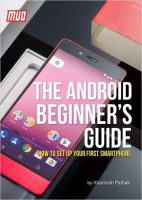

Reviews for The Android Beginner’s Guide, How To Set Up Your First Smartphone
Click Here to Read Reviews for The Android Beginner’s Guide, How To Set Up Your First Smartphone >> Click Here to Submit Reviews for The Android Beginner’s Guide, How To Set Up Your First Smartphone >>