What Does VCF Editor Do?
VCF Editor is a dedicated Windows utility designed for managing and modifying vCard files locally. Unlike cloud-based alternatives, this tool operates entirely offline, ensuring that sensitive contact data remains on the user's hardware rather than being transmitted to external servers. This local-first approach prioritizes data privacy and security for both individual and professional use.
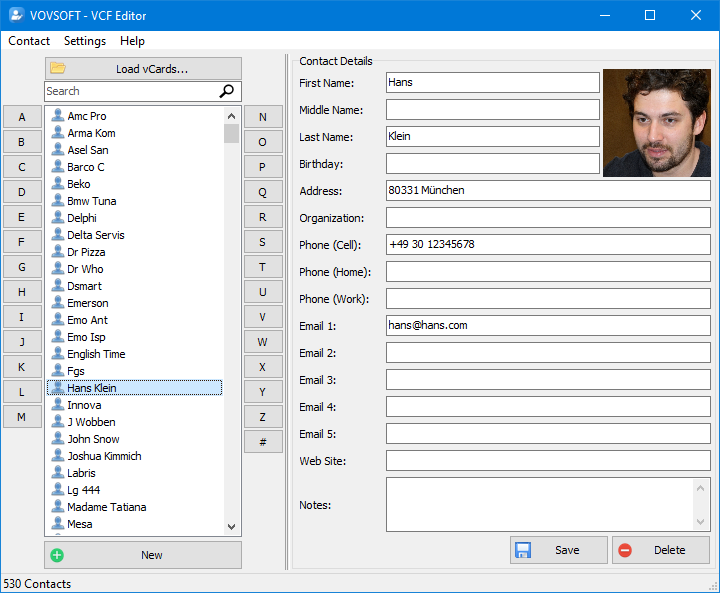
The software allows users to load and view VCF files to edit primary fields, including names, telephone numbers, physical addresses, and profile photographs. It supports both individual vCard adjustments and bulk processing, making it suitable for managing large contact directories. The interface provides a structured environment to view all data points contained within the files before committing changes.
Beyond basic editing, the application facilitates data conversion and list maintenance through several key features:
- Format Support: Save updated records in the native VCF format or export data to CSV for use in spreadsheets and databases.
- Duplicate Removal: Identify and delete redundant entries automatically to clean up cluttered contact lists.
- Bulk Operations: Edit and manage multiple contact files simultaneously to improve workflow efficiency.
- Local Processing: Perform all tasks without an internet connection, preventing data leaks or third-party access.
Whether you are organizing personal phone contacts or maintaining a business database, VCF Editor provides a secure, functional environment for ensuring contact information remains accurate, organized, and private.
Top 5 Reasons To Download VCF Editor
In the world of digital organization, managing your contacts can often feel like a secondary chore until the moment you actually need to find someone’s information and realize your address book is a mess. Whether you are migrating data between devices, cleaning up a professional database, or simply trying to make sense of a collection of vCard files, having the right tool is essential. VCF Editor is that tool. If you have been looking for a way to take full control over your contact lists without compromising your privacy, this is the software you need. Here are the top five reasons why you should download this giveaway today:
- Total Offline Privacy and Security: Your contact list contains some of your most sensitive information, and VCF Editor ensures it stays on your machine, never touching the cloud.
- Granular Editing Capabilities: From profile photos to complex address fields, you have the power to modify every aspect of a vCard file with ease.
- Effortless Duplicate Removal: Say goodbye to cluttered address books with a built-in feature designed to identify and eliminate redundant entries.
- Seamless CSV and VCF Interoperability: Whether you need to move data to a spreadsheet or back to a mobile device, the export options have you covered.
- Lightweight and Intuitive User Interface: There is no steep learning curve here; the software is designed for efficiency and speed, even when handling bulk files.
1. Total Offline Privacy and Security
We live in an era where data is often treated as the new currency. Almost every "free" tool you find online these days wants something in return: your email address, your browsing habits, or worse, access to the very data you are trying to process. When it comes to your contact list—which includes names, private phone numbers, home addresses, and even personal photos of your friends and family—the stakes are incredibly high. Uploading a VCF file to a web-based converter or editor is a massive security risk that many users overlook in the name of convenience.
The primary reason I recommend VCF Editor so highly is its offline-first architecture. This software does not require an internet connection to function. When you open a file, it is processed locally on your Windows machine’s RAM and CPU. Nothing is sent to a remote server, nothing is cached in a cloud database, and no third-party scripts are scraping your contacts for marketing purposes. In a world where data breaches are a weekly occurrence, having a "local-only" tool is a breath of fresh air for anyone who values their digital sovereignty.
For business professionals, this is not just a matter of preference; it is a matter of compliance. If you are handling client information, uploading that data to an unverified web tool could potentially violate privacy regulations. By using a dedicated offline editor, you ensure that your professional integrity remains intact while you perform necessary maintenance on your contact directories. You have complete control over your sensitive information from the moment you open the app to the moment you hit save.
2. Granular Editing Capabilities
A vCard file (VCF) might seem like a simple text file on the surface, but it contains a complex structure of fields and metadata that can be a nightmare to edit manually in a text editor like Notepad. If you’ve ever tried to change a phone number or fix a typo in a raw VCF file, you know how easy it is to accidentally break the formatting, rendering the file unreadable by your phone or email client. This software eliminates that frustration entirely.
VCF Editor provides a clean, structured environment where you can load, view, and edit every key contact field. We aren’t just talking about names and phone numbers. This tool allows you to dive deep into the personal details that matter. You can update surnames, modify physical addresses, add or change email addresses, and even manage the profile photos associated with the contact. This level of granular control is essential for keeping a professional appearance in your communications.
One feature that really stands out to me as a reviewer is the ability to manage multiple files simultaneously. Often, when you export contacts from an older device, you end up with hundreds of individual .vcf files rather than one consolidated list. This software handles that scenario with grace, allowing you to move through your collection and make updates without having to open and close files repeatedly. It turns what would be a multi-hour manual task into a streamlined, five-minute process.
3. Effortless Duplicate Removal
There is nothing more annoying than searching for a contact on your phone and seeing "John Smith" listed four different times, each with a different snippet of information. One entry might have an old work email, another might have his current mobile number, and a third might just be a ghost entry from an old sync. This happens to the best of us, usually the result of multiple cloud syncs (Google, iCloud, Outlook) clashing with one another. Over time, your contact list becomes bloated, inefficient, and difficult to navigate.
One of the standout features of VCF Editor is its dedicated ability to delete duplicate contacts. Instead of scrolling through your list and manually comparing entries, the software does the heavy lifting for you. It identifies redundant information and allows you to clean up your files effortlessly. This is a massive "quality of life" improvement for anyone who has ever felt overwhelmed by a cluttered digital Rolodex.
By removing these redundant entries, you aren't just making your list look better; you are also making it more functional. Clean vCard files are smaller in size, sync faster across devices, and prevent those awkward moments where you accidentally text an old, inactive number because it was still sitting in your contacts. It is about efficiency and clarity, and this tool provides both in spades.
4. Seamless CSV and VCF Interoperability
In the tech world, compatibility is king. While the VCF format is the standard for mobile phones and email clients like Outlook, it isn't always the best format for data analysis or bulk management. Sometimes, you just need to see all your contacts in a spreadsheet. This is where VCF Editor truly shines as a versatile utility. It allows you to export your updated data into CSV (Comma Separated Values) files.
Why is this important? Because once your contacts are in a CSV format, you can open them in Microsoft Excel, Google Sheets, or any database management system. This is perfect for businesses that need to import their contact lists into a CRM (Customer Relationship Management) system or for individuals who want to print out a physical contact sheet for an emergency binder. The ability to move back and forth between VCF and CSV gives you a level of flexibility that most basic contact managers simply don't offer.
Furthermore, if you have a huge list of contacts in a spreadsheet that you’ve been dreading manual entry for, you can use this tool as a bridge. It facilitates the transition between the static world of spreadsheets and the active world of mobile communication. It ensures that your data remains portable and usable, regardless of which platform or device you decide to use in the future. You are never "locked in" to a single format.
5. Lightweight Performance and User-Friendly Design
We have all downloaded software that feels like it’s trying to do too much. You want a simple tool to edit a file, but instead, you get a 500MB installation package full of "helper" apps, background services, and distracting animations. Vovsoft, the creator of VCF Editor, is known for the exact opposite approach. Their software is notoriously lightweight, fast, and focused.
When you run VCF Editor, it opens instantly. There is no splash screen that hangs for thirty seconds while it "checks for updates" or phones home. The interface is intuitive, meaning you don't need a 50-page manual to figure out how to change a phone number. The buttons are where you expect them to be, the layout is clean, and the performance remains snappy even when you are dealing with large bulk edits involving thousands of entries.
This "no-nonsense" design philosophy is something I wish more developers would adopt. It respects the user's time. You have a task to do—editing a contact list—and the software gets out of your way and lets you do it. Whether you are a tech-savvy power user who wants to quickly strip metadata from a vCard or a casual user who just wants to fix a typo in their boss's phone number, the experience is equally smooth. It’s a professional-grade tool that remains accessible to everyone.
Final Verdict: Why You Should Get It Now
If you have a collection of vCard files sitting on your hard drive, or if you’ve recently exported your contacts from an old phone, you owe it to yourself to download this tool. It addresses the three biggest pain points of contact management: privacy, clutter, and compatibility. Most people don't realize how much they need a dedicated VCF editor until they are in the middle of a data migration nightmare. By downloading this now, you are essentially "future-proofing" your contact list.
Think about the peace of mind that comes with knowing your data is being handled entirely on your own terms. No cloud snooping, no subscription fees, and no complicated web interfaces. Just a powerful, local Windows application that does exactly what it says on the tin. It is a specialized tool for a specialized task, and in my experience, those are always the most valuable additions to any software toolkit.
Don't wait until you're frustrated by a messy contact list. Take the proactive step toward better digital organization. Whether you are an individual looking to tidy up your personal life or a business professional managing a massive directory, VCF Editor provides the features, the security, and the ease of use necessary to get the job done right. This giveaway is a fantastic opportunity to add a high-quality utility to your arsenal for free. Download it, clean up those contacts, and enjoy the feeling of a perfectly organized digital life.
In conclusion, the combination of privacy-first design, bulk editing power, and format flexibility makes VCF Editor a must-have. It is a rare example of software that knows exactly what it needs to be and executes that vision perfectly. If you value your time and your data, this is one download you definitely don't want to skip. It's time to take control of your vCards once and for all!

Reviews for VCF Editor
Click Here to Read Reviews for VCF Editor >> Click Here to Submit Reviews for VCF Editor >>