

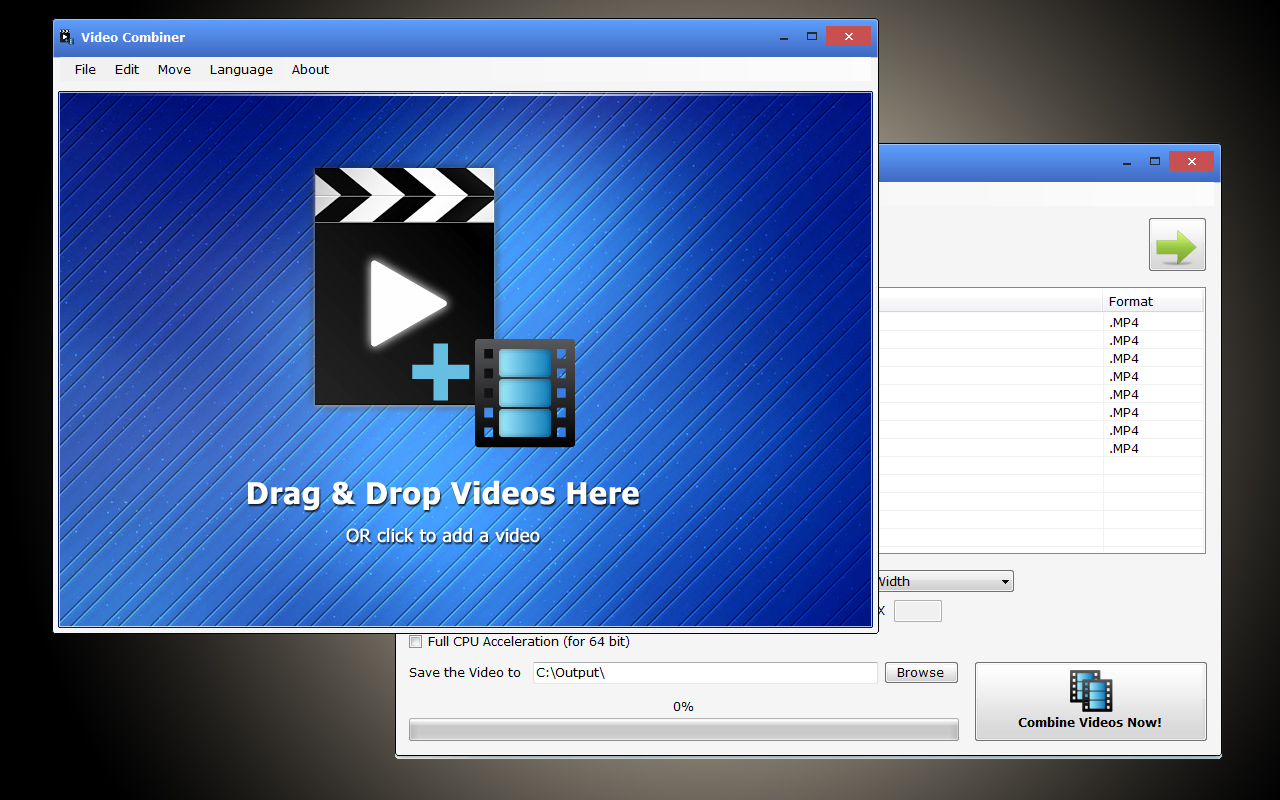
Video Combiner is a powerful video merging software tool on Windows. This small video tool allows users to merge video clips in multiple formats into a single video at one time, and it has a variety of adaptive video resolution to choose from. This useful video combing application supports video formats recorded from all major smart phones and tablets such as Apple iPhone, iPad, Android Phone, Android Tablet, and supports most of popular video formats such as MP4, MOV, FLV, 3GP, AVI, WMV, MPG, VOB and more. this program can mix and concatenate videos in multiple video formats at the same time, so you can easily join mp4 files with other videos formats into one video at once. Video Combiner remains the original video bit rates by default, which means you can merge videos without losing the original video quality. If you want to compress the combined video file or adjust the video quality, the program also allows you to customize the video bitrate. You can adjust the value of the video bitrate according to your own needs. There is another unique feature of Video Combiner is the auto-fit “Screen Size” option. The biggest trouble you may encounter while combining video clips is that the screen resolution and aspect ratio of each video is different. In addition to merging videos into standard 16:9, 5:4, and 9:16 screen ratios, Video Combiner offers several pre-set options for adaptive video screen resolution, and it also provides the “Customize Size” option, which allows users to enter the width and height of the screen to set a custom video screen size. The program retains every video clip’s original display aspect ratio by default, and fill the blank area with black color. If you want to scale the video display aspect ratio to fit the full screen size, please check the “Scale Videos” option. If you’re using a 64-bit multi-core CPU, Video Combiner offers a 64-bit multi-threaded acceleration option that provides faster video merging speed.
Official Product Description
Overview
What Does Video Combiner PRO Do?
Video Combiner is a dedicated Windows utility designed to merge multiple video clips into a single file. The software supports a wide range of formats, including MP4, MOV, FLV, 3GP, AVI, WMV, MPG, and VOB, making it compatible with footage recorded on iOS and Android devices. Users can concatenate different formats simultaneously without the need for manual conversion beforehand.
By default, the application maintains original bitrates to preserve video quality, though it provides options to customize bitrates for file compression or quality adjustments. One of its primary features is the handling of varied aspect ratios and resolutions. It offers standard presets such as 16:9, 5:4, and 9:16, alongside an auto-fit screen size option and custom dimension inputs. To manage differing source ratios, the tool can either retain original proportions by adding black borders or scale the footage to fill the frame using the Scale Videos option.
For performance, the software includes a 64-bit multi-threaded acceleration mode specifically for users with multi-core CPUs, which optimizes processing speed during the merging phase. The interface is built for batch processing, allowing for the rapid consolidation of diverse media assets into a unified output while retaining the original display aspect ratios of each individual clip.
Top 5 Reasons To Download Video Combiner PRO
Before we dive into the nitty-gritty details of why this software is a must-have for your digital toolkit, let’s look at the highlights. If you are looking for a streamlined, efficient, and powerful way to manage your video library, here are the top five reasons you need to download Video Combiner today:
- Seamless Multi-Format Concatenation: The ability to merge different video formats (like MP4, MOV, and AVI) into one single file without needing to convert them first.
- Lossless Quality Retention: By default, the software retains the original bitrates, ensuring your final video looks just as crisp as the source clips.
- Adaptive Resolution and Smart Aspect Ratio Management: Intelligent "Screen Size" options that handle the headache of mixing vertical and horizontal videos from different devices.
- High-Speed Performance via Multi-Threading: Full utilization of 64-bit multi-core CPUs to ensure your videos are merged in record time.
- Total Bitrate and Dimension Customization: Granular control for those who need to compress files for the web or set specific dimensions for professional projects.
In the world of content creation, video editing can often feel like a daunting chore. We have all been there: you have five different clips from your iPhone, three from a friend’s Android tablet, and maybe a few older AVI files from a digital camera. You just want them to be one single movie that you can share with your family or upload to social media. Normally, this would involve opening a heavy, resource-hungry video editor, importing every file, waiting for proxies to generate, and then struggling with export settings that usually end up making the video look blurry or stretched. This is where Video Combiner steps in to save the day. As a tech reviewer who has seen hundreds of "utility" apps, it is rare to find one that does exactly what it says on the tin with such surgical precision. This isn't just another video tool; it is a specialized powerhouse designed to eliminate the friction of video merging.
1. Seamless Multi-Format Concatenation
The most frustrating part of working with video today is the sheer variety of file formats. Between Apple’s MOV, the industry-standard MP4, and legacy formats like AVI or WMV, trying to get different files to talk to each other is usually a nightmare. Most basic joiners require you to convert every single clip to a matching format before you can even think about merging them. Video Combiner throws that entire outdated workflow out the window. It is built with a robust engine that can mix and concatenate videos in multiple formats simultaneously.
Imagine you are working on a presentation and you have a high-quality MP4 recorded from a professional camera, a 3GP clip from an old mobile phone, and a FLV file you downloaded from a legacy web archive. With Video Combiner, you simply drag and drop all these disparate files into the interface. The software handles the complex background task of "stitching" these different codecs together. You don’t have to be a video engineer to understand how it works; you just need to know that it does work. This support extends to almost every major format used by modern smartphones and tablets, including the iPad and various Android devices. It simplifies your workflow by acting as a universal bridge, allowing you to focus on the content of your video rather than the technical specifications of your files.
2. Lossless Quality Retention
One of the biggest "sins" of budget video software is the forced re-compression of video. Usually, when you merge two videos, the software will re-encode the entire stream, which leads to "generation loss." This means every time you save the video, the quality gets slightly worse—colors become less vibrant, and blocks of "noise" appear in the shadows. Video Combiner addresses this by prioritizing the original video bitrates. By default, the program is configured to maintain the source quality, ensuring that the merged output is a faithful representation of the input.
For those of us who care about high-definition clarity, this is a game-changer. Whether you are merging 4K footage from a high-end smartphone or 1080p clips for a YouTube vlog, you want the final product to look professional. However, the software isn't just a "one-trick pony" for lossless quality. It also recognizes that sometimes, your files are too big. If you are trying to email a video or upload it to a platform with strict file size limits, Video Combiner allows you to manually adjust the bitrate. This flexibility is key. You can choose to keep the original settings for an archival-quality masterpiece, or you can dial down the bitrate to compress the file into a more manageable size. Having this level of control in such a lightweight application is something you normally only find in expensive, professional suites.
3. Adaptive Resolution and Smart Aspect Ratio Management
If you have ever tried to merge a vertical video (9:16) from a phone with a horizontal video (16:9) from a camera, you know the result is often a distorted mess. One video ends up stretched out like a funhouse mirror, or the other gets cropped so much that you can’t see the subject's face. Video Combiner’s "Screen Size" feature is arguably its most impressive technical feat. It offers several pre-set options for adaptive video screen resolution, including the standard 16:9 widescreen, the old-school 5:4 ratio, and the modern vertical 9:16 format used by TikTok and Instagram Reels.
The software’s default behavior is incredibly smart: it retains the original display aspect ratio of every clip and fills any blank areas with black bars. This ensures that nothing is stretched or warped. However, for those who want a more seamless look, the "Scale Videos" option is a lifesaver. This option allows you to scale the video to fit the full screen size you’ve selected. But the customization doesn't stop at presets. The "Customize Size" option allows you to manually enter the exact width and height you need. Whether you are creating a non-standard resolution for a digital billboard or a specific square format for a social media ad, Video Combiner gives you the tools to ensure your video fits its destination perfectly without sacrificing the integrity of the footage.
4. High-Speed Performance via Multi-Threading
We live in an era where time is our most valuable commodity. Waiting for a video to render can feel like watching paint dry, especially on older machines. Video Combiner is optimized for the modern hardware environment. If you are running a Windows machine with a 64-bit multi-core CPU—which most of us are these days—the program offers 64-bit multi-threaded acceleration. This is a fancy way of saying that the software can do many things at once, utilizing every ounce of power your processor has to offer.
Instead of processing one frame at a time in a single line, multi-threading allows the software to distribute the workload across all the cores of your CPU. This results in significantly faster merging speeds compared to traditional, single-threaded applications. When you have twenty or thirty clips to join, this speed difference becomes very apparent. You can spend your time actually watching your videos rather than staring at a progress bar. For a "small" video tool, the inclusion of multi-threaded acceleration shows a level of optimization that many larger developers overlook. It makes the software feel snappy, responsive, and reliable, even when handling large batches of high-resolution files.
5. Total Creative Control over Customization
The final reason to download this giveaway is the sheer amount of control it places in the hands of the user. While the software is easy enough for a beginner to use, it hides a depth of customization that power users will appreciate. Beyond just merging and scaling, the ability to fine-tune the output to meet specific requirements is what sets Video Combiner apart. You aren't locked into "Auto" settings. You can dictate the exact bitrate, which is essential for balancing quality and file size. You can dictate the exact dimensions, which is essential for multi-platform publishing.
The user interface is designed to be intuitive, yet it provides these advanced options clearly. It caters to the "set it and forget it" crowd who just want the default settings to work perfectly, but it also caters to the "tinkerer" who wants to make sure the final MP4 has a specific bitrate of 8000 kbps for a specific hardware player. This versatility is why Video Combiner belongs on your desktop. It is a utility that grows with you. As your needs evolve from simply joining home movies to creating more complex video projects, this tool remains relevant and useful. It bridges the gap between a "simple" app and a "pro" tool, providing a focused set of features that are executed with perfection.
Conclusion: Why You Should Act Now
In the digital age, we are all videographers. Our hard drives are filled with fragments of our lives captured in various formats across different devices. Without a tool like Video Combiner, those fragments remain scattered and difficult to share. This software is more than just a merger; it is an organizational tool that helps you unify your digital memories. It removes the technical barriers of codecs, bitrates, and aspect ratios, allowing the story within your videos to take center stage.
Video Combiner is lightweight, meaning it won't hog your system resources, yet it is powerful enough to handle the most demanding video formats. Its ability to maintain original quality while offering 64-bit acceleration makes it a top-tier choice for anyone on Windows. Whether you are a parent wanting to combine clips of your child's first steps, a student putting together a project, or a professional needing a quick way to join b-roll footage, this tool is designed for you. Don’t miss the chance to add this powerful utility to your arsenal. Download Video Combiner today and experience the simplest, fastest, and most reliable way to merge your videos into one.
By downloading this giveaway, you are investing in your own productivity. You are choosing a tool that respects your time and your hardware. In a market flooded with overly complicated software that requires a subscription, finding a solid, dedicated tool like Video Combiner is a breath of fresh air. It does one job, and it does it better than almost anyone else. Give your videos the treatment they deserve and make them whole again with Video Combiner.
Reviews for Video Combiner PRO
Click Here to Read Reviews for Video Combiner PRO >> Click Here to Submit Reviews for Video Combiner PRO >>