What Does VidiKeep Do?
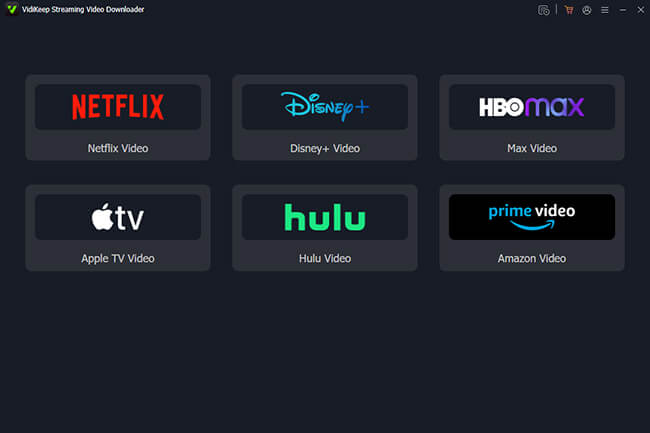
VidiKeep Streaming Video Downloader is a utility for Windows and macOS designed to extract content from major platforms including Netflix, Disney+, Amazon Prime Video, Apple TV, Max, and Hulu. While native streaming applications often impose expiration dates and device-specific limitations on offline downloads, this software bypasses those restrictions by converting videos into MP4 or MKV formats for permanent storage.
The software focuses on high-fidelity reproduction, supporting resolutions up to 1080p. Beyond visual quality, it retains original soundtracks such as EAC3 5.1 surround sound and Dolby Atmos. Users can maintain multi-language audio tracks and manage subtitles according to their preference, with options for both embedded tracks and external SRT files.
Key technical capabilities of the software include:
- Support for high-definition 720p and 1080p video output.
- Retention of original audio fidelity and multi-channel surround sound.
- Flexible subtitle management for localized viewing across different devices.
- Universal compatibility through the use of standard MP4 and MKV file containers.
Essentially, VidiKeep provides a streamlined method for users to create offline backups of streaming libraries. This allows for personal media playback on any hardware without the need for an active internet connection or a specific streaming app installation.
Top 5 Reasons To Download VidiKeep
We live in an era of peak streaming, but we also live in an era of peak streaming frustration. Think about it: you pay hard-earned money every single month for subscriptions to Netflix, Amazon Prime Video, Disney+, Hulu, Max, and Apple TV. Yet, when you actually want to watch your favorite shows on your own terms—such as during a long-haul flight, on a remote camping trip, or simply in a room with spotty, unreliable Wi-Fi—you are met with a wall of arbitrary restrictions. Native streaming apps allow "offline downloads," sure, but those downloads come with a laundry list of frustrating caveats. They expire after forty-eight hours once you press play, they require proprietary, resource-heavy apps to run, they restrict the number of devices you can use, and they outright block you from moving your downloaded files to an external drive, a tablet, or a home media server.
Enter VidiKeep Streaming Video Downloader. This software is a total game-changer for digital media consumption, operating flawlessly on both Windows and macOS. It functions as a complete, all-in-one bypass to the annoying limitations imposed by major streaming giants. It allows you to download, save, and keep your favorite high-definition movies and TV shows in universally compatible formats like MP4 and MKV. To make this deal even more irresistible, there is a storewide 25% off coupon code, VKMC25, available right now for those ready to upgrade their digital library experience.
If you have ever felt like you do not actually "own" the digital access you pay for month after month, this is the tool you need in your tech arsenal. Below, we have outlined the top five reasons why you need to download this software today, followed by an in-depth breakdown of what makes VidiKeep an essential utility for the modern viewer.
The Top 5 Reasons to Use VidiKeep Streaming Video Downloader
- Bypass Proprietary Streaming Restrictions: Convert temporary, DRM-locked app downloads into permanent, unrestricted MP4 or MKV files that never expire or delete themselves.
- True 1080p Full HD Video Quality: Enjoy high-definition visual clarity offline without the aggressive quality throttling common in web browsers and native desktop apps.
- Immersive Cinema-Grade Audio Preservation: Maintain the theater-like sound experience at home or on the go with support for EAC3 5.1 surround sound and Dolby Atmos.
- Advanced Multi-Language Subtitle Control: Tailor your viewing experience with the choice between embedded subtitles, hardcoded text, or external SRT files in multiple languages.
- Universal Cross-Platform Playback and Archiving: Build a permanent offline media library playable on any device—from laptops to smart TVs—completely safe from corporate content purges.
Now, let us dive deep into each of these reasons to look at exactly how VidiKeep Streaming Video Downloader changes the way you interact with your favorite streaming platforms.
1. Bypass Proprietary Streaming Restrictions and Reclaim Ownership
Have you ever downloaded a movie on your tablet using a streaming app's official offline mode, boarded a flight, and opened the app only to realize your download had expired because your device briefly connected to the internet before takeoff? Or perhaps you found yourself unable to watch a downloaded episode because you exceeded the platform's arbitrary limit on the number of devices allowed to store offline content. These are the artificial boundaries of Digital Rights Management (DRM), designed to keep you trapped within a specific digital ecosystem.
VidiKeep completely shatters these walled gardens. Instead of saving files in a locked, encrypted format that only a specific, bloated application can read, VidiKeep downloads the video stream directly and packages it into standard MP4 or MKV containers. These are the two most widely accepted video formats on the planet. Once a file is saved to your computer via VidiKeep, it is yours. It does not have an expiration date. It will not suddenly refuse to play because you have been offline for more than thirty days. It does not check back with a server to verify your subscription status before launching. This represents a return to true media ownership, allowing you to build a local collection of the movies and television shows you love without corporate chaperones monitoring your screen time.
2. True 1080p Full HD Video Quality Without Throttling
Many consumers do not realize that streaming platforms actively throttle video quality depending on the device and browser you use. For example, if you watch Netflix on a Mac using Chrome or Firefox, you are often limited to a maximum resolution of 720p. Even on Windows computers, getting a true, uncompressed high-definition stream can be a headache of system requirements, specific browser extensions, and updated graphics drivers. When you use the "offline download" feature on official mobile apps, the platform often compresses the video file heavily to save storage space, resulting in blocky dark scenes, pixelated action sequences, and a muddy overall image.
VidiKeep bypasses these browser-based and app-based limitations. It utilizes advanced extraction technology to tap directly into the source stream, pulling down genuine 720p and 1080p Full HD video files. When you watch a 1080p download from VidiKeep, you are seeing the content exactly as it was meant to be seen: sharp details, vibrant colors, clean gradients, and minimal compression artifacts. This high-fidelity preservation is particularly noticeable on larger screens, such as a modern MacBook Pro with a Liquid Retina display or a high-end Windows gaming laptop. You no longer have to settle for blurry, low-bitrate video just because you chose to watch your content offline.
3. Immersive Cinema-Grade Audio Preservation
A great movie is only half-complete without great sound. Yet, audio is almost always the first thing sacrificed by standard screen-recording tools or low-tier downloaders. Most generic video downloaders on the market strip away multi-channel audio tracks, downmixing everything into flat, lifeless 2.0 stereo sound. This completely ruins the experience of watching action-heavy blockbusters, sci-fi epics, or concert films where atmospheric soundscapes are crucial to the storytelling.
VidiKeep treats audio with the same respect as video. The software is capable of preserving high-fidelity, original soundtracks directly from the source stream. This includes support for advanced audio codecs like Enhanced AC-3 (EAC3) 5.1 surround sound and state-of-the-art Dolby Atmos. If you have a high-quality pair of headphones with spatial audio support, a dedicated soundbar, or a full multi-speaker home theater setup, VidiKeep ensures that your offline files deliver the same chest-thumping bass and directional audio cues that you would experience when streaming live. Furthermore, VidiKeep preserves multi-language audio tracks, meaning you can easily switch between the original language track and localized dubs depending on who is watching.
4. Advanced Multi-Language Subtitle Control
For international cinema enthusiasts, anime fans, and viewers who simply prefer to watch with dialogue text on, subtitles are not an optional feature—they are a necessity. Traditional screen recorders often fail to capture subtitles, or they force you to record them as "hardcoded" text that is permanently burned into the video frame, meaning you can never turn them off or change their language.
VidiKeep offers an incredibly sophisticated subtitle management system that gives you complete control over your viewing experience. When preparing a download, the software allows you to choose from three distinct subtitle output modes:
- External Subtitles: This option saves the subtitle tracks as independent SRT files. This is highly recommended if you like to use custom media players like VLC, where you can manually adjust the font size, color, timing, and style of the text on the fly.
- Embedded Subtitles: This mode merges the subtitle tracks directly into the MP4 or MKV container file. It keeps the file package neat and tidy while still allowing you to toggle the subtitles on or off and switch between different languages using your media player's menu.
- Hardcoded Subtitles: This option burns the subtitles directly into the video frames. This is ideal if you plan to play the file on older devices or basic hardware players that do not have the processing power to render subtitle files dynamically.
Additionally, VidiKeep lets you select and download subtitles in multiple languages simultaneously, making it a fantastic tool for language learners who like to compare translations side-by-side.
5. Universal Cross-Platform Playback and Archiving
Perhaps the most compelling argument for downloading VidiKeep is the sheer versatility it brings to your physical media collection. When you are restricted to a platform's native app, you can only watch your downloaded content on devices that support that specific app. But what happens if you want to watch a show on an older tablet, a projector that doesn't have smart apps, a custom-built home theater PC, or a flight entertainment system? You are completely out of luck.
Because VidiKeep outputs standard, DRM-free MP4 and MKV files, your media becomes universally compatible. You can copy your downloaded files to a USB flash drive and plug it directly into your smart TV. You can upload them to your personal cloud storage. You can import them into media server software like Plex, Emby, or Kodi to stream them locally to every screen in your household.
Furthermore, we are currently living in an era of "digital volatility." Streaming platforms regularly delete original movies and TV shows from their libraries due to licensing agreements, tax write-offs, or corporate restructuring. Shows that you love today could disappear tomorrow with absolutely no way for you to watch them legally. By using VidiKeep to create permanent backups of your favorite media, you are protecting your favorite entertainment from disappearing into the digital ether. It is the modern equivalent of recording your favorite broadcast programs onto VHS tapes or purchasing them on DVD, but with the pristine quality of the digital age.
Unlocking the Power of VidiKeep: A User-Friendly Experience
While the underlying technology of VidiKeep is incredibly complex, the user interface is designed with absolute simplicity in mind. You do not need to be a software engineer or a tech-savvy power user to get the most out of this application. The download process is highly intuitive: you simply log into your streaming account through the secure, built-in browser, find the video you want to download, customize your quality, audio, and subtitle preferences, and click the download button.
The software handles the rest, utilizing hardware acceleration to download videos at blazing-fast speeds without taxing your system's CPU. Whether you are downloading a single feature-length film or an entire season of a television series, VidiKeep processes the files efficiently, saving you time and hassle.
Conclusion: Grab the Giveaway and Take Control of Your Media
If you are tired of paying expensive monthly subscription fees only to be treated like a temporary renter of your favorite content, VidiKeep Streaming Video Downloader is the ultimate escape hatch from the streaming wars. It puts the control back where it belongs: in the hands of the consumer. By converting transient streams into permanent, high-quality, high-fidelity MP4 or MKV files, VidiKeep lets you build a digital library that is truly yours, accessible anytime, anywhere, on any device.
Do not miss out on this incredible opportunity to upgrade your entertainment system. You can get started today and experience the freedom of unrestricted offline viewing. Plus, if you decide to unlock the full potential of the software, you can take advantage of the storewide 25% off coupon code: VKMC25. Head over to the official VidiKeep website, download the software, apply the discount code at checkout, and start building your ultimate, permanent offline media library today!

Reviews for VidiKeep
Click Here to Read Reviews for VidiKeep >> Click Here to Submit Reviews for VidiKeep >>