What Does Volume Concierge 2 Do?
Volume Concierge 2 is a dedicated system utility designed to automate audio level adjustments on Windows PCs. The software addresses the common issue of sudden, loud audio blasts by allowing users to establish predefined volume rules based on the time of day and specific days of the week.
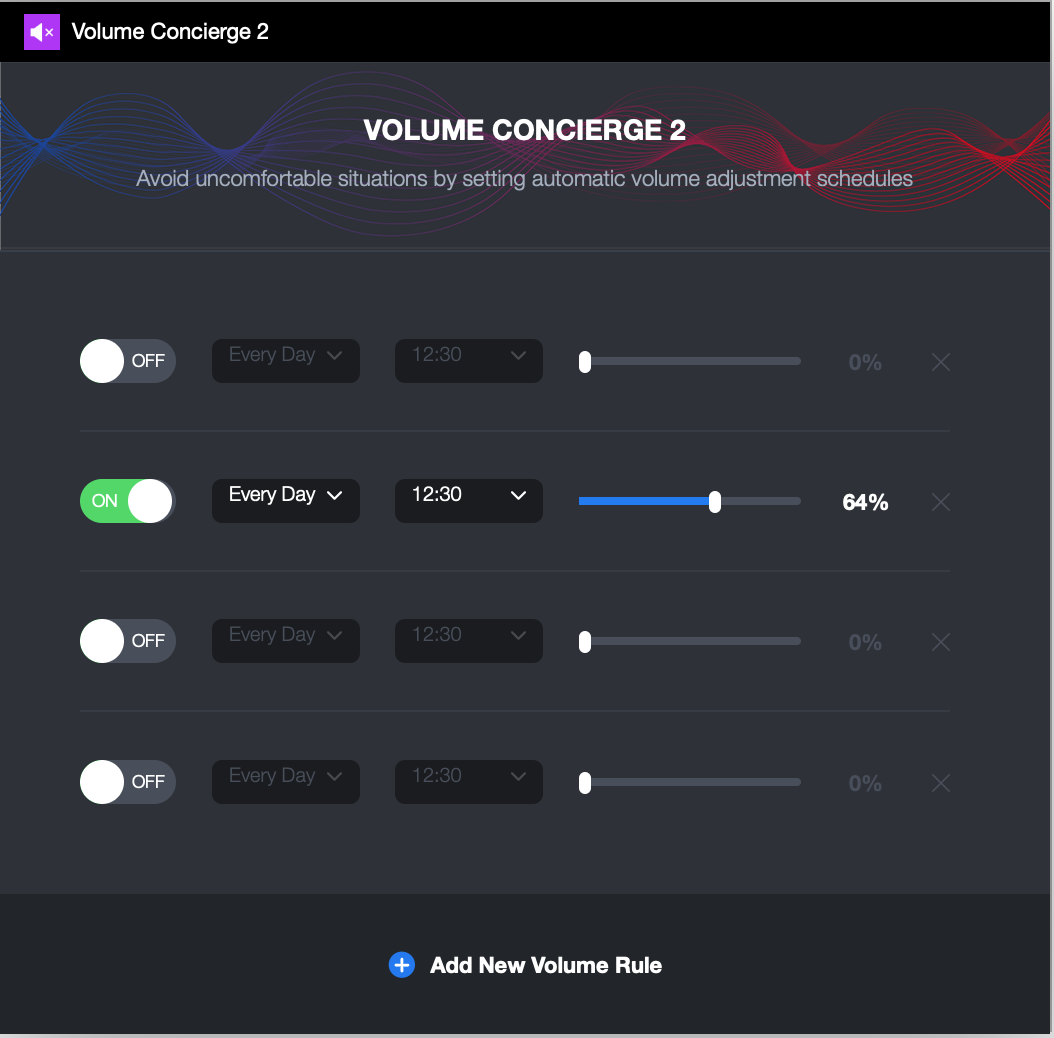
The application enables the creation of a customized schedule for workdays, weekends, or daily routines. Users can select any time interval and assign a corresponding volume level ranging from 0 to 100%. This ensures that the system audio remains at appropriate levels without manual intervention, whether in a quiet office environment or a home setting.
This second iteration of the software features several technical updates, including:
- A completely redesigned user interface for improved navigation.
- Full compatibility with the latest Windows operating systems.
- Support for multiple, overlapping scheduling rules.
- Automatic 24/7 volume monitoring and adjustment.
By implementing these rules, Volume Concierge 2 eliminates the need for constant manual monitoring of the system tray. The utility runs in the background, executing volume shifts precisely at the user's programmed times to prevent unexpected noise disruptions and ensure the hardware remains at a comfortable decibel level throughout the day.
Top 5 Reasons To Download Volume Concierge 2
- Total Automation of Your Auditory Environment: Set your rules once and let the software handle the rest, eliminating the need for manual adjustments.
- Intelligent Scheduling for Work and Play: Create distinct volume profiles for workdays and weekends to match your lifestyle.
- Professional and Social Insurance: Prevent embarrassing "volume blasts" in quiet offices, libraries, or late-night home environments.
- Modern, Sleek User Interface: Enjoy a completely redesigned UI that integrates perfectly with the latest Windows operating systems.
- Enhanced Productivity and Wellness: Minimize distractions and protect your hearing by ensuring your PC never surprises you with excessive decibels.
We have all been there. You are sitting in a quiet office, perhaps a library, or maybe you are just settling into bed while your partner sleeps soundly nearby. You open your laptop or wake your PC to check one last email or watch a quick video. Suddenly, the Windows startup chime or an auto-playing advertisement blasts through your speakers at maximum volume. It is jarring, embarrassing, and entirely avoidable. As a tech reviewer, I see hundreds of utilities every year that promise to "optimize" your workflow, but few address the simple, visceral pain point of sound management as elegantly as Volume Concierge 2. This is not just another system tray icon; it is a sophisticated sound butler for your digital life. If you have the chance to grab this giveaway, you need to jump on it immediately. Here is the deep dive into why Volume Concierge 2 is the essential upgrade your PC has been missing.
1. Total Automation of Your Auditory Environment
The primary reason you need Volume Concierge 2 is the sheer luxury of automation. In the modern tech world, we automate our lights, our thermostats, and our coffee makers, yet we still manually fiddle with the volume slider on our PCs dozens of times a day. We lower it at night so we don't wake the house, and we raise it in the morning so we can hear our notifications. Volume Concierge 2 takes this manual chore and turns it into a "set it and forget it" experience. By allowing you to set specific rules for different times of the day, the software ensures that your PC is always at the appropriate volume level before you even touch a key.
Imagine your PC automatically lowering its volume to 10% at 11:00 PM and then boosting it back to 50% at 8:00 AM. You no longer have to remember to check the slider before you hit play on a video. The software acts as a silent guardian, monitoring the clock and adjusting your system's master volume with precision. This level of automation provides a sense of "intelligence" to your machine that the standard Windows operating system simply does not offer out of the box. It turns your computer into a device that is aware of its surroundings and your personal schedule.
Furthermore, the range of control is absolute. You can set the volume anywhere from 0% to 100%. If you want a "silent mode" during your deep-focus hours, you can schedule a drop to 0%. If you need a loud wake-up call in the afternoon, you can crank it to 100% for a specific window. This granular control, handled entirely by the software's engine, means you are always in the ideal auditory "sweet spot" without ever having to click a single icon once your initial setup is complete.
2. Intelligent Scheduling for Work and Play
One of the most impressive features of Volume Concierge 2 is its ability to distinguish between different types of days. Our schedules on a Monday morning are vastly different from our schedules on a Saturday afternoon, and our technology should reflect that. This utility allows you to create specific rules for work days, weekends, or every day. This level of flexibility is what separates a professional tool from a basic script. Most volume tools treat every day the same, but Volume Concierge 2 understands the rhythm of your life.
During the work week, you might want your PC to stay at a modest 20% to ensure you aren't disrupting colleagues, with a specific "mute" rule during your daily lunch hour. However, when Saturday rolls around, you might want your PC to default to 70% so you can enjoy music or movies from across the room. With Volume Concierge 2, these transitions happen seamlessly. You don't have to reconfigure your settings every Friday evening; the software intelligently switches profiles based on the calendar.
The ability to set multiple time intervals within a single day adds another layer of sophistication. You can have five different volume levels throughout a 24-hour period if you wish. This is particularly useful for those who work from home. You can have a "Focus Morning" at 15%, an "Active Afternoon" at 40%, and a "Quiet Evening" at 5%. This adaptability makes Volume Concierge 2 an indispensable tool for anyone who lives a multifaceted life and uses their PC for both professional productivity and personal entertainment.
3. Professional and Social Insurance
Let's talk about the uncomfortable situations mentioned in the software description. We live in an era where "digital etiquette" is more important than ever. There is nothing quite as mortifying as being the person whose computer screams a loud notification in the middle of a serious board meeting or a quiet study hall. Volume Concierge 2 acts as a form of social insurance. By scheduling your volume to drop to near-zero during your known office hours or class times, you eliminate the risk of human error. You no longer have to rely on your memory to "mute" your laptop before you walk into a building.
This "safety net" extends to the home environment as well. If you live with roommates, a partner, or have young children, the sudden blast of a YouTube video or a high-octane video game intro at 2:00 AM can lead to genuine domestic friction. Volume Concierge 2 ensures that you are a respectful digital citizen. You can schedule your PC to enter "Ninja Mode" every night, ensuring that even if you accidentally click a loud link, the system-level volume is already throttled down to a whisper.
As a reviewer, I often look for software that solves "real-world" problems, and the social anxiety of accidental noise is a very real issue. This software provides peace of mind. You can open your laptop with confidence, knowing that it will behave exactly as you have commanded it to, based on the time and the place. It is about taking control of your environment and ensuring your technology serves you rather than embarrassing you.
4. Modern, Sleek User Interface and OS Support
The original Volume Concierge was a classic, but the tech landscape has changed significantly since 2011. The developers have clearly listened to their user base, as Volume Concierge 2 features a completely redesigned user interface. In the world of tech utilities, the UI can make or break the experience. A clunky, outdated interface can make a powerful tool feel like a chore to use. Fortunately, Volume Concierge 2 looks and feels like a modern Windows application. It is clean, intuitive, and, dare I say, stylish.
The new design isn't just about aesthetics; it is about ease of use. Setting up rules is a visual process that feels natural. You don't need to be a power user or a programmer to understand how to schedule your sound. The layout is logical, and the feedback is immediate. This ease of entry is crucial because a utility like this should save you time, not cost you time in learning how to navigate it. The "brand new look" mentioned by the developers isn't just marketing speak—it is a functional overhaul that brings the software into the current era of Windows 10 and 11 design language.
Moreover, the support for the latest Windows operating systems is a major selling point. Many older volume utilities struggle with the way modern Windows handles audio sessions and system permissions. Volume Concierge 2 has been built from the ground up to be compatible with the current architecture of Windows. This means it is stable, lightweight, and won't cause the system hangs or glitches that you might experience with outdated legacy software. It runs quietly in the background, consuming minimal resources, while performing its duties with 24/7 reliability.
5. Enhanced Productivity and Wellness
The final, and perhaps most overlooked, reason to download this giveaway is the impact on your focus and physical health. We often talk about "blue light" affecting our sleep, but "auditory clutter" and sudden noise spikes can be just as damaging to our productivity and stress levels. A sudden, loud noise triggers a "startle response" in the human brain, releasing cortisol and breaking your state of flow. If you are a writer, a coder, or a designer, a single loud notification can ruin twenty minutes of deep concentration.
By using Volume Concierge 2 to create a consistent, predictable auditory environment, you are essentially "protecting your flow." You can ensure that notifications are audible but not intrusive during the day, and completely silent during your deep-work blocks. Furthermore, there is the aspect of hearing health. We often gradually turn our volume up throughout the day as our ears become fatigued. Volume Concierge 2 can be used to "reset" your volume to a safe, lower level every morning, preventing you from starting your day with the high volume levels you might have ended with the previous night. It acts as a digital "palate cleanser" for your ears.
In a world where we are constantly bombarded by pings, dings, and alerts, having a tool that allows you to pre-emptively manage the intensity of those sounds is a massive win for your mental well-being. It is about reclaiming the "quiet" in your workspace. This software isn't just about making things quiet or loud; it's about intentionality. It allows you to decide exactly how much of the digital world you want to hear at any given moment of the day.
Conclusion: Volume Concierge 2 is one of those rare utilities that you didn't know you needed until you used it for a week, at which point it becomes impossible to live without. It bridges the gap between a "dumb" volume slider and a truly "smart" PC. With its robust scheduling, modern interface, and the sheer peace of mind it provides, it is an absolute must-download. Whether you are a professional trying to maintain a quiet office presence, a gamer who doesn't want to wake the neighbors, or simply someone who appreciates a well-ordered digital life, this giveaway is your ticket to a much more harmonious computing experience. Don't wait for the next "volume jump-scare" to realize you need this—download it now and let your new concierge handle the noise while you focus on what really matters.
From its roots in 2011 to this polished, second-generation iteration, Volume Concierge 2 has proven itself as a top-tier solution for Windows users worldwide. It has been vetted by media publications and thousands of users for a reason: it works, and it works well. The new interface is a joy to use, and the logic behind the rules-based scheduling is flawless. In a marketplace filled with bloatware, this is a lean, mean, volume-controlling machine. Grab it while you can and finally put an end to the "uncomfortable situations" that have plagued PC users for decades. Your ears—and your coworkers—will thank you.

Reviews for Volume Concierge 2
Click Here to Read Reviews for Volume Concierge 2 >> Click Here to Submit Reviews for Volume Concierge 2 >>