What Does WidsMob FilmPack Do?
WidsMob FilmPack is a dedicated photo editing utility designed to apply analog film aesthetics to digital images captured via cameras or smartphones. The software focuses on reproducing the unique color profiles, contrast levels, and grain textures associated with traditional film photography through a streamlined digital interface.
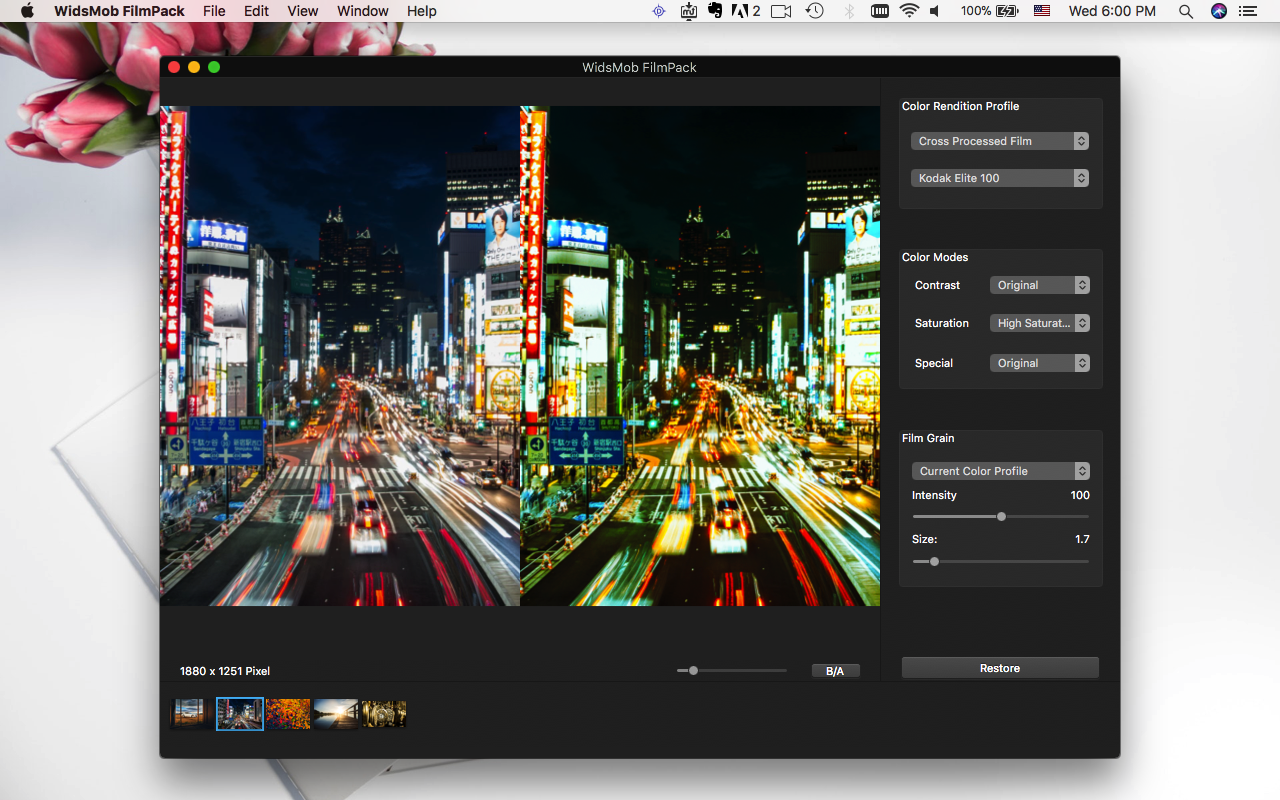
The application features four distinct color rendition categories: Color Positive Film for vibrant tones, Color Negative Film for nostalgic palettes, Black and White Film for monochrome depth, and Cross Processed Film for stylized color shifts. Users have access to 28 camera profiles, 15 color modes, and 25 film grain options. Specific emulations include classic stocks such as Kodak Ektachrome, Fuji Velvia 50, Fuji Superia, and Ilford HPS 800.
Key technical capabilities include:
- Manual adjustment of contrast, saturation, and special color tones to refine image depth.
- A customizable grain engine with adjustable size and intensity settings to alter image texture.
- Native support for RAW files from a variety of popular digital camera manufacturers.
- A Before-and-After preview mode for real-time comparison of filter effects.
- Functional tools such as one-click restoration and zoom features for detail inspection.
Available for macOS, WidsMob FilmPack provides photographers with a functional toolkit for color grading and vintage rendering without requiring complex manual workflows.
Top 5 Reasons To Download WidsMob FilmPack
- Authentic Emulation of Iconic Film Stocks: Gain access to a massive library of 28 camera profiles and 25 film gain profiles that perfectly replicate the look of legendary films like Kodak Ektachrome and Fuji Velvia.
- Comprehensive Color Rendition Profiles: Utilize four distinct rendering modes—Color Positive, Color Negative, Black and White, and Cross-Processed—to instantly shift the emotional weight of your photography.
- Granular Control Over Analog Texture: Move beyond simple overlays with adjustable film grain size and intensity, allowing you to create a unique tactile feel for every digital image.
- Professional RAW Support and High-Detail Editing: Edit with confidence using full RAW file support and a dedicated Before-and-After mode to ensure your high-resolution photos maintain their integrity.
- Effortless Workflow with Stunning Results: Achieve professional-grade "analog" looks with one-click presets while retaining the ability to fine-tune contrast, saturation, and special color tones.
In an era where every smartphone can take a sharp, high-resolution photo, digital photography has ironically found itself in a bit of a creative rut. We have millions of pixels, perfect sharpness, and clinical clarity, but often, these images lack "soul." They feel cold, artificial, and sometimes a bit too perfect. This is exactly why the revival of analog film aesthetics has taken the world by storm. However, shooting real film is expensive, time-consuming, and difficult to master. Enter WidsMob FilmPack. This software is the bridge between the convenience of the digital age and the timeless, emotive quality of the analog era. If you have been looking for a way to make your photos stand out in a crowded social media feed or simply want to breathe new life into your portfolio, this giveaway is something you cannot afford to miss. As a tech reviewer who has seen hundreds of filter apps, I can tell you that this isn't just another "filter pack." It is a sophisticated color grading tool designed for those who appreciate the nuance of light and chemistry.
1. Authentic Emulation of Iconic Film Stocks
The primary reason you need to download WidsMob FilmPack is its incredible library of film profiles. For decades, photographers chose their film stock based on the specific "color science" of the brand. A Kodak shooter wanted those warm, golden skin tones and rich reds, while a Fuji enthusiast sought out the vibrant greens and cool blues that made landscapes pop. This software reproduces those legendary aesthetics with startling accuracy.
With 28 different camera profiles and 25 film gain profiles, you aren't just slapping a generic "vintage" look on your photo. You are choosing specific historical signatures. You can apply the look of Kodak Ektachrome, which was famous for its vividness and fine grain, or Fuji Velvia 50, the gold standard for landscape photographers who wanted high saturation and high contrast. If you prefer the gritty, high-speed look of street photography, you can opt for Ilford HPS 800. The software meticulously replicates how these films reacted to light, providing a level of depth that standard photo editors simply cannot match. This isn't just about color; it’s about the soul of the film. When you apply these profiles, the software adjusts the color rendition, contrast, and gain to mimic the chemical reaction of light hitting silver halide crystals. It’s a masterclass in digital alchemy that transforms a flat digital file into a piece of art.
2. Comprehensive Color Rendition Profiles
Most photo editing apps give you a few sliders and call it a day. WidsMob FilmPack takes a much more structured and professional approach by offering four distinct color rendition categories. This allows you to categorize your creative intent before you even start fine-tuning. First, you have Color Positive Film. This is designed for those who want vibrant, dramatic colors that leap off the screen. It’s perfect for travel photography, fashion, or any scene where you want the colors to be the star of the show.
Second, there is the Color Negative Film profile. This is where the nostalgia lives. These profiles offer a more classic, slightly muted, and "dreamy" look that characterizes old family photo albums and 1990s cinema. It brings a sense of warmth and approachability to your images. Third is the Black and White Film category. This isn't just "removing color." The software reproduces hundreds of results with different profiles and contrasts, allowing you to find the perfect silver-gelatin look, from deep, inky blacks to soft, misty greys. Finally, for the experimentalists, there is Cross Processed Film. This mimics the technique of developing film in the "wrong" chemicals, resulting in surreal, high-contrast, and oddly shifted colors. It’s a favorite for artistic and edgy portraits. Having these four pillars of film development at your fingertips gives you a massive range of creative possibilities that most other apps simply don't provide.
By using these profiles, you can rediscover the stunning photo effects of analog film without having to spend a fortune on a darkroom or vintage cameras. The software allows you to adjust the contrast, saturation, and special color tones within these profiles, giving you the flexibility to bring out the nuances in every shot. Whether you want to emphasize the shadows in a moody B&W street scene or brighten the highlights in a sunny beach photo, the color rendering engine is remarkably responsive and intuitive.
3. Granular Control Over Analog Texture
One of the biggest complaints about digital photography is that it is too "clean." It lacks texture. In the world of analog photography, "grain" wasn't a flaw; it was a feature. It gave the image a physical presence, a sense of tangibility that digital noise just can't replicate. WidsMob FilmPack understands this better than almost any other software on the market. It doesn't just offer "film grain" as a toggle switch; it treats grain as an essential artistic element.
The software includes 25 film gain profiles, but the real power lies in your ability to customize that grain. You can adjust the size and the intensity of the grain particles. This is crucial because grain looks different depending on the film speed and the size of the original negative. A 35mm film shot at ISO 1600 will have large, chunky, expressive grain, while a 120mm medium format film will have a much finer, smoother texture. With WidsMob FilmPack, you can dial in exactly the right amount of grit for your image. Want a subtle, elegant texture for a wedding portrait? Lower the intensity and size. Want a rough, "lo-fi" look for an indie album cover? Crank them both up. This level of control makes the effects look "baked in" and authentic rather than like a cheap digital overlay. It transforms the texture of the image, making it look like it was printed on paper rather than just displayed on a screen.
4. Professional-Grade RAW Support and High-Detail Editing
Many "filter" apps are designed for JPEGs taken on a phone, which limits their usefulness for serious photographers. WidsMob FilmPack, however, is built with the professional and the serious hobbyist in mind. It supports RAW files from all popular camera manufacturers. This is a game-changer. When you edit a RAW file, you are working with all the data captured by the camera sensor, meaning you have much more headroom to adjust exposure, shadows, and highlights without the image falling apart.
The software also features a Before-and-After mode, which is an absolute necessity for precision editing. It allows you to see the original "flat" digital image side-by-side with your film-emulated version. This instant preview ensures that you aren't over-processing the image and helps you appreciate exactly how much character the software is adding. Furthermore, the Zoom features allow you to get close and check the details of the film grain and color shifts at a pixel level. This ensures that even when you print your photos in large formats, the effects remain stunning and professional. The software is optimized for high-resolution work, ensuring that your 24MP, 45MP, or even 100MP files are handled with the care they deserve. It also includes a one-click "restore to default" feature, which encourages experimentation without the fear of losing your original work. For Mac users especially, the interface is sleek, responsive, and takes full advantage of the hardware to provide a smooth editing experience.
5. Effortless Workflow with Stunning Results
At the end of the day, a piece of software is only as good as its usability. You might have the best algorithms in the world, but if the interface is a nightmare, no one will use it. WidsMob FilmPack strikes the perfect balance between power and simplicity. It is an all-in-one solution that respects your time. While it offers deep customization for those who want to spend hours perfecting a single image, it also offers a "one-click" philosophy for those who need to process a batch of photos quickly.
The user interface is designed to be intuitive. You select your photo, choose your film profile, and immediately see the transformation. The layout is clean and logical, with the most important controls—contrast, saturation, and grain—right where you need them. This "fun with colors" approach makes the editing process enjoyable rather than a chore. You can quickly cycle through different looks, from vintage rendering to modern vibrant styles, until you find the one that fits the "mood" of your photograph. This speed and efficiency make it an essential tool for photographers who need to deliver high-quality results on a deadline. It effectively removes the steep learning curve usually associated with high-end color grading and film emulation. By downloading this giveaway, you are essentially adding a professional colorist to your digital darkroom, one that works at the click of a button and produces results that look like they came out of a high-end film lab.
In conclusion, WidsMob FilmPack is more than just a piece of software; it’s a creative gateway. It allows you to reclaim the artistic heritage of photography and apply it to the digital files of today. Whether you are a professional photographer looking to add a specific aesthetic to your client work, or a hobbyist who wants their vacation photos to look like they were shot on a vintage Leica, this tool provides the profiles, the grain, and the control to make it happen. Do not miss out on this giveaway—it is the simplest and most effective way to give your digital photography the analog soul it has been missing.

Reviews for WidsMob FilmPack
Click Here to Read Reviews for WidsMob FilmPack >> Click Here to Submit Reviews for WidsMob FilmPack >>