What Does WidsMob HDR Do?
WidsMob HDR is a dedicated photo processing application designed to merge three exposure-bracketed images into a single high dynamic range (HDR) photograph. Utilizing an advanced tone-mapping algorithm, the software balances light and shadow to mimic the human eye's perception. It supports both JPEG and RAW file formats captured by DSLR cameras or mobile devices, offering a full-resolution live preview with Retina display support.
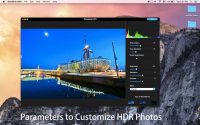
The software allows users to manually customize HDR outputs through specific parameters. Key adjustment options include:
- Tone Mapping: Controls for tone length and tone saturation.
- Color Management: Adjustments for brightness, contrast, and overall saturation.
- Presets: Built-in effects including black and white and artistic HDR styles.
To ensure image clarity, the tool features an automatic alignment algorithm to correct handheld shots that may contain slight aberrations. It also includes ghost suppression technology, which reduces blurring or artifacts caused by moving objects like vehicles, clouds, or people within the bracketed set. Finalized images can be exported in high quality as JPEG, PNG, or TIFF files without additional compression changes.
Top 5 Reasons To Download WidsMob HDR
- Advanced Tone-Mapping for Photorealistic Results: WidsMob HDR uses a sophisticated algorithm to merge bracketed shots, ensuring your photos mimic the dynamic range of the human eye.
- Full RAW and JPEG Support Across Devices: Whether you are shooting on a professional DSLR or a high-end smartphone, this software handles various file formats with ease.
- Automatic Alignment and Ghost Suppression: Forget the tripod; the software corrects handheld shakes and removes "ghost" artifacts caused by moving subjects like cars or people.
- Granular Customization and Color Management: Take total control over your images with adjustable parameters for tone length, saturation, brightness, and contrast.
- Instant High-Resolution Previews and Artistic Presets: See your changes in real-time with Retina display support and apply stylized effects, including stunning Black and White HDR.
If you have ever spent a golden hour out in the field, clicking away at a breathtaking sunset, only to return to your computer and find that your camera captured either a blown-out sky or a pitch-black foreground, you know the frustration of limited dynamic range. Our eyes are incredible biological machines capable of seeing details in both the brightest highlights and the deepest shadows simultaneously. Unfortunately, even the most expensive camera sensors struggle to keep up. This is where High Dynamic Range (HDR) photography comes in, and more specifically, why WidsMob HDR is the tool you need in your digital arsenal. This isn't just another photo filter app; it is a dedicated powerhouse designed to bridge the gap between digital capture and human perception. In this review, we are going to dive deep into why you need to download this giveaway immediately.
1. Advanced Tone-Mapping for Photorealistic Results
The core of any HDR software is its algorithm. Many entry-level tools simply "crunch" the pixels, resulting in an "over-cooked" look that features strange halos around buildings and neon-bright grass that looks like it belongs in a sci-fi movie. WidsMob HDR stands apart because of its advanced tone-mapping algorithm. It is designed to take a set of three different bracketed photos—one underexposed, one overexposed, and one at a neutral exposure—and blend them with surgical precision.
What makes this specific software so impressive is the "eye view" philosophy. The algorithm is tuned to prioritize a natural look. It analyzes the luminance data across all three frames to ensure that the transition between a bright window and a dark room, or a glowing sun and a shaded forest, is seamless. When you use this tool, you aren't just smashing images together; you are reconstructing a scene with the same depth and vibrance that you remember seeing with your own eyes. For the professional photographer, this means less time fixing errors and more time enjoying the final product. For the hobbyist, it means finally achieving that "pro" look without needing years of experience in manual post-processing.
The software doesn't just stop at merging; it optimizes. It looks at the metadata and the pixel values to decide how to best distribute the light. This results in a photograph that has a rich, velvety texture in the shadows and a crisp, detailed clarity in the highlights. If you have ever wanted your photos to "pop" without looking fake, this tone-mapping technology is exactly what you have been searching for.
2. Full RAW and JPEG Support Across Devices
In the world of photography, the debate between RAW and JPEG is eternal. Professional photographers swear by RAW for its uncompressed data and latitude for editing, while casual users prefer the convenience and smaller file size of JPEG. WidsMob HDR ends the conflict by offering robust support for both. This software is compatible with RAW formats taken by almost every major DSLR manufacturer on the market today. Whether you are shooting with a Nikon, Canon, Sony, or Fujifilm, the software can ingest those heavy data files and extract every bit of information available.
Furthermore, it is perfectly optimized for the modern era of smartphone photography. High-end smartphones now offer incredible sensors, but they still struggle with dynamic range in tricky lighting. By using WidsMob HDR, you can take those bracketed shots from your iPhone or Android device and give them a professional desktop-grade polish. The software also supports Retina display, which is a massive win for Mac users. This means when you are editing, you are seeing the true colors and the sharpest possible version of your image, ensuring that what you see on your screen is exactly what you get when you save the file.
The export options are equally impressive. Once you have crafted your masterpiece, you can save it as a high-quality JPEG, a transparent PNG, or a lossless TIFF. The ability to export to TIFF is particularly important for professionals who plan to do further retouching in other software, as it ensures that no quality is lost during the transition. This level of flexibility makes the software a versatile component of any workflow, regardless of whether you are a mobile enthusiast or a studio pro.
3. Automatic Alignment and Ghost Suppression
One of the biggest hurdles in HDR photography is the requirement for a tripod. Because you are taking three separate photos that must be perfectly overlaid, even the slightest movement—a millimeter of hand shake or a gust of wind—can ruin the final image by creating "ghosting" or blur. WidsMob HDR solves this problem with two very important technical features: Auto-Alignment and Ghost Suppression.
The Auto-Alignment feature is a lifesaver for travel photographers. When you are hiking or walking through a crowded city, you don't always have the time or space to set up a tripod. This software uses a superior algorithm to detect common points in your bracketed shots and micro-adjusts them so they line up perfectly. It compensates for the natural sway of your body, effectively turning your handheld attempts into "tripod-quality" captures. This feature alone makes the software worth the download, as it opens up a world of HDR possibilities in situations where you previously would have given up.
Then there is the issue of "ghosts." In an HDR set, if a car drives through the frame or a person walks by while the three shots are being taken, they will appear as transparent, blurry shapes in the final merged image. WidsMob HDR features an intelligent Ghost Suppression tool. It identifies these moving objects and intelligently selects the data from a single frame to represent that object, while still maintaining the HDR effect for the rest of the static scene. This means you can capture busy street scenes, moving clouds, or swaying trees without worrying about the messy artifacts that plague lesser HDR programs. It turns a technical nightmare into a one-click solution.
4. Granular Customization and Color Management
While the automatic features of WidsMob HDR are fantastic, many of us want to put our own personal stamp on our photos. This is where the software’s customization suite shines. It provides a comprehensive set of tone mapping parameters that allow you to fine-tune the "HDR-ness" of your photo. You can adjust the "tone length," which controls the reach of the shadows and highlights, and "tone saturation," which helps you manage the intensity of the colors within the HDR spectrum.
Beyond just the HDR-specific controls, the software includes a full color management system. You can tweak the overall brightness, saturation, and contrast of the image. This is vital because HDR processing can sometimes shift colors in unexpected ways. Having these sliders built directly into the interface means you don't have to bounce between multiple programs to get the final look you want. You can deepen the blues of an ocean, brighten the reds of a sunset, or add a bit of "crushed" contrast to an architectural shot to give it more drama.
The user interface is designed to be intuitive. Even if you aren't a professional editor, the sliders are responsive and easy to understand. You get an instant preview of every change you make. This "live" feedback loop is essential for learning how different settings affect your image. You can experiment, push the sliders to their limits, and then pull them back until you find that "sweet spot" where the image looks its absolute best. It gives you the power of a darkroom expert with the ease of a modern app.
5. Instant High-Resolution Previews and Artistic Presets
Time is the most valuable asset for any creator. WidsMob HDR respects your time by offering live previews with full resolution. Many other HDR programs show you a low-quality thumbnail while you work, only revealing the actual result after a long "rendering" process. With WidsMob, what you see is what you get. You can zoom in to check the details of a specific leaf or the texture of a brick wall, and the preview stays sharp and accurate. This prevents the "surprise" of finding noise or artifacts in your final export that you couldn't see during the editing process.
Furthermore, for those times when you want a specific "vibe" but don't want to fiddle with sliders, the software offers a range of default presets and effects. These aren't just generic filters; they are curated styles that leverage the HDR engine to create specific moods. For example, the "Artist HDR" effects can give your photos a painterly, surreal quality that is perfect for creative projects or social media. If you are a fan of classic photography, the black and white HDR effects are world-class. Converting an HDR image to black and white allows you to play with extreme luminosity and contrast, creating moody, noir-style images that have incredible depth and soul.
These presets serve as a great starting point. You can apply a preset and then use the manual sliders to tweak it further, giving you a hybrid workflow that is both fast and flexible. Whether you are looking for a naturalistic enhancement or a bold artistic statement, these built-in tools provide the inspiration and the technology to get you there in seconds.
Conclusion: Why You Should Download It Now
In the crowded market of photo editing software, WidsMob HDR carves out a significant niche by being both powerful and incredibly user-friendly. It tackles the most difficult aspects of photography—dynamic range, image alignment, and ghosting—and simplifies them into a streamlined, elegant workflow. It doesn't matter if you are using a professional DSLR or a smartphone; the goal remains the same: to capture the beauty of the world as you see it.
By downloading this giveaway, you are gaining access to a professional-grade tool that can breathe new life into your old photos and provide a new perspective for your future ones. The combination of its advanced tone-mapping algorithm, its support for high-quality RAW files, and its intelligent correction tools makes it a "must-have" for anyone serious about their imagery. Stop settling for flat, lifeless photos. Start creating images that resonate with light, color, and detail. WidsMob HDR is the key to unlocking the full potential of your camera, and there has never been a better time to add it to your collection. Download it today and see the difference for yourself!


Reviews for WidsMob HDR
Click Here to Read Reviews for WidsMob HDR >> Click Here to Submit Reviews for WidsMob HDR >>