What Does WindowCloser Do?
WindowCloser is an automation utility designed for the Windows operating system that allows users to manage active applications and system power states through scheduled triggers. The software provides the functionality to terminate specific running programs and background tasks automatically, reducing the need for manual process management.
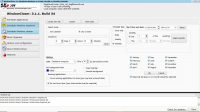
The core of the application is its scheduling engine, which supports daily, weekly, and monthly configurations. Users can set tasks for single days, specific combinations, or recurring cycles. In addition to application control, the tool manages power actions, enabling the system to shut down, log off, hibernate, or reboot based on the user's defined timeline.
WindowCloser also incorporates system maintenance into its automation routines. Users can create sequences that perform the following actions before a system restart or shutdown:
- Empty the Recycle Bin
- Clear the Internet cache
- Execute drive maintenance tasks
- Terminate specific background applications
By batching these tasks, the software functions as a tool for automated system hygiene and power management. It supports multiple simultaneous tasks, allowing for complex routines that ensure the PC is cleaned and turned off according to a user-defined schedule without further intervention.
Top 5 Reasons To Download WindowCloser
- Complete Automation of System Lifecycle: From closing specific applications to managing reboots and shutdowns, this tool takes the manual labor out of managing your PC’s uptime.
- Optimized System Maintenance and Cleaning: It doesn’t just close programs; it performs essential digital hygiene by clearing caches and emptying the Recycle Bin on a schedule.
- Granular Scheduling Flexibility: Unlike basic timers, you can create complex daily, weekly, or monthly routines tailored to your specific workflow or lifestyle.
- Enhanced Resource Management: By forcefully ending background tasks and stubborn applications, you free up CPU and RAM for the tasks that actually matter.
- Seamless Background Execution: The software operates quietly in the background, ensuring your computer stays organized and efficient without requiring constant user intervention.
Introduction: Why Your PC Needs a Digital Personal Assistant
We have all been there. It is the end of a long workday, your desktop is cluttered with twenty different open windows, your browser has thirty tabs eating up your RAM, and your system feels like it is crawling through molasses. You know you should probably clean out your temporary files and give the machine a fresh reboot, but you are tired. You just want to close the lid and walk away. This is exactly where most Windows users fail their hardware. Over time, leaving programs running indefinitely and neglecting basic maintenance leads to registry bloat, memory leaks, and a significant drop in overall performance.
Enter WindowCloser. As a tech reviewer who has seen hundreds of "utility" apps come and go, I am usually skeptical of automation tools that promise the world. However, every once in a while, a piece of software comes along that simplifies the complex. WindowCloser is not just a simple timer; it is a comprehensive scheduler that acts as a digital personal assistant for your Windows environment. It gives you the power to dictate exactly how your system behaves when you are not looking. If you have been looking for a way to streamline your workflow and keep your hardware running at peak performance, this giveaway is something you cannot afford to miss.
1. Complete Automation of System Lifecycle
The core strength of WindowCloser lies in its ability to manage the very life cycle of your operating system. Most users treat their computers like a light switch—on or off—but the reality of modern computing is much more nuanced. Sometimes you need a log-off to clear user-specific processes; other times, a full hibernate is necessary to save your state without drawing power. WindowCloser handles all of these commands—shutdown, log off, hibernate, and reboot—with clinical precision.
Imagine setting your computer to automatically hibernate at 11:00 PM every weeknight, ensuring you aren't wasting electricity while you sleep. Or, perhaps more importantly, scheduling a full reboot every Sunday morning at 3:00 AM. Reboots are the single most effective way to clear out "zombie processes" and memory fragmentation that Windows accumulates over time. By automating this, you ensure that every Monday morning when you sit down to work, your PC is fresh, fast, and ready to go. You no longer have to remember to do these things; the software does the heavy lifting for you.
Furthermore, the ability to close specific running programs at a set time is a game-changer for professionals. If you use resource-heavy software like video editors or CAD tools, you can schedule them to close at the end of your shift, ensuring that your PC isn't struggling to keep those massive applications in memory overnight. This level of control over the system's state is why I consider WindowCloser an essential download for anyone serious about their PC’s longevity.
2. Optimized System Maintenance and Cleaning
One of the most impressive features tucked inside WindowCloser is its maintenance suite. It is easy to find a program that shuts down your computer, but it is much harder to find one that cleans your computer before it shuts down. This software bridges the gap between a system cleaner and a task scheduler. When you set up a schedule, you can instruct WindowCloser to perform several critical maintenance tasks: emptying the Recycle Bin, clearing the Internet cache, and cleaning out temporary system files.
Every time you browse the web or install an update, your hard drive collects "digital dust." Internet caches can grow to several gigabytes in size, slowing down your browser and taking up valuable space on your SSD. Most users forget to clear their Recycle Bin until they get a "low disk space" warning. WindowCloser turns this into a proactive process. By scheduling a "Clean and Shutdown" routine, you ensure that your drive is always optimized. It is like having a maid service that comes in and tidies up your house every night after you go to bed. When you wake up, everything is exactly where it should be, and the trash has been taken out.
For users who are concerned about privacy, the ability to clear the Internet cache on a schedule is a fantastic secondary benefit. It ensures that your browsing history and temporary data are wiped regularly, reducing your digital footprint without you having to navigate through complex browser settings every single day.
3. Granular Scheduling Flexibility
The "Windows Task Scheduler" that comes built into the OS is, quite frankly, a nightmare for the average user to navigate. It is clunky, unintuitive, and often fails to execute if the conditions aren't perfectly met. WindowCloser replaces that headache with an interface designed for humans. The flexibility offered here is truly granular. You are not limited to a simple "one-time" event. You can create daily, weekly, or monthly schedules with just a few clicks.
Do you want to close your work applications at 6:00 PM Monday through Friday, but leave them open on the weekends? You can do that. Do you want to perform a deep system clean on the last Saturday of every month? You can do that too. The software allows for combinations of days, specific dates, or repeating intervals that match your life. This is particularly useful for those who use their computers for both work and play. You can set a "Work Mode" schedule that terminates Slack, Zoom, and Excel at 5:00 PM, effectively forcing you to "clock out" and reclaiming your system for gaming or entertainment.
The power to support multiple tasks at a time means you aren't limited to a single "action." You can create a chain of events. For example: at 1:00 AM, close all web browsers, then empty the Recycle Bin, then clear the cache, then hibnerate. This level of "macro-style" scheduling is what sets WindowCloser apart from the competition. It understands that a user’s needs change depending on the day of the week, and it provides the tools to manage those changes effortlessly.
4. Enhanced Resource Management
In the world of Windows, "closing" an app doesn't always mean the app is gone. Many programs leave background processes running that continue to eat up CPU cycles and RAM. These background tasks are the silent killers of laptop battery life and system speed. WindowCloser is specifically designed to end these background tasks effectively. It doesn't just ask the program to close; it ensures the task is terminated, freeing up those resources for other uses.
This is especially vital for gamers and power users. If you are planning on launching a high-performance game, you can use WindowCloser to schedule the closure of all non-essential background applications (like cloud storage syncers, update checkers, and messaging apps) to ensure every ounce of power is directed toward your framerate. By managing these background tasks, you are also reducing the thermal load on your processor. A cooler PC is a faster PC, and by automating the closure of unnecessary software, you are effectively extending the lifespan of your hardware components.
Furthermore, for those who manage media libraries, the mention of "organizing music at a scheduled time" points to the software's ability to handle file-level organization tasks. This prevents your drive from becoming a chaotic mess of unsorted files, ensuring that your system's indexing services don't have to work overtime to find your data. Efficient resource management isn't just about speed; it's about making your entire computing experience feel smoother and more responsive.
5. Seamless Background Execution
The best kind of software is the kind you forget is even there. WindowCloser is designed to be lightweight and non-intrusive. It sits in the background, keeping an eye on the clock and your running processes, and only springs into action when it is time to perform a task. It does not nag you with constant notifications or pop-ups that interrupt your work. It simply follows the rules you have set.
As a tech reviewer, I often see apps that try to do too much, cluttering the system tray and slowing down the boot process. WindowCloser avoids this pitfall by focusing on efficiency. The user interface is straightforward, allowing you to set up your schedules quickly and then get back to what you were doing. Once your routines are established, the software becomes a set-it-and-forget-it solution. This is the ultimate goal of automation: to reduce the "mental load" of the user. You no longer have to check if you emptied the bin, you no longer have to check if you left that heavy app running, and you no longer have to manually shut down your PC at night.
The peace of mind that comes with knowing your computer is being "managed" is hard to overstate. Whether you are a business professional looking to automate office PCs or a home user who wants to keep their gaming rig in top shape, WindowCloser provides a level of reliability that is rare in the world of freeware and utilities. The fact that you can try a fully functional version for 15 days is great, but getting in on this giveaway to secure your copy is an absolute no-brainer.
Conclusion: Don't Let Your System Manage You
Most people are slaves to their computers. They react to slow-downs, they react to low-disk-space warnings, and they react to system crashes. It is time to flip the script. By downloading WindowCloser, you are taking a proactive stance toward your digital life. You are deciding when your programs close, when your system cleans itself, and when your hardware takes a break. It is about taking back control.
The combination of powerful scheduling, system maintenance, and resource management makes this tool a powerhouse for any Windows user. It bridges the gap between a simple utility and an essential system management suite. In an era where we are more dependent on our computers than ever before, keeping those computers running efficiently is not just a luxury—it is a necessity. This giveaway represents a fantastic opportunity to upgrade your system's intelligence without spending a dime.
WindowCloser is intuitive enough for a novice but powerful enough for a power user. It addresses the real-world problems of system bloat and manual maintenance with a clean, effective solution. If you want a faster, cleaner, and more organized PC, do yourself a favor and download this giveaway today. Your hardware will thank you, your productivity will increase, and you will finally have the automated Windows experience you’ve always wanted.
Final Verdict: This is a must-have utility for anyone looking to optimize their Windows environment. Its ability to combine task termination with system cleaning makes it a unique and invaluable tool in the modern tech landscape. Grab it while you can and start automating your way to a better computing experience.


Reviews for WindowCloser
Click Here to Read Reviews for WindowCloser >> Click Here to Submit Reviews for WindowCloser >>