What Does GiliSoft Privacy Protector Do?
GiliSoft Privacy Protector is a comprehensive data security suite designed to protect local files and system privacy from unauthorized users and malicious software. The utility provides several layers of defense, including the ability to hide or lock specific files, folders, and entire drives. Hidden data remains invisible even in Windows Safe Mode, while locked items are restricted from being opened, modified, or deleted without a password.
For dedicated storage, the Private Disk feature allows users to set aside secure space for sensitive documents and media. To ensure deleted information remains unrecoverable, the software includes a Safe Delete tool that overwrites data multiple times using specific patterns. This is complemented by a History Clean function that erases digital traces from Internet Explorer and Windows system logs, including temporary files, cache, and the Recycle Bin.
The application itself is password-protected, meaning it cannot be launched or uninstalled without authorized credentials. It is compatible with FAT, NTFS, and exFAT file systems and integrates with the Windows Shell for streamlined operation. By combining encryption, visibility controls, and permanent data destruction, the software offers a centralized solution for maintaining local privacy.
Top 5 Reasons To Download GiliSoft Privacy Protector
- Absolute Data Invisibility: The ability to hide files, folders, and entire drives so they are completely invisible to other users and even the operating system’s Safe Mode.
- Ironclad Access Control: Robust locking mechanisms that prevent unauthorized reading, modifying, moving, or deleting of your sensitive data, even if the system reboots or crashes.
- Personal Secure Digital Vault: A dedicated Private Disk feature that acts as a secure container for your most important documents, multimedia, and games.
- Military-Grade Data Destruction: A Safe Delete and File Shredder tool that overwrites data multiple times to ensure it can never be recovered by forensic software.
- Total Digital Footprint Eraser: Comprehensive cleaning of browser history, Windows temporary files, and free disk space to ensure your past activities remain private.
In an era where our entire lives are digitized, the concept of privacy has moved from a luxury to an absolute necessity. Whether you are a professional handling sensitive client information, a student protecting personal projects, or simply someone who shares a family computer, the threat to your data is real. We live in a world of persistent threats—malware, spyware, nosy roommates, and even the "helpful" family member who accidentally deletes a folder they weren't supposed to see. If you have been looking for a comprehensive solution to take back control of your digital life, look no further. GiliSoft Privacy Protector is the "Swiss Army Knife" of data security, and getting your hands on this software through this giveaway is, quite frankly, a no-brainer.
As a tech reviewer, I see dozens of security apps every year. Most of them are bloated, overpriced, or focus on just one niche aspect of privacy. GiliSoft has taken a different approach by bundling every essential privacy tool into one sleek, user-friendly package. This isn't just an antivirus or a simple file locker; it is a full-scale privacy suite designed to make your data invisible, untouchable, and unrecoverable to anyone but you. Let’s dive deep into the top five reasons why you need to download GiliSoft Privacy Protector today.
1. Absolute Data Invisibility
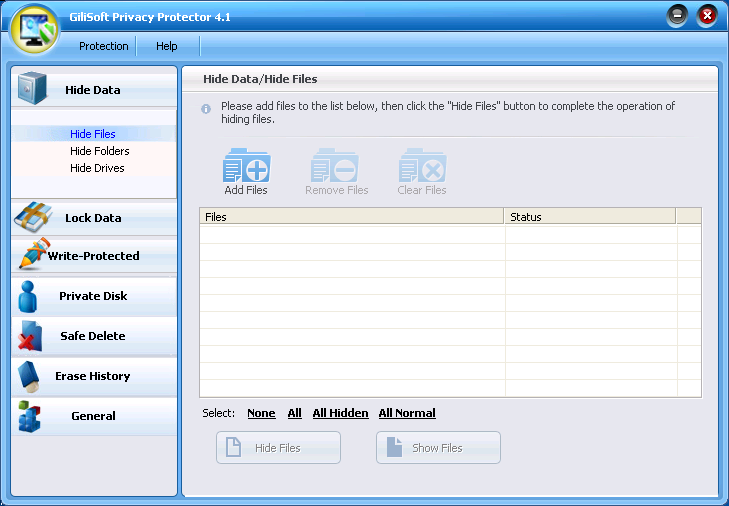
We have all used the "Hidden" attribute in Windows at some point. You right-click a folder, check the "Hidden" box, and hope for the best. The problem? Anyone with a basic knowledge of computers can just click "Show hidden files" in the folder options and see everything you were trying to conceal. It is a paper-thin layer of security that provides a false sense of safety. This is where GiliSoft Privacy Protector changes the game. Its Hide Data feature doesn't just toggle a visibility attribute; it effectively removes the data from the file system's visibility.
When you hide a file, folder, or even an entire drive with GiliSoft, it becomes a ghost. It won't show up in Windows Explorer, it won't appear in search results, and most impressively, it remains invisible even if you boot the computer into Windows Safe Mode. This is a critical distinction. Many "privacy" apps fail the Safe Mode test because they rely on basic drivers that don't load during a diagnostic boot. GiliSoft’s integration is deeper and more robust. For the average user—or even a tech-savvy intruder—your private data simply does not exist. This level of "stealth mode" is perfect for laptops that might be stolen or shared workstations where you need to keep your personal life completely separate from the eyes of others.
2. Ironclad Access Control
Hiding data is great for stealth, but sometimes you need your files to be visible but strictly protected. This is where the Lock Data feature comes into play. Imagine having a folder on your desktop that everyone can see, but no one can touch. Without the correct password, the protected data is essentially encased in digital carbonite. It cannot be opened, it cannot be read, it cannot be modified, and—perhaps most importantly—it cannot be deleted or moved.
One of the most impressive technical feats of GiliSoft Privacy Protector is its persistence. A common weakness in many file-locking programs is what happens during a system failure. If a computer shuts down suddenly or crashes while a folder is being accessed, the security software might fail to re-engage the lock upon reboot. GiliSoft has engineered a solution for this. Even if you lose power or your system crashes while you are exploring a password-protected folder, the software ensures that the folder remains locked and encrypted the moment the computer restarts. This "always-on" mentality extends to all sub-folders and files within a locked directory, ensuring that there are no leaks or backdoors to your sensitive information. It turns your hard drive into a fortress that requires a master key for entry.
3. Your Own Personal Digital Vault
While locking and hiding individual folders is useful for organizing existing data, the Private Disk feature provides a more holistic approach to security. Think of this as your own personal digital vault or a "safe" within your computer. GiliSoft allows you to create a virtual disk partition where you can store documents, pictures, music, videos, and even games. This isn't just a folder; it acts like a separate drive on your machine, but one that is encrypted and hidden behind a heavy-duty password wall.
The beauty of the Private Disk is the organization and seamless user experience it offers. Instead of hunting through various directories to lock or unlock specific items, you can simply move all your sensitive assets into this dedicated virtual space. When you need to work, you "mount" the disk with your password, and it appears as a drive letter (like D: or E:). When you are done, you "unmount" it, and the entire drive vanishes from the system. This is the ideal solution for users who handle massive amounts of sensitive data, such as photographers with private client galleries or developers with proprietary source code. It provides a clean, segregated environment that keeps your most valuable assets away from the general file system.
4. Military-Grade Data Destruction
Most users don't realize that when you "delete" a file in Windows and empty the Recycle Bin, the file isn't actually gone. The operating system simply marks the space as "available" and removes the pointer to the file. The actual data stays on your hard drive until it is eventually overwritten by something else. This means that anyone with a basic data recovery tool can bring your deleted tax returns, private photos, or deleted passwords back to life in seconds. This is a massive security loophole that GiliSoft Privacy Protector closes permanently.
The Safe Delete and File Shredder tools are designed for one thing: total annihilation of data. Instead of just "deleting" a file, GiliSoft overwrites the data multiple times using carefully selected patterns. This process ensures that even the most advanced forensic hardware used by data recovery experts cannot piece the original information back together. Whether you are preparing to sell an old computer or you just want to make sure a sensitive document is gone for good, this feature is indispensable. It gives you the peace of mind that once you say a file is gone, it is truly gone forever, leaving no digital trace behind.
5. Total Digital Footprint Eraser
Every time you browse the web or use your computer, you leave a trail of "digital breadcrumbs." Your browser saves images to a cache, records your history, and stores cookies. Windows keeps a log of the documents you’ve recently opened, the searches you’ve performed, and the programs you’ve run. Over time, these breadcrumbs form a detailed map of your habits, interests, and private life. GiliSoft’s History Clean feature is an all-in-one janitor for your digital footprint.
This suite goes far beyond what a standard browser "clear history" button does. It targets the deep-seated files that Windows hides, such as the Index.dat files, AutoComplete memory, and temporary directories that often balloon in size and contain sensitive snippets of data. It even cleans the "Recent File List" in Media Player and the Start Menu's "Run" history. But perhaps the most powerful part of this feature is the Cleaning Free Disk Space tool. As we discussed earlier, deleted files often linger in the "free space" of your drive. GiliSoft can wipe that free space across FAT, FAT32, and NTFS systems, ensuring that any remnants of previously deleted files are scrubbed clean. It is a comprehensive maintenance tool that doesn't just protect your privacy; it often speeds up your system by removing the clutter that bogs down performance.
Beyond these five core reasons, there are several "under the hood" features that make GiliSoft Privacy Protector a must-download. First, the software itself is password-protected. This means no one can open the app to see what you’ve hidden, and—critically—no one can uninstall the software to try and bypass its protections without your master password. It effectively locks itself to your system.
Secondly, the Ease of Use cannot be overstated. Tech reviewers often complain about security software being too complex for the average user, but GiliSoft has cracked the code on user interface design. The dashboard is intuitive, and it integrates directly with the Windows Shell. This means you can right-click any file or folder directly in Windows Explorer to hide or lock it instantly, without even having to open the main program window. It fits perfectly into your existing workflow.
Finally, the software is incredibly versatile when it comes to file systems. Whether you are using an older drive formatted in FAT32 or a modern high-capacity drive using NTFS or exFAT, GiliSoft Privacy Protector handles it all with ease. This cross-compatibility ensures that your external thumb drives and portable hard drives can be just as secure as your internal system disk.
In conclusion, GiliSoft Privacy Protector is a rare find in the software world. it is a tool that offers professional-grade security features while remaining accessible to the everyday user. It addresses the reality that privacy is multifaceted—it’s about hiding what you don’t want seen, locking what you don’t want touched, and destroying what you don’t want found. In a world where our data is constantly under threat, having a suite like this is your best defense.
If you care about your digital sovereignty, this giveaway is an opportunity you shouldn't miss. Download GiliSoft Privacy Protector, set your master password, and rest easy knowing that your private life is finally, truly, private. You won't just be downloading a program; you’ll be downloading peace of mind. And in today's tech landscape, that is the most valuable thing you can own.

Reviews for GiliSoft Privacy Protector
Click Here to Read Reviews for GiliSoft Privacy Protector >> Click Here to Submit Reviews for GiliSoft Privacy Protector >>