What Does idoo Secure Disc Creator Do?
idoo Secure Disc Creator is a professional-grade utility designed for high-level optical media encryption. It facilitates the creation of password-protected CDs and DVDs, allowing home and business users to secure sensitive backups against unauthorized access in the event of physical theft or loss.
The software functions by encrypting data directly onto the disc. A significant feature is its standalone accessibility: recipients of an encrypted disc do not need idoo Secure Disc Creator installed on their local machine to view the files. Access is granted simply by entering the pre-defined password when the disc is inserted into a computer.
The application offers several key functions for advanced data management:
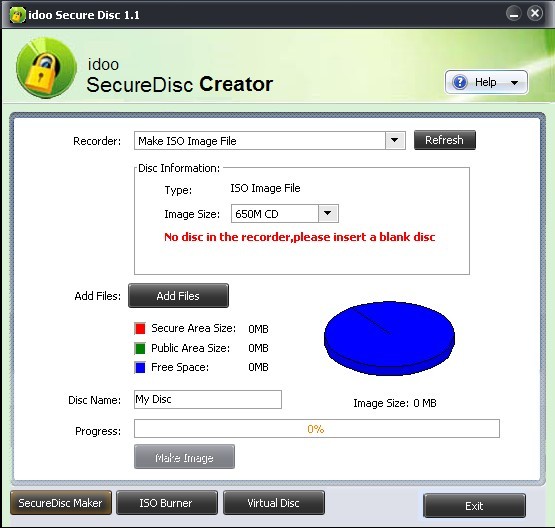
- Disc Partitioning: Users can create discs containing both a Safe Area and a Public Area. The software allows for the custom allocation of storage space between these two zones, ensuring public files remain accessible while sensitive data is locked.
- ISO Generation: The tool can produce encrypted ISO image files, preserving the security structure for digital storage.
- Virtual Drive: The program includes functionality to create a virtual CD/DVD drive for mounting and viewing disc images without physical media.
By utilizing multiple protection methods, the software ensures that confidential information remains private. It provides a factual, streamlined workflow for users who require both security and flexibility when distributing or archiving data on physical media.
Top 5 Reasons To Download idoo Secure Disc Creator
- Military-Grade Privacy Through Professional Encryption: Secure your sensitive data with patent-pending technology that ensures your files remain private even if the physical disc falls into the wrong hands.
- The Innovative Dual-Zone System: Create discs with both a "Public Area" for general files and a password-protected "Safe Area" for confidential data, giving you total control over who sees what.
- Zero-Footprint Portability: Recipients of your encrypted discs do not need to install idoo Secure Disc Creator to access the files; they simply enter the password, making it the perfect tool for sharing data across different workstations.
- Comprehensive ISO Management and Virtual Drives: Beyond just burning discs, the software allows you to create ISO images and mount them as virtual drives, streamlining your digital workflow.
- Foolproof Physical Backup Security: Ideal for both home and business users, it provides the ultimate "air-gapped" security solution, protecting your offline backups from theft, loss, or unauthorized snooping.
Top 5 Reasons To Download idoo Secure Disc Creator
In an era where we are constantly told that the cloud is the only way to store our data, many seasoned tech enthusiasts know better. There is an inherent risk in keeping every piece of your digital life on a server owned by a billion-dollar corporation. This is why physical backups—CDs and DVDs—remain a cornerstone of a truly robust data management strategy. However, physical media comes with its own set of anxieties. What happens if you lose that disc? What if it is stolen from your office or home? This is where idoo Secure Disc Creator steps in, and let me tell you, this is the utility you didn't know you needed until you realized how vulnerable your offline data actually is.
As someone who has tested countless security suites and burning utilities, I have seen many programs try to tackle the "secure disc" problem. Most of them are clunky, require proprietary readers, or simply fail to provide a user-friendly experience. idoo Secure Disc Creator is a breath of fresh air in this niche. It combines professional-grade encryption with a level of accessibility that makes it perfect for the average home user and the high-stakes business professional alike. If you are looking for a reason to jump on this giveaway, I have five compelling arguments that will make this software a permanent resident in your digital toolkit.
1. Military-Grade Privacy Through Professional Encryption
The primary reason anyone looks for a tool like idoo Secure Disc Creator is for the security. We live in a world where data breaches are a daily occurrence. When you burn your tax returns, family photos, or proprietary business secrets onto a standard DVD, you are essentially putting that data in an open envelope. Anyone who finds that disc can read it. idoo Secure Disc Creator changes the game by utilizing professional-grade encryption methods to lock your data behind a digital fortress.
The software uses multiple patent-pending protection methods to ensure that your data is not just "hidden," but truly encrypted. When we talk about "encryption" in this context, we are talking about a process that renders the data unreadable to anyone without the specific decryption key—in this case, your password. This is "air-gapped" security at its finest. By keeping your most sensitive files on an encrypted disc rather than a connected hard drive, you are protecting yourself from hackers, ransomware, and local intruders. If a malicious actor gets their hands on a disc created with this software, they won't find a single usable file. They will simply find a locked gate that they cannot bypass.
2. The Innovative Dual-Zone System
One of the coolest features of idoo Secure Disc Creator, and one that really sets it apart from basic encryption tools, is the ability to create "Public" and "Safe" areas on the same disc. Think of it as a house where the living room is open to guests, but the safe in the basement is bolted shut and requires a code. This dual-zone functionality is incredibly versatile.
Imagine you are a freelance photographer delivering a wedding gallery to a client. You might want to put the low-resolution "proof" images in the Public Area so the client can view them immediately on any device without a password. However, you could put the high-resolution, unwatermarked originals in the Safe Area. Or, consider a business setting where you are sharing a training video with a team (Public Area) but also need to include sensitive financial reports on the same disc (Safe Area). You can allocate the exact size of each area according to your needs. This flexibility means you don't have to carry two separate discs; you have one disc that serves two different purposes, maintaining a professional workflow while keeping your high-value data under lock and key.
3. Zero-Footprint Portability
We have all experienced the frustration of "proprietary software" syndrome. You encrypt a file on your computer, put it on a flash drive, take it to a friend's house, and realize you can't open it because they don't have the specific encryption software installed. It is a nightmare for productivity and a massive barrier to the practical use of encryption. idoo Secure Disc Creator solves this problem brilliantly.
When you burn an encrypted disc using this program, the decryption engine is essentially baked into the disc's architecture. When you or your recipient inserts the disc into any Windows-based computer, it will automatically prompt for the password. There is no need to install idoo Secure Disc Creator on the target machine. This is a massive win for portability. You can confidently send a secured DVD to a client, a relative, or a government agency knowing that they will be able to access the files simply by typing in the password you provided. This "zero-footprint" approach makes it an ideal tool for professionals who need to share confidential information across different technical environments without requiring the IT department to approve a new software installation.
4. Comprehensive ISO Management and Virtual Drives
While the name suggests a focus on physical discs, idoo Secure Disc Creator is actually a powerhouse for digital disc images as well. In modern computing, we often deal with ISO files—digital replicas of physical discs. This software allows you to create encrypted ISO image files with the same level of security as a physical CD or DVD. This is perfect for users who prefer to store their backups on large external hard drives or in the cloud but still want the organizational benefits and security of an encrypted disc format.
Furthermore, the software includes a built-in Virtual Drive creator. If you have an ISO file—whether it's one you created or an existing one—you can "mount" it as a virtual drive. Your computer will treat the ISO file as if you had just inserted a physical disc into a tray. This is an essential feature for gamers, software testers, and anyone who wants to access their archived data quickly without having to hunt through a physical binder of discs. Having these features bundled into a single interface makes idoo Secure Disc Creator a comprehensive suite for disc management, rather than just a one-trick pony.
5. Foolproof Physical Backup Security
Finally, we have to talk about the "peace of mind" factor. We live in a mobile world. We carry laptops in bags, discs in portfolios, and we move our lives from office to home and back again. The risk of losing physical media is real. For a business, losing a disc containing client data or intellectual property isn't just an inconvenience—it can be a legal and financial catastrophe. For a home user, losing a disc of private family documents can lead to identity theft.
By using idoo Secure Disc Creator, you are effectively neutralizing the "loss" factor. If you accidentally leave a disc on a train or a thief breaks into your office and grabs a handful of DVDs, the data remains useless to them. The password protection is robust, and the encryption is deep. You can sleep better at night knowing that your physical backups are just as secure as your most protected online accounts. This software bridges the gap between the reliability of physical media and the security of modern digital encryption. It is a professional-grade solution that is easy enough for anyone to use, and during this giveaway, there is absolutely no reason not to add this layer of protection to your digital life.
In conclusion, idoo Secure Disc Creator is more than just a burning tool. It is a security necessity for anyone who takes their privacy seriously. Whether you are protecting your business's future or your family's personal history, the ability to create password-protected, dual-zone discs that can be read anywhere is an incredible value. The added functionality of ISO creation and virtual drive mounting only sweetens the deal. Don't wait until you have a data scare to start thinking about disc security. Download this giveaway today, set your passwords, and start burning with confidence. Your data deserves this level of protection, and your peace of mind is worth the few minutes it takes to master this powerful utility.
If you are still on the fence, consider the alternative. Using standard burning software leaves your data exposed. Every time you backup to a disc without encryption, you are taking a gamble. With idoo Secure Disc Creator, you remove the element of luck from your data security strategy. It is fast, it is effective, and it is professional. This is a "must-have" for the modern power user who knows the value of a secure, offline backup. Make sure you grab this software while it's available—you'll thank yourself the next time you need to transport sensitive files across town or across the country.
The interface is intuitive, the encryption is heavy-duty, and the portability is unmatched. There is no reason to settle for basic burning tools when you can have a professional secure disc creator at your fingertips. Take control of your physical media and ensure that your private information stays exactly that—private.

Reviews for idoo Secure Disc Creator
Click Here to Read Reviews for idoo Secure Disc Creator >> Click Here to Submit Reviews for idoo Secure Disc Creator >>