What Does idoo Video Editor Pro Do?
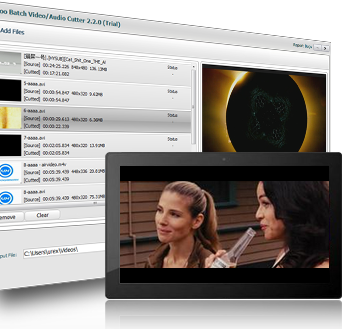
idoo Video Editor Pro is a comprehensive media utility designed for streamlined video and audio manipulation. The software provides a suite of tools for cutting, splitting, and joining files without quality loss. Users can extract specific segments from movies or audio tracks, such as MP3s, to create custom clips. The splitting function allows for manual control via a slider or automated division based on specific file sizes or durations.
Beyond basic trimming, the application includes cropping features to remove black bars and focus on specific areas of the frame. It supports a wide array of input formats, including AVI, MP4, MKV, and WMV, and can convert these during the editing process. Users can also adjust visual parameters such as brightness, contrast, and saturation to enhance footage quality or correct underexposed videos.
For those looking to personalize or protect their content, the software allows for the addition of text and image watermarks across video frames. It also supports the integration of external .srt or .ass subtitles and provides rotation tools for 90, 180, and 270-degree adjustments. Key functionalities include:
- Merging multiple video and audio files into a single, cohesive output.
- Batch conversion of files into various standard formats.
- Frame-by-frame image adjustments and visual enhancement tools.
- Advanced file splitting by time or size constraints.
Top 5 Reasons To Download idoo Video Editor Pro
- Universal Format Support and High-Efficiency Conversion: The software handles almost every video and audio format imaginable, ensuring your content is playable on any device.
- Precision Cutting and Advanced Splitting Features: Easily extract specific scenes or split massive files by size or time without breaking a sweat.
- Lossless Video Joining and Merging: Combine multiple clips into a single cohesive movie without sacrificing a single pixel of quality.
- Comprehensive Visual Enhancement Tools: Fix lighting, adjust colors, crop out distractions, and rotate footage to create a professional-grade look.
- Professional Branding and Subtitling Options: Protect your intellectual property with customizable watermarks and reach a global audience with external subtitle support.
If you have ever dabbled in video editing, you know exactly how frustrating the process can be. You usually find yourself caught between two extremes: expensive, professional-grade software that requires a degree in film editing to understand, or "free" tools that are riddled with malware, watermarks, and limited features. Today, I am here to tell you that the search for the perfect middle ground is over. idoo Video Editor Pro is the powerhouse solution you have been waiting for, and this giveaway is an opportunity you simply cannot afford to miss. As a tech reviewer who has seen hundreds of editing suites, I can confidently say that this software strikes the perfect balance between robust functionality and an intuitive user interface. Whether you are a YouTuber, a social media influencer, or just someone who wants to make their family vacation videos look spectacular, this tool is built for you. Let’s dive deep into the top five reasons why you need to download this giveaway right now.
1. Universal Format Support and High-Efficiency Conversion
The single most common headache in the world of digital video is the "Unsupported File Format" error. We have all been there: you record a great clip on your phone, transfer it to your computer, and suddenly your media player or editor refuses to open it. With idoo Video Editor Pro, those days are officially behind you. This software is an absolute beast when it comes to compatibility. It supports an exhaustive list of input formats, including high-definition standards like MKV, MTS, and TS, as well as classic formats like AVI, MP4, and MOV. Even niche formats like 3GP, RMVB, and VOB are handled with ease. This isn't just a video editor; it is a universal translator for your media library.
But the power doesn't stop at input. The output capabilities are equally impressive. When you are finished editing your masterpiece, you need to make sure it plays perfectly on your target device, whether that is a 4K television, a smartphone, or a tablet. This software allows you to convert your videos into desired formats in one seamless step. It optimizes the file for the specific platform you intend to use, ensuring that you get the best possible bit rate and resolution without unnecessarily large file sizes. The ability to handle audio files like FLAC, MP3, and WMA alongside video means you have a complete multimedia workstation at your fingertips. In the fast-paced world of tech, versatility is king, and this software wears the crown.
2. Precision Cutting and Advanced Splitting Features
Editing is, at its heart, the art of subtraction. You start with hours of raw footage and whittle it down to the "charming smiles" and "amazing moments" that actually matter. The video cutter function in this software is remarkably easy to use, allowing you to isolate multiple segments from a single source file. Imagine you have a thirty-minute recording of a birthday party, but you only want the ten seconds where the candles are blown out and the five minutes of gift-opening. This tool allows you to pluck those moments out with surgical precision, which you can then compile into a fantastic home video that people will actually want to watch.
Furthermore, the splitting tool is a game-changer for anyone dealing with massive 4K files or long-form recordings. If you have a video that is too large to email or upload to a specific platform, you can split it into smaller, more manageable clips. You have the total freedom to do this manually by dragging a slider to the exact frame you want, or you can automate the process. You can tell the software to split the video every ten minutes or every 500 megabytes. This level of control is usually reserved for much more expensive software, but here it is presented in a way that anyone can master in minutes. Even better, you can use these same tools to extract audio clips from your favorite movies or songs, allowing you to create custom ringtones or save iconic movie quotes as MP3 files.
3. Lossless Video Joining and Merging
One of the biggest risks when editing video is "generational loss." Every time you process a video, you run the risk of the quality degrading—colors becoming washed out, or the image becoming pixelated. idoo Video Editor Pro solves this problem with its high-speed joining function. It allows you to join multiple video files together without any quality loss whatsoever. This is particularly useful for those of us who record several short clips on our phones and want to turn them into one continuous movie. You can take various clips, even if they were originally in different formats, and merge them into a single, polished file.
The "Merge" feature is incredibly flexible. You can join many videos into different formats at one time, and the software is smart enough to ensure the output file matches the quality of your best input source. This isn't just for video, either. If you are a music lover or a podcaster, you will appreciate the ability to merge several audio files into one. Think of it as a digital glue that holds your creative projects together. Whether you are combining "cool videos" you’ve captured on a weekend trip or stitching together an extended video clip for a presentation, the process is fast, efficient, and, most importantly, keeps your footage looking crisp and professional.
4. Comprehensive Visual Enhancement Tools
Raw footage is rarely perfect. Sometimes the lighting is off, the framing is awkward, or the colors look a bit dull. This is where the enhancement suite of idoo Video Editor Pro really shines. Let's start with the crop function. We have all seen those annoying black bars on the sides of videos that were recorded in the wrong orientation. This software allows you to remove those black bars and focus the viewer's attention exactly where it belongs. You can reclaim your screen real estate and ensure your video looks great on any display, from a computer monitor to a smartphone.
Beyond framing, you have a suite of "pro-sumer" level adjustment tools. If your original video is too dark because it was filmed indoors or at night, you can use the brightness option to "light up" the scene. If the image looks a bit flat, adjusting the contrast will give you those sharper, punchier videos that look like they were shot on professional gear. You can also tweak the saturation to make the colors fuller and more pleasing to the eye. It is like having a digital darkroom for your videos. Additionally, the software includes a rotation tool. If you accidentally recorded a video vertically when it should have been horizontal (or vice versa), you can rotate the footage 90, 180, or 270 degrees with a single click. These are the "little things" that separate an amateur video from a professional production.
5. Professional Branding and Subtitling Options
In today's digital landscape, protecting your content is more important than ever. If you are uploading videos to social media, you want people to know who created them. This software offers robust watermarking features that allow you to add both text and image watermarks. You can put your name, your brand's logo, or a copyright notice directly onto the video frames. This not only makes your video unique and "piracy proof" but also helps in building your personal or professional brand. You can customize the transparency and position of these watermarks so they are visible but not distracting.
Finally, we have to talk about accessibility and international reach. idoo Video Editor Pro allows you to add external subtitles in .srt or .ass formats to any video. In an era where many people watch videos on mute while scrolling through their feeds, subtitles are no longer optional—they are a necessity. Whether you are translating your content for a global audience or simply making it accessible to those with hearing impairments, the ability to easily bake subtitles into your video file is a massive advantage. This feature, combined with all the others, transforms this software from a simple utility into a comprehensive creative suite.
In conclusion, idoo Video Editor Pro is a versatile, powerful, and incredibly user-friendly tool that addresses the most common pain points of video editing. It provides you with the precision of a scalpel for cutting and splitting, the strength of an industrial forge for merging and converting, and the eye of an artist for enhancements and branding. This giveaway is your chance to upgrade your digital toolkit with a professional-grade application that will save you time, frustration, and money. Whether you are looking to preserve precious family memories or create the next viral sensation, this is the software that will get you there. Do not wait—download it now and start creating the high-quality videos you have always dreamed of making.
The sheer breadth of supported formats alone makes this a "must-have" for any tech enthusiast. When you consider the added value of the lossless merging, the advanced watermarking, and the intuitive color correction, it becomes clear that this is a premium offering. It is rare to find a tool that is this feature-rich while remaining accessible to beginners. Usually, you have to trade power for ease of use, but this software refuses to make that compromise. It is designed to grow with you as your editing skills improve. Today you might just be cropping a video, but tomorrow you could be using its advanced splitting and merging features to create a documentary-style home movie. The possibilities are truly endless.
Final Thoughts: We live in a visual world. Our stories are told through screens, and the quality of those stories depends on the tools we use to tell them. By downloading this giveaway, you are giving yourself the best possible advantage in the world of digital media. You are getting a tool that respects your time, preserves your quality, and unleashes your creativity. Don't let your great footage sit on your hard drive gathering digital dust because you didn't have the right software to edit it. Take control of your media library today and see for yourself why idoo Video Editor Pro is the preferred choice for savvy users everywhere. This is a limited-time opportunity to get a top-tier piece of software for your collection, so make sure you take advantage of it before it’s gone.

Reviews for idoo Video Editor Pro
Click Here to Read Reviews for idoo Video Editor Pro >> Click Here to Submit Reviews for idoo Video Editor Pro >>