Original price was: $19.99.Current price is: $0.00. (100% off)
Sale has ended!
Get More Giveaways And Discounts Discuss This Offer >> Submit A Review >>

Overview

Top 5 Reasons To Download iResizer

In the vast, ever-evolving landscape of digital imagery, where every pixel tells a story and every dimension defines its canvas, we've all encountered the universal frustration of image resizing. It’s a chore that too often leads to disappointment: distorted faces, awkwardly cropped landscapes, or the dreaded "squished" effect that turns masterpieces into miserable failures. Whether you're a seasoned professional photographer, a budding graphic designer, a social media maven, or simply someone who loves sharing their life through pictures, you know the struggle is real. The moment you try to fit that perfect shot into a new aspect ratio, print it larger, or adapt it for a website, the integrity of your visual content hangs in the balance. Traditional resizing methods, for all their utility, operate with a brute-force mentality, uniformly chopping away or stretching every pixel, regardless of its importance. This often means sacrificing the very elements that make your photo special – a poignant expression, a crucial architectural detail, or the majestic sweep of a natural wonder.

But what if there was a better way? What if you could bend and mold your images to fit any container, any platform, or any purpose, all while preserving their essence? Imagine a world where your carefully composed photographs retain their beauty, where people stay perfectly proportioned, and where backgrounds can be artfully condensed without affecting the foreground subject. Such a world is no longer a futuristic fantasy; it's here, and it's embodied in the revolutionary software we're about to explore. Prepare to cast aside your old notions of image manipulation, because today, we're diving deep into an absolute game-changer. This isn't just another utility; it's a creative liberation, a powerful tool that puts you, the artist, firmly in control. If you're tired of compromise and ready to elevate your visual game, then you absolutely need to pay attention to this incredible giveaway. It promises to transform not just your images, but your entire workflow, offering an unparalleled level of precision, flexibility, and creative freedom. Get ready to discover the top 5 reasons why this is more than just a download – it’s an essential upgrade for anyone serious about their digital images.

  1. Revolutionary Content-Aware Resizing – No More Squished Faces or Chopped-Off Landmarks.
  2. Master Your Image Composition – Effortlessly Refit and Reframe Your Shots.
  3. Upscale Your Vision, Not Your Pixels – Enlarge Photos Beautifully Without Blur.
  4. Unleash Precision with Smart Marking Tools – You Decide What Stays and What Goes.
  5. The Ultimate Toolkit for Every Visual Creator – Adapt Any Image to Any Need.

Revolutionary Content-Aware Resizing – No More Squished Faces or Chopped-Off Landmarks.

Let's face it: the Achilles' heel of digital imaging has always been resizing. You capture a breathtaking panorama, a candid portrait, or a stunning architectural marvel, only to find that when you need to adjust its dimensions, the software butchers it. Traditional resizing is a blunt instrument. It operates on a simple, often destructive principle: scale everything uniformly, or crop mercilessly. The result? People look like they've been stretched or compressed by a funhouse mirror, majestic buildings lose their imposing stature as parts are lopped off, and once-vibrant scenes become awkward, disfigured approximations of their former selves. The frustration is palpable, and the hours spent trying to salvage a decent crop or painstakingly retouching distorted elements are a productivity killer. For far too long, we've accepted these limitations as an unavoidable evil, a necessary compromise in the pursuit of fitting images into predefined spaces.

But what if you could have your cake and eat it too? What if you could resize an image without fear of distortion, without the heartbreak of losing critical content, and without the tedious process of manual adjustments? This is precisely where iResizer steps in, not just as an improvement, but as a complete paradigm shift in how we approach image manipulation. At its core lies a truly revolutionary technology: content-aware image resizing. This isn't your grandma's image editor; this is intelligent design at its finest. Instead of treating every pixel as equal, iResizer employs sophisticated algorithms to identify and distinguish between "important visual content" – think people, animals, distinct architectural features, prominent objects – and less crucial background elements. When you instruct iResizer to scale an image, it doesn't just stretch or shrink uniformly. Instead, it intelligently and non-uniformly scales the image, prioritizing the preservation of those vital elements. The magic happens in the areas deemed less important; these are the regions that absorb the bulk of the scaling, contracting or expanding to fit the new dimensions while the critical parts remain untouched, perfectly proportioned, and utterly free from deformation.

Imagine, for a moment, resizing a group photo for a new profile picture. With traditional methods, you'd either crop out half your friends or end up with a blurry, squished mess. With iResizer, the software intuitively understands that the faces are paramount. It will intelligently reduce the space between individuals, perhaps compress a neutral background, or subtly adjust the less significant parts of their clothing, all while ensuring every smile, every eye, and every detail of their expressions remains exactly as it should be. The same applies to architectural photography. You no longer have to worry about a skyscraper looking like it's melting or a historic landmark losing a crucial spire. iResizer identifies these structures as important content and scales the surrounding sky, pavement, or less detailed elements, ensuring the building itself retains its original, commanding presence. This isn't just a minor enhancement; it's a fundamental redefinition of image resizing, moving it from a destructive process to a creative, preserving one. It empowers you to adapt your visuals to any constraint without ever compromising on quality, detail, or the emotional impact of your original shot. The days of accepting distorted images are over. Welcome to the era of intelligent, content-aware image resizing.

Master Your Image Composition – Effortlessly Refit and Reframe Your Shots.

Beyond the immediate pain point of distortion and cropping, image resizing often presents a deeper, more artistic challenge: composition. A photograph might look spectacular in its original landscape orientation, but what happens when you need it to be a perfect square for Instagram, a vertical banner for a website sidebar, or a wide, panoramic header? Suddenly, your carefully balanced elements are off-kilter, crucial details are lost to the cropping tool, and the entire visual narrative you worked so hard to create falls apart. Recomposing an image traditionally meant either a heavy-handed crop that sacrifices large portions of the original or, in the hands of a skilled editor, hours of painstaking cloning, stretching, and content-aware fill operations – often with less-than-perfect results. It's a creative bottleneck, forcing artists and casual users alike to compromise their vision or invest significant time and effort into complex, often frustrating, post-processing techniques.

iResizer, however, doesn't just resize; it recomposes. It empowers you to transcend the rigid boundaries of aspect ratios and reframe your shots with an unprecedented level of fluidity and intelligence. Its content-aware capabilities extend far beyond simply preventing distortion; they allow you to actively manipulate the spatial relationships within your image, making it an invaluable tool for mastering composition. Consider the common scenario of needing to transform a sprawling landscape picture into a compact square. With conventional methods, you’d either crop out huge swaths of the sky and foreground, or squish the entire scene horizontally, ruining the perspective. iResizer approaches this challenge with finesse. It can intelligently identify the essential elements – perhaps a distant mountain range, a focal point tree, or a winding river – and then condense the less important, often uniform areas around them, creating a perfectly balanced square image that retains all the critical visual information and the intended atmosphere. The result is a beautifully reframed shot that looks like it was originally composed for that square format, rather than being awkwardly forced into it.

But the compositional magic doesn't stop there. Imagine a photograph where your subjects are too far apart, leaving an awkward expanse of empty space between them. Manually closing this gap would typically involve selecting, cutting, pasting, and then meticulously blending – a task that even seasoned Photoshop users dread. iResizer simplifies this seemingly complex operation into an intuitive, seamless process. By understanding what constitutes "important content" (the people) and what is "less important" (the space between them), it can intelligently shrink or expand the intervening areas, effectively closing the gap without distorting the individuals themselves. This means you can create a more intimate grouping, enhance the visual connection between subjects, or simply eliminate distracting negative space, all with a few clicks. This capability is nothing short of transformative for photographers looking to refine their compositions, marketers needing to adapt visuals for various ad placements, or even personal users wanting to present their memories in the most impactful way possible. iResizer turns daunting compositional challenges into simple, elegant solutions, allowing you to tell your visual story exactly as you envision it, across any medium or dimension, without ever losing an ounce of its original power or beauty. It's not just a resizer; it's a genuine composition assistant.

Upscale Your Vision, Not Your Pixels – Enlarge Photos Beautifully Without Blur.

The quest for larger, more impactful images often leads to one of digital photography's most frustrating dead ends: pixelation and blur. You've got a fantastic photo, perhaps captured on an older smartphone or pulled from a smaller original file. It looks great on your screen, but then you decide you want to print it as a poster, use it as a high-resolution desktop background, or simply zoom in to appreciate the finer details. That's when the nightmare begins. Traditional image enlargement, also known as upscaling, is essentially an act of guesswork. Software tries to create new pixels where none existed, often by simply duplicating existing ones or averaging colors, leading to a blocky, fuzzy, or otherwise degraded image. Fine lines become jagged, smooth gradients turn into noticeable steps, and what was once a crisp detail transforms into an indistinct smudge. The larger you try to make it, the worse it gets, leaving you with an image that's technically bigger but utterly devoid of quality. For anyone aiming for professional-looking results or even just a pleasing personal display, the limitations of conventional upscaling have been a constant source of disappointment, forcing us to abandon projects or settle for suboptimal visual outcomes.

Here's where iResizer delivers another astonishing feat of technological innovation. While its core strength lies in intelligently reducing image sizes, its capabilities extend in reverse, allowing you to make a photo larger without succumbing to the typical degradation associated with upscaling. This isn't just a simple pixel-doubling trick; it leverages the same content-aware intelligence that prevents distortion during reduction. When iResizer enlarges an image, it doesn't just blindly add pixels. Instead, it intelligently analyzes the existing visual content, understanding the context of lines, shapes, and textures. It then uses this understanding to extrapolate and synthesize new pixels in a way that preserves the integrity of important elements. Imagine a photograph of a beloved pet: if you try to enlarge it traditionally, its fur might become a fuzzy mess, and its eyes might lose their sparkle. With iResizer, the software recognizes the animal as important content and expands it in a manner that maintains the sharpness of its fur, the clarity of its features, and the expressive depth of its eyes, while intelligently extending less critical background elements.

This capability is a true game-changer for a multitude of applications. Photographers can now take moderately sized images and prepare them for large-format printing, allowing their work to be showcased on a grander scale without sacrificing sharpness or detail. Graphic designers can repurpose existing assets for higher-resolution displays or print materials, saving valuable time and avoiding the need to reshoot or recreate content. Even casual users can breathe new life into cherished old photos, transforming small digital memories into stunning, wall-worthy prints or vibrant digital canvases. No longer are you constrained by the original capture size. iResizer grants you the freedom to dream bigger, literally. It breaks the cycle of compromise, allowing you to magnify your visual ideas without inviting the dreaded pixel plague. This intelligent upscaling feature ensures that your vision, however grand, can be fully realized, delivering images that are not just larger, but genuinely enhanced in their clarity and detail, unlocking new possibilities for how you display and share your most important visual content.

Unleash Precision with Smart Marking Tools – You Decide What Stays and What Goes.

Even with the most sophisticated automated tools, there are always those nuanced situations where a human touch is indispensable. While iResizer's content-aware algorithms are incredibly intelligent at identifying important visual content, there are times when your artistic intent or specific project requirements demand absolute, granular control over what elements are protected and what areas are sacrificed during a resize. Perhaps there’s a subtle background texture you want to retain, even though the AI might deem it "unimportant," or conversely, a seemingly insignificant detail that, to you, is a major distraction that absolutely needs to be removed. Relying solely on automated processes, however advanced, can sometimes leave you feeling disconnected from the creative process, wishing for a direct way to communicate your precise vision to the software. This gap between intelligent automation and precise user control is where many powerful tools often fall short, leaving advanced users wanting more and casual users feeling overwhelmed by complex workarounds.

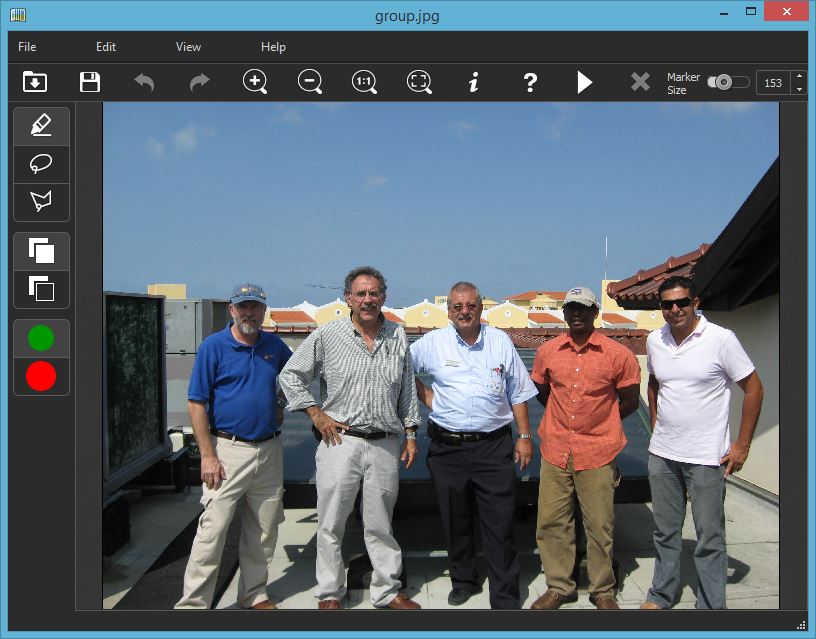
iResizer bridges this gap beautifully with its intuitive and powerful smart marking tools. It understands that ultimate creative control lies with the user, and it empowers you to guide its content-aware engine with pinpoint accuracy. The software provides two distinct, yet complementary, markers that allow you to dictate its behavior: the green marker and the red marker. The green marker is your declaration of preservation. When you use it to highlight specific elements within your image, you are explicitly telling iResizer: "This is important. Do not touch this. Protect it at all costs." This technique is incredibly handy when you have areas of the image that you want to retain at the expense of other, less critical areas. For instance, if you're resizing a product photo, you can use the green marker to ensure the product's logo, intricate details, or specific features remain perfectly intact, even if the surrounding background needs to be drastically compressed. More poignantly, it can be used to protect people in an image, ensuring their faces, bodies, and expressions are absolutely inviolable, regardless of how much the image needs to be scaled down or adjusted. This provides an unparalleled level of assurance that your key subjects will always maintain their integrity.

Conversely, the red marker serves as your directive for elimination. With this tool, you can select which features of the image should be discarded. This isn't just about cropping; it's about intelligent, content-aware removal. Imagine a beautiful landscape marred by a distracting power line or an unwanted person in the far background. Instead of painstakingly cloning them out or resorting to a harsh crop that sacrifices a portion of your scene, you can simply paint over the unwanted element with the red marker. iResizer will then intelligently remove that portion of the image, seamlessly closing the gap and reconstructing the background in a consistent and natural way, as if the distraction was never there. This is far more sophisticated than a simple delete function; it’s a content-aware "fill" that understands the surrounding pixels and integrates the changes harmoniously. These markers elevate iResizer from a smart tool to an indispensable creative partner. They provide the ultimate fine-tuning mechanism, allowing you to override or enhance the software's automatic detection with your specific artistic vision. This means you’re not just resizing images; you’re sculpting them, precisely controlling their composition, eliminating distractions, and preserving every essential detail exactly as you intend. The power to decide what stays and what goes is now firmly in your hands, giving you unprecedented control over your final visual output.

The Ultimate Toolkit for Every Visual Creator – Adapt Any Image to Any Need.

In today's visually driven world, images are no longer static entities; they are dynamic assets that must fluidly adapt to an ever-growing array of platforms, devices, and print formats. A single photograph might need to serve as a high-resolution print for an exhibition, a compact banner for a website, a perfectly square post for Instagram, a vertical story for TikTok, a wide header for a blog, and a tiny thumbnail for an e-commerce catalog. Each of these applications demands a different aspect ratio, a specific resolution, and often, a unique composition. The sheer logistical nightmare of manually preparing an image for every conceivable scenario, often relying on multiple tools and endless rounds of trial and error, has been a significant bottleneck for photographers, graphic designers, social media managers, web developers, and even casual users. The constant need to compromise on quality or spend inordinate amounts of time on repetitive tasks can stifle creativity and drain productivity, leaving visual creators feeling overwhelmed by the technical demands of image adaptation.

This is where iResizer truly shines, consolidating an arsenal of transformative capabilities into a single, intuitive, and incredibly powerful toolkit. It transcends the definition of a mere "resizing tool" to become an indispensable hub for all your image adaptation needs. Imagine a scenario where a client sends you an image that's perfect in content but completely wrong in dimension for their new website. Instead of despairing over distortion or awkward cropping, you can instantly leverage iResizer's content-aware scaling to seamlessly fit it into the required space, protecting the key visual elements. Need to create a series of social media posts, each with a different aspect ratio (1:1, 4:5, 16:9)? iResizer allows you to generate these variations effortlessly, intelligently adapting your original image without losing impact or quality. The ability to transform a landscape into a square, close gaps between subjects, or even intelligently enlarge a smaller photo, all while preserving important content and offering precise manual control via the green and red markers, makes it an unparalleled Swiss Army knife for anyone working with digital visuals.

iResizer liberates you from the technical constraints that have traditionally plagued image manipulation. It streamlines your workflow, allowing you to achieve complex compositional adjustments and resolution adaptations in a fraction of the time it would take with conventional methods. For professional photographers, it means more time behind the lens and less time wrestling with software. For graphic designers, it translates to unparalleled flexibility in incorporating images into diverse layouts. For social media influencers, it ensures their visual brand remains consistent and captivating across all platforms. And for everyday users, it means their cherished memories always look their best, regardless of how or where they choose to share them. This isn't just about making pictures smaller or larger; it's about empowering you to tell your visual story with absolute clarity and impact, across every possible medium. By integrating revolutionary content-aware technology with precision marking tools, iResizer stands as the ultimate toolkit, adaptable to any project, any platform, and any creative vision. It's more than software; it's a creative enabler, ensuring your images are always perfectly poised to impress, no matter the demand. Downloading this giveaway isn't just acquiring a utility; it's investing in a future where your visual content knows no bounds.

So, there you have it: five compelling reasons why iResizer isn't just another piece of software but an essential upgrade for anyone serious about their digital images. From banishing the specter of distortion and liberating your compositional creativity, to intelligently upscaling your most cherished memories and providing unparalleled precision control, this tool redefines what's possible in image manipulation. It’s a powerful ally for photographers, designers, social media mavens, and everyday users alike, ensuring your visuals always stand out, perfectly adapted to any need or platform. In a world saturated with imagery, the ability to effortlessly craft perfect visuals is no longer a luxury—it's a necessity. Don't let your images be limited by outdated resizing methods. Seize this opportunity to elevate your entire visual workflow. This isn't just a giveaway; it's a gateway to limitless creative possibilities. So go ahead, unlock the full potential of your images, and download iResizer today. Your visual content will thank you.

Official Description

iResizer allows you to resize images without deforming or cropping content; it scales an image without changing important visual content such as people, buildings, animals, etc. While normal resizing affects all pixels uniformly when scaling an image, iResizer resizing mostly affects pixels in areas that do not have important visual content.

How it works

iResizer content aware image resizing software rescales images non uniformly while preserving the key features of the picture. iResizer avoids distortion of the important parts of the image. It also can be used to remove portion of the image in a consistent way. For example, you can turn a landscape picture into a square picture and close up the space between people in an image if they are a long way apart. It also works in reverse and you can use it to make a photo larger.

You can mark important elements in the image using the green marker. This technique is handy if you have areas of the image that you want to retain at the expense of other areas and it can also be used to protect people in the image. Also you can use the red marker to select which features of the image should be discarded.